





 Shopify
 Stripe
 Slack
Slack Notion
 Google Workspace
 Confluence

How Should You Design Zendesk Custom Ticket Statuses? (2026)


A Zendesk custom ticket status is a label on one of four status categories, and your SLA policies read the category underneath, not the label. Most sprawl comes from labels nobody uses, which you can find with a short API loop and deactivate.
Key takeaways
- A Zendesk custom ticket status is a label attached to one of four status categories, Open, Pending, On hold or Solved, because New and Closed cannot accept one.
- Zendesk SLA metrics use the underlying status category rather than the custom ticket status label, so two custom statuses under the same category behave identically for SLA purposes.
- On one checked Zendesk instance with 499 tickets, three custom statuses held only one ticket between them, and two had never been used at all.
- Zendesk's ticket status picker displays only the first 10 active statuses, and an account is capped at 100 total statuses.
- Zendesk only lets an admin delete a custom ticket status after deactivating it and when no active tickets use it, so deactivation is the usual cleanup step.

A Zendesk custom ticket status is a label on one of four status categories (Open, Pending, On hold or Solved), so a model that holds adds a status only when agents act differently in that state, gives every status a description, and deactivates any status still at zero tickets after a quarter. The category underneath drives your SLA policies; the label drives what agents, customers and Explore see.
| Status category | Accepts a custom status? | What reads it |
|---|---|---|
| New | No | SLAs, business rules |
| Open | Yes (In Progress is seeded here on accounts created on or after 13 February 2024) | SLAs read the category; agents, end users and Explore read the label |
| Pending | Yes | Same as Open |
| On hold | Yes, once the On-hold status is activated | Same as Open |
| Solved | Yes (the label stays on the ticket after it closes) | Same as Open |
| Closed | No | Set by Zendesk |
How does a custom status relate to its status category?
Every ticket carries two fields. status holds the category, one of six values Zendesk defines: new, open, pending, hold, solved, closed. custom_status_id points at whichever custom status is applied.
Custom statuses sit on top, but not on all six. Zendesk is explicit that "you cannot assign a ticket status to the New or Closed status categories", so in practice you get four: Open, Pending, On hold and Solved, and On hold only appears if that status is activated. Category is also fixed once set, since "you can't move it to a different status category".
That constraint explains something in our own data below. "New on-boarding request" sits under open despite its name, because Zendesk won't let you file a status under New. SLA targets key off the category, so two custom statuses under pending are identical to a policy: Zendesk states that "the SLA metrics use the status categories instead of the custom ticket statuses you created". Triggers, automations and views are converted to the Status Category condition when you activate custom statuses but can be pointed at a specific ticket status afterwards, and a trigger action can set one. Explore reports on the label directly through the Ticket custom status name attribute. The custom label is what an agent sees in the status dropdown and what an end user sees on their request.
So the label is real to agents, to customers and to Explore, and invisible to your SLA policies. Creating "Waiting on vendor" under pending does not create a state your SLAs can treat differently from ordinary pending. If you want different SLA behavior you need a different category or a different field, not a different label.
What does status sprawl look like on a real instance?
Here is the ticket statuses page on a Zendesk Enterprise demo instance. Zendesk groups the list by category and prints its own description for each one.
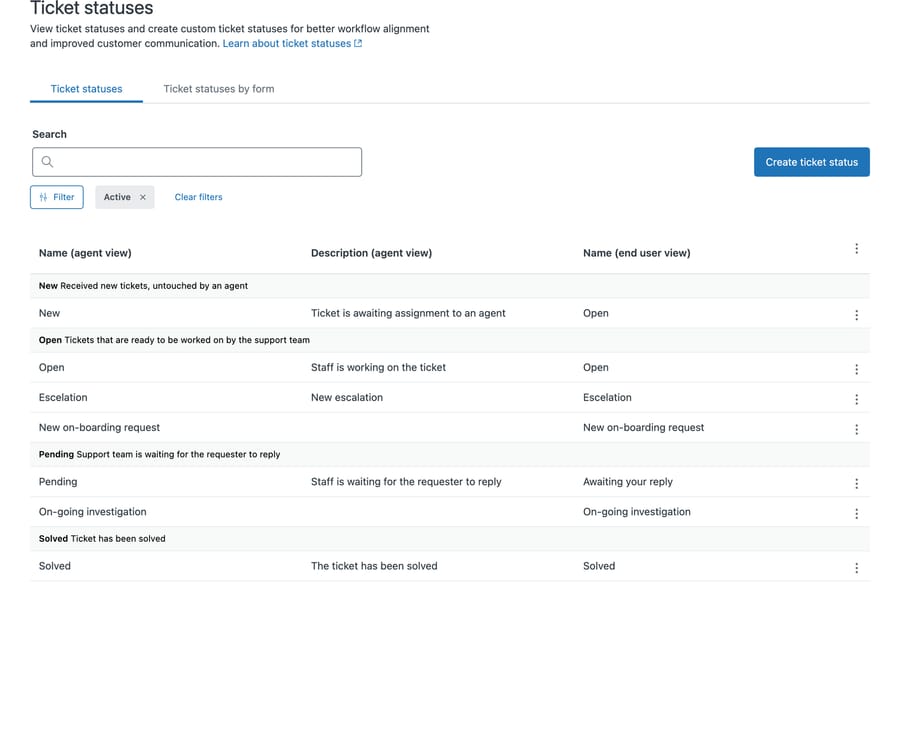
Three things in that screenshot are worth noticing, and none of them are unusual.
A misspelled status is live. "Escelation" appears in the agent view and, in the right-hand column, in the end user view as well. Customers are reading the typo on their own requests.
Two custom statuses have no description at all: "New on-boarding request" and "On-going investigation". "New on-boarding request" and "On-going investigation" both have an empty description column, so an agent picking either has nothing telling them when it applies.
All three custom statuses sit in a category that already had one. "Escelation" and "New on-boarding request" sit under open alongside the built-in Open, and "On-going investigation" sits under pending alongside Pending. Nothing about them behaves differently from Open.
How do you count which statuses are actually used?
This is the number nobody has, because the admin page does not show it. The Admin Center statuses page has no usage column, no last-used date and no way to sort by adoption, so a status created once in 2024 looks exactly like the one your team uses hourly. Explore can report on it, which is the vendor's answer, but it doesn't help the admin standing on the page deciding what to cut.
You can get it from the API in a loop. List the statuses, then count tickets against each one:
GET /api/v2/custom_statuses.json
GET /api/v2/search/count.json?query=type:ticket custom_status_id:<id>
Wired together, that is a short script. It prints one row per status and needs nothing but curl and jq:
#!/usr/bin/env bash
# status-usage.sh — how many tickets actually use each ticket status.
Z="https://$ZD_SUBDOMAIN.zendesk.com/api/v2"
A="$ZD_EMAIL/token:$ZD_TOKEN"
total=0

printf '%-26s %-9s %-9s %7s\n' "NAME (agent view)" "CATEGORY" "STATE" "TICKETS"
while IFS=$'\t' read -r id cat label active; do
  n=$(curl -s -u "$A" -G "$Z/search/count.json" \
        --data-urlencode "query=type:ticket custom_status_id:$id" | jq .count)
  [ "$active" = "true" ] && state=active || state=inactive
  printf '%-26s %-9s %-9s %7s\n' "$label" "$cat" "$state" "$n"
  total=$((total + n))
done < <(curl -s -u "$A" "$Z/custom_statuses.json" \
         | jq -r '.custom_statuses[] | [.id, .status_category, .agent_label, .active] | @tsv')

# %53s pads by BYTES, and the box-drawing character is three of them, so a naive
# width lands the rule well left of the column. Pad with spaces, then print it.
printf '%*s%s\n' 46 '' '────────'
printf '%54s\n' "$total"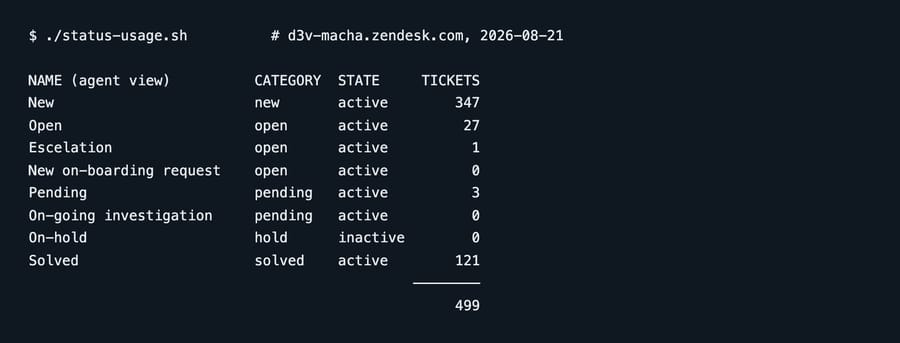
Run against the instance above, 499 tickets:
| Status | Category | Tickets |
|---|---|---|
| New | new | 347 |
| Solved | solved | 121 |
| Open | open | 27 |
| Pending | pending | 3 |
| Escelation (custom) | open | 1 |
| New on-boarding request (custom) | open | 0 |
| On-going investigation (custom) | pending | 0 |
| On-hold (inactive) | hold | 0 |
Three custom statuses were created. Between them they hold one ticket out of 499, and two have never been used at all.
Two caveats on that number, because they matter. The 499 is a sum of the per-status counts, so it is no independent measure of the corpus, and closed tickets need thinking about. Zendesk documents that "any tickets that are solved with a status in the Solved status category retain that ticket status even after they are closed", so a Solved-category custom status can carry closed tickets that this count may not reach. Treat the totals as a floor. And this is a demo instance: 347 of the 499 are still sitting in New, which tells you nobody there works tickets the way a real desk does. The shape of the finding transfers. The magnitude is not a benchmark.
Why does the status list keep growing?
It's worth naming the incentive, because the sprawl isn't carelessness. Zendesk puts Create ticket status as a primary blue button on the page and surfaces no adoption data on it at all. Creating one is a single click; discovering that it was never used requires writing an API loop. A vendor building a feature naturally optimizes for that feature being adopted, and the interface reflects that.
Nothing here is dishonest. The effect is that the cheapest action is always to add another status, and the cost of doing so never surfaces where an admin would see it.
What does status sprawl actually break?
Not your workflows. Everything category-driven keeps working, which is exactly why nobody notices.
What it breaks is reporting. In Explore, a "tickets by status" breakdown now splits your open tickets across three labels instead of one. Anyone building a dashboard has to know that Escelation and New on-boarding request are open tickets, or their numbers are wrong. That knowledge lives in someone's head rather than in the data model.
It also degrades the agent's decision. A dropdown with eight statuses defined and seven active where three mean the same thing takes longer to use and produces less consistent data, and inconsistent status data is what makes the reporting problem worse over time.
How do you design a status model that holds?
One status per genuinely distinct state, per category. If you can't say what a person does differently when a ticket is in this status versus the built-in one, you don't need it.
Write the description. It's the only place the rule lives. An empty description means the status means whatever each agent assumes.
Check the end-user label separately. It's a different field, and it's the one your customers read. A typo there is public.
Use tags or a custom field for reasons, not statuses. "Waiting on vendor" and "Waiting on customer" are usually both pending. The distinction is a reason, and reasons belong in a field you can report on without fragmenting the status dimension.
Deactivate rather than delete. Deactivating leaves historical tickets intact and readable. Zendesk only lets you delete a status after it is deactivated and no active tickets use it, and it warns to check your business rules first because rules referencing a deleted status stop running. On our instance "On-hold" is deactivated, which is why it is missing from the statuses page above, filtered to Active. The API loop still returns it, which is the point of counting from the API.
Re-count quarterly. The API loop above takes a minute. Any status at zero after a quarter is a candidate for deactivation.
If you want the definitional layer rather than the design one, our guide to Zendesk ticket statuses covers what each built-in status means. The design layer is about auditing and designing the custom layer on top.
Scope statuses to the forms that need them. If the list is long because different teams need different statuses, you don't have to shorten it for everyone. Zendesk lets you associate ticket statuses with forms, which "results in a shorter list of ticket statuses in the status picker" for the agents on that form. It is the tab next to Ticket statuses on the same page. It is available on Suite Growth and above and on Support Enterprise, and it is usually a better answer than deleting a status somebody still needs.
One more thing worth checking before you read a status as sprawl: if your account was created on or after 13 February 2024, Zendesk seeded an extra In Progress status into the Open category for you. A status nobody remembers creating is not always evidence that somebody created it.
Common questions
What's the difference between status and status category in Zendesk? The category is one of six fixed values (new, open, pending, hold, solved, closed) and drives SLA behavior. A custom status is a label mapped to a category, and only four categories accept one: Open, Pending, On hold and Solved.
Can I change a custom status's category later? No. Zendesk states that "you can't move it to a different status category" once created, so the category choice is permanent.
Can I delete a custom ticket status? Only after deactivating it, and only when no active tickets use it, per Zendesk's managing statuses article. Deactivation alone usually does the job: it keeps historical tickets readable and stops the status appearing in the dropdown for new work.
Do custom statuses affect SLA targets? Only through their category. Two custom statuses under pending are identical as far as SLA policies are concerned.
Can I hide Zendesk's default statuses? The built-in statuses can't be removed, though some can be deactivated. Note also that the status picker shows the first 10 active statuses, and an account is capped at 100, so sprawl has a hard edge.
How do I find out which statuses my team actually uses? The admin page doesn't total it for you, though Explore does report on the status label. For a quick count, loop /api/v2/search/count.json with custom_status_id:<id> for each status, as above. See our Zendesk API guide if you haven't used the search endpoint before.
Where does an AI layer fit on top of statuses?
A status model tells you where a ticket sits. It doesn't decide what happens next, and no amount of status design will, because that decision needs someone to read the ticket.
Macha runs on top of the Zendesk you already have. It reads the ticket, including custom field values and attachments, and can classify it, write the status and custom field values back, add an internal note, or post a public reply, using your existing triggers and webhooks as the entry point. Because it writes the fields you already defined, your status model stays the system of record. It suits teams already committed to Zendesk who want agents acting inside the ticket. Setup runs through the Zendesk integration, and billing is per ticket, so one thread with one person is one charge however many replies it takes.
Start your free trial and connect your Zendesk in a few minutes.






