Intercom
 Shopify
 Stripe
 Slack
Slack Notion
 Google Workspace
 Confluence

What Is Deflection Rate, and Why Is Yours Lower Than the Vendor Quote? (2026)


Deflection rate is the share of support contacts answered without a human, and vendors quote 55% to 75% while Gartner found only 14% of issues fully resolved in self-service. The gap comes from what each number counts, and you can check every part of it against your own data.
Key takeaways
- Deflection rate is deflected contacts divided by total contact attempts, times 100, and vendor benchmarks for it typically range from 55% to 75%.
- Gartner's survey of 5,728 customers found only 14% of issues fully resolved in self-service, and 36% even for issues customers called very simple.
- Zendesk changed its automated-resolution formula on May 18, 2026, from Verified over all conversations to Contained plus Verified, while billing only Verified resolutions.
- Fin bills $0.99 per outcome, at most one per conversation, and counts both customer-confirmed resolutions and conversations the customer exited without asking for more help.
- Salesforce's Help Agent costs 400 Flex Credits, listed as $2, per resolved session, and unresolved sessions are not charged.
Deflection rate is the share of support contacts answered without a human agent, calculated as deflected contacts divided by total contact attempts, times 100. Vendors quote 55% to 75%, while Gartner's survey of 5,728 customers found only 14% of issues fully resolved in self-service. Both numbers can be honest because they count different events: one counts conversations that ended, the other counts problems that got solved.
So the gap between your number and the vendor quote is usually not a performance problem. It is a counting problem, and every part of it is checkable against your own data in an afternoon.
What do deflection, containment and automated resolution each count?
Deflection, automated resolution and containment get used interchangeably in sales decks and they are not the same measurement. Each answers a different question, and the one a vendor puts on the dashboard is usually the one their billing runs on.
| Metric | The question it answers | What it counts | Where it usually appears |
|---|---|---|---|
| Deflection rate | Did the contact avoid a human? | Avoidance, across every channel | Help center and self-service reporting |
| Containment rate | Did the conversation stay inside the bot? | Sessions that never escalated, in one channel | Chatbot, IVR and voice reporting |
| Automated resolution | Did the AI actually fix it, with no human? | Outcomes, per conversation | The AI vendor's invoice |
| Automation rate | Did a system do the work? | Steps performed, resolved or not | Workflow and agent-activity reporting |
Decagon, which ranks first for this keyword, draws the line between the first two cleanly on its own containment glossary: containment is "a channel-level metric" while deflection is "a portfolio-level metric." A contact can be deflected and contained without being resolved, and a ticket can be heavily automated (summarized, tagged, enriched, routed) without producing a single deflection. Holding the four apart is most of the work.
The reason the confusion persists is that three of the four are somebody's billing unit. Fin bills per outcome, Zendesk and Gorgias bill per automated resolution, and legacy chatbots marketed on containment. When a vendor defines the word and charges you for the event, a generous definition is worth money to them. That is not an accusation of bad faith; it is the reason to read each definition yourself before comparing two products' percentages.
How is deflection rate calculated?
The standard calculation is unambiguous:
Deflection Rate = (Deflected Contacts ÷ Total Contact Attempts) × 100Take 2,000 help-seeking attempts in a month: 900 answered by an AI agent, 300 resolved by customers reading help center articles, 800 landing in an agent's queue. Deflected contacts are 1,200, so the rate is 60%.
The arithmetic is trivial. The denominator is not. The loose definition counts a deflection whenever somebody reads an article or talks to a bot and doesn't open a ticket, which quietly counts everybody who gave up. The conservative version only counts interactions where the system closed the loop:
Deflection Rate = Deflected conversations ÷ (Deflected conversations + Tickets created after a self-service attempt)The same month reads 35% or 70% depending on which you pick. Write your choice down, put it next to the number on every report, and don't switch it quietly.
Zendesk publishes both versions, and names the difference
This isn't a theoretical distinction. Zendesk's Explore reporting ships two separate deflection metrics, and the definitions are in Zendesk's own metrics reference. A confirmed deflection "is registered as a help center session when a user selected an article from the suggested articles on the request form and did not submit a ticket during their session." An assumed deflection "happens when a user visits the help center and doesn't ask for help or submit a ticket, but also didn't confirm they found an answer. It's assumed they found what they needed on their own."
Read that second definition again, because the vendor wrote it: an assumed deflection is a person who left. If your monthly report shows one blended deflection figure, it is almost certainly summing both. Splitting them is a single change to the Explore query and it is the fastest honest number you can get today.
The same article carries a limit worth knowing before you compare yourself to anyone: since April 4, 2025, "All ticket deflection reports, such as confirmed and assumed deflections, only track tickets submitted using the help center request form." Email, chat and messaging contacts are outside that denominator entirely.
How does each vendor count a resolution on your invoice?
"Automated resolution" is not a standardized term. Five platforms define it five ways, and each definition is a billing rule.
| Platform | What it counts | Window | Billed |
|---|---|---|---|
| Zendesk | Verified resolution: AI answered, no further request, LLM confirms it was satisfactorily resolved | 72h email, 2h messaging (up to 72h), voice at hangup | Per verified resolution |
| Zendesk | Contained resolution: same, but the LLM verification did not pass | Same | Not billed |
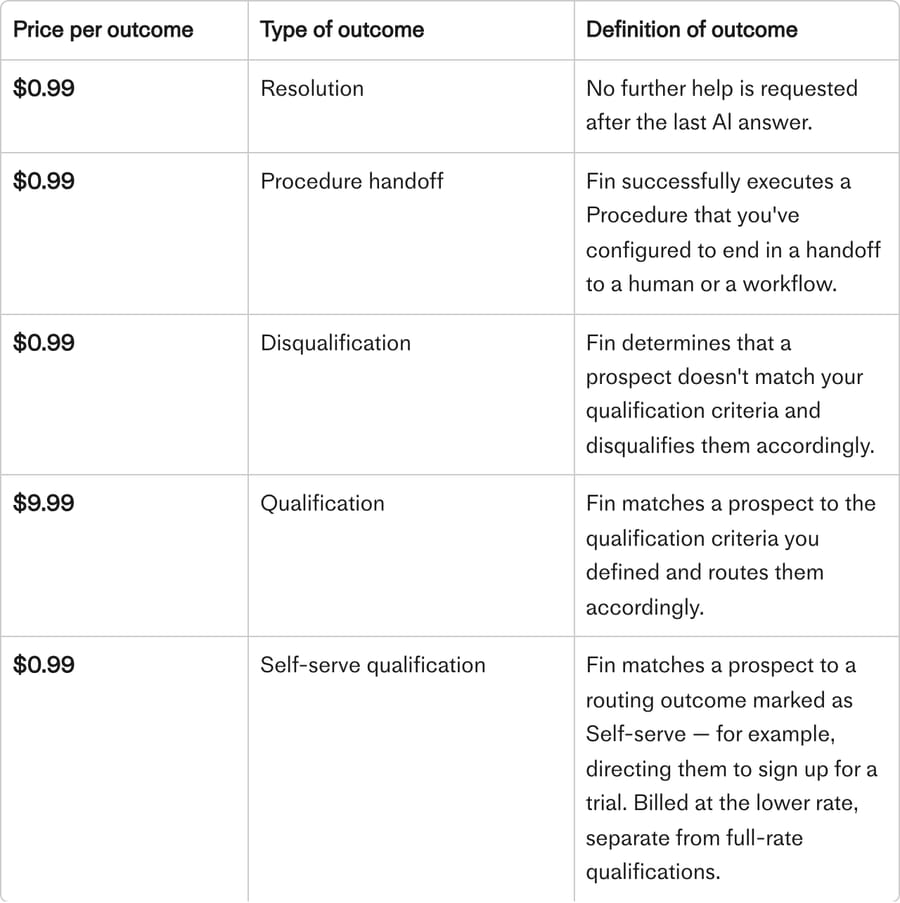
| Fin (Salesforce) | "No further help is requested after the last AI answer," confirmed or assumed | One outcome per conversation | $0.99 per outcome |
| Gorgias | "Interactions resolved by automation features from start to finish, with no human involved" | 72h with no human handover | Per automated resolution |
| HubSpot Breeze | A reply that shares a content source or performs an action, with no qualifying handoff | 72h, reset on reopen | Credits per resolution |
| Salesforce Help Agent | A resolved session; unresolved sessions are free | Not stated on the rate card | 400 Flex Credits, $2 |
Zendesk split the number you see from the number you pay
On May 18, 2026 Zendesk replaced one automated-resolution metric with three tiers. Zendesk's own tier reference sets them out: an Assisted escalation is where the AI contributed but a human finished, a Contained resolution is where the AI handled it to completion and the customer never came back, and a Verified resolution is the same conversation after an LLM "evaluates the text of the conversation to confirm that the customer's request was satisfactorily resolved."
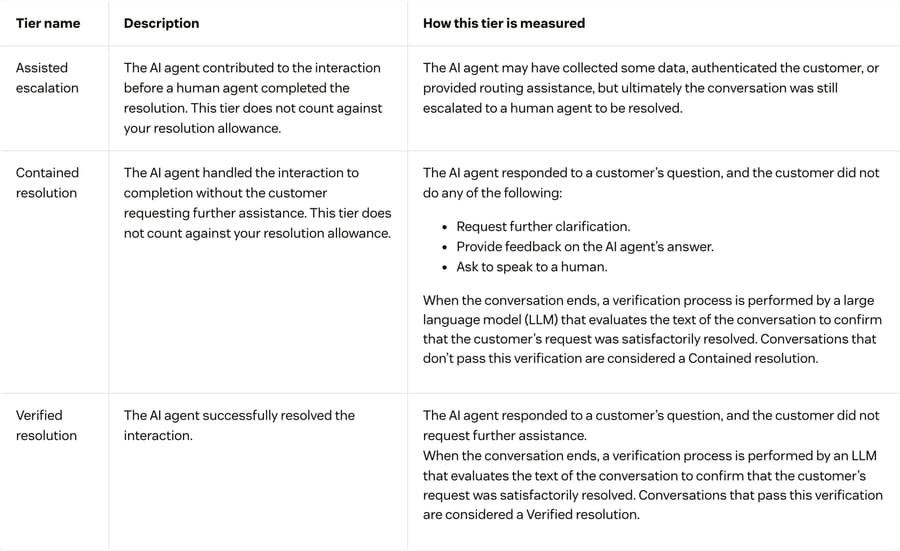
The consequence is the single most useful thing on this page. Zendesk's reporting change announcement gives the before and after formulas: the rate used to be Verified divided by all conversations, and since May 18 it is Contained plus Verified divided by all conversations. Zendesk says plainly what that does. "You may notice an increase in your AR%. This is because your AR% will now include both Contained and Verified resolutions. You will continue to be billed only for Verified resolutions and Contained resolutions do not consume automated resolutions."
So on Zendesk your dashboard percentage is now structurally higher than your invoice, by design, and the gap is exactly the set of conversations where an LLM read the transcript and could not confirm the customer was helped. That gap is the most honest self-service quality signal any vendor currently hands you for free. Watch it as a ratio month over month. The same announcement also records a quieter change worth checking on your bill: intelligent triage auto-replies "will no longer be charged as automated resolutions." The counting rules and the cap are covered in more depth in our Zendesk AI explainer.
Fin bills an outcome, and an exit counts as one
Fin's definition is in Intercom's outcomes documentation: a resolution happens when, after Fin's last answer, the customer "either confirms the answer was satisfactory (confirmed resolution), or exits the conversation without requesting further assistance (assumed resolution)." Both bill at $0.99, at most one outcome per conversation. Escalations Fin triggers itself, Procedure failures caused by technical errors, spam, and conversations where Fin asked a clarifying question and got no answer are all non-billable. The full arithmetic is in our Fin pricing breakdown.
The assumed half of that definition is the most argued-about line in AI support pricing, and the argument is on Intercom's own forum rather than a competitor's blog. In the thread "Fin's flawed assumed resolved & pricing design", marked ANSWERED with 30 replies and 2,066 views, a customer posting as bosbeest writes: "TL;DR: Fin assumes it has resolved an issue when you step in before a customers presses 'Speak to Human'. I do this when Fin is completely wrong and I want to help the customer ASAP." The same post reports their own measured figure: "We have a resolve rate of about 12%." Paul Byrne of Intercom replied on the thread that "there's value in recognising when a teammate takes the reins at the right moment" and passed it on internally.
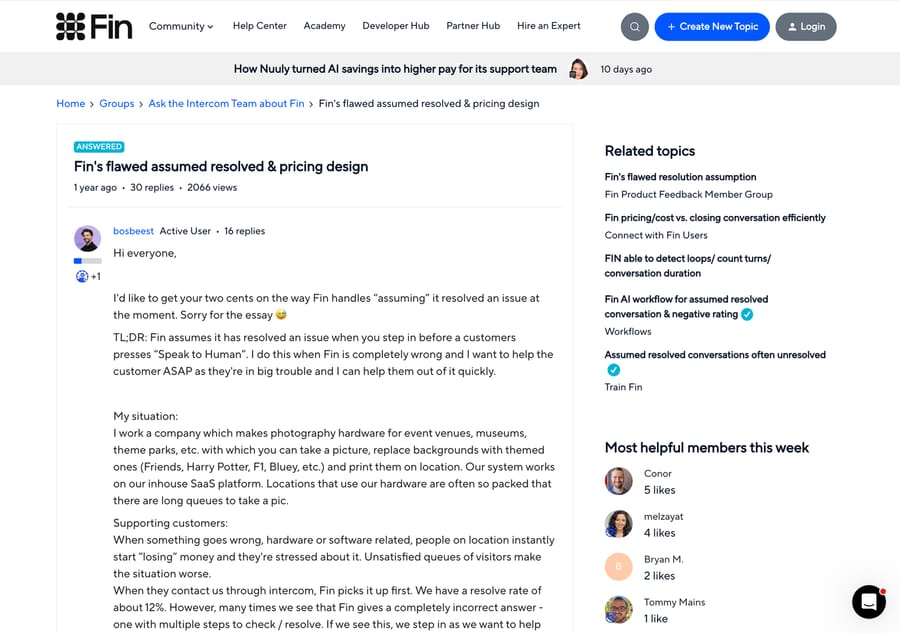
That 12% is one team's number and shouldn't be read as an industry figure. It is worth more than a benchmark anyway, because it is a practitioner's own measurement sitting next to the vendor's marketing claim on the vendor's own site.
Gorgias, HubSpot and Salesforce each pick a different clock
Gorgias counts "interactions resolved by automation features from start to finish, with no human involved," and bills only after the clock runs out: "An interaction is only billed as automated once 72 hours have passed without a human handover, so the most recent 3 days aren't immediately reflected in this metric." If you pull a report on Monday for last week, the last three days are structurally empty. Handovers on AI Agent tickets are deduplicated per ticket, while Flows, Article Recommendations and Order Management handovers count per event. Our Gorgias AI Agent guide covers where that lands on the bill.
HubSpot's Customer Agent resolves on a 72-hour window too, with a reopen rule attached: if a customer replies after more than 72 hours on an email thread, "the conversation is reopened and the 72-hour evaluation window resets," and a fresh resolution can be counted on the same thread. Salesforce's Help Agent charges 400 Flex Credits per resolved session on its Flex Credits rate card (dated 31 August 2026), which the Agentforce pricing page lists as $2 per Help Agent resolution. Unresolved sessions are free. Salesforce's public pricing pages do not state a session time window.
Line them up and the lesson is blunt. A resolution can be customer-confirmed, LLM-verified, assumed after a 2-hour messaging silence, assumed after 72 hours, re-billable on reopen, or de-duplicated. Comparing two vendors' resolution rates without reading both definitions is comparing numbers that do not share a unit.
Why is your deflection rate lower than the vendor benchmark?
The published benchmarks are real quotes from real vendors. Decagon's glossary gives 55% to 75% for e-commerce, 40% to 60% for SaaS and 25% to 45% for financial services and healthcare, with no source attached. For Fin, Salesforce, which completed its acquisition of Fin on 10 September 2026, cites a 76% average resolution rate. Gartner's August 2024 survey of 5,728 customers found 14% of issues fully resolved in self-service, and 36% even for issues customers described as "very simple."
Those figures are not in conflict. They measure different events from different ends of the conversation. Here are the six gaps, ordered by how often they turn out to be the cause when you go looking.
1. The benchmark counts assumed departures and your audit doesn't. This is the most common single cause, and Zendesk's own metric names it. If the vendor's number includes assumed deflections or assumed resolutions and yours is confirmed-only, you are measuring a strictly smaller set. The check: split confirmed from assumed for one month and report both. The fix: nothing, usually. Keep reporting the conservative number internally and the split externally, so nobody has to guess which one they're reading.
2. Your denominator covers channels the vendor's doesn't. Zendesk's deflection reports only track tickets submitted through the help center request form. A containment rate covers one channel. Your deflection rate probably spans email, chat, help center and social. The check: write the denominator out in words and count the channels in it. The fix: report per channel as well as blended. A 60% blended rate built on a strong knowledge base is a different operation from a 60% built on a bot that says "I didn't get that."
3. The dashboard number and the billed number are different on purpose. On Zendesk since May 18, 2026 the dashboard includes contained resolutions the LLM would not verify, and the invoice does not. The check: put AR% next to the verified-resolution count on your bill for the same month. The fix: treat the difference as your quality backlog and read a sample of those transcripts.
4. Re-contacts are still in the numerator. A "deflection" that produces a second ticket 40 hours later helped nobody and got counted twice. The check: for every contact you logged as deflected, look for another contact from the same customer inside 72 hours. The fix: subtract them. Teams doing this for the first time commonly lose several points off the headline, which is the number getting more honest rather than worse.
5. You are comparing month three to somebody's year two. Decagon's own maturity curve says initial rollouts start at 30% to 40% and climb toward 60% to 75% within three to six months. A benchmark quoted with no deployment age attached is not a target for a new deployment. The check: date your own baseline. The fix: measure the trend rather than the level for the first two quarters.
6. The quoted deployment is scoped to easier questions than yours. Deflection plateaus when the agent only recognizes a narrow set of intents, and it looks excellent when that set is password resets and store hours. The check: break deflection out by intent and see which questions are carrying the number. The fix: mine real tickets for the intents you are missing and build coverage for those. That is where the remaining deflection lives, and it is also where connecting the right knowledge sources does more than prompt-tuning ever will.
How do you measure deflection so the number survives an audit?
We ran this sequence against our own reporting before writing it down, and it is short:
- Write the numerator and denominator in one sentence each and put them in the report header. Use the conservative formula.
- Split confirmed from assumed and never publish the blended figure without both halves next to it.
- Gate on re-contact within 72 hours. A customer who came back was not deflected.
- Report deflection next to a quality metric. CSAT, first-contact resolution or re-contact rate. Deflection climbing while CSAT falls is the signature of confidently wrong answers, and it is the one pattern that never shows up in a single number.
- Read 30 conversations a month by hand. Nothing on this list replaces it. A sample you read yourself is the only number that cannot be defined in somebody else's favor.
- Track escalation quality separately. A conversation that reaches a human with full context is a good outcome, not a failed deflection. Our guide to AI-to-human handoff covers what should travel with the transfer.
Community threads describe the failure this all guards against better than benchmark tables do. On r/customerexperience, the thread "The quiet ways AI agents fail in real support conversations" opens with "The biggest risk I see with AI in support is rarely a dramatic blow up." On r/automation, "Every AI chatbot I've tried in the last year has been the same flavor of useless" collected 45 comments agreeing. Neither of those customers filed a ticket. Both were deflected.
What is each AI billing unit optimizing for?
Every pricing model rewards something, and it is worth saying out loud which behavior each one pays for.
Per-resolution pricing pays the vendor more the more contacts you fail to prevent, and it gives the vendor the pen on the definition of the billable event. That is why the Fin forum thread exists and why r/Zendesk has been arguing about automated resolutions since the model launched, in threads like "Zendesks new 'AR' pricing model" and, on r/SaaS, "Per-resolution pricing for AI support rewards the wrong behavior", whose author starts from "I've been looking at how AI support agents get priced." Per-seat pricing pays for headcount you are trying to reduce. Per-message pricing pays for long conversations. We work the arithmetic on both at real volumes in per-action vs per-resolution AI pricing.
Fin's own team makes the argument against deflection in the same breath: "Deflection was the standard metric of the chatbot era. It tells you about volume reduction. It tells you nothing about customer outcomes." They are right, and the same sentence applies to any metric whose definition sits with the party sending the invoice.
Where does Macha sit on this?
Macha is an AI agent layer on top of the help desk you already run, on Zendesk, Freshdesk, Gorgias, Front, HubSpot or Intercom. The specific failure it answers here is the one this whole page is about: there is no resolution definition to dispute, because resolutions are not the billing event. Macha is priced on ticket volume, from $299/month for 750 tickets, at about $0.40 per ticket on every tier. A ticket is one thread between Macha and one person, charged once no matter how many messages it takes, and the model an agent runs on, the tools it calls and how long the thread runs do not change the charge.

That suits teams who want their deflection number to be a diagnostic rather than a line item, and who would rather argue with their own knowledge base than with a vendor about whether a 2-hour silence was a resolution. It suits you less if you specifically want to pay only when a vendor certifies an outcome and you trust that certification. Setup and monitoring by the Macha team are included on every plan, and the trial is $50 of free usage (about 125 tickets), no credit card, no time limit. The full table is on the pricing page.
Frequently asked questions
What is a good deflection rate? Vendor benchmarks land at 55% to 75% for e-commerce, 40% to 60% for SaaS and 25% to 45% for financial services and healthcare, per Decagon's glossary, which attributes them to no source. A realistic first-year target measured conservatively is 40% to 55%. A verified 40% that resolves issues is worth more than a self-reported 80% that counts people who left.
What's the deflection rate formula? (Deflected Contacts ÷ Total Contact Attempts) × 100. The honest variant is Deflected conversations ÷ (Deflected conversations + Tickets created after a self-service attempt), which stops you crediting customers who abandoned the channel without getting help.
What's the difference between deflection rate and automated resolution? Deflection measures avoidance across every channel: the contact didn't reach a human. Automated resolution measures outcome per conversation: the AI fixed it and nobody escalated. Deflection counts an abandoned chat and a wrong answer the same as a real fix. Automated resolution is also somebody's billing unit, so its definition is written by the party invoicing you.
What is containment rate, and is it the same as deflection? Containment is "the percentage of customer interactions that enter an automated channel and are fully resolved within that channel without being escalated to a human agent," per Decagon. It is channel-level, so it only counts sessions that entered the bot or the IVR. Deflection is portfolio-level and spans every channel. Neither tells you whether the issue was resolved.
What counts as an AI resolution? It depends entirely on the vendor. Zendesk requires an LLM to verify the transcript before billing a Verified resolution. Fin counts it when the customer confirms, or simply exits without asking for more help. Gorgias waits 72 hours with no human handover. HubSpot uses 72 hours and resets the window if the customer replies later. Salesforce's Help Agent charges 400 Flex Credits ($2) per resolved session and nothing for an unresolved one.
Why did my Zendesk automated resolution rate go up in May 2026? Because the formula changed. Since May 18, 2026 the rate is (Contained + Verified) divided by all conversations, where it used to be Verified alone over the same denominator. Zendesk's own announcement says "you may notice an increase in your AR%" and that "you will continue to be billed only for Verified resolutions." Your dashboard rose; your invoice didn't.
What is an assumed deflection? Zendesk's definition: "An assumed deflection happens when a user visits the help center and doesn't ask for help or submit a ticket, but also didn't confirm they found an answer. It's assumed they found what they needed on their own." In practice it includes everyone who gave up. Report it separately from confirmed deflections.
Why is deflection rate called a vanity metric? Because naive tracking counts abandonment and confidently wrong answers as successes. A customer who read a useless article and quit looks identical to one who got a perfect answer. Reported alone, deflection can climb while satisfaction falls, which is why it belongs next to CSAT, first-contact resolution or re-contact rate.
Is automation the same as resolution? No. Automation counts steps a system performed: summarizing a thread, tagging by intent, looking up an order, drafting a reply, routing to the right queue. Most of those resolve nothing on their own, and a ticket can be heavily automated and still need a human to close it. You can run high automation with modest resolution, and the reverse.
How do I improve deflection without hurting customers? Improve the resolution that happens before an agent reaches the ticket. Fix and expand the knowledge the agent reads, broaden intent coverage from real tickets rather than guesses, route the rest cleanly with context attached, and answer proactively with order-status pages and in-app banners. Then check CSAT and re-contact rate alongside, so hidden harm shows up in a week instead of a quarter.
What should you report instead of one deflection number?
Deflection rate tells you how much load left the queue. It does not tell you whether anybody was helped, and on most dashboards it is quietly summing people who gave up with people who got an answer. The four fixes are all small: split confirmed from assumed, name the channels in your denominator, subtract re-contacts inside 72 hours, and put a quality metric next to the number every time you publish it. Do that and your deflection rate will drop, which is the point. The number you can defend in a QBR is worth more than the number that matches the vendor's slide.
Sources: Zendesk, About automated resolution tiers · Zendesk, Announcing changes to AI agent reporting · Zendesk, Announcing unified conversation statuses · Zendesk, Metrics and attributes for Zendesk Knowledge · Zendesk, A conversation displays an automated resolution but it was escalated · Intercom, Fin AI Agent outcomes · Fin, resolution rate vs deflection rate · Gorgias, How metrics are calculated · HubSpot, Understand the customer agent · Decagon, deflection rate · Decagon, containment rate · Gartner, August 2024 self-service survey · Salesforce, Agentforce pricing · Salesforce, completes acquisition of Fin · Intercom community, Fin's flawed assumed resolved & pricing design
Vendor definitions and prices checked September 24, 2026. Next review by March 2027.
Resolve tickets automatically with AI agents
Macha's AI agents work on top of the help desk you already use — no code.