





 Shopify
 Stripe
 Slack
Slack Notion
 Google Workspace
 Confluence

Why Does AI-to-Human Handoff Fail? 6 Causes and How to Fix Each


When an AI agent's handoff to a human breaks, it rarely breaks loudly: the agent says it is connecting the customer, then nothing happens, or the person who picks up has none of the context. The six causes below are ordered by how often they turn out to be the problem, each with a check and a fix.
Key takeaways
- AI-to-human handoff fails in six ways, from ignoring a customer's request for a person to escalating into the wrong queue or outside business hours.
- A 20-minute test finds most handoff problems: ask for a human in three unusual phrasings, ask an unanswerable question three times, and reply again after a human takes over.
- On Zendesk, a handoff with no agents available is logged as both Escalated to agent and Automated resolution, the fingerprint of a transfer that never executed.
- A healthy AI escalation rate runs around 15% to 30% of conversations, and a rate consistently above 30% usually means the agent's scope is too broad.
- Ada scored 1.7 out of 5 from 21 Trustpilot reviews on September 21, 2026, against roughly 4.6 on G2, where the reviewers are the admins who build the agent.
AI-to-human handoff fails in six ways: the agent ignores a request for a person, announces a transfer that never executes, drops the context, answers again after a human takes over, loops instead of escalating, or escalates into the wrong queue or hours. Each one is a configuration problem you can find with a 20-minute test and fix without retraining the agent.
| # | Failure mode | How to spot it | First fix |
|---|---|---|---|
| 1 | Customer asks for a human, agent keeps answering | Unusual phrasings like "get me a person" never escalate | Phrase-independent escalation intent plus an always-visible control |
| 2 | Transfer announced, never executed | Escalated conversations close with no human comment | Configure the no-agents-available path; check the conversation-end window |
| 3 | Handoff completes, context lost | Human asks the customer to repeat details | Write transcript and entities onto the ticket |
| 4 | AI replies after a human takes over | AI message after a human message in one thread | Narrow broad "any message" workflows; suspend the agent after a human comment |
| 5 | Agent loops instead of escalating | Three or more agent messages, no escalation | Cap attempts at two or three; remove overlapping instructions |
| 6 | Escalation into a void | Out-of-hours tests, high re-escalation rate | Skill-based routing, stated wait times, an out-of-hours ticket path |
The reason to fix this rather than tune the answers: customers tolerate an AI agent they can escape from, and they punish one they cannot. That shows up in the review split further down, where the same product scores 4.6 from the admins who configure it and 1.7 from the people who hit it.
How do you test your AI handoff in 20 minutes?
Run this against your own production agent before reading the causes. We ran it on our own setup and it takes about twenty minutes.
- Type "talk to a human" as the first message. Not a question, just the request. Note how many turns pass before a person is offered.
- Type it again in three phrasings the agent has never seen: "get me a person", "this isn't working", "agent pls". Intent matching that only covers the canonical phrase is the single most common cause below.
- Ask a question the agent cannot answer, three times. Count whether it escalates, rephrases, or asks a clarifying question it already asked.
- When it does hand off, read what the human receives. Open the ticket as an agent. Is the transcript there? The order number? The reason for escalation?
- Run steps 1 to 4 outside business hours. Half of the reports in the community threads below turn out to be the out-of-hours path, which nobody tests.
- Reply once more after a human takes over. Check whether the AI agent answers again over the top of your colleague.
Write down which step failed. That number maps to the cause below.
What are the six ways AI handoff fails?
1. The customer asks for a human and the agent keeps answering
This is the most common failure and the most damaging, because the customer reads it as deliberate. On r/AI_Agents, the thread "If a customer asks to speak to a human, should the chatbot..." describes "a case of a user trapped in an endless bot loop. The customer would type exactly 'talk to a human' or 'I need to speak to a...'" and the thread's answer is blunt: "a chatbot refusing to handoff after someone explicitly ask for a person is basically teaching customers that the channel can't be trusted."
Customers describe the same thing from the other side. A Trustpilot reviewer wrote on September 18, 2026 under the title "Barrier to customer service" that "the bot isn't programmed well and seems to be purely an interface to prevent customers liaising with support teams."
The check: step 2 of the test. List every phrasing that fired an escalation and every one that didn't.
The fix: make the escalation intent phrase-independent rather than keyword-matched, and add an always-visible control that doesn't depend on parsing at all. Most platforms support both. If the agent was scoped for a deflection target, check whether somebody removed the escape hatch to protect that number, because that is usually what happened.
2. The agent announces a transfer that never executes
The second most common cause, and the hardest to see from the outside, because the transcript looks correct. The r/AI_Agents thread "Your AI agent says 'transferring you to a human' and then..." names the mechanism: "The root cause is almost always the same: the escalation logic was designed to send a message, not to actually hand off state."
Zendesk documents a specific version of this in its own help center, and it is worth reading because the symptom shows up as a metric instead of a complaint. In "A conversation displays an automated resolution but it was escalated to an agent", edited September 9, 2026, Zendesk Customer Care explains: "The AI agent attempted to escalate the conversation to a human agent, but no agents were available to accept the handoff. For this reason, the escalation couldn't complete. Instead, the AI agent created a ticket for follow-up and then finished the conversation itself." The ticket then shows a custom resolution of "Escalated to agent" and a conversation status of "Automated resolution" at the same time.
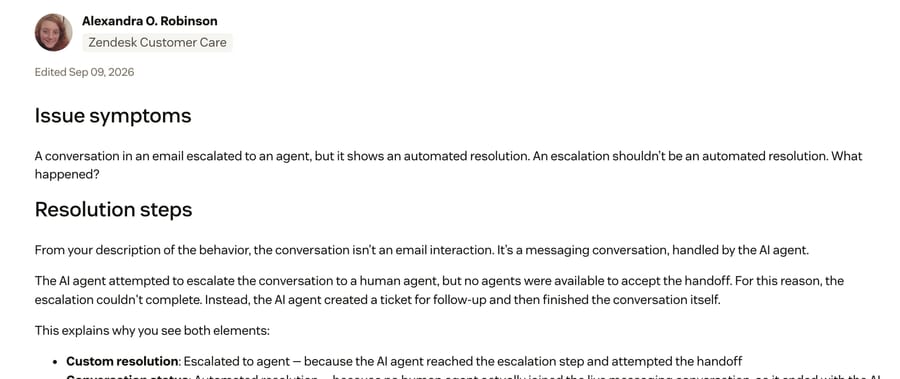
The check: filter last month's conversations for ones that reached an escalation step and still closed without a human comment. On Zendesk, the contradictory pair of labels above is the exact fingerprint.
The fix: two things, in order. Configure the no-agents-available path explicitly so the customer is told a ticket was created and when to expect a reply, instead of leaving them on a cheerful sign-off. Then check how long a conversation stays open while it waits. Internal Note's map of the Zendesk messaging lifecycle shows an AI agent session ending two hours after a resolved conversation goes quiet and after 72 hours for an ongoing one, so a conversation wrongly marked resolved can close while it was waiting for a person.
3. The handoff completes and the context doesn't travel
The customer reaches a human and has to start again. On r/AI_Agents, "I tried building a support agent and the handoff was where..." puts the subtle version of it well: "Agent escalates, but the human gets a clean little summary that leaves out the only detail that mattered." A summary that drops the order number is worse than no summary, because the human trusts it.
The customer's version, from Ada's Trustpilot page in August 2025: the bot "repeatedly asks you to resubmit the same information over and over, and cannot understand what you are asking."
The check: step 4 of the test. Open the escalated ticket as an agent and count how many of the five items below are actually on the screen.
Five things should land with the human before they reply: the full conversation history verbatim, the extracted entities (order number, account, product), what the agent already tried, the escalation reason, and a short plain-language summary. Our own context bundle for escalations covers how we assemble those.
The fix: this is nearly always a missing integration rather than a hard problem. The agent has the data and no write path to the ticket. Attach the transcript and entities to the ticket itself instead of a separate log, so the human sees it where they already work.
4. The AI agent comes back after a human has taken over
Less frequent, more embarrassing. A teammate replies, the customer responds, and the agent answers over the top. On Intercom's public forum, a user posting as RobAPH described it on October 17, 2025: "When a conversation is handed over to a teammate, everything starts fine - the teammate replies, but as soon as the customer responds again, Fin jumps back in and interrupts." Another user, Charlie Moore, replied the same day: "I'm experiencing similar issues as well." The thread also reports a second version, where a customer saying "thank you" after the handoff reads as a resolution, so the conversation closes and the teammate never sees it (Fin AI Agent issues on the Whatsapp Channel).
The check: look for conversations where an AI message sits after a human message on the same thread.
The fix: the cause is usually not the AI agent. Nathan Sudds, one of that forum's Top Experts, replied on October 18 that the culprit is typically a workflow on the "When a user sends any message" trigger, and recommended turning on Show Conversation Events "and checking to see which workflow was engaging with the conversation in those instances." He reports the same root cause on email, where "too broad exposure on the 'sends any message workflow'" was reassigning threads it shouldn't touch. Narrow that workflow's audience and set a rule that suspends the agent once a human has commented.
5. The agent loops instead of escalating
The agent rephrases the same answer rather than admitting it is stuck. This is the failure customers name most often in reviews, and it is a tuning problem with a known cause. On Intercom's Train Fin forum, Amber Stephens posted "How are you stopping Fin from looping and being repetitive?": "Something is going wrong with my anti-repetition guidance. No matter what, Fin will not stop repeating/rephrasing the same answer multiple times."
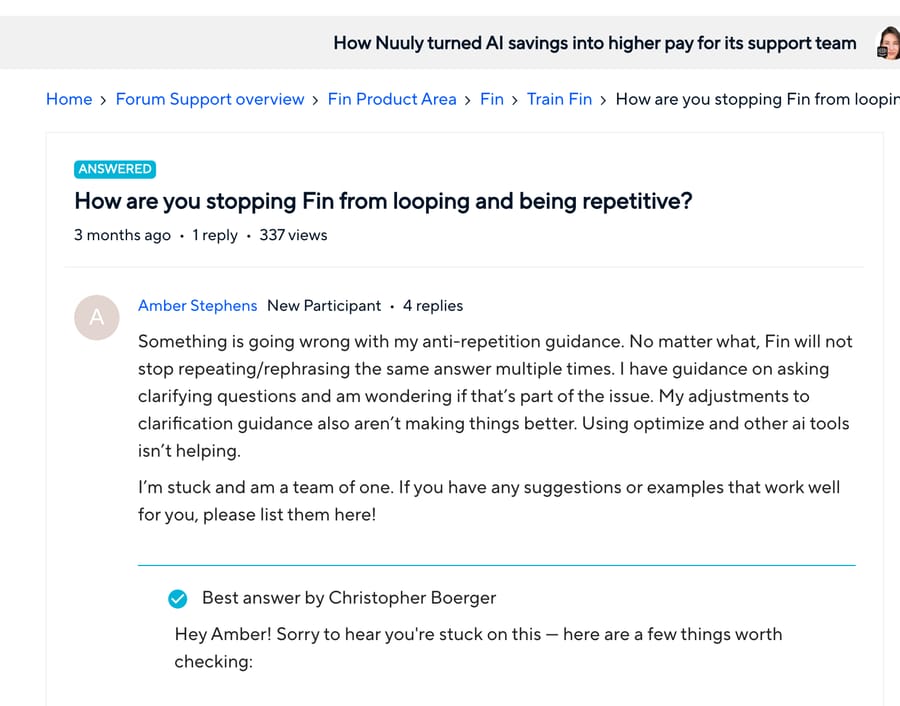
The accepted answer, from Christopher Boerger, names the cause first: "Check for conflicting or overlapping guidance rules. This is the most common cause of Fin rephrasing and circling back with the same answer." He adds a practical trick for the follow-up question the agent generates on its own, which is "ending a guidance rule with your own question", so the agent uses that instead of inventing one. The same reply notes that Fin's clarifying questions "are baked into its AI model and can't be directly edited," which is the sort of limit worth knowing before you spend a week on prompt wording.
The check: step 3 of the test, plus a count of conversations containing three or more agent messages and no escalation.
The fix: cap failed attempts at two or three and escalate on the third. Then go and find the overlapping instruction rules, because a repetition cap treats the symptom. Platform-specific click paths differ; for Fin, the configuration steps live in our Fin handoff how-to rather than here, and our Fin explainer covers the wider set of behavior problems teams hit with it.
6. It escalates into a void: wrong queue, wrong hours, no expectation set
The transfer works, and the customer waits with no idea for how long, or lands in a queue that cannot help. One Ada reviewer described the contradiction version in 2021: the bot told them to contact the restaurant first, and when they came back, live chat said the 24-hour window had closed.
The check: step 5 of the test, and a look at re-escalation rate. Handoffs that bounce between queues are a routing problem wearing a handoff costume.
The fix: route by skill, language and workload rather than to a generic inbox, say what is happening and give a realistic wait, and build an explicit out-of-hours path that creates a ticket and tells the customer so. A handoff that says nothing and lands in the wrong place feels identical to being dropped.
Why do customers rate a bot lower than admins do?
Ada is a useful case because both populations review it in public and they disagree completely. On G2, where the reviewers are the support and CX people who build the agent, Ada scores around 4.6 out of 5 with ease of use near 9.0, praised for onboarding and the builder (our own research checked that in June 2026; G2 blocks scripted access, so it carries that date). On Trustpilot, where the reviewers are end customers who hit the bot, the page read 1.7 out of 5 from 21 reviews on September 21, 2026, with 81% at one star.
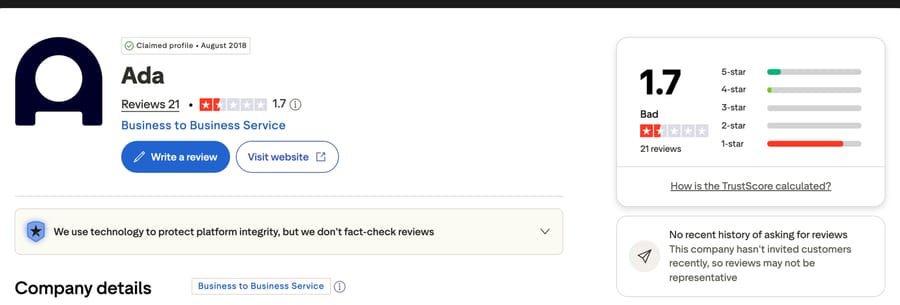
Two honest caveats before anyone quotes that number. Twenty-one reviews is a tiny base, Trustpilot's own banner says the company "hasn't invited customers recently, so reviews may not be representative," and at least one of the 21 is a review of Ada Cosmetics, an unrelated company. Treat it as a direction rather than a rating.
The direction is the point, and it is consistent across vendors: the admins rate the platform and the customers rate the exit. The most-quoted review on that page, from November 2023, is about time, and accuracy never comes into it: "Dogwater. I've never seen a product so ruthlessly dedicated to wasting a person's time." Another, from April 2025, is titled simply "Went in circles." Nothing in those complaints is about a wrong answer. They are all failure modes 1, 5 and 6.
When should an AI agent escalate to a human?
Good escalation logic blends three families of trigger, and the tuning is what separates a handoff rate of 20% from one of 45%.
Explicit: the customer asks. Give them a person. No maze, no "are you sure", no requiring them to fail twice more first. This is the trigger that fails most often and it is the cheapest to fix.
Implicit: the agent is failing. Low confidence on intent or answer, sentiment turning clearly negative, and repeat detection. On the last one, r/AI_Agents "How are you handling AI agent handoffs to human reps?" offers a usable rule: escalate "if they say 'no, that's not what I meant' three times, that's a clearer signal" than any confidence score. Start conservative, escalate readily, and tighten once you trust the agent.
Policy: some intents always go to a person. Fraud, account takeover and security, legal threats, self-harm, large refunds, and anything in regulated territory. In high-risk deployments this becomes a compliance requirement: the EU AI Act's Article 14 requires demonstrable human oversight of high-risk AI systems. The original August 2, 2026 deadline for standalone high-risk systems has been pushed to December 2, 2027 under the AI Omnibus amendments (Morgan Lewis summary), so there is time, but not a reason to wait.
What does a clean handoff look like?
A cold transfer drops the conversation on whoever is next with no context. A warm transfer routes to the right person by skill, language, department and workload, and puts the history, the entities, what was tried, the reason and a summary on their screen before they reply. Vendors publish CSAT uplift figures for warm transfers; we have left them out because every one we could find was vendor-authored with no methodology attached. The mechanism does not need a statistic: the customer either repeats themselves or does not. The words the human uses when they pick the conversation up matter too; our customer service phrases page has handoff lines for chat, email and phone.
Where the AI agent is a layer on top of an existing help desk, the human half happens inside that help desk. The agent creates or updates the ticket, attaches its summary and history, and assigns it to the right queue, so agents work escalations in the tool they already live in. How good that pass-through is depends entirely on how well the agent is connected to your systems in the first place, which is the same dependency behind failure mode 3. What the native help-desk AI can and cannot do on that front is covered in our Zendesk AI explainer.
How do you measure whether your handoff is working?
Two questions: are you escalating the right amount, and is each escalation good?
Escalation rate is the share of AI conversations that reach a human. Industry guidance lands around 15% to 30% depending on complexity, and consistently above 30% usually means the agent's scope is broader than what it can resolve. A very low rate is only good news if real resolution is driving it instead of customers giving up, which is failure mode 1 wearing a good number.
Post-handoff CSAT is the truest single measure of handoff quality: satisfaction on the conversations that were escalated. Watch whether escalated conversations recover to a healthy score. They do when context travels with them. Pair it with CSAT overall so you can see the difference.
Four supporting signals are worth a column each on the same report:
- Context pass-through rate: did the human receive history, entities and a summary?
- Repeat-explanation rate: how often customers restate their issue after the handoff. Lower is better and it moves post-handoff CSAT more than anything else on this list.
- Time-to-human, and post-handoff resolution time.
- Re-escalation rate: handoffs that bounce back, which points at routing rather than the agent.
One reporting trap to know about if you are on Zendesk: an assisted escalation, where the AI agent contributed and a human finished, is its own resolution tier and does not count against your resolution allowance, per Zendesk's tier documentation. That means a good handoff is free and a contained conversation is not, which is an incentive worth being aware of when somebody proposes lowering the escalation rate to save money.
How does handoff fit into human-in-the-loop support?
Customer-facing handoff is the most visible form of keeping a person with context and authority at the decision points that matter. The other two forms are worth building at the same time.
Agent assist, where the AI drafts replies, summarizes threads and suggests next actions while a human stays the final check. This is the copilot pattern, and field studies of support teams report double-digit gains in issues resolved per hour, though we have not run that experiment ourselves and would treat the published figures as directional.
Approval gates, where the agent proposes a high-stakes action and a human approves before it executes. The useful rule is reversibility: autonomy for low-risk reversible steps, sign-off for irreversible ones.
Where does Macha fit on handoff?
Macha is an AI agent layer on top of the help desk you already run (Zendesk, Freshdesk, Gorgias, Front, HubSpot or Intercom); the current list is on our integrations page. The failure it is built against here is number 3, the context wipe, because the agent works inside the ticket instead of a separate widget: when it escalates, the transcript, the entities it collected and the reason are already on the ticket the human opens, and the assignment goes to a real queue in the help desk instead of a generic inbox. Our pre-built triage and escalation templates are where most teams start.
It suits teams whose humans already work in one of those help desks and who want escalations to land there. It suits you less if support lives in a standalone chat widget with no ticketing behind it, because then there is no queue to hand off to. Pricing is on ticket volume, from $299/month for 750 tickets, at about $0.40 per ticket, with setup and monitoring by the Macha team included on every plan and a trial of $50 of free usage (about 125 tickets), no credit card, no time limit. The tiers are on the pricing page, and you can run the 20-minute test above against a Macha agent on that trial before deciding anything.
Frequently asked questions
What is human handoff in AI customer support? It is the transfer of a live conversation from an AI agent to a person, triggered by an explicit request, a failure signal such as low confidence or repeated loops, or a policy rule covering fraud, security and regulated topics. A good handoff carries the full history so the customer does not repeat themselves.
Why does my chatbot say it is transferring me and then nothing happens? Usually because the escalation logic sends a message without changing the conversation's state, or because the transfer fired and no human was available to accept it. Zendesk documents the second case directly: with no agents available the escalation cannot complete, so the AI agent creates a follow-up ticket and finishes the conversation itself, which is why the record shows an escalation and an automated resolution at once.
Why won't the AI agent let me talk to a human? Most often the escalation intent is matched on a narrow set of phrases, so "get me a person" or "this isn't working" never fires it. Sometimes the escape hatch was deliberately narrowed to protect a deflection target. Test three unusual phrasings against your own agent and see how many reach a person.
When should an AI chatbot escalate to a human? Whenever the customer asks; when its confidence is low or it has failed two or three times; when sentiment turns clearly negative; and always for fraud, account security, legal or medical questions, and large refunds. Start with conservative thresholds and tighten them as the agent earns it.
What's the difference between a warm and a cold handoff? A cold handoff passes the conversation on with no coordination and often no context. A warm handoff routes to the right person by skill and workload and puts the history, entities, what was tried, the escalation reason and a summary in front of them before they reply.
What is a good handoff (escalation) rate? Around 15% to 30% of AI conversations, depending on how complex your queue is. Consistently above 30% usually means the agent's scope is too broad. A very low rate is only healthy if resolution quality is real, because trapping customers also produces a low number.
How do you measure handoff quality? Escalation rate for the right amount, post-handoff CSAT for the quality of each one, context pass-through and repeat-explanation rate for whether the human got what they needed, plus time-to-human and re-escalation rate. Post-handoff CSAT and "did the customer have to repeat themselves" are the two that move.
Why does the AI agent keep replying after a human takes over? On Intercom this is usually a workflow on the "When a user sends any message" trigger, per the Top Expert answer on Intercom's own forum. Turn on conversation events, find which workflow engaged, and narrow its audience. On any platform, set a rule that suspends the agent once a human has commented.
Why does the AI agent repeat itself instead of escalating? The accepted answer on Intercom's community names conflicting or overlapping guidance rules as the most common cause of an agent rephrasing and circling back with the same answer. Cap failed attempts at two or three and escalate on the third, then audit the instruction set for rules that touch the same behavior.
What is human-in-the-loop support? A design where a qualified person keeps decision authority over AI actions, through customer-facing handoff, agent assist where the AI drafts and a human sends, or approval gates on high-stakes actions. The EU AI Act's Article 14 requires demonstrable human oversight for high-risk systems, with the standalone high-risk deadline now December 2, 2027.
What should you fix first?
Fix the step that failed in your own test, starting with failure mode 1, because customers forgive a wrong answer faster than a closed exit. Handoff makes the automation acceptable to the person on the other end, and the six ways it breaks are all configuration problems. Run the 20-minute test on your own agent this week, write down which step failed, and fix that one. The teams that win with AI support are not the ones that escalate least. They are the ones whose customers never have to ask twice.
Sources: Zendesk, A conversation displays an automated resolution but it was escalated to an agent · Zendesk, About automated resolution tiers · Intercom community, How are you stopping Fin from looping and being repetitive? · Intercom community, Fin AI Agent issues on the Whatsapp Channel · Trustpilot, Ada · r/AI_Agents, Your AI agent says "transferring you to a human" · r/AI_Agents, the handoff was where it fell apart · r/AI_Agents, should the chatbot hand off on request · r/AI_Agents, How are you handling AI agent handoffs to human reps?
Vendor documentation and review pages checked September 21, 2026; EU AI Act dates and Zendesk resolution tiers rechecked September 24, 2026. Next review by March 2027.






