





 Shopify
 Stripe
 Slack
Slack Notion
 Google Workspace
 Confluence

How Do Macha's Agent Templates Work? Triage, Replies and Escalation in One Click


Most teams stall on a blank agent builder, deciding what the agent reads, which tools it calls and when it hands off to a human. Macha's templates pre-fill those decisions for triage, replies and escalation, so the job becomes reviewing an agent rather than designing one.
Key takeaways
- Macha's agent templates create an editable agent in one click, pre-filling instructions, a default model, recommended connectors and tools, while the user adds the trigger afterward.
- Macha's onboarding flow, shipped March 8, 2026, walks users through selecting tools and recommended templates with a stated goal of being up and running in under 2 minutes.
- Macha's escalation template chains Get Ticket, Get Order from Shopify and Get Customer from Stripe before writing the bundle into the ticket and sending it to Slack.
- Macha documents its support templates for Zendesk, Freshdesk, Gorgias and Front, and the gallery only shows templates for connectors an organization has set up.
- Template-created Macha agents bill the same as any agent, per ticket from $299 a month for 750 tickets, about $0.40 each, regardless of the model used, with setup by the Macha team and a dedicated success manager included.

Macha's agent templates create a working, editable agent in one click: each template pre-fills the instructions, a default model, the recommended connectors and the tools for one job, and the three jobs every support team has are triaging new tickets, drafting or sending replies, and escalating the ones that need a human. You click "Use Template," land in the agent editor, add the trigger it recommends (Macha offers it, but doesn't switch it on for you) and any extra knowledge, and test it in minutes instead of an afternoon.
| Template job | Tools it reaches for | Recommended trigger (you add it) | Writes to the customer? |
|---|---|---|---|
| Triage and routing | Get Ticket, Update Ticket (priority, tags, group, ticket type) | New Ticket Created | No |
| Draft replies for review | Get Ticket, knowledge search (e.g. Notion) | New Customer Message | No, internal note |
| Auto-reply from the knowledge base | Get Ticket, Get Articles, Add Comment, Update Ticket | None; you pick one | Yes, once you let it |
| Escalation with context | Get Ticket, Shopify Get Order, Stripe Get Customer, Add Comment, Slack Send Message | Ticket Priority Changed | No, internal note plus Slack |
Below is what's in the gallery, what each template does under the hood, and where a template is the wrong starting point. Macha is an AI agent layer that sits on top of the helpdesk you already run (Zendesk, Freshdesk, Gorgias, Front, HubSpot or Intercom), so everything here lands inside the tools your team is already in, not a separate inbox you have to babysit.
What is a Macha agent template?
In Macha, an agent is five things bundled together:
- Instructions: the system prompt that defines its job, tone, and guardrails.
- A model: the LLM it reasons with (you can swap this; the model you pick doesn't change what you pay).
- Tools: the read/write actions it's allowed to take in your connected apps (Get Ticket, Update Ticket, Get Articles, Send Message, and so on).
- Knowledge: the data sources it can search to ground its answers.
- A trigger: what makes it run (a new ticket, a status change, a webhook, a schedule).
Building that from scratch means making five sets of decisions correctly and in the right order. Macha's docs describe a template as a name, a description, detailed instructions, a recommended set of connectors and pre-selected tools, with a default model. That covers the hard three. Applying it creates a real, editable agent in your workspace, not a locked black box. You then add the trigger and any data sources beyond what the connectors give it, and you can rename the agent, rewrite the instructions, and add or remove tools. The template means you start from a working configuration instead of nothing.
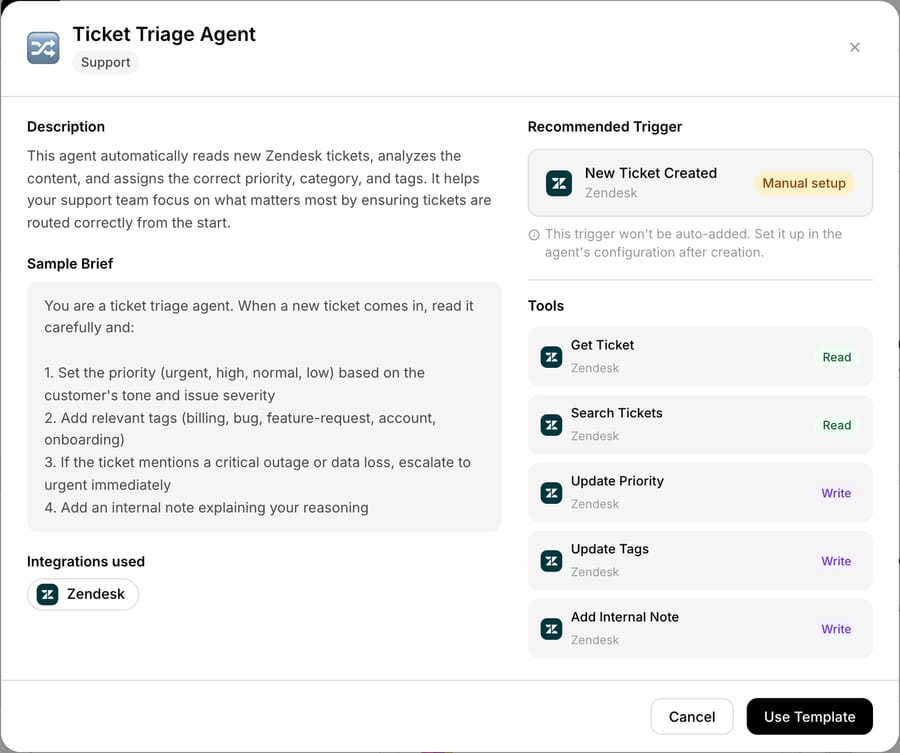
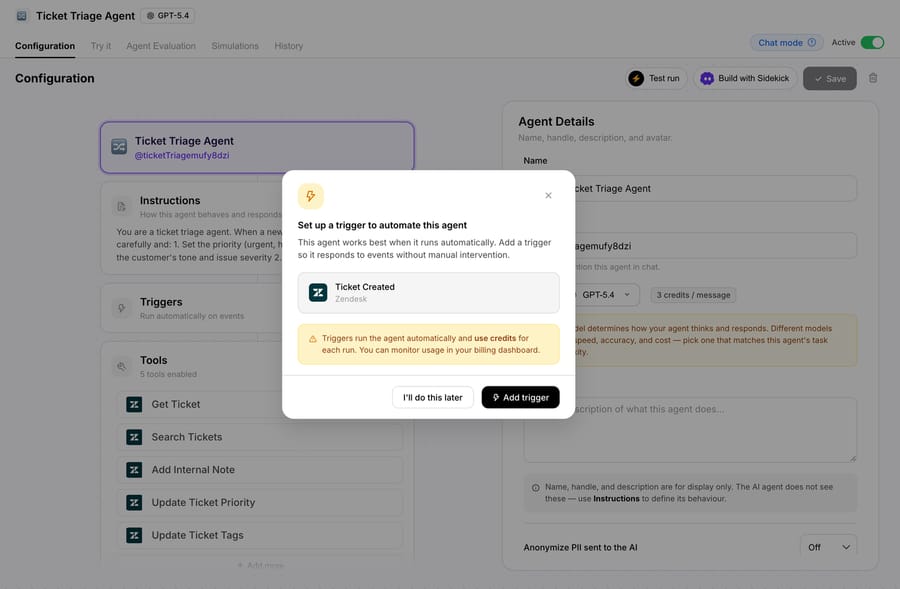
About half the templates (18 of the 36 in the gallery when we checked) also name a Recommended Trigger: New Ticket Created for the Ticket Triage Agent, New Customer Message for the Customer Reply Assistant, Ticket Priority Changed for the Escalation Manager, a scheduled run for the SLA Monitor. Each is labelled "Manual setup", because applying the template doesn't add it. The agent is created with an empty Triggers card, and Macha then offers the recommended trigger in a prompt: one click on Add trigger, or "I'll do this later".
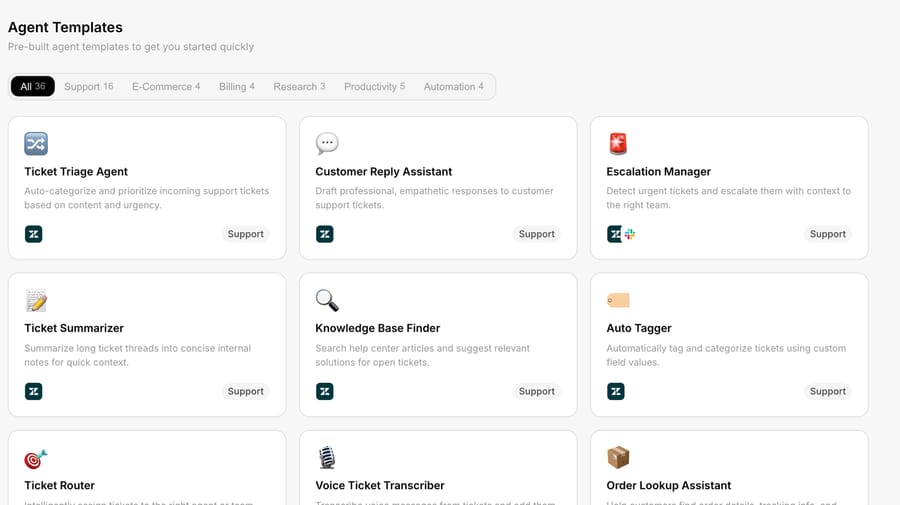
The gallery is filterable. Since April 2, 2026, the templates page uses the same segmented filter tabs as the main agents page, so you can narrow to the category you care about instead of scrolling a wall of cards. The gallery also only shows templates for connectors your organization has set up, so connecting a new integration can surface new templates. And because templates are part of onboarding (the 3-step flow Macha shipped on March 8, 2026: select your tools, pick recommended agent templates, connect your integrations), most teams meet their first template before they've finished connecting Zendesk. The stated goal of that flow is up and running in under 2 minutes, and templates are the reason that's realistic.
Which support jobs do the templates cover?
1. Triage: read every new ticket and route it
The triage template is the one most teams turn on first, because triage is pure overhead. Someone has to read each incoming ticket and decide where it goes, and that someone is usually a senior agent who'd rather be solving hard problems.
The Zendesk triage template (Triage and route tickets by topic in the gallery) is built to run on Ticket Created for any new ticket. Its tools are deliberately minimal: Get Ticket to read the full context (subject, description, requester, the whole thread) and Update Ticket to act on it. The agent reads the ticket the way a dispatcher would, classifies it by topic and urgency, and writes that decision back: setting priority, applying tags, assigning the right group.
A detail that makes triage cleaner: Macha shipped a dedicated Update Ticket Type tool, so a triage agent can categorize a ticket as a problem, incident, question, or task without you having to build a custom field to hold the category. The agent handle auto-generates in camelCase as you name it, so your triage agent becomes something like @ticketTriageAgent, which matters the moment you start having agents call each other.
This is the part of the workflow where AI earns its keep fastest. Rules-based routing tops out because keyword trees can't read intent: a ticket that says "your update broke my checkout" never contains the word "billing," so a keyword rule misses it, while an agent that reads the whole thread understands what it's about. As a rule of thumb, not a benchmark, an LLM that reads full context tends to catch the misroutes a keyword tree silently passes through, but the only number that matters is the one you measure on your queue after you've encoded your routing policy. Treat any "accuracy" figure you see quoted (including ours) as directional until you've tested it on your own tickets. For the broader landscape of triage tooling and how native and standalone approaches compare, eesel's triage roundup is a reasonable survey.
2. Replies: draft for review, or answer outright
There are two reply templates, and the difference between them is the difference between assistive and autonomous. Pick deliberately.
Draft ticket responses for agent review is the cautious one. On a new ticket it runs Get Ticket, searches your knowledge (for example Notion pages via Search Pages / Get Page), and writes a suggested reply as an internal note for a human to approve, edit, and send. Nothing reaches the customer without a person in the loop, which is exactly how you want to start.
Auto-reply using knowledge base articles is the autonomous one. On a new ticket it runs Get Ticket → Get Articles to find the matching help-center content, Add Comment to post the answer to the customer, and Update Ticket to set status. This is real deflection, but only switch it from draft mode to send mode once you've watched the drafts and trust them.
The honest framing on cost: Macha bills per ticket, one conversation charged once, not per resolution. A reply that reads the ticket, searches articles, and writes a response is still one ticket, about $0.40, however many steps it takes, and the model you run it on doesn't change that. That's worth knowing when you turn a template on: a draft-mode agent you're still tuning bills the ticket the same as a live one, whether or not its draft gets sent. The incentive runs the other way from per-resolution pricing, where the vendor earns more the more tickets it closes on its own.
3. Escalation: hand off with the full context bundle
Escalation is where most "AI support" demos quietly stop, because it's the unglamorous part, but it's where a template saves the most senior-agent time. The Escalate tickets with full context bundle template is built for a Ticket Updated event (a ticket flagged or re-prioritized for escalation) and assembles everything a human needs before it pings them.
In its richest form the agent runs a chain across connectors: Get Ticket (the conversation), Get Order from Shopify (what they bought), Get Customer from Stripe (their billing standing), then Update Ticket and Add Comment to write the assembled bundle into the ticket, and finally Send Message to Slack so the right human sees it with context already attached. Instead of "hey, can someone look at #4821?", the escalation arrives as a brief: who, what they ordered, what they paid, what's gone wrong, and where the thread is.

This is also the cleanest demonstration of why Macha sits on top of your helpdesk rather than replacing it: the escalation lands in Zendesk and Slack, the places your team already works, enriched with commerce and billing context the helpdesk doesn't have on its own.
Do the templates work on helpdesks other than Zendesk?
Yes. Macha's template docs list the support templates (triage, customer reply, escalation, and a helpdesk-plus-Confluence docs template) for Zendesk, Freshdesk, Gorgias and Front, each using that connector's own tools: the Gorgias triage template reaches for macros, and the Front version uses inboxes and teammate assignment because Front has no native priority field. On Freshdesk there are versions of triage (Triage and route Freshdesk tickets by topic, which can Assign to Group), escalation (Handle Freshdesk ticket escalations automatically, meant for priority → Urgent), and replies (Reply to Freshdesk tickets using knowledge base articles). Front and Gorgias arrived on June 23, 2026 under Connectors → Support with their own built-in templates. HubSpot and Intercom connect to Macha too; if the gallery has no template for your desk yet, build the same agent in the agent builder. See the integrations directory for the current connector list.
How do you go from a template to a running agent?
Here's the whole flow, end to end:
- Open the templates gallery from the sidebar and filter to the job (triage / replies / escalation).
- Click a template to see the instructions it will use and the tools it will enable, then click Use Template. Macha creates a real agent in your workspace.
- Land in the agent editor and read what it set up. This is the moment to make it yours: tighten the instructions to your tone, add your knowledge sources, and add the trigger (Macha prompts you with the recommended one as soon as the agent is created).
- Test before it touches a customer. Run the agent against a real recent ticket and read its reasoning and the action it wanted to take. For reply agents, keep it in draft/internal-note mode until you trust it. The docs also suggest disabling write tools until you're confident.
- Turn the trigger on. Now it runs automatically on every matching ticket.
The template collapses steps 1 to 3 from "design an agent" into "review an agent," which is a far easier job: you're editing a strong default instead of inventing one.
When is a template the wrong place to start?
Templates are a head start, not a finished product. A few honest caveats:
- A template is a default, not your policy. It doesn't know your refund rules, your SLA tiers, or that "urgent" means something specific at your company. The generic instructions will route and reply reasonably, but the value comes from the 15 minutes you spend encoding your actual policy into the instructions and knowledge.
- Don't ship auto-send on day one. Start reply agents in draft-for-review mode. Watch a few dozen drafts, fix the instructions where they're wrong, then let an agent post to customers. The auto-reply template puts the autonomous mode one toggle away, which is exactly why you should be deliberate about flipping it.
- Highly custom workflows outgrow templates fast. If your job needs a chain of conditional steps, multiple specialist sub-agents, or a custom API call into your own systems, you'll quickly leave the template behind and build with the AI agent builder instead. Templates are best for the common jobs; the long tail is bespoke.
- Templates assume the connector is wired. A triage agent can't update a ticket it can't reach. Make sure the relevant connector (and its read/write tools) is connected first, otherwise the agent will reason correctly and then have nothing to act with. The gallery's connector filter helps here: it won't show a template whose connectors you haven't set up.
- Volume is real. An always-on agent that fires on every new ticket bills that ticket, once. That's predictable, but model it against your monthly volume and pick a tier that covers it: 750 tickets is $299 a month, 1,500 is $599. Match the model to the job as well (a light model is plenty for "classify and tag," a stronger one is worth it on nuanced replies), but that choice is about quality and speed, not cost.
How do Macha's templates compare to the alternatives?
The broader market for support-agent templates spans helpdesk-native libraries (Zendesk's own automations, Freshdesk's Freddy templates), AI-platform galleries (Intercom Fin, and Forethought, which Zendesk acquired in March 2026), API-tool marketplaces like Postman's triage collections, and standalone triage vendors such as eesel. Each makes a different trade between out-of-the-box coverage and how much assembly you do yourself. Macha's templates differ in two ways that matter: they create a live, editable agent inside your existing helpdesk (not a separate tool to integrate), and they cover the full job, triage and replies and escalation as a connected set, not three disconnected point products. Because Macha is a layer on top of Zendesk, Freshdesk, Gorgias, Front, HubSpot or Intercom, the template's actions show up where your agents already work. If you'd rather not assemble anything, the Macha team builds your first agents for you on the trial and every plan: it analyzes your past tickets, builds the knowledge base and the agent, and runs it in safe mode, with drafts as internal notes, until the drafts are right. About $0.40 a ticket includes that setup and a dedicated success manager who handles your changes afterwards, such as new categories, instruction changes or new tools. For the Zendesk-specific version of this, see Macha on Zendesk.
FAQ
Do I have to use a template? No. Templates are an optional fast start. You can build any agent from scratch in the agent builder, and you can heavily edit any agent a template creates.
Is a template-created agent locked or limited? No, it's a normal agent. Rename it, rewrite the instructions, swap the model, add or remove tools and connectors, set the trigger, point it at different knowledge. The template just pre-fills the starting configuration.
Which jobs have templates? The common support jobs: ticket triage and routing, knowledge-base auto-replies, draft-for-review replies, and escalation with a context bundle, documented for Zendesk, Freshdesk, Gorgias and Front. There are also e-commerce templates (order lookup, refunds) and internal ones (knowledge-base answers, data lookup).
Will a reply template message customers automatically? Only if you let it. The draft template posts an internal note for a human to approve. The auto-reply template can respond directly, but you control whether it's in draft mode or live, so start in draft mode and graduate it once you trust it.
How much do template agents cost to run? Agents are billed per ticket: one conversation, charged once however many steps the agent takes, not per resolution. Pricing starts at $299 a month for 750 tickets, about $0.40 each, and the model you pick doesn't change it. That price includes setup by the Macha team and a dedicated success manager who handles your changes afterwards. See the pricing page for the full tier table.
How do you try a template?
The fastest way to understand agent templates is to apply one and read what it set up. Start a free trial ($50 of usage, no credit card required), connect your helpdesk, open the templates gallery, and spin up a triage agent, then test it on a real ticket before you let it loose. The full walkthrough lives in the agent templates docs, and there's more on the Macha blog.
Written by Abbas (Customer Support & AI, Macha) · Reviewed by Ankeet Guha (Co-founder & CTO) · Published 2026-06-24 · Last updated 2026-09-24.






