





 Shopify
 Stripe
 Slack
Slack Notion
 Google Workspace
 Confluence

What Are AI Agents for Customer Support, and How Do They Differ From Chatbots?


An AI agent for customer support uses tools to read and write in systems like Zendesk, Shopify and Stripe, so it can find a duplicate charge and refund it, while a chatbot follows a script or paraphrases a help article and can only reply. Gartner predicted in March 2025 that agentic AI will autonomously resolve 80% of common customer service issues by 2029.
Key takeaways
- An AI agent for customer support calls tools that read and write in systems like Zendesk, Shopify and Stripe, while a chatbot follows a script or paraphrases an article.
- Gartner predicted in March 2025 that agentic AI will autonomously resolve 80% of common customer service issues by 2029, with a 30% cut in operational costs.
- Macha sub-agents nest up to 3 levels deep, and Macha blocks circular setups where two agents are each other's sub-agents, checking on save and at runtime.
- Gartner predicts over 40% of agentic AI projects will be canceled by the end of 2027, citing escalating costs, unclear business value and weak risk controls.
- Macha bills agents per ticket rather than per resolution, from $299 a month for 750 tickets, however many turns and tool calls a conversation takes.

An AI agent for customer support is a language model with instructions, tools and knowledge that can read and write in systems like Zendesk, Shopify and Stripe, so it resolves a request (finds the duplicate charge, issues the refund, updates the ticket) instead of only replying. A chatbot follows a script or paraphrases a help article; it can tell a customer the return policy but cannot start the return. Gartner predicted in March 2025 that agentic AI will autonomously resolve 80% of common customer service issues by 2029, with a 30% cut in operational costs. We build these agents at Macha, so the screenshots below come from the real product.
What is the difference between an AI agent and a chatbot?
| Rule-based chatbot | AI agent | |
|---|---|---|
| How it decides | Scripted decision tree, keyword matching | Reasons over context with an LLM |
| What it does | Replies, deflects to an article | Replies and takes actions in your systems |
| System access | Usually read-only or none | Reads and writes in Zendesk, Shopify, Stripe, etc. |
| Conversation | Breaks on anything off-script | Holds context across turns, handles the unexpected |
| When it's stuck | Dead-ends or loops | Escalates with a summary and full context |
| Maintenance | Hand-build every branch | Give it instructions, tools, and knowledge |
The one-line version: a chatbot answers questions; an agent resolves issues. Everything below is detail on that sentence.
What is a customer support chatbot?
The classic support chatbot is a rule-based system. Someone, often you, maps out the conversations in advance: if the message contains "refund," show this menu; if they click "order status," ask for an order number; if none of that matches, hand off to a human. It's a flowchart wearing a chat window.
A more modern variant bolts a large language model onto retrieval: it reads your help center, and when a customer asks a question, it finds the most relevant article and paraphrases it. This is useful (it's the "answer FAQs from your knowledge base" layer) and it deflects a real slice of volume. It still can't act: it can tell you the return policy, but it can't start your return.
That's the ceiling of a chatbot. It communicates. It does not act. The moment a customer needs something done (a charge looked up, an address changed, a subscription paused), a chatbot's only move is to collect information and hand the human a half-finished ticket.
What is an AI agent for customer support?
An AI agent is built on a large language model, but the model is the brain, not the whole system. The agent also has:
- Instructions: its job description, tone, and rules ("always confirm the order number before issuing a refund").
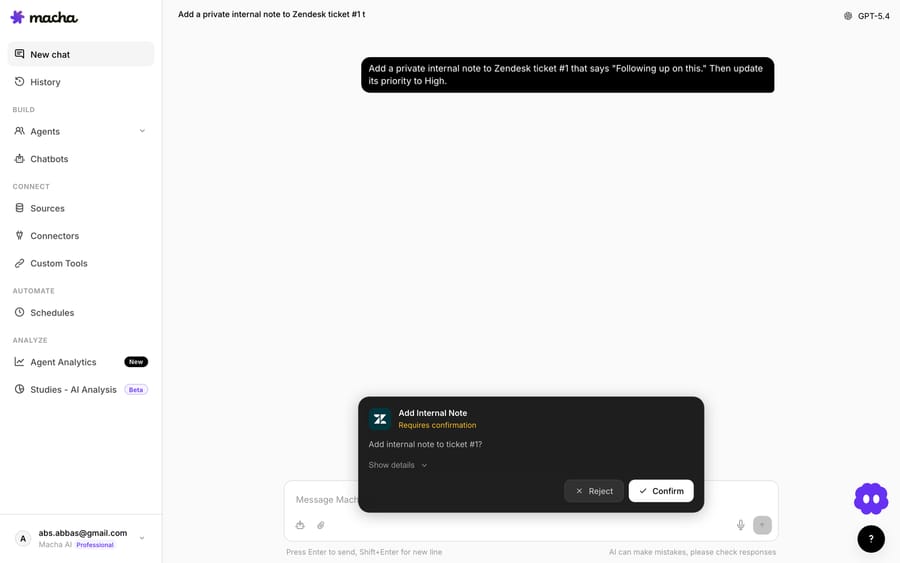
- Tools: the actions it's allowed to take, each wired to a real system: look up an order in Shopify, refund a charge in Stripe, add a private note in Zendesk, post to Slack.
- Knowledge: your help center, policy docs, Notion wiki, or past resolved tickets, so its answers are grounded in your reality.
- A model: the reasoning engine that decides, turn by turn, what to do next.
Give an agent a messy real-world request, such as "I was charged twice for order #4471 and I want one refunded", and it doesn't pattern-match to a menu. It reasons: look up the order, check the payment history, confirm there really are two charges, then either issue the refund or, if your rules say a human must approve, draft the action and escalate with everything attached. The agent works out the intent, plans the steps, and executes them against your systems.
Because the agent takes real actions, it can also ask permission for the risky ones. Reading an order is safe; refunding €200 might need a human nod. Macha agents can surface a confirmation card before a write action runs, so the agent runs read-only steps on its own and keeps a human in the loop on the writes you choose to gate.
What sits between a scripted chatbot and an AI agent?
Four rungs, and most teams climb them one at a time:
- Scripted bot: pure decision tree. Cheap, brittle, frustrating off-script.
- Retrieval bot (RAG): LLM answers from your knowledge base. Good at FAQs, can't act.
- Action-taking agent: reasons, calls tools, resolves issues end-to-end with escalation when unsure.
- Multi-agent system: a coordinator agent that delegates to specialists.
Many products sold as "AI chatbots" live on rungs 1 and 2. Gartner's 80% prediction is about rung 3 and up. Plenty of scripted bots now have an LLM paraphrasing answers; the jump that changes outcomes is giving the system tools and letting it act.
Rung 4: when one agent isn't enough
A single agent loaded with forty tools and a 2,000-word prompt gets confused, because it's a generalist asked to be an expert at everything. The fix is delegation: a front-line triage agent that routes to specialists.
In Macha, that's sub-agents. A parent agent can hand a task to a specialist sub-agent, each with its own model, tools and knowledge, nested up to 3 levels deep (A calls B calls C; a fourth hop is blocked). Circular references are refused: if Agent A is a sub-agent of Agent B, B can't also be a sub-agent of A, and Macha checks this on save and at runtime. A billing question goes to the billing agent (which has the Stripe tools); a shipping question goes to the logistics agent (which has the Shopify and carrier tools). Each sub-agent run is captured as its own record linked back to the parent, so you can expand any handoff and see exactly what the specialist did: its prompt, every tool call, and the result.
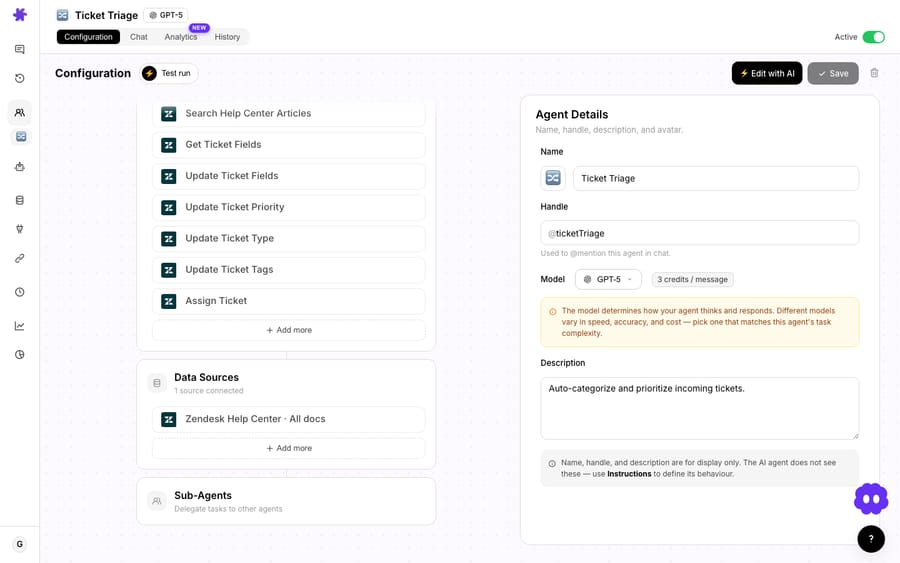
A coordinator routing to specialists is something a chatbot architecture can't express. A decision tree has no one to delegate to.
Why do connected tools decide whether an agent can resolve a ticket?
An agent's reasoning is only as useful as what it can reach, and this is the biggest practical difference from a chatbot: agents are wired into the systems where the work happens.
A chatbot points to a help article; an agent checks the order, issues the refund and updates the account, and the difference comes from access. Macha agents connect to the helpdesk you already run (Zendesk, Freshdesk, Gorgias, Front, HubSpot or Intercom) plus commerce and ops tools like Shopify, Stripe, Notion, Slack, Google Workspace and Airtable. Macha is a layer on top of your helpdesk, so your team keeps its desk and the agents work inside it.
Read-only access gives you a smarter answer. Read-and-write access gives you a resolution. Whether the system can do the task or only describe it is the cleanest test for whether you're looking at an agent or a chatbot with good marketing.
How do you build an AI agent compared with a chatbot?
You brief an agent instead of scripting it. Building a chatbot means drawing branches: every question, every fork, every dead-end, by hand. Building an agent is closer to onboarding a new hire: you write what its job is, hand it the tools and the knowledge, and it figures out the path per conversation.
In Macha you can do this in plain language: describe the agent you want ("handle order-status questions, look up the order in Shopify, escalate anything about damaged goods") and the builder assembles a configured agent with the right instructions, tools, triggers, and sub-agents. You refine from there.

For concrete starting points, our use-case library breaks down real flows (auto-resolving order-status inquiries, triaging and routing tickets by topic, resolving duplicate-charge complaints), each as the trigger, tools, and steps an agent uses. You define the job instead of mapping the conversation.
When is a chatbot still the better choice?
Chatbots still have a job, and replacing every one with an agent sets teams up to fail.
A simple chatbot is the right tool when:
- The interaction is fixed: a structured intake form, a "track my order" lookup with no edge cases, an appointment scheduler with rigid slots.
- You need perfectly deterministic answers for compliance or legal reasons, where a model's small probability of phrasing things wrong is unacceptable.
- Volume is tiny and the cost or effort of building agents isn't justified yet.
And agents come with real trade-offs you should price in:
- They cost more to run than a script. Agents call a model (and often several tools) per turn, and that reasoning isn't free the way a canned reply nearly is. In Macha the bill is still simple: per ticket (one conversation, charged once however many turns and tool calls it takes), never per resolution, from $299 a month for 750 tickets.
- They can be wrong with confidence. An LLM can hallucinate. The mitigations (grounding in your knowledge, confirmation cards on write actions, and testing) are part of the build. Set them up before you let an agent loose on live customers.
- Most failures are project failures, not model failures. Gartner also predicts that over 40% of agentic AI projects will be canceled by the end of 2027, citing escalating costs, unclear business value, and weak risk controls. Start narrow: pick one high-volume, well-bounded issue type, give the agent exactly the tools it needs, measure resolution and CSAT, then expand.
The realistic end state for most teams is both: a deterministic flow for the truly fixed paths, and agents for everything that needs judgment or action, with humans owning the genuinely complex, high-empathy cases. If you run Zendesk, our Macha-on-Zendesk overview shows how that layering works inside a helpdesk you already use.
How can you tell whether a vendor is selling an agent or a chatbot?
Vendor pages blur the line because "agent" sells better: "AI chatbot" and "AI agent" appear on the same product. Cut through it with three questions:
- Can it take an action in my systems, or only reply? If it can't write to your helpdesk, commerce, or billing tools, it's a chatbot, however good its answers are.
- What happens off-script? Ask for a demo of a messy, multi-step request. A chatbot dead-ends; an agent reasons through it or escalates cleanly.
- Can it delegate? Multi-step, multi-domain requests are where single bots fall apart. Sub-agent delegation is a strong signal you're looking at a real agentic system.
FAQ
Is an AI agent just a smarter chatbot? No. A chatbot communicates; an AI agent communicates and acts. It calls tools to read and write data in your real systems (helpdesk, commerce, billing) and resolves issues end-to-end. Adding an LLM to a chatbot makes its answers better, but it's still a chatbot until you give it tools and the autonomy to use them.
Do AI agents replace my helpdesk? Not in Macha's model. Agents sit on top of the helpdesk you already run (Zendesk, Freshdesk, Gorgias, Front, HubSpot or Intercom) and work inside it. You keep your tools, ticketing, and reporting; the agents add resolution and action.
Will an AI agent make mistakes? It can. LLMs sometimes get things wrong. That's why production agents are grounded in your own knowledge, ask for human approval before risky write actions, and are tested before launch. Treat the safeguards as part of the build, not an afterthought.
How much do AI agents cost to run? In Macha it's metered per ticket rather than per resolution (one conversation, charged once however many turns and tool calls it takes), from $299 a month for 750 tickets, about $0.40 each. See the pricing page for the tiers.
How deep can Macha sub-agents nest? Up to 3 levels (A calls B calls C). A deeper call is blocked, and Macha refuses circular setups where two agents are each other's sub-agents.
Where should I start? Pick one high-volume, well-bounded issue (order status, refund lookups, password resets), give an agent exactly the tools and knowledge it needs, and measure resolution rate and CSAT before expanding.
How do you try an AI agent on your own tickets?
Start a free trial ($50 of usage, no credit card required), connect your helpdesk, and stand up an agent that resolves a single ticket type end to end. The Macha team handles setup and monitoring on every plan. Or read the agents documentation for the full walkthrough, and browse the blog for deeper guides.
Written by Abbas (Customer Support & AI, Macha) · Reviewed by Ankeet Guha (Co-founder & CTO) · Published 2026-06-24 · Last updated 2026-09-24.






