





 Shopify
 Stripe
 Slack
Slack Notion
 Google Workspace
 Confluence

How Do You Measure AI Agent Quality? Metrics and LLM-as-a-Judge Scoring (2026)


An AI agent's deflection rate can climb while it hands customers confident, wrong answers. Quality is measured by grading real conversations against a pass/fail checklist, with an LLM judge for the subjective calls and a human sample to keep the judge honest.
Key takeaways
- AI agent quality is measured by grading real conversations against a pass/fail checklist, using deterministic checks for exact values and an LLM judge for groundedness, relevancy and tone.
- In the MT-Bench study, strong LLM judges like GPT-4 reached over 80% agreement with human preferences, the same level two human raters reach with each other.
- Binary pass or fail grading against a specific rule is more stable than a 1 to 10 scale, where the difference between a 7 and an 8 is mostly noise.
- LLM judges show verbosity, position and self-preference bias, so a judge should be calibrated against a human-graded sample before its score is trusted.
- Macha's Agent Evaluation shows the matching conversations and a cost estimate before a run, can test the checklist on 3 conversations first, and runs nothing until confirmed.

You measure an AI agent's quality by grading its real conversations against a short pass/fail checklist: deterministic checks for exact values such as an order ID, and an LLM judge for open-ended calls such as groundedness and tone, calibrated against a sample a human has graded. In the MT-Bench study, a strong judge model (GPT-4) agreed with human preferences more than 80% of the time, about as often as two humans agree with each other. Deflection rate is not a quality measure: an agent can deflect a ticket with an answer that is plausible, on-brand and wrong.
| Method | Use it for | Main weakness |
|---|---|---|
| Deterministic check | Exact values: tool name, order ID, refund amount | Can't judge open-ended text |
| LLM judge, single output | Groundedness, relevancy, tone, correct escalation | Verbosity and self-preference bias; needs a tight rubric |
| LLM judge, pairwise | A/B testing two agent versions | Position bias; run both orderings |
| Human review | Calibrating the judge; high-stakes, low-volume replies | Doesn't scale past a sample |
Macha makes agents that sit on top of your help desk, so we care about this question and built Agent Evaluation to answer it. The screenshots of that feature are near the end. Most of what follows is vendor-neutral: the metrics and the judging method are the same wherever your agent runs.
Why isn't one quality score enough?
The instinct is to ask for the score — one percentage that says "the agent is 87% good." That number doesn't exist, because an agent does several distinct things and can be excellent at one while failing another.
Modern agent-evaluation practice splits the problem into three levels (Confident AI's agent-evaluation guide lays this out well):
- End-to-end — black-box. Did the conversation reach the user's goal? This is the customer's experience, and the only level that matters to them.
- Trajectory-level — the path the agent took. Which tools did it call, in what order, with what arguments, how many retries? Two agents can both "succeed" while one took three steps and the other took eleven.
- Component-level — the individual pieces. Did the retriever surface the right doc? Did the sub-agent handle the handoff cleanly? This is where you isolate why something failed.
You want a read on all three, because a good end-to-end score sitting on top of a chaotic trajectory is a regression waiting to happen. The agent got lucky; it won't stay lucky.
Which metrics measure AI agent quality?
Underneath those levels sit the metrics. Not all apply to every agent — a simple FAQ responder needs three of them; an autonomous tool-using agent needs all of them. Here's the working set, with a one-line definition each.
| Metric | What it asks | How you score it |
|---|---|---|
| Task completion | Did the agent accomplish the user's actual goal? | LLM judge |
| Answer relevancy | Does the reply address what was asked? | LLM judge |
| Faithfulness / groundedness | Is the answer supported by retrieved sources, with no invention? | LLM judge |
| Tool correctness | Did it call the right tools? | Deterministic |
| Argument correctness | Did it pass the right parameters to those tools? | Deterministic |
| Step efficiency | Did it avoid pointless loops, retries, and detours? | Deterministic / judge |
| Plan quality & adherence | Was the plan sound, and did it stick to it? | LLM judge |
| Reasoning relevancy / coherence | Does each step tie back to the request and follow logically? | LLM judge |
| Safety | Any bias, toxicity, or policy-breaking content? | Judge / classifier |
The single most useful habit here is knowing which checks need a judge and which don't. Whether the agent called lookup_order with the correct order ID is a string comparison — you don't need a language model to grade it, and you shouldn't, because a deterministic check is faster, free, and never disagrees with itself. Whether the agent's answer was helpful, grounded, and on-task is a judgment call over open-ended text. That's where LLM-as-a-judge earns its place. The rule of thumb in eval frameworks: deterministic for the exact stuff, judge for the subjective stuff. Mixing the two, a "hybrid eval", beats either alone.
For a customer-support agent specifically, the metrics that move the needle are usually task completion, faithfulness (did it stay grounded in your help center, or did it freestyle?), answer relevancy, and a safety pass. Tool and argument correctness matter the moment your agent does more than talk — issuing refunds, looking up orders, scheduling.
How does LLM-as-a-judge scoring work?
LLM-as-a-judge is exactly what it sounds like: you give a language model the conversation, a rubric, and ask it to grade. For each item on your checklist it returns a verdict — pass or fail, or a score on a scale — plus a written reason. Done well, it turns "read 4,000 transcripts" into a job that runs while you get coffee.
It works because the judging task is easier than the original task. Recognizing whether an answer is grounded in a source is simpler than generating the answer in the first place — the same reason it's easier to grade an essay than to write one. The seminal benchmark here, Zheng et al.'s "Judging LLM-as-a-Judge" (the MT-Bench paper), found that strong judges like GPT-4 reached over 80% agreement with both controlled and crowdsourced human preferences, the same level of agreement two humans reach with each other. That's the bar that made automated evaluation credible at scale.
A few design choices shape how reliable your judge is:
- Binary beats vague scales. "Pass / fail against this specific rule" is far more stable than "rate this 1–10," because a 7-vs-8 distinction is noise. If you need granularity, build it from multiple binary checks rather than one fuzzy number. Frameworks like DeepEval push the same idea: explicit evaluation steps over a one-line criterion.
- Checklists over adjectives. "Was this good?" produces inconsistent grades. "Did the agent (1) confirm the order number, (2) cite a help-center article, (3) avoid promising a refund it can't issue?" produces repeatable ones.
- Single vs pairwise. A single-output judge grades one conversation against the rubric. A pairwise judge compares two candidates — useful when you're A/B testing two agent versions and want to know which is better, not whether each is "good."
The output you want from all this isn't a vibe. It's a percentage-followed score (what share of your checklist the agent actually satisfied across the conversations), a per-conversation verdict, and a one-line reason for each call so a human can audit any grade in seconds.
Where does an LLM judge get it wrong?
This is the section most "AI evaluation" posts skip, and it's the one that saves you. LLM judges are useful, not infallible, and they fail in specific, documented ways:
- Verbosity bias. Judges tend to reward longer, more elaborate answers even when a short one was correct and better. Your most efficient agent can score worse.
- Position bias. In pairwise comparisons, the option presented first (or second) gets a systematic edge regardless of quality. Mitigate by running both orderings and averaging.
- Self-preference / self-enhancement bias. A judge model tends to favor text written in its own style — sometimes its own outputs. Using a different model to judge than the one that generated the answer is a cheap, sensible guardrail.
- Vague criteria = noisy scores. The single biggest source of bad evals isn't the model; it's a rubric so broad the judge interprets it differently each run. Tighten the criteria before you blame the judge.
- No ground truth in production. Live tickets don't arrive with a labeled "correct answer," which limits reference-based metrics. You evaluate on what's checkable — groundedness, policy adherence, relevancy — not against an answer key you don't have.
The non-negotiable: calibrate the judge against humans. Have a person grade a sample of the same conversations, measure agreement (Cohen's kappa or a simple agreement percentage), and only trust the automated score once it tracks human judgment. Then re-check periodically, because models and your product both drift. An LLM judge is a force multiplier on human review — not a replacement for it. And give yourself enough volume: a handful of conversations tells you nothing. Grade enough that one odd conversation can't swing the percentage by several points.
When NOT to lean on an AI judge: for anything with a single objectively-correct value (an order ID, a refund amount, a returned tool name), use a deterministic check. For high-stakes, low-volume decisions — a legal or medical-adjacent reply, a billing dispute over a large sum — keep a human in the loop and use the judge to triage which conversations a human should read first, not to sign off.
How do you run an evaluation on your own agents?
Here's where it gets concrete. Macha's Agent Evaluation grades how your agents actually performed on past conversations — not a synthetic test set, but the real chats, trigger runs, and sub-agent handoffs that already happened on your helpdesk. The flow mirrors Macha Studies: you build a checklist, see the cost before you commit, run it, and read a report.
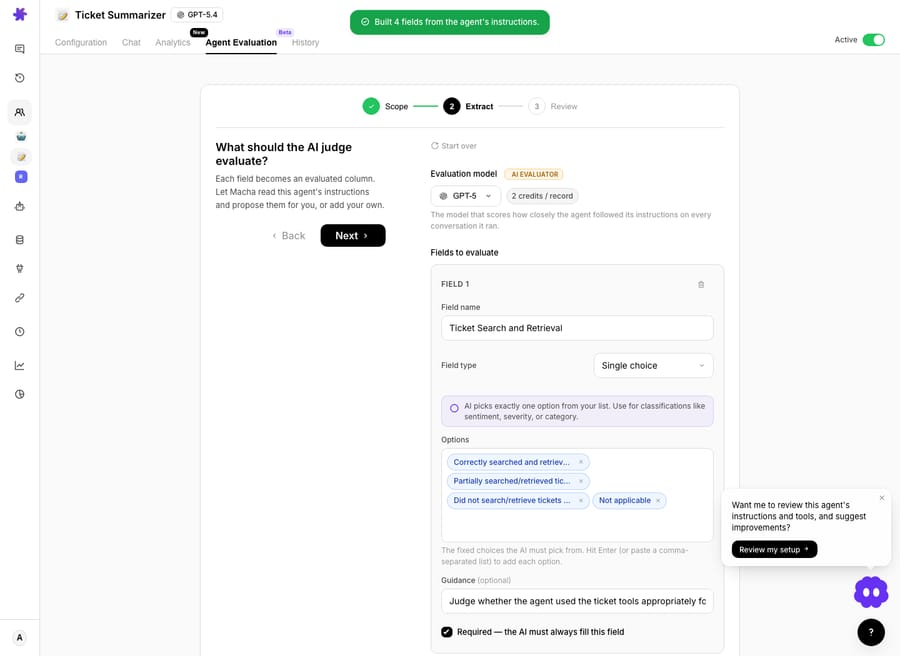
1. Build the checklist. You define the criteria the AI judge will grade against — the pass/fail rules that encode what "good" means for your agent. You can write them by hand or have Macha draft a starting checklist for you, then edit it down to the rules you actually care about.
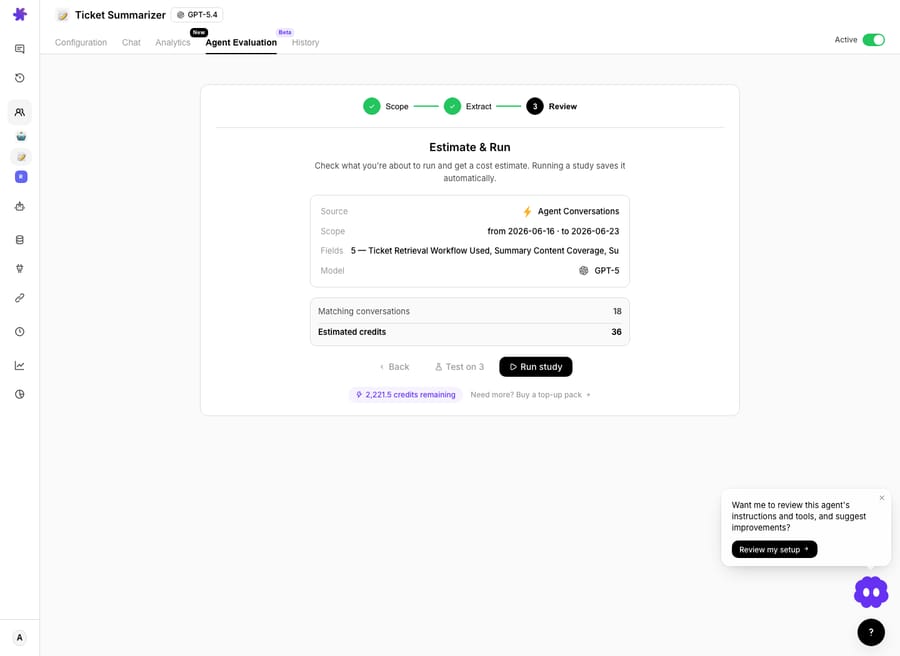
2. See the scope before you run. The Estimate & Run step lists the source, the date range, the fields being graded and the number of matching conversations, with a cost estimate, before anything runs. You can test the checklist on 3 conversations first, and nothing runs until you click Run study.
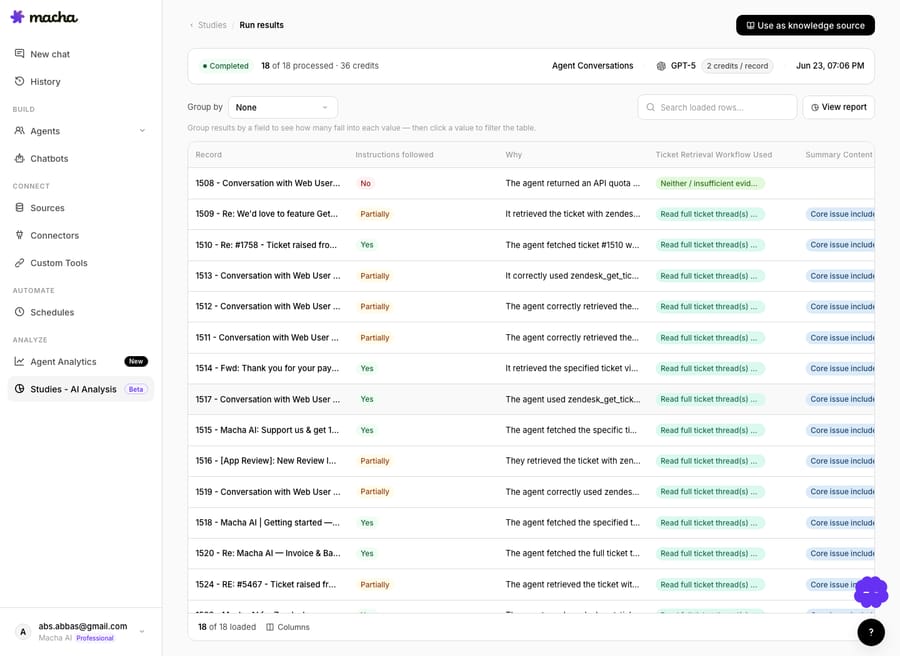
3. Read the per-conversation verdicts. The judge runs your checklist over every selected conversation and returns a result row each: which criteria it followed, which it missed, and a one-line reason for each call. This is the audit trail — you can open any conversation and see exactly why it was graded the way it was.
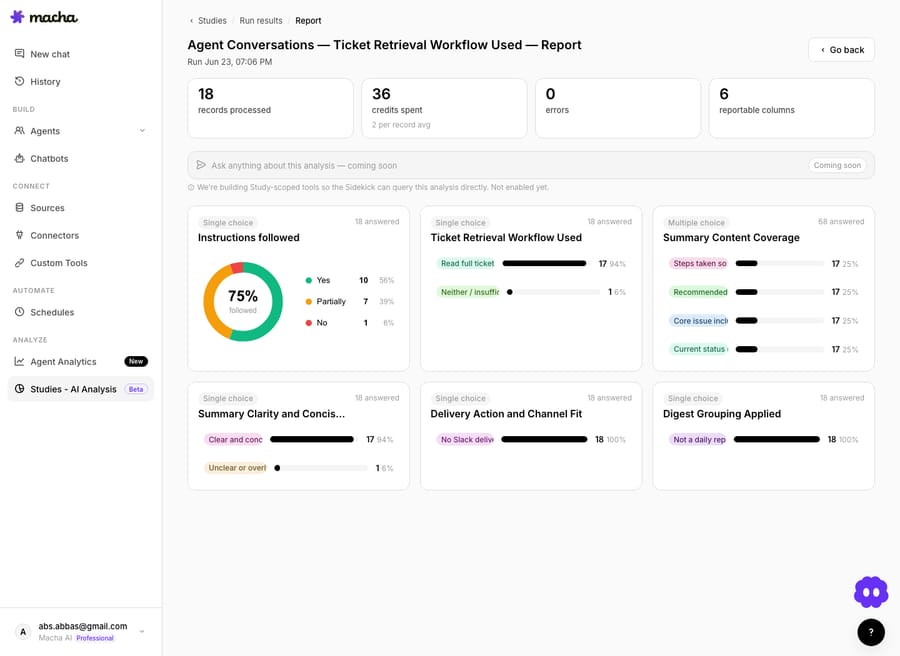
4. Read the aggregate score. The report rolls every conversation up into a percentage-followed score — the share of your checklist the agent satisfied across the batch — plus a breakdown by criterion so you can see which rule the agent fails most. That's the number you track release over release.
Because it grades agents that run on top of the help desk you already use (Zendesk, Freshdesk, Gorgias, Front, HubSpot or Intercom; see Macha on Zendesk for one example), you're measuring the agent against the same conversations your customers actually had, not a lab approximation. To test a change before it goes live, Macha's Agent Simulations replay past tickets from the first customer message without sending any reply, and the same judge grades those runs, so the simulated score compares directly with the live one.
What should a first rubric for a support agent include?
If you're staring at a blank checklist, this is a reasonable v1 for a support agent. Keep every item binary, keep them specific, and add the deterministic checks outside the judge.
| Criterion | Pass condition | Type |
|---|---|---|
| Grounded | Every factual claim is supported by a cited help-center source | Judge |
| On-task | The reply addresses the customer's actual question | Judge |
| No overpromising | Doesn't commit to refunds/actions outside policy | Judge |
| Correct escalation | Hands off to a human when (and only when) it should | Judge |
| Tone | Matches brand voice; no rudeness or condescension | Judge |
| Right tool called | The expected tool fired for the intent | Deterministic |
| Correct arguments | Order IDs / amounts passed correctly | Deterministic |
Start narrow, calibrate against a human-graded sample, then expand. A small rubric you trust beats a sprawling one you don't.
How is Agent Evaluation different from Studies?
Evaluation and Studies are two sides of the same coin. Studies runs an AI analysis across thousands of tickets to tell you what's in your queue — how much is billing, how urgent, what categories. Evaluation runs an AI judge across your agent's conversations to tell you how well it handled them. One profiles the work; the other grades the worker. Together they close the loop: analyze the queue, build the right agents, measure how they do, fix the weak criterion, re-measure.
FAQ
What's the difference between deflection rate and agent quality? Deflection counts how many tickets the agent resolved without a human. Quality asks whether those resolutions were correct. An agent can post a high deflection rate while quietly giving wrong answers — which is exactly why you measure quality separately, on the content of the conversations, not just the outcome counts.
Is LLM-as-a-judge accurate enough to trust? For subjective criteria, a well-designed judge agrees with human raters at rates comparable to human-human agreement (80%+ in benchmark studies). But that depends entirely on a tight rubric and on calibrating the judge against a human-graded sample first. Treat it as a force multiplier on review, not a replacement.
Should I use a scale (1–10) or pass/fail? Pass/fail per specific rule. Fuzzy scales add noise — the difference between a 7 and an 8 is rarely meaningful. If you need a granular score, build it by combining several binary checks.
Can I evaluate against real customer conversations, not a test set? Yes — and you should. Macha's Agent Evaluation grades real past chats, trigger runs, and sub-agent handoffs from your helpdesk, so you're measuring against the conversations your customers actually had. A synthetic test set is useful for regression testing, but production transcripts are the ground truth of how the agent behaves.
How much does running an evaluation cost? Evaluation and simulation are included in Macha's single plan, which is priced by ticket volume: $299 a month for up to 750 tickets, about $0.40 a ticket. The evaluation screen shows the matching conversations and an estimate before a run starts, and nothing runs until you confirm. See the pricing page for every tier, or other capability walkthroughs on the blog.
How many conversations should I grade? Enough that a single strange conversation can't move the percentage much, and always the same batch definition release over release so the numbers compare. Start with a test on a few conversations to check the checklist reads the way you meant, then run the full batch.
Where should you start?
Start with the failures you already know about. The teams running AI agents well are the ones who decided what "good" means, encoded it as a checklist, and let an AI judge grade every conversation against it so a human only has to read the failures. That's a closed loop, and it's how an agent gets better release over release instead of drifting until a customer catches it.
If you want to grade your own agents, start a free trial ($50 of usage, no credit card required), connect your helpdesk, and run an evaluation over last month's conversations — or read the Agent Evaluation docs for the full walkthrough.
Written by Abbas (Customer Support & AI, Macha) · Reviewed by Ankeet Guha (Co-founder & CTO) · Published 2026-06-25 · Last updated 2026-06-25.






