





 Shopify
 Stripe
 Slack
Slack Notion
 Google Workspace
 Confluence

What Is Customer Service AI? How It Works, Use Cases and Costs (2026)


Customer service AI is software that answers, routes and resolves customer requests across chat, email and phone, on its own or by drafting for a human agent. It covers how it works, the six jobs it does, what it costs under each billing model, and how to roll it out without a bad month.
Key takeaways
- Customer service AI does six jobs: answering and resolving, taking actions, drafting for agents, triaging and routing, reviewing quality, and answering the phone, and each fails and bills differently.
- An AI agent differs from a chatbot because it calls tools in your systems, so it can look up an order or issue a refund instead of linking to a help article.
- The billing unit decides what you pay for failures: per-resolution products charge only for what the vendor counts as resolved, while per-ticket products charge for every ticket the AI works.
- Against Fin's $0.99 per outcome, a $0.40 per-ticket price breaks even at about 40% resolution and costs less above that rate.
- Macha is the done-for-you option: the Macha team builds, tests and monitors agents on your existing help desk at about $0.40 a ticket, with setup and a dedicated success manager included on every plan.

Customer service AI is software that answers, routes and resolves customer requests across chat, email and phone, on its own or by drafting replies for a human agent. Newer agents also take actions, such as looking up an order or issuing a refund. Teams buy it as their help desk's own AI, a standalone agent, or an agent layer inside the help desk they keep. At 3,000 chats a month, the AI charge runs from about $9 to about $6,000 (from a bare cloud runtime to an enterprise contract), mostly depending on the billing unit.
What is customer service AI?
Customer service AI, also called AI in customer service, is a large language model put to work on support conversations. It reads what a customer wrote, works out what they need, and then answers from your knowledge, takes an action in a connected system, drafts a reply for a person, routes the ticket, or hands off to a human. It can face customers on chat and email, or sit behind your team in their inbox.
It is not any of three things vendors often blur together.
- It isn't a help desk. Zendesk, Freshdesk and Gorgias store tickets and hold your reporting; the AI reads and writes tickets in one of them.
- It isn't a scripted chatbot. A decision-tree bot follows a branch someone drew. A language-model agent decides from written instructions.
- It isn't a resolution rate. Vendor headline rates use their own definition of "resolved". Yours depends on your questions, your knowledge and what the AI may do.
"AI customer support" usually means the customer-facing half: agents that answer and resolve. The internal half (copilots, triage, quality review) is less visible.
How does customer service AI work?
Every customer service AI product, whatever the label, is built from the same six parts:
- A language model that reads the conversation and writes the reply.
- Knowledge sources: help center, policies, macros and past replies, searched per question.
- Tools: connections into Shopify, Stripe or your own API.
- Instructions and guardrails: written rules such as "never promise a refund over $200" or "send anything about a chargeback to a person".
- The help desk it reads from and writes to, which keeps your reporting, SLAs and QA working.
- A human handoff: a route to a person that passes the conversation, the collected details and the reason.
The model answers from the passages it retrieved, so a wrong help article becomes a wrong answer. Tool calls separate an agent from a chatbot. Instead of linking to a tracking page, the agent calls the order system and reads the status. The log is what lets you trust an action. When an agent says "I've updated your address", the proof is a recorded call with its inputs and result; without it, you're trusting the model's description of its own work.
What can AI do in customer service? Six use cases with examples
"AI in customer service" covers six jobs. Vendors bundle them, but each one fails differently and is billed differently, so separate them before any sales call.
1. Answer and resolve questions
The agent replies to the customer from your help center, policies and past tickets, and closes the conversation when the customer has what they need. One example is Fin. Salesforce, which completed its acquisition of Fin on September 10, 2026, describes it as averaging a 76% resolution rate on its own platform, a vendor figure. Where it goes wrong: confident wrong answers when the knowledge is thin or out of date. Usually billed per resolution, per conversation or per ticket.
2. Take actions in your systems
The agent looks up an order, changes a shipping address, cancels a subscription or issues a refund, through tools connected to Shopify, a billing system or your own API. Gorgias's pricing page, for example, describes its AI Agent as "automating actions like returns, order tracking, and more" for ecommerce stores. Actions need permissions, confirmation rules and a log. Where it goes wrong: an agent that says it did something it never did, which we saw in our own test. Usually billed like answers, sometimes per action. We track which help desk AI agents can take actions separately.
3. Draft replies for human agents
A copilot is the same model pointed at your staff. It drafts a reply, summarizes a long thread or suggests a macro, and a person sends every message. Zendesk sells Copilot at $50 per agent per month on yearly billing, per its pricing page, and Freshdesk sells Freddy AI Copilot at $29 per agent per month billed annually, per its pricing. Where it goes wrong: it saves little time if agents rewrite every draft. Billed per seat, because it makes seats more productive rather than replacing work.
4. Triage and route tickets
The AI tags, prioritizes, sets fields and assigns tickets before a person opens them. Zendesk's intelligent triage classifies each new ticket by topic, sentiment and language, which triggers can then use to route or escalate. Where it goes wrong: silent misroutes that nobody notices for weeks. Usually included in a plan or add-on, or billed per ticket.
5. Measure and review quality
The AI scores conversations for quality, finds contact reasons and flags churn risk. Zendesk's own blog cites Rentman, which uses Zendesk QA to analyze interactions and give agents targeted feedback, and Unity, which Zendesk says deflected 8,000 tickets and saved $1.3 million with AI. Where it goes wrong: dashboards nobody acts on. Billed per seat or per conversation analyzed.
6. Answer the phone
A voice agent answers the call, verifies the caller, and resolves or routes it. It has to reply in under a second and handle interruptions. Billed per minute: Amazon Connect lists $0.038 a voice minute before telephony on its pricing page. Our ElevenLabs integration guide shows one way to put a voice agent in front of an existing support stack.
How is an AI agent different from a chatbot or a copilot?
| Scripted chatbot | Copilot | AI agent | |
|---|---|---|---|
| How it works | Matches each message to an intent and follows a branch someone drew | A language model drafts, summarizes and searches for a human agent | A language model reads the whole conversation, follows written instructions and calls tools |
| What it can do | Answer the questions it was scripted for, collect fields, link to articles | Write a draft a person edits and sends | Answer, look up records, change orders, refund, cancel, hand off with context |
| Where it fits | Narrow, stable flows such as store hours or a password reset link | Complex or sensitive queues where a person must approve every reply | Routine categories with clear policies and systems it can reach |
A chatbot is predictable and brittle. An agent handles phrasing nobody planned for, so its rules become something you test with sample conversations. A copilot keeps a person on every reply. Many teams run both, with the agent on one routine category and the copilot helping humans with the rest. Our guide to AI agents for customer service goes deeper on the definition, tools, permissions and handoff.
What are the benefits of customer service AI?
Each benefit below has one sourced figure and its counterweight. More are in our customer service and AI statistics.
Human agents resolve more per hour. In the NBER study "Generative AI at Work", 5,179 support agents at one software company with an AI assistant resolved 14% more issues per hour on average, and novice agents 34% more. The counterweight: minimal impact on experienced agents, at one firm.
Routine tickets get answered without a person. Per Gorgias's own platform data, "the median brand resolves 45% of AI-touched tickets end-to-end" (Gorgias Ecom Lab, April 2026). The counterweight: in Ada's study with NewtonX, "Only 24% of consumers say their most recent AI customer service interaction was fully resolved by AI alone" (Ada, March 2026). Vendor logs and customer memory measure different things; see deflection is not resolution.
Customers find it easier, with conditions. Gartner's survey of 3,566 customers found 50% say interactions are easier when companies use generative AI, and 87% say it's essential to offer an option to reach a human (Gartner, August 2026). The counterweight comes from the same survey: customers count the human route as part of the product.
Volume grows without the same headcount growth. In a Gartner survey of 321 service leaders, 55% reported stable staffing while handling higher volumes, and only 20% had reduced staffing because of AI (Gartner, December 2025). The counterweight: absorbing growth pays back slower than the headcount cuts some business cases assume. Our staffing statistics cover the rest.
Answers at any hour, at a known unit price. Overnight and weekend coverage becomes a line item. The counterweight: Gartner predicts generative AI will cost more than $3 per resolution by 2030 (Gartner, January 2026).
What kinds of customer service AI products are there?
The type decides who builds the agent, where it runs and what you pay for.
| Type | Examples | Who builds it | Main channels | Billing unit |
|---|---|---|---|---|
| Help-desk-native AI | Zendesk AI agents, Freshworks Freddy, Gorgias AI Agent, HubSpot Customer Agent, Help Scout AI Answers, Salesforce Agentforce | Your support ops team, inside the help desk | Chat, email, messaging | Per resolution, session or conversation, plus seats |
| Standalone support agent | Fin, Ada, Sierra, Decagon, Forethought, Crescendo | The vendor with your team, or configured from your help center | Chat, email, voice | Per outcome or resolution, or an annual contract |
| AI agent layer on your help desk | Macha, eesel AI | Macha: done for you by the Macha team, with a dedicated success manager, included. eesel AI: your team, with a dedicated setup person on its Enterprise plan. Both work inside the help desk you keep | Tickets (email, chat) | Per ticket |
| Agent builder | Botpress, Voiceflow, ElevenLabs Agents | One technical builder in a visual canvas | Web chat, messaging, voice | Conversations, credits or minutes, plus seats |
| Enterprise CX and contact-center platform | NiCE Cognigy, Kore.ai, Yellow.ai, PolyAI, Talkdesk | Developers or a systems integrator | Voice, chat, 30+ channels | Annual contract, sessions or minutes |
| Cloud components | Amazon Connect and Lex, Google Conversational Agents, Microsoft Copilot Studio | Your cloud engineers | Chat, voice | Per request, message, minute or credit pack |
| Employee service agent | Moveworks (now ServiceNow), Copilot Studio, IBM watsonx Orchestrate | IT, with the vendor | Slack, Teams, portals | Per user or usage tier |
An IT team answering password resets in Teams belongs in the last row (our Moveworks guide covers that buyer). Building your own agent on a model API is the eighth option, covered in our guide to building a support agent with Claude. It is the cheapest per conversation and the most work per change.
Four practical differences follow from the type:
- Where the knowledge comes from. Native AI reads the help center already in that help desk; standalone agents and layers connect several sources; builders take whatever you wire up.
- What it can do. Native AI updates the ticket it lives in; standalone agents and layers call order, billing and subscription systems through connectors or custom API tools; builders can call anything someone builds.
- Where the conversation lives. Native AI and agent layers keep everything in the ticket. A standalone widget creates a second place conversations live, and the handoff becomes a thing to test.
- Who builds and maintains it. With a builder or cloud components, your engineers do. With an enterprise platform, the vendor or an integrator does, on a contract. Macha includes it in the price: the Macha team builds, tests and monitors the agents on your help desk, and a dedicated success manager handles your changes after go-live, on the trial and every plan.
How does customer service AI differ by channel?
Email. The whole problem arrives in one message, often with an order number, and nobody expects a reply in three seconds. That makes email the easiest place to start, and draft-first mode fits how email teams already work. Per-session pricing can count one thread as several sessions if replies span days, so ask how long a session lasts.
Live chat. Customers write in fragments and expect answers in seconds, and one problem takes six or eight turns, which is where per-message pricing adds up. Handoff has to be instant, because a chat customer who waits two minutes has usually left.
Messaging (WhatsApp, SMS, Instagram). Conversations stretch over days, with platform rules and fees. Check whether a two-day WhatsApp thread bills as one conversation or several.
Voice. The hardest channel, and billed per minute almost everywhere: $0.038 a minute on Amazon Connect before telephony, and $0.08 for each minute past an ElevenLabs plan's allowance, per ElevenLabs' pricing. Enterprise voice vendors sell commitments instead: PolyAI's AWS Marketplace listing asks $175,000 for 500,000 minutes over 12 months. Most support teams automate chat and email first and treat voice as a separate project.
What does customer service AI cost?
Learn the billing unit before the sales call, because it decides what you pay for when the agent fails.
| Billing unit | Who uses it | You pay for | What the vendor earns more from |
|---|---|---|---|
| Per resolution or outcome | Fin, Zendesk AI agents, Help Scout, HubSpot, Gorgias | Conversations the vendor counts as resolved | Resolutions, as the vendor's own system defines them |
| Per session or conversation | Freshdesk Freddy, Botpress, Salesforce Agentforce's older per-conversation plan | Every conversation the AI touches, resolved or not | Volume |
| Per ticket | Macha, eesel AI | Each ticket the AI works, once, however many replies | Tickets you hand the agent, resolved or not |
| Credits per answer or action | Salesforce Flex Credits, Microsoft Copilot Studio, Voiceflow | Each step: an answer, a tool call, a flow run | Heavier agents; a tool call costs more than an answer |
| Annual contract | Ada, Sierra, Decagon, Kore.ai, NiCE Cognigy, PolyAI | A committed platform fee, often plus usage | Committed spend and expansion at renewal |
One normalized month shows the spread. At 3,000 chats with half resolved by AI, the AI charge alone runs from about $9 for Amazon Lex's runtime (12,000 text requests at $0.00075, per Lex pricing) to about $6,000 on an enterprise contract (Ada's median buyer pays $72,000 a year, per Vendr). In between: eesel AI's 3,000-credit batch is $1,149 a month on its pricing page, Macha's 3,000-ticket plan is $1,199, Fin is about $1,485 (1,500 outcomes at $0.99), and Zendesk AI agents are about $2,250 at 1,500 resolutions × $1.50 (US pricing) before seat allowances. Our roundup has the full 3,000-chat month, product by product, and the AI customer support pricing index tracks published unit prices.
Per ticket or per resolution: where they cross
A per-ticket price charges for every ticket the AI works. A per-resolution price charges only for the ones it closes. The two cost the same when the resolution rate equals the per-ticket price divided by the per-resolution price.
At $0.40 a ticket against Fin's $0.99 per outcome, that break-even is about 40%. Below 40% resolution, per-outcome is cheaper; above it, per-ticket is. Against Help Scout's $0.75 a resolution (Help Scout pricing), the crossover is about 53%. Against HubSpot's Customer Agent, which uses 50 credits per resolved conversation at $0.010 a credit, so $0.50 a resolution (HubSpot pricing, credit rate sheet), it's 80%. Against Zendesk's $1.50 committed rate (US pricing) it's about 27%, and against its $2.00 pay-as-you-go rate, 20%. Early in a rollout, per-resolution pricing protects you; once the agent resolves more than half, you're paying the vendor to carry a risk you no longer have. Our explainer on per-resolution vs per-conversation pricing works through more cases.
Who decides what "resolved" means?
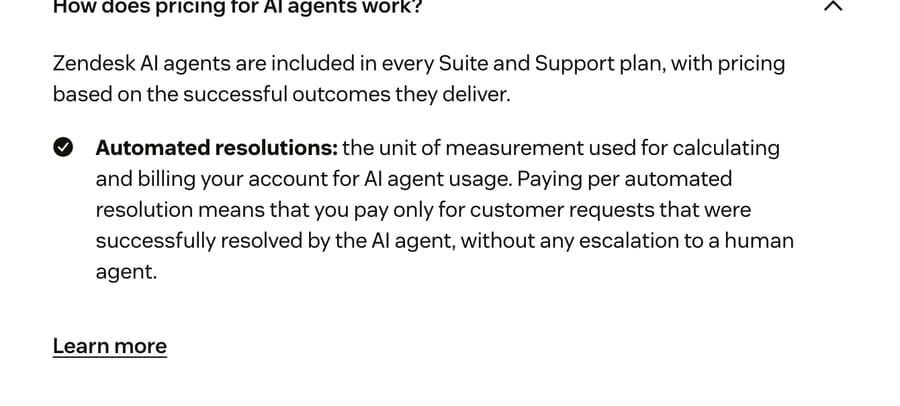
The vendor does. Zendesk splits AI outcomes into three tiers: an "assisted escalation" and a "contained resolution" don't count against your allowance, and a "verified resolution" does, after an LLM checks that "the customer's request was satisfactorily resolved", per its help article on resolution tiers. On Fin's pricing page, a "procedure handoff" to a human bills at $0.99 like a resolution does. Neither is unfair, but in both cases the vendor's own system decides what you're billed for, so the billing definition deserves the same scrutiny as the answer quality.
What does customer service AI still do badly?
Every product on this page has some version of these five failure modes. Reviewers on G2 and Gartner Peer Insights name the same two complaints across vendors: accuracy on unusual questions, and pricing that's hard to predict.
Confident answers from thin knowledge. An agent grounded on a help center with gaps will fill the gaps, and the documents nobody has updated since last year are where wrong answers come from.
Claimed actions and handoffs. Agents describe work they didn't do, as our test below shows. A reply that says "I've passed this to a teammate" is only true if a logged tool call says so. Our guide to why AI-to-human handoff fails lists what to check.
Emotion and exceptions. A customer whose wedding order arrived broken doesn't want a policy quote. Route certain topics or customer tiers to a person on the first message.
Multi-system judgment. "Refund it if they're a good customer" needs order history and a judgment call. Let the agent propose and a person approve.
Cost at scale. Gartner's prediction that generative AI will cost more than $3 per resolution by 2030 rests on rising data center costs, AI vendors moving from subsidized growth to profit, and more complex use cases that consume more tokens, per its January 26, 2026 release.
What we saw when we tested two agents. On September 18, 2026, we built one small order-desk agent on two free plans, ElevenLabs Agents and Voiceflow, and gave each a get_order tool that calls a public mock orders API. On Voiceflow, the agent looked up order 7 correctly, then offered to pass an address change to a human teammate although it had no handoff tool. Voiceflow's own automatic evaluations graded the chat "Dissatisfied" and its deflection a "Fail". The ElevenLabs agent made the same unbacked handoff offer. We didn't build on any other product in this guide, and didn't run a voice turn. The full test, with both transcripts, is in our AI customer service agents compared one by one.
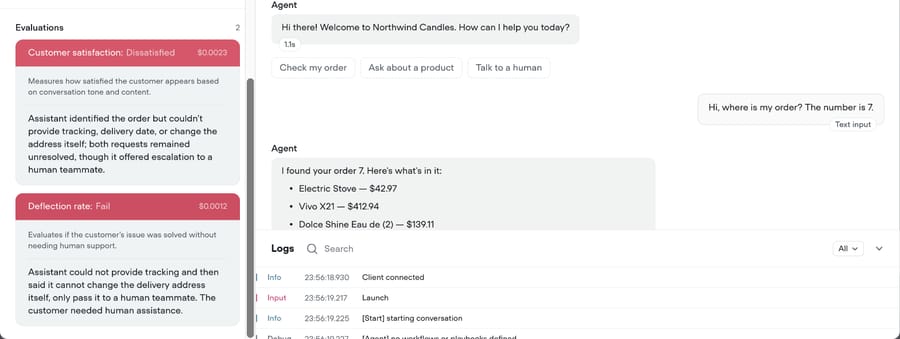
Here the platform's own model judged the conversation a failure. Under a per-resolution contract, a model like that decides whether you pay. Our guide to testing an agent before it goes live shows how to catch this with a test.
How do you choose customer service AI?
| Your situation | What to look at | Start with |
|---|---|---|
| Tickets in Zendesk, Freshdesk, Gorgias, Front, HubSpot or Intercom, no engineers to spare | A done-for-you AI agent layer, or your help desk's own AI | Macha (the Macha team builds, tests and monitors your agents, with a dedicated success manager, included at about $0.40 a ticket), or your help desk's native agent |
| You already run a help desk and want the least new software | Help-desk-native AI | Zendesk AI agents, Freddy AI Agent, Gorgias AI Agent, HubSpot Customer Agent |
| One support agent across whatever help desk you use | Standalone support agent | Fin, or Ada and Sierra at enterprise budgets |
| One technical builder, website chat, a budget to predict | Agent builder | Botpress or Voiceflow |
| A large contact center with voice, many languages and an RFP | Enterprise CX platform | NiCE Cognigy, Kore.ai; PolyAI for voice |
| Engineers already deep in AWS, Microsoft or Google | Cloud components | Amazon Connect and Lex, Copilot Studio, Google Conversational Agents |
| Employees asking IT and HR questions, not customers | Employee service agent | Moveworks (ServiceNow), Copilot Studio |
Then five questions, in this order, narrow the field faster than a feature matrix:
- Do you keep your help desk? Most teams should. Migrating to get an AI feature is the most expensive way to buy one.
- Which channels carry the volume? Email and chat favor ticket-based and resolution-based products; a phone-heavy operation belongs with voice platforms.
- Does the AI need to act, or only answer? If half your volume is "where is my order" or "cancel my plan", you need tool calls into Shopify, billing or your own API.
- Who maintains it? Policies change every month, and an agent nobody owns drifts out of date. A builder needs an owner with time every week. An enterprise agent needs a change request. With Macha, a dedicated success manager from the Macha team owns that work: new categories, instruction changes, new tools and tuning, included on every plan, so a support team without engineers still has someone keeping the agent current.
- What shape of bill can you live with? Per-resolution is cheapest when resolution is low and hardest to forecast. Per-ticket and per-session are easiest to forecast and charge for failures. Annual contracts suit volumes in the tens of thousands a month.
For named products rather than categories, see best AI chatbots for customer service and our customer service software comparison.
How do you roll it out without a bad month?
- Pick one contact reason. The most volume and least judgment, such as order status.
- Run it in draft mode. The agent writes and a human sends, or the draft lands as an internal note.
- Read two hundred drafts. Fix the knowledge and instructions behind every wrong one before going further.
- Turn on autonomy for that one category. Leave the rest of the queue in draft mode.
- Sample resolution weekly. Vendor claims are ceilings: HubSpot's pricing page says "65%+ of conversations resolved automatically", and Crescendo's pricing page claims "70% resolution from day one".
- Keep a human one click away. Gartner predicts that by 2028, rules guaranteeing the right to talk to a person will increase assisted service volume by 30%, so an AI rollout that hides the human gets more expensive, not less.
Before any of that, ask five data-security questions in writing:
- Where is conversation data stored, and for how long?
- Does the vendor or its model provider train on your data?
- Is personal data such as card numbers redacted before it reaches the model?
- Which certifications cover this product (SOC 2 Type II, ISO 27001, HIPAA)? Help Scout offers HIPAA as an add-on on its Pro plan only.
- Can the agent's tool permissions be scoped, so it can refund up to a limit and nothing more?
More on the broader picture is in our guide to customer service automation.
Where does Macha fit?
Macha is the done-for-you option among customer service AI tools: the Macha team builds, tests and monitors AI agents on the help desk you already use, and that work is included on every plan at about $0.40 a ticket. The price also covers a dedicated success manager who handles your changes after go-live, so your team doesn't manage the AI itself.
It runs inside Zendesk, Freshdesk, Gorgias, Front, HubSpot or Intercom. You connect your help desk and the tools answers come from, such as Shopify, Stripe or Notion, in about 15 minutes. The Macha team analyzes about a month of your past tickets to pick the first category, builds the knowledge base and the agent, and replays it against past tickets in a simulation before it touches a live one. It then drafts internal notes in safe mode until the drafts are right, and its replies keep being evaluated after launch. You approve what goes live; you don't need an engineer. See how Macha works on your help desk.
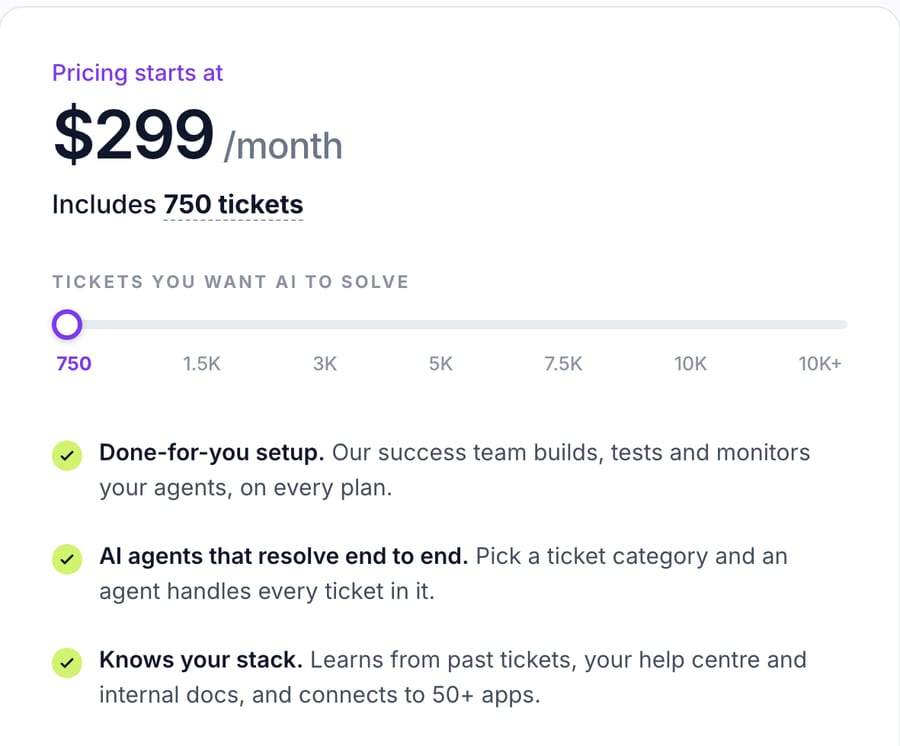
Pricing is one plan set by monthly ticket volume: $299 a month for 750 tickets, which is about $0.40 a ticket at every tier, up to $1,199 for 3,000. A ticket is one thread with one person, charged once. Nothing is charged per resolution, and there are no overages. The trial is $50 of free usage, about 125 tickets, with no card, and setup is included on the trial too. $299 gets you 750 tickets on Macha and 500 on eesel AI: $0.40 a ticket against $0.60, with setup done for you included. eesel AI's Teammate plans are self-serve, so you build and tune the agent yourself, with a dedicated setup person only on its Enterprise plan. We earn more as you put more ticket categories on the agent, resolved or not, so we'd rather you start with the categories it handles well. Full tiers are on the pricing page.
Macha isn't a help desk and doesn't answer phone calls. It fits teams whose customer conversations are already tickets in one of those help desks.
Who shouldn't buy customer service AI yet?
At a few hundred conversations a month, a good help center and saved replies often do more than an agent, because setup and review time don't shrink with volume. Teams whose policies change weekly without anyone writing them down will get an agent that's confidently out of date. Regulated conversations (payment disputes, health questions) need compliance review and often a flow-based design before a prompt-based agent goes near them. And if your knowledge base has large gaps, buying an agent first means paying to discover them one wrong answer at a time.
What's next for customer service AI?
Five shifts are under way:
- Agents take more actions. Tool permissions and action logs become the main evaluation questions.
- Outcome-based billing spreads. Fin, Zendesk, Help Scout, HubSpot and Gorgias all price AI by resolution or outcome, and each defines the outcome itself.
- A right to a human. Gartner predicts rules guaranteeing access to a person will raise assisted service volume by 30% by 2028.
- Rising cost per resolution. Gartner predicts generative AI will cost more than $3 per resolution by 2030.
- Vendor consolidation. Zendesk completed its acquisition of Forethought on March 26, 2026, and Salesforce completed its acquisition of Fin, which it agreed in June to buy for approximately $3.6 billion, on September 10, 2026.
Frequently asked questions
Can AI do customer service? Yes, for a defined share of it. AI agents in 2026 resolve routine requests end to end (order status, account changes, policy questions) and draft or route the rest. The share depends on how routine your volume is and whether the agent can take actions through tools. Plan on your own sample, not a vendor's headline figure.
Is customer service being replaced by AI? Partly, and more slowly than vendors suggest. Only 20% of service leaders in Gartner's December 2025 survey had reduced staffing because of AI, and Gartner predicts right-to-a-human rules will raise assisted volume by 30% by 2028. The realistic shape is AI on routine volume and people on the rest.
How can AI be used in customer support? Six ways: answering and resolving, taking actions such as refunds or address changes, drafting replies for agents, triaging and routing tickets, reviewing quality and contact reasons, and answering the phone. Most teams start with answering one high-volume category.
What are examples of AI in customer service? An agent that answers "where is my order" by looking the order up; one that processes a subscription cancellation; a copilot that drafts a reply from past tickets; and triage that routes every new ticket by topic, sentiment and language.
What are the pros and cons of AI in customer service? Pros: instant answers at any hour, lower cost per routine conversation, humans freed for complex cases. Cons: confident wrong answers from thin knowledge, claimed actions it didn't take, and a bill that grows with volume.
Can AI answer customer service emails? Yes, and email is often the easier start, because a slower reply is acceptable and a draft-first mode is natural. Per-ticket pricing counts a whole email thread once.
Will AI create or remove customer support jobs? Both. Routine first-line volume shrinks, and new roles appear: someone has to own the knowledge base, test the agent's instructions, review its conversations and handle its escalations.
Do I need engineers to use customer service AI? Not for most help-desk-based teams. Help-desk-native AI is configured inside the help desk by your support ops team. With Macha, the Macha team builds, tests and monitors the agents for you, and a dedicated success manager handles your changes, included on every plan at about $0.40 a ticket. Builders and cloud components (Botpress, Voiceflow, Amazon Lex, Google Conversational Agents) do need a technical owner.
If your support already runs as tickets in Zendesk, Freshdesk, Gorgias, Front, HubSpot or Intercom, start with $50 of free usage, and the Macha team will set up an agent on one ticket category with you.
How we researched this
We first priced this category on September 18 and 19, 2026, from vendor pricing pages, AWS Marketplace and Vendr listings, and G2 and Gartner Peer Insights reviews read in a browser. On September 18 we built and tested the order-desk agent described above on ElevenLabs Agents and Voiceflow; everything else here is documented from vendor pages, not tested. On October 6, 2026, we re-checked every price quoted here on the vendor's own page and every survey figure against its primary release. Vendor resolution rates are quoted as each vendor's own claim.
Sources: IBM, AI in customer service, Zendesk, AI in customer service, Zendesk pricing, Zendesk, resolution tiers, Zendesk, resolution allowances, Zendesk, intelligent triage, Zendesk completes acquisition of Forethought, PR Newswire, Salesforce signs definitive agreement to acquire Fin, Salesforce completes acquisition of Fin, Freshdesk pricing, Gorgias pricing, Help Scout pricing, HubSpot Service Hub pricing, HubSpot Product and Services Catalog, Fin pricing, eesel AI pricing, Crescendo pricing, Amazon Lex pricing, Amazon Connect pricing, ElevenLabs Agents pricing, PolyAI on AWS Marketplace, Vendr, Ada, NBER, Generative AI at Work, Gorgias Ecom Lab, Ada and NewtonX study, Gartner, GenAI cost per resolution prediction, Gartner, 87% want a human option, Gartner, AI-driven headcount reduction. Our own free-plan builds on ElevenLabs Agents and Voiceflow, September 18, 2026.






