





 Shopify
 Stripe
 Slack
Slack Notion
 Google Workspace
 Confluence

What Is Moveworks, What Does It Cost, and What Changed Under ServiceNow? (2026 Guide)


Moveworks is an enterprise AI agent that answers employee IT, HR and finance requests inside Slack and Microsoft Teams, and it has belonged to ServiceNow since December 15, 2025. Below: how it works, what third-party data says it costs on a headcount model, who it fits, and the alternatives if your problem is customer support instead.
Key takeaways
- Moveworks is an AI agent for internal employee support in Slack and Microsoft Teams, and ServiceNow completed its reported $2.85 billion acquisition of it on December 15, 2025.
- Moveworks publishes no pricing and quotes on total employee headcount, and Vendr's data on 31 purchases puts the median contract at about $130,000 a year.
- Moveworks' completion announcement put its reach at 5.5 million employee users, up from nearly 5 million when ServiceNow announced the deal in March 2025.
- Moveworks connects to more than 100 enterprise applications across ITSM, HRIS, identity and collaboration tools such as ServiceNow, Workday, Okta, Slack and Microsoft Teams.
- Moveworks suits large enterprises deflecting employee tickets, while teams resolving customer tickets in a help desk fit Macha, which the Macha team sets up and runs for about $0.40 a ticket, including a dedicated success manager.
Moveworks is an enterprise AI agent for internal employee support (IT, HR, finance and facilities requests, answered inside Slack and Microsoft Teams), and since December 15, 2025 it has been part of ServiceNow, which bought it for a reported $2.85 billion. Moveworks publishes no prices: deals are custom-quoted on total employee headcount, and Vendr's data on 31 purchases puts the median contract at about $130,000 a year.
| Question | Answer (checked September 24, 2026) |
|---|---|
| Owner | ServiceNow, deal completed December 15, 2025 |
| Built for | Employees asking IT, HR, finance and facilities questions, not external customers |
| Where it runs | Slack and Microsoft Teams |
| Pricing model | Custom quote on total employee headcount, not active users |
| Typical spend | Median about $130,000 a year across 31 purchases (Vendr); $89,500 to $271,333 in that sample |
| Integrations | More than 100 enterprise applications (ITSM, HRIS, identity, collaboration) |
| Best fit | Large enterprises, especially ServiceNow shops |
ServiceNow announced a definitive agreement to acquire Moveworks in a cash-and-stock deal on March 10, 2025, reported as the largest acquisition in ServiceNow's history, and completed it on December 15, 2025 (ServiceNow's press room carries both announcements). If you're shopping today, you're buying from ServiceNow, not an independent startup, and the product's roadmap is increasingly tied to the ServiceNow platform. Keep that in mind for everything below.
What does the ServiceNow acquisition mean for Moveworks buyers?
The ~$2.85 billion price tag wasn't an accident. ServiceNow already owned the enterprise system of record for IT and increasingly HR workflows; what it lacked was a polished, employee-facing conversational front end that lived where employees already work, Slack and Microsoft Teams. Moveworks gave ServiceNow exactly that, plus an enterprise-search layer and a large installed base of front-office AI deployments. The deal was framed by ServiceNow as extending "agentic AI to every employee for every corner of the business," and it drew enough attention to trigger a Department of Justice antitrust review before closing, a signal of just how consolidated the enterprise-AI-assistant market is becoming.
For a buyer, three practical things follow. First, Moveworks is no longer a neutral, best-of-breed layer: it is increasingly a ServiceNow on-ramp, and its roadmap will favor tight ServiceNow integration (Now Assist, the Now Platform, ServiceNow's own agentic AI) over deep parity with rival ITSM and HRIS platforms. Second, if you already run ServiceNow, the acquisition is a tailwind: the combined stack is where ServiceNow is pouring engineering and go-to-market effort. Third, if you don't run ServiceNow, weigh the strategic risk: you're now buying a product whose owner has an obvious incentive to steer you toward its broader platform over time. None of this makes Moveworks a bad product (it remains a category leader), but the "independent startup" framing you'll still find in older reviews no longer applies.
What is Moveworks?
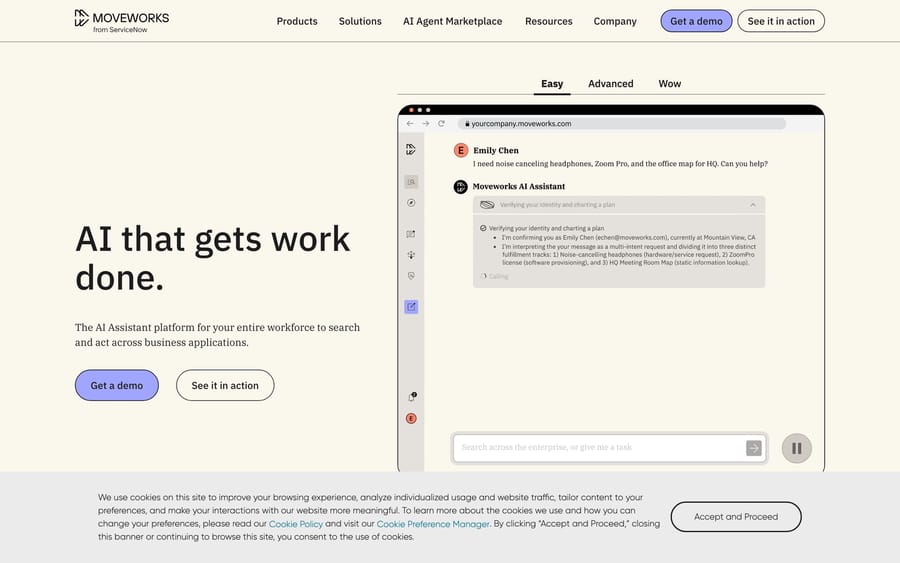
Moveworks is an enterprise AI assistant, a conversational, increasingly agentic layer that sits in front of your internal service desk and resolves employee requests automatically. Think password resets, software-access requests, PTO questions, expense-policy lookups, "how do I connect to the VPN," and IT ticket creation and status checks. Instead of an employee opening a ticket and waiting, they ask the assistant in Slack or Microsoft Teams and get an answer or an action.
Moveworks was founded in 2016 by Bhavin Shah (CEO) and is headquartered in Mountain View, California. It built its early reputation on IT support automation, deflecting the flood of repetitive help-desk tickets that swamp enterprise IT teams, and expanded into HR, finance, facilities and other internal functions. By the time of the ServiceNow acquisition, Moveworks reported reaching nearly 5 million employee users in roughly 18 months, with almost 90% of its customers deploying the assistant to all of their employees, according to ServiceNow's acquisition announcement. By the time the deal closed, Moveworks' completion announcement put the figure at 5.5 million employee users, with about 250 customers already running both ServiceNow and Moveworks.
The important distinction to grasp: Moveworks is built for internal employee support, not external customer service. That framing matters for who it competes with and whether it's the right tool for your problem. When you evaluate Moveworks, you're evaluating a tool that answers your own employees, not a tool that answers your customers. That single distinction, more than pricing or features, is what determines whether it belongs on your shortlist at all.
Who actually uses Moveworks
Moveworks' customer base skews heavily toward large, technically sophisticated enterprises, the kind of companies with tens of thousands of employees and internal service desks fielding six or seven figures of tickets a year. Publicly referenced customers include Broadcom, Palo Alto Networks, Unity, Toyota, Databricks, Snowflake, GitHub, Spotify, Marriott and Hearst, among a roster the company reportedly puts at more than 350 brands. The results these customers report are the kind of numbers that justify a six-figure contract: Broadcom has publicly cited an autonomous-resolution rate reportedly approaching ~89% across engineering, IT and HR support; Unity reported a ~90% employee-satisfaction rate even as its IT ticket volume doubled; and Palo Alto Networks branded its Moveworks assistant "Sheldon" as the first line for IT, HR and policy questions, resolving thousands of issues a month. These are internal-support metrics (deflection and resolution of employee requests), which is exactly the lane Moveworks is built to win.
How does Moveworks' AI work?
Moveworks pitches itself as an agentic AI platform, not just a chatbot. Under the hood, a few things are doing the work:
- Natural-language understanding tuned for enterprise requests. Employees don't phrase things cleanly: "my laptop won't join the wifi again" needs to map to the right resolution path. Moveworks trained heavily on the messy way employees actually ask for help.
- Enterprise search / knowledge retrieval. The assistant pulls answers from your knowledge bases, wikis, policy docs and connected systems so it can respond with grounded, company-specific information rather than generic replies.
- An agentic automation engine. Beyond answering, the assistant can take actions (reset a password, provision access, file or update a ticket, kick off a workflow) by orchestrating steps across connected systems.
- Prebuilt integrations and plugins. Moveworks ships connectors for common ITSM, HRIS, IAM and collaboration tools, and supports building custom plugins so it can reach into your specific stack.
- Analytics. Dashboards report on deflection, resolution and where knowledge gaps are dragging down automation.
The delivery surface is the key differentiator: most of this happens inside Slack or Microsoft Teams, where employees already live, rather than in a separate portal they have to be trained to visit. Moveworks understands and responds in over 100 languages, which is a genuine advantage for global workforces where the service desk can't realistically staff every timezone and locale.
The Employee Assistant and Creator Studio
Two product surfaces are worth naming specifically.
The Employee Assistant is the conversational front end, the branded bot employees actually talk to (Palo Alto's "Sheldon" is one example). It handles the full loop: understand the request, search the relevant knowledge and systems, either answer directly or execute an action, and follow up if it needs more context. Because it lives natively in Slack and Teams, adoption doesn't depend on employees remembering a new URL, which is a large part of why Moveworks reports that roughly 90% of its customers deploy the assistant to their entire workforce rather than a pilot group.
Creator Studio is the builder layer, the tooling that lets an enterprise's own admins and developers extend the assistant with custom plugins, workflows and automations without shipping everything through Moveworks' professional-services team. This is what turns Moveworks from a fixed IT-deflection bot into a platform: your team can wire the assistant into a homegrown internal tool, define a multi-step approval flow, or expose a bespoke workflow to employees through the same chat interface. The trade-off is that building meaningful custom automations is genuine engineering work: Creator Studio lowers the ceiling but doesn't eliminate the need for technical ownership.
Deployment and integrations
Moveworks connects to more than 100 enterprise applications out of the box, spanning the four categories that matter most for internal support: ITSM (ServiceNow, Jira Service Management and others), HRIS (Workday and peers), IAM/identity (Okta, Active Directory) and collaboration (Slack, Teams). Each connected system typically exposes a set of plugins (Slack alone offers a dozen or so) that the assistant orchestrates to resolve a request end to end.
Deployment is an enterprise project, not a self-serve toggle. A realistic rollout involves connecting your identity and knowledge sources, mapping the systems the assistant is allowed to act in, tuning it against the messy real-world language of your workforce, and a change-management push to drive adoption. Most buyers rely on Moveworks' implementation and customer-success teams for this, which is part of why services costs are a real line item (more on that below). Moveworks has also pursued public-sector credentials, including FedRAMP "In Process" status, for enterprises and agencies with stricter compliance requirements.
What features does Moveworks include?
- Employee-facing conversational assistant across IT, HR, finance and facilities
- Agentic automation: the assistant executes multi-step actions, not just retrieves answers
- Enterprise search across connected knowledge sources
- Slack and Microsoft Teams native delivery
- Prebuilt integrations for ITSM, HRIS, IAM and collaboration platforms
- Custom plugins / an automation engine for building organization-specific workflows
- Multilingual support for global workforces
- Analytics and reporting on deflection and resolution
- Post-acquisition: deepening ties into the ServiceNow platform and its Now Assist / agentic AI portfolio
How much does Moveworks cost?
Here's the honest truth: Moveworks does not publish pricing. Every deal is custom-quoted, and, unusually, it's typically priced on total employee headcount, not active users. That means you pay based on the size of your workforce whether or not every employee ends up using the assistant.
Because there's no public price sheet, the only real numbers come from third-party procurement data, and these should be treated as approximate and dated, not quotes:
- Multiple sources cite roughly $15–$45 per employee per year, with some ranges going higher ($100–$200/employee/year in certain configurations). Ranges vary widely by source and deal.
- Vendr's analysis of 31 Moveworks purchases put the median customer at roughly $130,000 per year, with deals in that sample running from $89,500 to $271,333 (checked September 24, 2026).
- For mid-market companies (1,000–5,000 employees), annual contract values commonly land in the $200,000–$600,000 range, per third-party teardowns.
- Larger enterprises (10,000+ employees) negotiate lower per-employee rates through volume, but total spend rises with headcount.
- Implementation and services add materially to total cost of ownership beyond the platform fee. Setup, integration and change-management work are frequently cited as a hidden line item.
What drives the number. Because pricing is quote-only, the levers that move your quote are worth understanding before you walk into a negotiation:
- Total employee headcount is the primary driver. Unlike usage-based tools, you're generally quoted on your whole workforce, so a 12,000-person company pays far more than a 1,200-person one, even if actual usage is similar in shape.
- Modules and scope. A deployment limited to IT support costs less than one spanning IT, HR, finance and facilities. Broader coverage means more integrations, more knowledge sources and more configuration.
- Implementation and professional services. Setup, integration and change-management are frequently cited as a hidden line item on top of the platform fee. For complex stacks this can be a meaningful fraction of first-year cost.
- Contract length and volume. Larger enterprises negotiate lower per-employee rates by committing to bigger, multi-year deals, the classic enterprise volume discount.
A note on the headcount model. This is the single most important thing to understand about Moveworks economics: you pay for employees who exist, not tickets deflected or actions taken. If you deploy to 20,000 employees and only 6,000 use the assistant in a given quarter, you still pay for 20,000. For a company where nearly everyone uses it, that's fine: the per-resolution economics are excellent. For a company with uneven adoption, or one that wants to start narrow and expand, the model can feel like paying for capacity you're not using.
Bottom line: Moveworks is an enterprise-priced, six-figure-and-up commitment for most buyers, quoted per your headcount, with real services costs on top. If you're a small team, it isn't aimed at you.
What reviewers say: Independent review evidence for Moveworks is unusually thin for a company this size. Its Capterra listing shows 5.0 out of 5 from a single review, checked 21 September 2026, and we could not surface a G2 rating with its review count through any source we could reach on that date, so we are not quoting a G2 figure here. Ask Moveworks for reference customers at your headcount instead of relying on review sites for this one.
What are Moveworks' strengths and weaknesses?
Pros
- Strong, purpose-built fit for internal employee support at enterprise scale
- Slack/Teams-native: meets employees where they already work, driving adoption
- Genuinely agentic: resolves and acts, not just deflects to an article
- Mature enterprise integrations across ITSM, HR and IAM
- Backing and roadmap of ServiceNow now behind it
Cons
- Opaque, enterprise-only pricing: no self-serve, no published figures, six-figure commitments common
- Headcount-based pricing means you pay for employees who may never use it
- Implementation is heavyweight: real services cost and time-to-value
- Acquisition uncertainty: the independent Moveworks roadmap is now ServiceNow's; buyers weigh platform lock-in
- Built for internal support, so it's the wrong tool if your problem is external customer service
- Overkill for small and mid-sized teams
Who is Moveworks best for?
Moveworks is a strong fit if you are a large enterprise with thousands of employees, a swamped internal IT/HR service desk, an existing ITSM investment (especially ServiceNow), and the budget and appetite for a heavyweight, agentic deployment. If you want to deflect internal tickets at scale inside Slack or Teams, it's exactly the category leader you'd shortlist.
It is not the right tool if you're a smaller team, if you want transparent self-serve pricing, or, importantly, if your actual problem is external customer support rather than employee support.
What are the best Moveworks alternatives?
If Moveworks isn't the right fit (too enterprise, too opaque, or aimed at internal rather than customer-facing support), here's an honest comparison of where it sits.
| Tool | Primary focus | Delivery surface | Pricing model | Best for |
|---|---|---|---|---|
| Moveworks | Internal employee support (IT/HR/finance) | Slack / Teams | Custom, per-headcount, six-figure+ | Large enterprises, especially on ServiceNow |
| Aisera | Enterprise service automation (IT/HR + some CX) | Chat / portal / voice | Custom / quote | Large enterprises wanting broad coverage |
| Espressive | Internal employee support (Barista) | Chat / Slack / Teams | Custom / quote | Enterprises focused on IT/HR self-service |
| Leena AI | Employee experience & HR automation | Slack / Teams | Custom / quote | HR-led internal support deployments |
| Kore.ai | Conversational AI development platform | Any channel | Custom / quote | Teams building custom bots across channels |
| ServiceNow Now Assist | ITSM/HR workflows on the Now Platform | Portal / Teams | Platform add-on | Existing ServiceNow shops |
| Macha | External customer support, on top of your help desk | Your help desk (Zendesk, Freshdesk, Gorgias, Front, HubSpot, Intercom) | Per ticket, from $299/mo for 750 tickets (~$0.40/ticket); setup and a dedicated success manager included | CX teams already running one of those help desks |
A note on Macha, since it's a different shape of tool. Where Moveworks automates internal employee support, Macha is an AI agent layer that runs on top of the external customer help desk you already use: Zendesk, Freshdesk, Gorgias, Front, HubSpot or Intercom. Pricing is per ticket (about $0.40 a ticket, from $299 a month for 750 tickets) rather than per-employee headcount, so you're not paying for seats or a whole workforce that may never touch it. Setup is done for you: the Macha team analyzes your past tickets, builds the knowledge base and the agent, and runs it in safe mode, with drafts as internal notes, until the drafts are right, usually live in under a week. That's included on the trial and every plan, and the price covers a dedicated success manager who handles your changes after go-live (new categories, instruction edits, new tools). If your problem is deflecting and resolving customer tickets, not employee IT requests, Macha and Moveworks are solving different problems, and Macha is the honest fit. You can explore Macha's AI agents for customer service, how it builds workflows with custom tools, and its usage-based pricing.
Two of those alternatives have full guides here: Aisera, the closest direct competitor for AI-led employee service, and Espressive, which takes the same virtual-agent approach to the IT help desk with a narrower scope.
How we researched this: The features, pricing and customer figures above come from Moveworks' own public pages and the third-party sources linked inline, first researched in August 2026. On 21 September 2026 we re-checked the links and added the review figures; the Capterra figure was read in a real browser that day, and no G2 rating with a matching review count could be reached, so none is claimed. On 24 September 2026 we re-checked the acquisition close date and user count against Moveworks' completion announcement and the median and range against Vendr. Moveworks still publishes no price list, so the per-employee ranges are third-party figures from August 2026, not quotes.
Frequently asked questions
Is Moveworks owned by ServiceNow? Yes. ServiceNow completed its acquisition of Moveworks on December 15, 2025, in a deal reported at about $2.85 billion, reported as the largest acquisition in ServiceNow's history.
How much does Moveworks cost? Moveworks doesn't publish pricing; every deal is custom-quoted, typically based on total employee headcount. Vendr's data on 31 purchases shows a median around $130,000/year, with mid-market contracts often in the $200,000–$600,000 range and per-employee rates roughly $15–$45/year. Treat these as approximate, not quotes.
Is Moveworks for customer support or employee support? Moveworks is built for internal employee support (IT, HR, finance and facilities requests), delivered mostly in Slack and Microsoft Teams. It is not primarily a customer-facing support tool.
What are the main Moveworks alternatives? Common alternatives include Aisera, Espressive, Kore.ai and Leena AI for internal support. If your need is external customer support instead, a per-ticket AI agent layer like Macha that runs on top of your existing help desk is a different and often better-fit approach, and the Macha team sets it up and runs it for you at about $0.40 a ticket, with a dedicated success manager included.
Is Moveworks agentic AI? Yes. Moveworks positions itself as an agentic AI platform that not only answers questions but takes multi-step actions across connected enterprise systems, orchestrating steps like resetting a password, provisioning access, or filing and updating a ticket rather than just returning a knowledge-base article.
What does Moveworks integrate with? Moveworks connects to more than 100 enterprise applications across ITSM (ServiceNow, Jira Service Management), HRIS (Workday and peers), identity (Okta, Active Directory) and collaboration (Slack, Microsoft Teams). Admins can extend it with custom plugins and workflows through Creator Studio, its builder layer.
Do I need ServiceNow to use Moveworks? No. Moveworks works with a range of ITSM and HRIS systems and predates its ServiceNow ownership. That said, now that Moveworks is part of ServiceNow, the tightest integration and the clearest roadmap alignment are with the ServiceNow platform. If you're not on ServiceNow, factor in the strategic direction of the product's new owner.
How long does Moveworks take to deploy? Moveworks is an enterprise implementation, not a self-serve setup. A realistic rollout involves connecting identity and knowledge sources, mapping the systems the assistant can act in, tuning it to your workforce's language, and a change-management push, typically with help from Moveworks' implementation team. Plan for weeks to months and a real services budget, not a same-day switch-on.
Can Moveworks handle customer support, not just employee support? Moveworks is built and priced for internal employee support delivered in Slack and Teams. It is not primarily a customer-facing tool. If your problem is deflecting and resolving customer tickets in a help desk like Zendesk or Freshdesk, a support-focused, per-ticket AI agent layer such as Macha is a closer and usually more cost-effective fit.
Moveworks is the category leader for enterprise internal employee support, and the ServiceNow acquisition only strengthens that position for organizations already invested in the ServiceNow ecosystem. Just be clear-eyed about what you're buying: an opaque, headcount-priced, six-figure enterprise commitment aimed at deflecting employee tickets. If your actual problem is customer support, the right shortlist looks different and starts with tools that live on top of your help desk. Start with Macha if that's you.






