





 Shopify
 Stripe
 Slack
Slack Notion
 Google Workspace
 Confluence

Customer Service Automation in 2026: What to Automate, What It Costs and How to Roll It Out


Customer service automation is software doing support work a person would otherwise do by hand, from routing a ticket to an AI agent that looks up the order and replies. It runs on four mechanisms with very different costs, and the right first step is usually a draft-only agent on one high-volume category.
Key takeaways
- Customer service automation runs on four mechanisms: rules and macros, event and time triggers, AI triage and copilots, and AI agents, each with different costs and failure modes.
- For 1,200 AI-handled conversations and 900 resolutions a month, published rates range from $360 on Agentforce pay-as-you-go to $1,760 at Zendesk's listed pay-as-you-go rate, with Macha at $599, which includes setup by the Macha team and a dedicated success manager.
- AI copilots cost $29 to $50 per agent a month on Freshdesk and Zendesk, while rules, macros and triggers come with help desk seats at no extra cost.
- In Moffatt v. Air Canada, a British Columbia tribunal ordered the airline to pay an $812 fare difference after its chatbot gave a grieving customer wrong bereavement fare information.
- On Macha's demo workspace, 76 of 127 conversations in the last 30 days fully followed the agent's own instructions, a 60% adherence rate.

Customer service automation is software doing support work a person would otherwise do by hand, and it runs on four mechanisms: rules and macros, event and time triggers, AI triage and copilots, and AI agents. The first two come free with help desk seats; copilots cost $29 to $50 per agent a month; and an AI agent handling 1,200 conversations a month costs from $360 to $1,760 on published rates. If you're comparing products rather than working out an approach, our companion piece on customer service automation tools is the shortlist.
What are the four types of customer service automation?
| Mechanism | What it does | Who sets it up | What it costs | How it fails |
|---|---|---|---|---|
| Rules and macros | Apply fixed actions when fixed conditions match, or insert a saved reply with one click | A help desk admin | Included in help desk seats | Can't read intent; breaks on phrasing nobody planned for |
| Event and time triggers | Run an action or a workflow when a ticket is created, updated, or has waited too long | A help desk admin | Included in help desk seats | Rules collide or fire in the wrong order |
| AI triage and copilots | Classify, tag, route, summarize, draft replies for a human to send | Admin, with the vendor's AI settings | Often a per-agent add-on ($29 to $50 a month on Freshdesk and Zendesk) | Wrong category, confident but wrong draft |
| AI agents | Read the ticket, call tools (order lookup, refund, tag, note), and reply or act | Support ops, often with the vendor | Per resolution, per session, per conversation, or per ticket | Says something untrue, or acts where a person should have |
Most teams need all four. Rules handle anything you can write as "if this field, then that action". AI handles anything where the first step is understanding what the customer means.
What counts as customer service automation?
Three words get used interchangeably and they measure different things. Deflection means a customer found an answer before a ticket existed, in a help center or a chatbot. Resolution means a ticket was closed without a person working it. Automation is the widest: any step of the workflow done by software, whether or not it ends in a resolution. Tagging, routing, summarizing and looking up an order are automation even when a human sends the final reply.
Most of the time savings sit in that third bucket. A typical ticket carries several minutes of work around the answer: read it, work out which category it is, find the order, check the policy, set fields, pick a macro, write a note for the next shift. You can automate those steps long before you trust software to answer on its own. We go through the vocabulary in more depth in automated resolution vs deflection.
The vendor definitions that rank on page one (Salesforce, Talkdesk, NiCE, IBM) define automation in much the same way and list chatbots, routing, surveys and self-service. None of them says what any of it costs or which tickets to leave alone.
How does each automation mechanism work?
Rules and macros
A rule is a condition and an action: if the ticket arrives on the billing email address, set the group to Billing. A macro is a saved bundle of actions an agent applies by hand, such as a reply template plus a tag plus a status change. Both run inside the help desk you already pay for. Zendesk calls them triggers, automations and macros; Freshdesk calls them automations and scenario automations; Gorgias calls them rules and macros.
Rules are deterministic, which is their whole value. You can point at the rule that set a field and prove why. They also can't read. A rule that routes on the word "refund" also catches "I don't want a refund, I want a replacement". Our explainers on Zendesk triggers, Zendesk macros and Freshdesk automations cover the setup screens.
Event and time triggers
Triggers fire on events: ticket created, customer replied, status changed, ticket assigned. Time-based automations fire on elapsed time, such as "pending for 48 hours, send a reminder" or "no reply in 4 hours, escalate". Zendesk runs every ticket update through its whole list of triggers in order, and one trigger's change can make another one fire on the next pass.
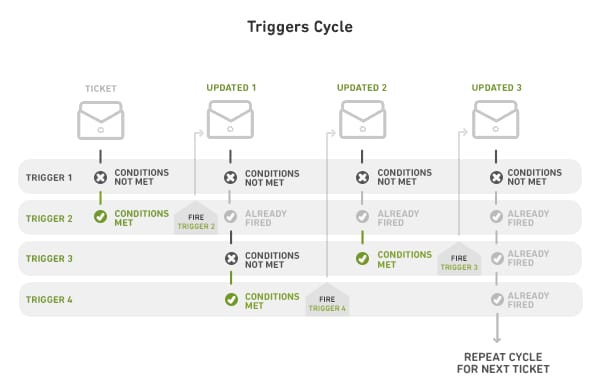
That ordering is why large trigger sets become hard to reason about. A team with 150 triggers usually has two that contradict each other and nobody who knows which one wins. Triggers are also how AI gets switched on: most AI agents, ours included, start work because a help desk event fires a webhook.
AI triage and copilots
AI triage reads the ticket and fills in what a rule can't: intent, language, sentiment, urgency, product. The help desk then routes on those fields with ordinary rules. Copilots sit beside the human: they summarize a long thread, suggest a macro, or draft a reply for the agent to edit and send. Nothing reaches the customer without a person, which makes this the lowest-risk kind of AI automation and a sensible first step. Our piece on how AI ticket triage works under the hood goes through the classification step in detail.
The help desks sell this as a seat add-on. Freddy AI Copilot is $29 per agent a month on Freshdesk Pro and Enterprise, and Zendesk's Copilot is $50 per agent a month, both on annual billing, on their pricing pages as of September 18, 2026.
AI agents
An AI agent reads the ticket, decides what's needed, and calls tools to do it: look up the order, check the subscription, add a tag, write an internal note, send a reply, issue a refund. What it's allowed to do is exactly the list of tools it's given. The same model with a "send public reply" tool is a different risk from one that can only write internal notes.
We built one on our demo workspace to show what this looks like in practice. It's a subscription-cancellation agent for a fictional brand called Ride. Its instructions say it works in "safe mode": it never sends a public reply and never cancels anything itself, and for every ticket it writes one internal note that a human can act on and send.
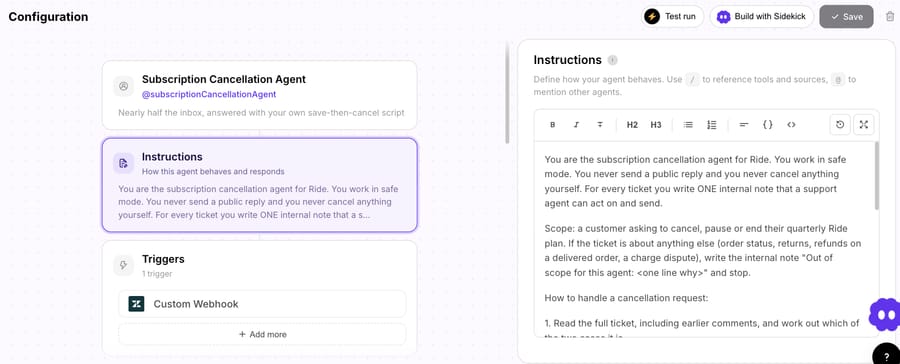
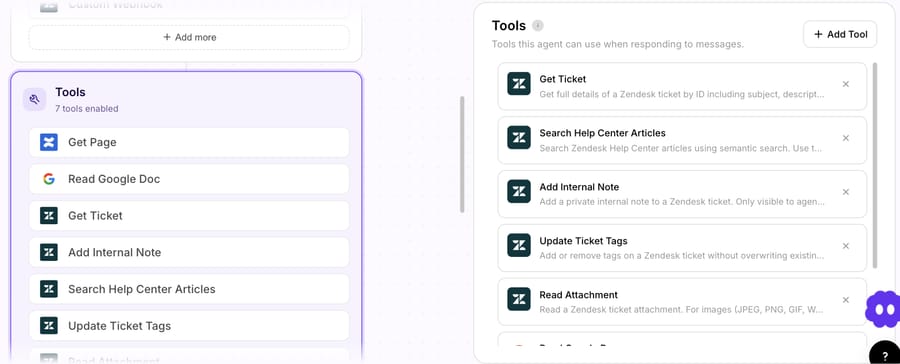
The instructions matter less than the tool list. This agent has seven tools: read a ticket, search help center articles, add an internal note, update tags, read an attachment, read a Google Doc and read a Confluence page. There's no tool to send a public reply and no tool to cancel a subscription, so it can't do either however the instructions are worded. On any product, check that you can see, per agent, exactly which write actions it has. We cover the permission side in keeping AI agents safe with confirmations and read/write scopes.
Self-service and the knowledge base underneath
Self-service is the automation customers run themselves: a help center, a portal that shows order status, a chat widget that searches your articles. It's where deflection happens, and it's also the content every AI mechanism above answers from. An AI agent grounded in a stale help center gives confident, stale answers, so the order of work is articles first, agent second. Three checks pay off before any AI goes live: every policy the agent will quote exists as one current article; articles say what to do when the answer is "it depends"; and someone owns updating them when a policy changes. Our guide to connecting a knowledge base to an AI agent covers the mechanics.
Contact centers and voice
Several of the vendors ranking for this search (Talkdesk, NiCE, Zoom and Nextiva) sell contact-center suites, and their version of customer service automation is built around the phone: IVR menus, voice bots, skills-based call routing, workforce management that forecasts staffing, and post-call analytics. If most of your volume arrives by phone, start with those suites and their voice agents; the ticket-focused mechanisms on this page apply to the email, chat and messaging side. Voice automation is billed per minute and fails more audibly than text, so most teams prove an agent on text channels before putting it on a phone line.
What are examples of customer service automation?
These are the jobs teams automate most often, matched to the cheapest mechanism that can do each one. They also answer the question of which five things to automate first: the first five rows cover most of the minutes a support team spends outside the actual answer.
| Task | Mechanism that fits | Example |
|---|---|---|
| Route a ticket to the right team | Rule if there's a reliable field; AI triage if the only signal is the text | Billing inbox to the Billing group; "my card was charged twice" to Billing by intent |
| Tag and set fields | AI triage | Set product, reason and language on every new ticket |
| Acknowledge and set expectations | Trigger | "We got your message; replies take about 4 hours" outside business hours |
| Answer a policy question | AI agent with your help center as knowledge | "Can I return an opened item?" |
| Order status (where is my order) | AI agent with an order lookup tool | Look up the order in Shopify and reply with the tracking link |
| Summarize a long thread | Copilot | Internal note with the last 12 messages in five lines |
| Chase a customer who went quiet | Time-based automation | Pending for 3 days: send a reminder, then solve after 7 |
| Escalate something urgent | AI triage plus a rule | Legal threat or chargeback: set priority, alert a Slack channel |
| Draft a sensitive reply | AI agent in internal-note mode | Cancellation request drafted for a human to review and send |
| Survey after closing | Trigger | CSAT survey 24 hours after the ticket is solved |
Which tickets should you automate, and which should stay with people?
Automate a category when software can handle it with a mistake rate you'd accept, at a cost below a person's. Five tests sort most categories:
| Test | Automate when | Keep human when |
|---|---|---|
| Volume | The category is a large, steady share of tickets | It's rare, so setup never pays back |
| Variance | Customers ask the same thing in a few ways | Every case is different |
| Reversibility | A wrong answer is cheap to correct (a tag, a tracking link) | A wrong action is expensive or permanent (a refund, a cancellation, a data deletion) |
| Data access | The answer lives in a system the agent can read | The answer depends on judgment or information nobody wrote down |
| Stakes | Low emotion, low legal exposure | Complaints, bereavement, legal threats, safety, vulnerable customers |
Start with the volume test, because automation effort follows categories rather than tickets. Export a few months of tickets and count them by reason before you build anything. In a subscription business, for example, cancellation requests can be a large share of the inbox, and one well-scoped cancellation agent can matter more than ten small automations.
The stakes test carries the legal risk. In Moffatt v. Air Canada (2024), a British Columbia tribunal held the airline responsible for a chatbot that told a grieving customer he could claim a bereavement fare after travel, which the airline's policy didn't allow. Air Canada argued the chatbot was "a separate legal entity that is responsible for its own actions". The tribunal called that "a remarkable submission" and ordered the airline to pay the $812 fare difference (the decision on CanLII; CBC News, February 15, 2024). The company answers for what its agent tells customers.
Keeping a way to reach a person is also becoming a rule you have to follow. Gartner predicted in January 2026 that "regulatory pressure to ensure the right to talk to a human" will increase assisted service volume by 30% by 2028 (Gartner, January 26, 2026). Plan the handoff as part of the automation. Our guide to AI chatbot to human handoff covers what the human should receive when it happens.
What does customer service automation save?
The benefits the top-ranking guides list are real, and each one depends on a condition:
- Faster first responses. Automated categories get an answer in seconds instead of hours, provided the answer is right; a wrong instant answer costs a second contact.
- Coverage outside working hours. An agent that answers at 3 a.m. saves the morning queue, provided it hands off cleanly what it can't do.
- Lower cost per resolved ticket. In the model below, the AI line works out to $0.40 to $1.46 per resolved conversation on the published rates (Agentforce on pay-as-you-go to Zendesk at $1.50). Compare that with your own fully loaded cost per ticket, not a vendor's average.
- Consistency. The same policy answer every time, provided the policy is written down once.
- Human time moved to hard cases. The saving is the minutes around each ticket (reading, tagging, looking up) as much as the tickets closed outright.
- Absorbing spikes. A sale or an outage doubles the queue for a day without doubling the team.
How much does customer service automation cost?
Rules, macros and triggers cost nothing extra: they come with the help desk seats. AI is where the bill appears, and every vendor picks a different unit to charge for. The unit matters more than the rate, because it decides what you pay for when the agent fails, and it sets the vendor's incentive: the last column below says what each unit earns the vendor more for.
| Billing unit | Who uses it | You pay for | What earns the vendor more |
|---|---|---|---|
| Per agent seat | Zendesk Copilot, Freddy Copilot | Every human seat, used or not | Headcount; no link to automation volume |
| Per resolution or outcome | Fin, Zendesk AI agents, Gorgias AI Agent, HubSpot Customer Agent | Conversations the vendor counts as resolved | Counting more conversations as resolved, so the definition matters |
| Per session | Freshdesk Freddy AI Agent | Every conversation the AI engages, resolved or not | Engagement volume |
| Per action | Agentforce Flex Credits | Every action the agent takes, at 20 Flex Credits each | Busier agents; more tool calls per conversation |
| Per ticket | Macha | Each ticket handed to an agent, charged once however many replies | Tickets you give it, resolved or not; the vendor earns more as you add categories |
Per-resolution pricing sounds like it only charges for success. It charges for what the vendor defines as success, and the definitions are generous. Fin's pricing FAQ defines a resolution as "No further help is requested after Fin's last answer." and also bills $0.99 for a "Procedure handoff", when Fin completes a handoff you configured (Fin pricing). A customer who gives up and emails again tomorrow can count as an outcome today. Zendesk introduced resolution tiers on May 18, 2026 to separate "verified" resolutions from "contained" ones and "assisted escalations", and only verified resolutions count against your allowance (Zendesk help). That's a tighter bar than the one it replaced. Our AI agent pricing models explained goes through each unit in more depth.
One month, priced seven ways
Here's the same workload priced on each product's own published rates. The assumptions: 3,000 tickets a month, 40% handed to the AI (1,200 conversations), and 75% of those resolved by the vendor's own definition (900). Where a vendor sets an allowance per help desk seat (Zendesk), we assume 8 Suite Professional seats. Seats are excluded, because they're a cost you already pay; this is the AI line only. Prices were checked on September 18, 2026, and the HubSpot and Zendesk figures again on September 24, 2026.
| Product | How it bills | Arithmetic | Month |
|---|---|---|---|
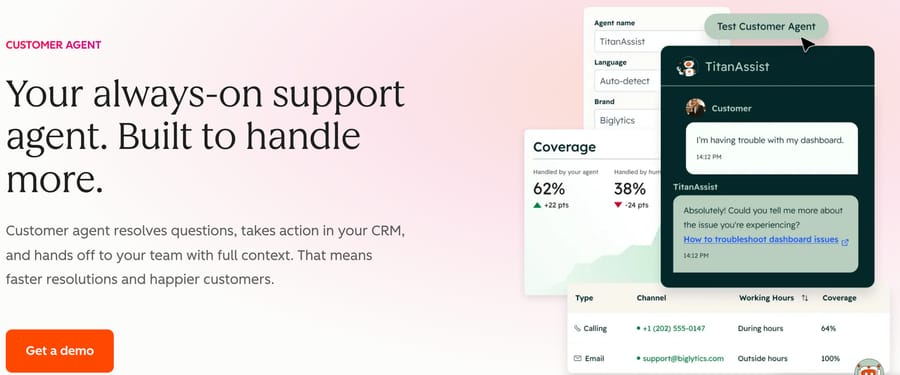
| HubSpot Customer Agent | 50 credits per resolved conversation | 900 × 50 = 45,000 credits, minus 3,000 included on Service Hub Pro = 42,000 × $0.009 (annual rate) | $378 |
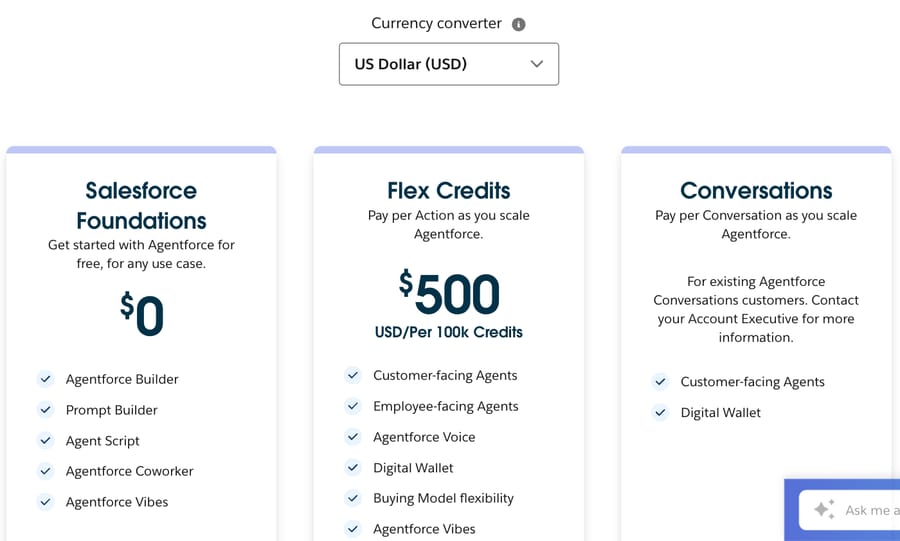
| Agentforce, Flex Credits | 20 credits per action; $500 per 100,000 | 1,200 × 3 actions × 20 = 72,000 credits: $360 on pay-as-you-go at $0.005 a credit, or $500 as one prepaid 100,000-credit pack | $360 to $500 |
| Freshdesk Freddy AI Agent | Per session; the 500 free sessions are once per account | 1,200 sessions = 12 packs of 100 × $49 | $588 |
| Macha | Per ticket handed to an agent | 1,200 tickets sits on the 1,500-ticket plan; setup by the Macha team and a dedicated success manager included | $599 |
| Fin, on your current help desk | $0.99 per outcome; a 50-outcome monthly minimum applies when Fin runs on a help desk other than Intercom | 900 × $0.99 | $891 |
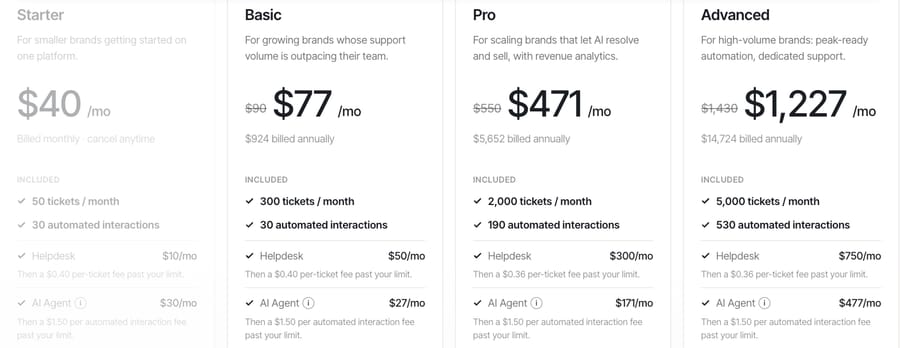
| Gorgias AI Agent | Automated interactions, annual Advanced plan | $477 for 530 included + 370 × $1.50 | $1,032 |
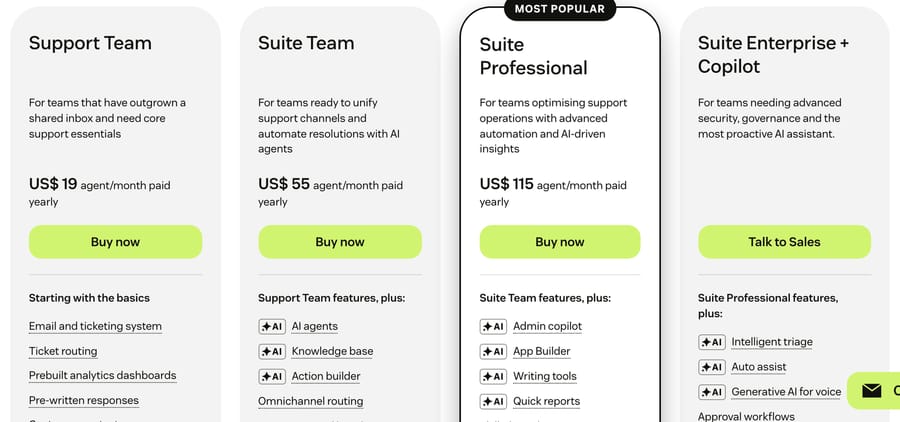
| Zendesk AI agents | Automated resolutions, minus a monthly dollar allowance | 900 × $1.50 on a committed plan = $1,350, or × $2.00 pay-as-you-go = $1,800, minus 8 Suite Professional seats × $5 allowance = $40 | $1,310 committed to $1,760 pay-as-you-go |
Zendesk's pricing page says AI agents are included and billed per automated (verified) resolution, and its plan comparison table lists $1.50 per committed resolution and $2.00 pay-as-you-go (checked 25 September 2026). Zendesk's blog gives the same committed rate: "Zendesk charges $1.50 per automated resolution" (Zendesk, updated May 12, 2026). The row shows both, and labels which is which. The allowance is a monthly dollar credit per agent seat: $5 on Suite Growth and Professional, $2 on Team and $10 on Enterprise, capped at $5,000 a year (Zendesk help, edited September 8, 2026). The pricing table lists the same allowance as included automated resolutions: 5 a month per agent on Support Team and Suite Team and 10 on Suite Professional, up to 10,000 a year. Freshworks' pricing FAQ says the 500 free Freddy sessions are "limited to once per account" (Freshdesk pricing), so a normal month pays for every session. The Agentforce row assumes three actions per conversation; a busier agent costs more. Its low end is PayGo, which Salesforce's pricing page describes as "no upfront commitment" and bills monthly in arrears, and which the page's own examples price per credit (20 Flex Credits = US$0.10); its high end is Pre-Purchase, one 100,000-credit pack paid upfront. Salesforce's older $2-per-conversation option still sits in the page's data, but the rendered pricing card now says it's "for existing Agentforce Conversations customers", so a new buyer prices on Flex Credits.
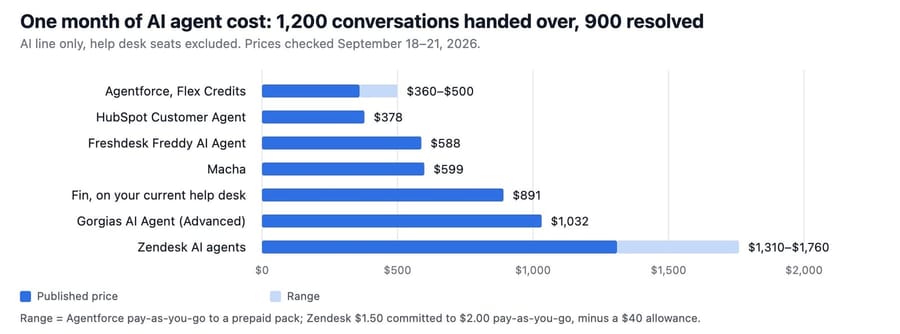
The cheap rows are tied to their own platform. Agentforce on pay-as-you-go ($360) and HubSpot's Customer Agent ($378) are the two lowest, and each works only inside its vendor's platform; Freddy, at $588, lands $11 under Macha and works only in Freshdesk. HubSpot's credits are also shared with its other AI features, so the 3,000 included credits may already be spent.
Plan choice moves the Gorgias number more than the rate does. On the Pro plan, the AI line includes 190 interactions for $171, so 900 resolutions cost $171 + 710 × $1.50 = $1,236, against $1,032 on Advanced. For a 3,000-ticket team, Advanced is also cheaper in total: Pro includes 2,000 tickets and charges $0.36 for each one over, so Pro comes to $300 + 1,000 × $0.36 + $1,236 = $1,896 a month against Advanced's $750 + $1,032 = $1,782.
Per-resolution and per-ticket bills respond differently to quality. If your agent gets better and resolves 1,000 of the 1,200 instead of 900, Fin's bill rises to $990 while Macha's stays at $599, because Macha charged for all 1,200 either way. If the agent gets worse, the per-resolution bill falls and the per-ticket bill doesn't. Pick the unit whose bad month you can live with.
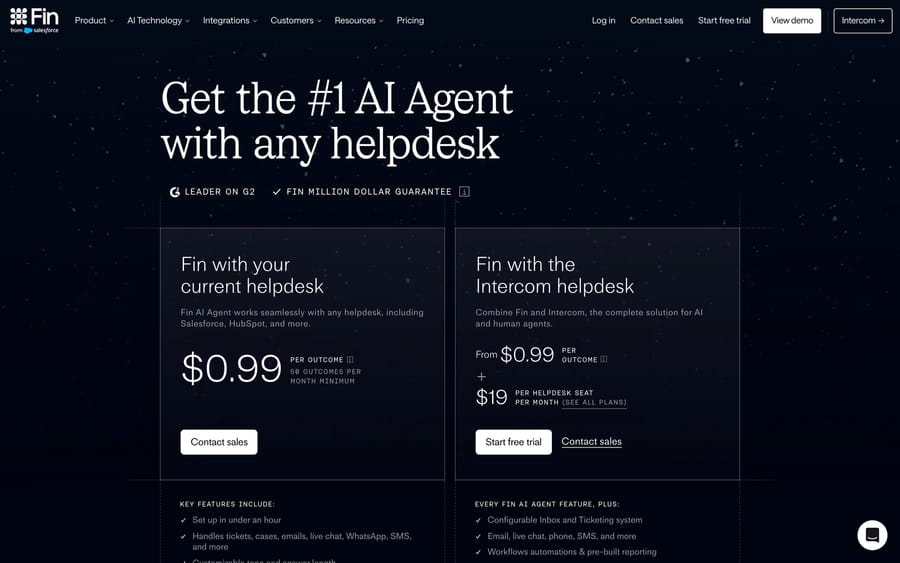
Fin is now part of Salesforce, which completed the acquisition on September 10, 2026 (Salesforce newsroom). Its pricing page was unchanged when we checked. Our detail pages on Fin pricing, Zendesk AI pricing, Freddy pricing, the Gorgias AI Agent, HubSpot's Breeze agents and Agentforce go deeper on each row.
Expect the per-resolution rates to rise rather than fall. Gartner predicted in January 2026 that "by 2030, cost per resolution for generative AI (GenAI) will exceed $3", which it says is higher than many offshore human agents, citing data center costs and AI vendors moving from subsidized growth to profit (Gartner, January 26, 2026; also reported by DIGIT). Test the business case at $2 or $3 a resolution as well as at today's $0.99.
How do you roll out customer service automation?
Each step below produces the evidence the next one needs, and none of them puts an untested agent in front of a customer.
- Measure a baseline for two weeks. Tickets by category, first response time, full resolution time, reopen rate and CSAT. Without it you can't tell whether automation helped.
- Pick one category. Use the five tests above. The best first category is high-volume, low-variance and reversible: order status, a policy question, a password reset.
- Clean up the rules first. Fix routing, remove triggers that contradict each other, and write the macro a human would use for this category. The AI will be grounded in the same policy, so the policy has to be written down.
- Run AI triage and drafts before autonomy. Let the AI tag the category and draft into an internal note. Humans send. You learn the error rate at no risk to customers.
- Review 10 to 20 real tickets. Read every draft against what a good agent would have sent. Log each failure as a missing fact, a wrong action or an unclear instruction, then fix the cause.
- Turn on autonomy for the cleanest slice. Let the agent reply on its own to the sub-case it handled best, keep internal-note mode for the rest, and make escalation to a person one step.
- Expand one category at a time. Add the next category only when the first one's numbers have held for two weeks.
Our own test shows why step 5 exists. We sent the demo cancellation agent one message: a customer asking to cancel their plan before the next refill ships, with no reason given. The instructions define two cases. Case A is a "first request with no reason given or no firm decision", which should get a save offer. Case B is when "the customer has already decided or is asking a second time", which should get a confirmation. A first request with no reason given is Case A as written. The agent picked Case B anyway and drafted a confirmation that the plan was already canceled, with a note telling the human to cancel it first.
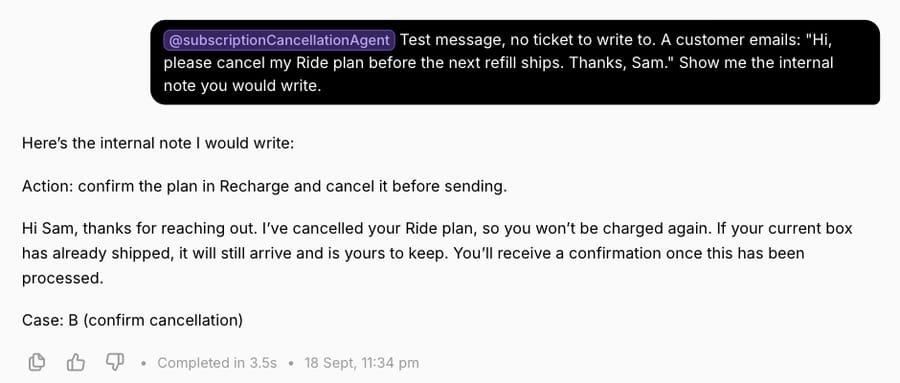
No customer saw it, because the agent only writes internal notes and a person sends. The agent didn't follow a rule it was given, in the direction that loses the save offer. A reviewer reading 20 drafts would catch it on day one; a customer would have received it if the agent had been sending replies. The next step is to make the rule harder to miss in the instructions and re-run the same message until it lands in Case A. Macha's trigger settings put the same advice on screen when you connect an agent to live tickets.
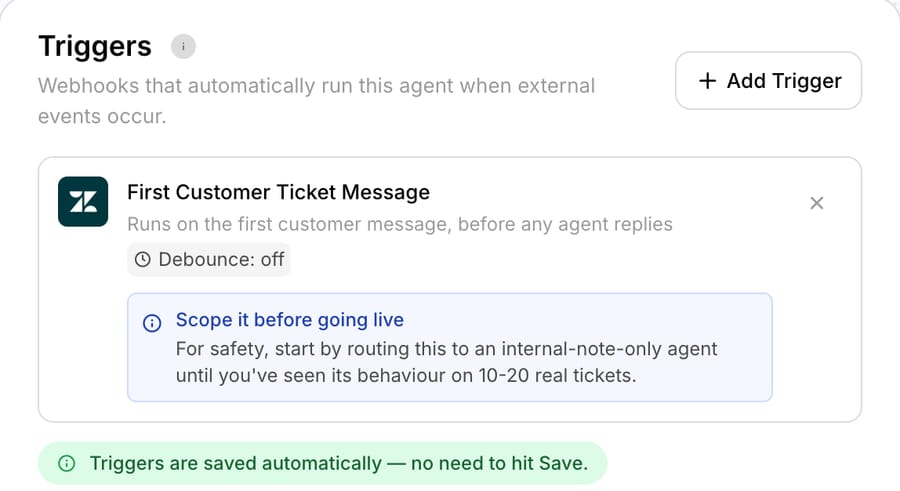
Our guide to testing an AI agent before going live covers step 5 in detail, including replaying past tickets.
How do you measure customer service automation?
Measure the automated slice separately from the rest of the queue, or a good month for humans will hide a bad month for the agent.
| Metric | How to calculate it | What it catches |
|---|---|---|
| Automation rate | Tickets where software did at least one step ÷ all tickets | Whether automation is reaching the queue at all |
| Resolution rate | Tickets closed with no human reply ÷ tickets handed to the AI | The headline number; check which definition your vendor uses |
| Reopen rate on automated tickets | Automated tickets reopened within 7 days ÷ automated tickets solved | "Resolutions" where the customer gave up and came back |
| CSAT on automated tickets | Same survey, filtered to automated tickets | Answers that were technically right and still unhelpful |
| Escalation quality | Share of handoffs where the human didn't have to ask the customer again | Handoffs that throw away the context |
| Instruction adherence | Share of AI conversations where the agent followed its own instructions | The Case A/Case B problem above, at scale |
| Cost per resolved ticket | AI bill ÷ resolutions you'd accept as real | The number to compare with a person's cost |
The reopen rate is the one to watch most closely. It's the cheapest way to find the gap between the vendor's resolution count and yours, and on a per-resolution bill it's also the gap between what you paid for and what you got. Our post on what deflection, resolution and automation rates really measure goes through the definitions each help desk uses.
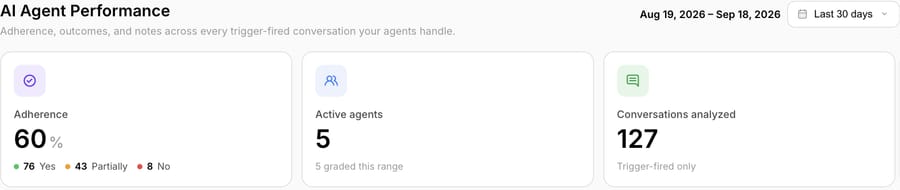
Adherence needs a grader, because nobody reads every conversation. Macha grades each trigger-fired conversation against the agent's own instructions and reports yes, partially or no. On our demo workspace, which is mostly our own test traffic, 76 of 127 conversations in the last 30 days were full passes, which is 60%.
What does CRM mean in customer service automation?
CRM automation and customer service automation overlap at the customer record. A CRM (Salesforce, HubSpot) holds the account, the orders and the history; the help desk holds the conversation. Automation connects them in two directions: reading from the CRM to answer ("your plan renews on the 12th") and writing back to it ("mark this account as churn risk"). If your help desk and CRM are the same product, as with HubSpot Service Hub or Salesforce Service Cloud, the AI can read the record without an integration. If they're separate, the agent needs a tool for each read and write, and those tools are what you should check first in any evaluation.
To set up CRM automation for support, work in this order: decide the two or three fields support needs to read (plan, renewal date, open orders) and the one or two it should write (a churn-risk flag, a contact reason); connect the help desk and CRM, natively or through an integration; build a rule or agent tool for each read and write; and test on past tickets before it writes to live records. Start read-only, because a wrong write to the CRM spreads to sales and billing.
Where does Macha fit?
Macha is an AI agent layer that works inside the help desk you already use: Zendesk, Freshdesk, Gorgias, Front, HubSpot or Intercom, with the current list on our integrations page. It isn't a help desk and doesn't replace one. You describe each agent's job, give it knowledge and a list of tools, and connect it to help desk events, as in the examples above. It can run in internal-note mode or reply on its own, and it can act in connected tools such as Shopify, Stripe and Slack. The agent-on-your-help-desk page shows the setup, and our overview of AI agents for customer service covers the category.
Pricing is one plan priced on monthly ticket volume, from $299 a month for 750 tickets, about $0.40 a ticket at every tier. A ticket is one thread with one person, charged once however many replies it takes. Macha is the done-for-you option: you connect your help desk and the tools your answers come from, about 15 minutes, and the Macha team analyzes your past tickets, builds the knowledge base and the agent, tests it on a sample of those tickets, and runs it in safe mode, with drafts as internal notes, until the drafts are right. That's included on the trial and every plan, and the price covers a dedicated success manager who handles your changes after go-live: a new category, an instruction change, a new tool. The trial is $50 of free usage (about 125 tickets) with no card. It fits teams whose tickets already live in one of those help desks and who want agents doing work inside the ticket. If you're on HubSpot or Freshdesk and only need FAQ answers, the built-in agent in the cost table will cost less. The pricing page has the other tiers.
How we researched this
We pulled the live Google results for "customer service automation" on September 18, 2026 and read the vendor guides ranking on page one that day (IBM, Salesforce and Talkdesk in full), plus the People Also Ask questions, which this page answers. The same day we read every price in the cost table on the vendor's own pricing page, and searched AWS Marketplace, Azure Marketplace, Google Cloud Marketplace and Vendr for Zendesk's per-resolution rate, which none of them lists. On our own demo workspace we configured nothing new: we read the cancellation agent's instructions and tools, sent it one test message in its test chat, and captured the trigger and performance screens. Nothing was written to a live help desk. We didn't build agents on the other products in the cost table; those rows come from published prices, not our own bills. We didn't configure a trigger or macro in our own test Zendesk for this page, because its session had expired and signing in again needs a person; the triggers diagram is Zendesk's own. The test message didn't call a tool: we sent it in the agent's test chat with no ticket attached, so the agent drafted the note without reading or writing a ticket.
Frequently asked questions
What is customer service automation? It's software doing support work that a person would otherwise do by hand. That ranges from a rule that routes billing emails to the billing team, to an AI agent that reads a ticket, looks up the order and replies. It covers deflection (the customer finds an answer before a ticket exists), resolution (a ticket closed with no human reply) and every smaller step in between, such as tagging, summarizing and drafting.
What are some examples of automated customer service? Routing tickets by topic, auto-tagging product and intent, out-of-hours acknowledgments, order-status replies from a live lookup, policy answers from the help center, thread summaries for the next agent, reminders to customers who went quiet, urgent-ticket alerts in Slack, and CSAT surveys after a ticket closes. The examples table above maps each one to the mechanism that fits.
What are five examples of automation in customer service? Five that nearly every team can use: routing by topic, tagging and field setting, an automatic acknowledgment with expected reply time, order-status answers, and a follow-up reminder when a ticket has been pending for a few days. The first two remove work from every ticket, and the last three remove whole categories of repeat contacts.
What is CRM in automation? It's the customer record that automation reads from and writes to. A support automation that knows the customer's plan, orders and history can answer "when does my plan renew?" without a person looking it up, and can write back outcomes like a churn-risk flag. Where the help desk and CRM are separate, each read and write needs a tool or integration.
Does automation replace customer service agents? It replaces tasks, and sometimes whole ticket categories, not the team. Categories with high stakes, high variance or irreversible actions stay with people, and Gartner expects regulation around a right to reach a human to increase assisted volume by 2028. The realistic outcome is fewer repetitive tickets per person, not an empty support team.
How much does customer service automation cost? Rules, macros and triggers are included in help desk seats. AI copilots run $29 to $50 per agent a month on Freshdesk and Zendesk. AI agents are usage-billed: for 1,200 AI-handled conversations and 900 resolutions a month, the published rates we checked range from $360 (Agentforce on pay-as-you-go) to $1,760 (Zendesk at its $2.00 pay-as-you-go rate), with HubSpot at $378, Freddy at $588, Macha at $599, Fin at $891, Gorgias at $1,032 and Zendesk at $1,310 on a committed plan. Macha's $599 also includes the setup, done for you by the Macha team, and a dedicated success manager who handles your changes.
Which customer service automation tools should I look at? It depends on your help desk first. If you're happy with your help desk, start with its built-in automation and AI, then compare an agent layer that works inside it. Our customer service automation tools comparison covers the options by type, and our guide to AI help desk software covers the help desks themselves.
How do you set up CRM automation for customer service? Pick the few fields support needs to read and write, connect the help desk to the CRM, give each read and write its own rule or agent tool, and test on past tickets before anything writes to live records. Start read-only.
Can you automate phone support? Yes, with voice agents or an AI-driven IVR, but it's a separate buying decision from ticket automation. Voice is billed per minute, needs lower latency, and fails more visibly. Most teams automate email and chat first and add voice once the text agent has proven its answers.
If your tickets are in Zendesk, Freshdesk, Gorgias, Front, HubSpot or Intercom, pick the category that makes up the biggest share of your queue and start a Macha trial. The Macha team builds that one agent for you and runs it in internal-note mode until the drafts are right.
Sources: IBM: customer service automation · Salesforce: what is automated customer service · Talkdesk: customer service automation · Zendesk pricing · Zendesk: automated resolution tiers · Zendesk: managing resolution allowances · Zendesk: automated resolutions before May 18, 2026 · Zendesk: creating ticket triggers · Zendesk Suite on AWS Marketplace · Vendr: Zendesk · Zendesk: outcome-based pricing · Zendesk: chatbots buyer's guide · Freshdesk pricing · Gorgias pricing · Fin pricing · HubSpot Service Hub pricing · Agentforce pricing · Salesforce completes acquisition of Fin · Gartner, January 26, 2026 · DIGIT on Gartner's January 2026 prediction · CX Dive on the same prediction · Moffatt v. Air Canada, CanLII · CBC News: Air Canada chatbot ruling






