





 Shopify
 Stripe
 Slack
Slack Notion
 Google Workspace
 Confluence

How Do You Give a Macha AI Agent Live Web Search? The Tavily Integration (2026)


Most AI support agents only know what you've fed them, so a question about a carrier outage or today's import duty sends the ticket to a human with a browser. The Tavily connector lets a Macha agent search the live web and read any page when your own knowledge base has no answer.
Key takeaways
- The Tavily connector gives Macha agents two tools, Web Search for live results and Read Web Page to extract text from a URL, using your own Tavily API key.
- Tavily's free Researcher plan includes 1,000 API credits a month, where a basic search costs 1 credit and an advanced search costs 2, with pay-as-you-go at $0.008 a credit.
- Macha bills per ticket, from $299 a month for 750 tickets, so the searches an agent runs inside a ticket add nothing on the Macha side.
- An AIMultiple benchmark of eight search APIs cited by Firecrawl found Brave, Firecrawl, Exa and Parallel statistically tied at the top, with Tavily fifth.
- Nebius announced an agreement to acquire Tavily in February 2026 for a reported $275 million, and Tavily's site now carries Tavily by Nebius branding.

Connecting Tavily to Macha gives your AI support agents two tools, Web Search and Read Web Page, so they can answer from the live web when your own knowledge base has nothing. You paste in your own Tavily API key, and Tavily's free Researcher plan includes 1,000 API credits a month, where a basic search costs 1 credit. It's the difference between an agent that can only recite your docs and one that can go look something up, the way a good human agent would.
| Question | Short answer |
|---|---|
| What the connector adds | Two tools: Web Search and Read Web Page |
| How it connects | Your own Tavily API key, no OAuth |
| Triggers | None. The agent calls Tavily on demand while it works a ticket |
| Tavily cost | Free Researcher plan with 1,000 credits a month; pay-as-you-go $0.008 a credit; monthly plans $30 to $500 |
| Macha cost | Per ticket, from $299 a month for 750 tickets; searches inside a ticket add nothing on the Macha side |
| Owner | Tavily now brands itself "Tavily by Nebius" |
Below: what the integration exposes, how to wire it into an agent, what it costs on both the Macha and Tavily side, and the cases where you should not hand your agent the open internet.
What is Tavily, and why use it for support agents?
Tavily is a web-search API built for AI agents rather than for human browsing. Where a raw Google scrape returns ten blue links and a pile of ad markup, Tavily returns clean, ranked, machine-readable results designed to be dropped straight into a model's context. It's the same class of tool that frameworks like LangChain and LlamaIndex reach for when they need grounding from the live web. (Tavily; Firecrawl's roundup of agent search engines lists it among its main recommendations.)
That "built for agents" design matters. Real-time search APIs retrieve information at request time instead of leaning on a stale cached index, which is the whole point: your agent grounds its answer in what the web says right now, not what a model absorbed during training a year ago.
One bit of context worth knowing if you're evaluating Tavily today: in February 2026 the AI-cloud company Nebius announced an agreement to acquire Tavily for a reported $275 million, with earn-outs that could take it to about $400 million, positioning Tavily's agentic search as the real-time web layer of Nebius's AI platform. (Nebius newsroom, Bloomberg) Tavily's site now carries "Tavily by Nebius" branding, and the Tavily API and Macha's connector work as before. Ownership changes can move pricing and roadmaps, so check Tavily's pricing page before you commit a heavy workload.
Macha exposes Tavily as a standard connector. It sits in the Productivity category in the integrations directory, alongside Notion, Confluence, Google Workspace and Airtable, because like those it's a source of information. The difference is that this source is the entire public web.

Which tools does the Tavily connector give an agent?
Macha's Tavily connector is deliberately small. It exposes exactly two actions, and that's all an agent needs:
| Action | What it does |
|---|---|
| Web Search | Searches the web for real-time information, news, and data, and returns ranked, summarized results. |
| Read Web Page | Fetches and extracts the readable content from any web page URL, stripping the nav, ads, and markup so the agent gets clean text. |
These map cleanly onto how an agent reasons. Web Search is the discovery step ("find me pages about X"); Read Web Page is the deep-read step ("now open this specific URL and pull the detail"). An agent will often chain them: search for a carrier's status page, then read the page it found to extract the exact incident detail.
What's not here: Tavily has no triggers. You don't point Tavily at a stream of events. It's a tool the agent calls on demand, mid-conversation, when it decides it needs information it doesn't already have. The triggers (a new Zendesk ticket, a customer reply, a Slack mention) come from your help desk or messaging connectors; Tavily is the capability the agent reaches for once it's already working a ticket.
How does Tavily compare to Exa, Firecrawl and Perplexity?
If you've researched "live web search for AI agents" at all, you've met the same shortlist: Tavily, Exa, Firecrawl, and Perplexity. They overlap, but they're built for different jobs. Prices below come from each vendor's pricing page, checked 24 September 2026; verify before you budget.
| Provider | Built for | What it returns | Pricing (24 Sept 2026) | Best when |
|---|---|---|---|---|
| Tavily | Agents (search-first) | Ranked, cleaned snippets plus an optional extracted answer | Free 1,000 credits a month; $0.008 a credit pay-as-you-go (basic search = 1 credit) (Tavily pricing) | You want a low-friction, agent-native search the model can call mid-ticket |
| Exa | Semantic discovery / RAG | Relevant documents via embeddings (meaning, not keywords) | $7 per 1,000 searches; $10 of free credits at sign-up, about 1,400 searches (Exa pricing) | Your pipeline needs raw documents for custom retrieval |
| Firecrawl | Full web-data stack | Search plus scrape, crawl, and structured extraction | Standard plan $99 a month, or $83 billed annually, for 100,000 credits; free 1,000 credits (Firecrawl pricing) | You need deep page extraction and crawling, not just a snippet |
| Perplexity | Search and answer synthesis | Raw search results (Search API) or a cited written answer (Sonar) | Search API $5 per 1,000 requests; Sonar billed on tokens plus a request fee (Perplexity pricing) | You want a ready-to-read answer with citations baked in |
On accuracy, Firecrawl's roundup cites an independent AIMultiple benchmark of eight search APIs across 100 real-world AI queries. It found the top four (Brave, Firecrawl, Exa and Parallel) statistically tied, with Tavily fifth at an agent score of 13.67 against 14.89 for the leader. So relevance differences are small at the top, and the choice is mostly about fit. Exa shines at semantic discovery, Firecrawl at heavy crawling and extraction, and Perplexity when you want a pre-written cited answer. Tavily's sweet spot is the support use case: a simple, search-first API with a free tier and an agent-friendly response shape, which is why Macha ships it as a first-class connector. Perplexity's docs also note that Sonar Chat Completions is moving to its Agent API, with support continuing until 27 September 2026. For most support teams that just need an agent to occasionally look something up, Tavily is the least-overhead choice, and because Macha is the orchestration layer, your agent still decides when to reach for it.
Where does Macha sit in the stack?
This is the thing people get wrong: Macha is not a search engine, and it's not a help desk. Macha is the AI agent layer that sits on top of the help desk you already run (Zendesk, Freshdesk, Gorgias, Front, HubSpot or Intercom) and connects it to the tools your agents need to resolve things. Tavily is one of those tools.
A realistic stack looks like this:
- Your help desk (Zendesk, for example) is where the ticket lives and where the trigger fires.
- Your knowledge sources (Help Center, Notion, Google Docs) are the agent's first port of call.
- Tavily is the fallback: when the answer isn't in your own material, the agent searches the live web.
- Commerce and payment tools (Shopify, Stripe) handle the actions, like looking up an order or issuing a refund.
The agent works across all of them in a single reasoning loop. Tavily widens the set of questions it can credibly answer.
How do you connect Tavily to a Macha agent?
Setup is the same three-step pattern as every Macha connector.
1. Connect Tavily. In the connectors directory, add Tavily and paste your Tavily API key. Auth is API key only: you bring your own Tavily account (more on its cost below). There's no OAuth step. The connector card lists the two actions you're enabling and links to where Tavily shows your key.
2. Attach the tools to an agent. Open the agent you want to give web access to and add Web Search and Read Web Page from its tools list. You can hand both to one agent or split them: a research agent gets both, a front-line deflection agent gets only Web Search.
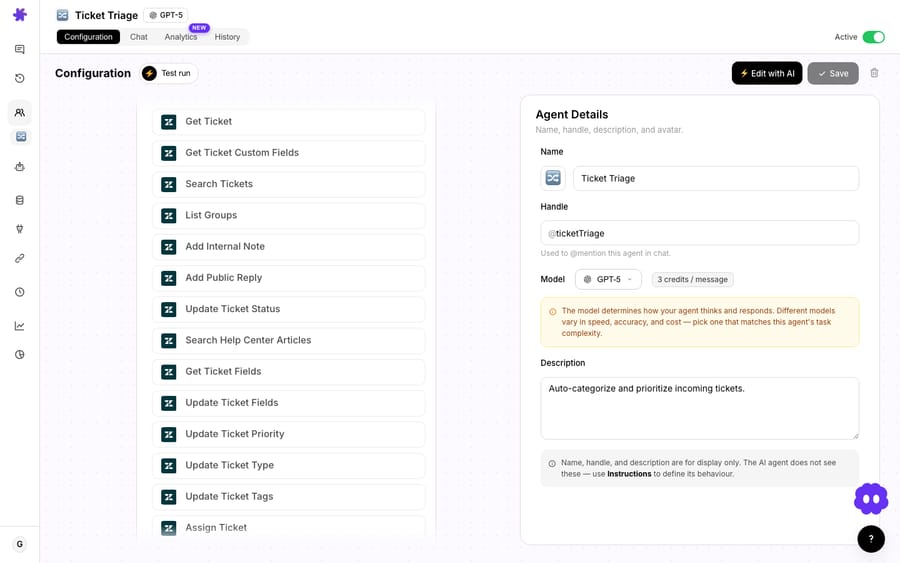
3. Tell it when to use them. The connector's built-in guidance is a good starting prompt: "When a question requires up-to-date information, search the web and return the most relevant results." In practice, be more prescriptive: tell the agent to try your own knowledge base first and only fall back to the web when internal sources come up empty, and to cite the source URL in its reply so a human can verify. That "internal first" rule is why your own knowledge connectors matter so much. If you haven't wired one up yet, our walkthrough on the Macha × Notion integration shows how to turn an existing wiki into the agent's primary source so Tavily stays the exception path. The web is useful because it's open, which is exactly why you want guardrails on it.
What support questions is live web search good for?
A few patterns where live web search earns its place on a support agent:
- Third-party and carrier status. "Is FedEx reporting delays in the Northeast right now?" The answer changes hourly and will never live in your Help Center. An agent that can check a live status page answers in one turn instead of escalating.
- Fast-moving external facts. Tax and duty rates, regulatory thresholds, currency, public pricing of a tool you integrate with: things that are true today and wrong next quarter, so you'd never hard-code them into your docs.
- Pre-sale and research questions. "Does your product work with [some app I use]?" where the answer depends on that app's current capabilities, not yours.
- Reading a specific page the customer linked. A customer pastes a competitor's spec sheet or a forum thread; Read Web Page lets the agent open and reason over it instead of guessing from the URL.
- Internal research agents. Outside the ticket queue, a Slack-based research agent that can search the web and read pages is a useful teammate for your ops or content folks.
The common thread: questions whose answers are outside your knowledge base and change over time. For anything that is in your docs, your own knowledge sources are faster, cheaper, and more on-brand, so use those first.
When should you not point your agent at the open web?
Most "just connect web search" posts skip this part.
The web is unverified by default. Your Help Center is curated; the open internet is not. An agent that pulls an answer from a random forum can confidently relay something wrong. Mitigate it with instructions: prefer official sources, always include the source URL in the reply, and for anything policy- or money-related, draft for human review rather than auto-sending. Don't let a web-search agent post public replies unsupervised on high-stakes topics.
It can drift from your voice and accuracy standards. Internal docs answer in your tone with your facts. Web results don't. Keep web search on informational questions, not on questions about your product, pricing, or policy. Those should always resolve from your own knowledge sources, never from whatever Google surfaces about you.
There's a second meter. Macha bills per ticket, so a search doesn't change what the conversation costs on our side, but every search spends a credit on your Tavily plan. It isn't huge, but a chatty agent that searches on every ticket adds up there. Scope it to where it's needed.
It's not a knowledge-base replacement. If your agent keeps searching the web for things that should be in your docs, fix your knowledge sources rather than leaning harder on Tavily. Web search is the exception path, not the main road.
How much does the Tavily integration cost?
There are two meters, and it's worth understanding both.
On the Macha side, billing is per ticket: one conversation, charged once, however many tool calls the agent makes inside it. A search-and-read sequence costs nothing on top of the ticket it happens in, and the model the agent runs on doesn't change the price either. Pricing starts at $299 a month for 750 tickets, about $0.40 each, with setup and monitoring by the Macha team included; see the pricing page for every tier. You can try the whole thing on a free trial ($50 of usage, no credit card required).
On the Tavily side, you're on your own Tavily account, since you supplied the API key. Per tavily.com/pricing and Tavily's credits documentation (checked 24 September 2026), the free Researcher plan includes 1,000 API credits a month with no card required. A Basic Search costs 1 credit and an Advanced Search costs 2, and extracting pages costs 1 credit per 5 successful basic extractions. Beyond the free allowance you can pay as you go at $0.008 a credit or take a monthly plan, priced from $30 to $500 a month (the Project plan starts at 4,000 credits a month). For most support teams the free or entry tier covers a long way, since web search should be the exception, not the default.
The two-meter reality is the main thing to remember: Macha bills you per ticket on your Macha plan; Tavily bills you per search on your Tavily plan. Budget for both.
FAQ
Do I need my own Tavily account? Yes. The connector authenticates with a Tavily API key, so you sign up with Tavily, grab a key, and paste it into Macha. Tavily's free Researcher plan, with 1,000 credits a month, is plenty for evaluating the integration.
Does the agent search the web automatically on every ticket? No, and you shouldn't want it to. Web Search is a tool the agent calls on demand when it decides it needs external, current information. Your instructions control when that happens; the sensible default is "check our own knowledge first, fall back to the web only if needed."
What's the difference between Web Search and Read Web Page? Web Search finds relevant pages for a query and returns ranked results. Read Web Page opens one specific URL and extracts its clean text. Agents often chain them: search, then read the best result.
Can it read a link a customer pasted into a ticket? Yes. That's what Read Web Page is for: the agent fetches the URL and reasons over the actual content instead of guessing from the link.
Is this Macha replacing my search engine or my help desk? Neither. Macha is the AI agent layer on top of your existing help desk (Zendesk, Freshdesk, Gorgias, Front, HubSpot or Intercom). Tavily is one connector that gives those agents live web access; see the full integrations directory for the rest.
How much does it cost? Two meters. Macha bills per ticket (one conversation, charged once, however many tool calls it takes), from $299 a month for 750 tickets. Tavily bills each search on your own Tavily plan, with 1,000 free credits a month to start and $0.008 a credit after that on pay-as-you-go. See the Macha pricing page and Tavily's pricing for current figures.
Who owns Tavily now? Nebius announced an agreement to buy Tavily in February 2026 for a reported $275 million, and Tavily's site now uses "Tavily by Nebius" branding. The API and the Macha connector work the same way.
How do you get started?
If your agents keep hitting "I don't have information on that" for questions whose answers obviously exist, just not in your docs, the Tavily integration is the fix. Connect your Tavily key, attach Web Search and Read Web Page to the right agent, tell it to check your knowledge base first and cite its sources, and you've turned a closed-book agent into one that can go look things up.
Start a free trial ($50 of usage, no credit card required), connect Tavily from the integrations directory, and read the docs for the full agent-builder walkthrough. If you're running support on Zendesk, the Macha on Zendesk overview shows how the agent layer fits on top of your existing setup.
Written by Abbas (Customer Support & AI, Macha) · Reviewed by Ankeet Guha (Co-founder & CTO) · Published 2026-06-24 · Last updated 2026-09-24.






