





 Shopify
 Stripe
 Slack
Slack Notion
 Google Workspace
 Confluence

How Do You Use Notion as a Knowledge Base for AI Support Agents?


Macha connects to Notion over OAuth and reads your wiki pages live, so support agents answer tickets from the current version of each page. Each agent gets six Notion tools and sees only the pages you scope to it.
Key takeaways
- The Macha Notion integration registers Notion automatically as a live knowledge source, so an agent reads a page's current content at answer time with no re-uploading after edits.
- Macha exposes six Notion tools to an agent: Search Notion, Get Database Schema, Query Database and Get Page for reading, plus Create Page and Update Page for writing.
- Macha's live Notion source and per-agent scope filtering shipped in the February 22, 2026 data-sources release, letting each agent see all documents or a hand-picked subset.
- Notion's API allows an average of three requests per second per connection, or about 10 a second on Business and Enterprise workspaces, with payloads capped at 1,000 blocks.
- Macha pricing starts at $299 a month for 750 tickets, about $0.40 each, and Notion reads are part of that per-ticket charge rather than a separate meter.

The Macha × Notion integration turns your Notion workspace into a live knowledge source for AI agents: you connect Notion once over OAuth, it registers automatically as a data source, and agents get six Notion tools (four read, two write) to search and quote pages while they work tickets on the helpdesk you already use (Zendesk, Freshdesk, Gorgias, Front, HubSpot or Intercom). Edit the page in Notion and the agent reads the new version on the next ticket, with no re-uploading and no stale PDFs.
| Question | Answer |
|---|---|
| How does it connect? | OAuth; Notion's consent screen controls which pages Macha can see |
| Import or live? | Live: agents read current content at answer time |
| Agent tools | Six: Search Notion, Get Database Schema, Query Database, Get Page (read); Create Page, Update Page (write) |
| Per-agent limits | Scope filtering: all documents from the source, or a hand-picked subset |
| Extra cost | None; Macha bills per ticket, from $299 a month for 750 tickets |
Macha is the agent layer that sits over your helpdesk; Notion is one of the places it gets its facts. Below: what the integration does, how to set it up, where it fits in an agent's knowledge stack, and where it doesn't.
What does the Macha Notion integration do?
When you connect Notion, Macha does two distinct things, and it's worth keeping them separate in your head because they solve different problems.
1. It exposes Notion as agent tools. The connector ships six Notion tools an agent can call mid-conversation, four read and two write:
| Tool | Type | What it does |
|---|---|---|
| Search Notion | Read | Search for pages and databases by title or content; returns the items the integration has access to, each with its real Notion URL |
| Get Database Schema | Read | Read a database's properties and their types, call this before querying so the agent knows the structure |
| Query Database | Read | Pull records from a Notion database with optional filtering and sorting |
| Get Page | Read | Retrieve a page by ID, including its properties and metadata |
| Create Page | Write | Create a new page in a Notion database |
| Update Page | Write | Update the properties of an existing Notion page |
The four read tools cover the support case: find the right doc, read it, query a database row. The two write tools (Create Page, Update Page) are why this is more than a search box: an agent can log a resolution, file a bug, or update a tracking row back into Notion in the same run. (Connect Notion from the Connectors page and Macha shows the exact toolset before you authorize.)
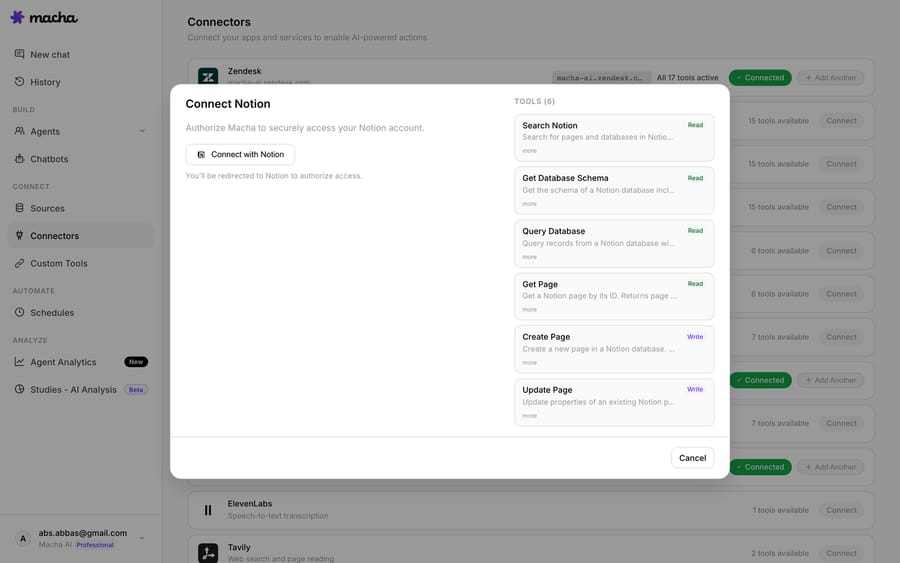
2. It registers Notion as a live data source. Connecting Notion automatically creates a knowledge source in Macha, the same way the Google Docs and Confluence connectors do. Once it's a source, you don't have to teach the agent to "go search Notion" with a tool call every time; the relevant content is part of the agent's knowledge and is retrieved on demand.
The integration authenticates over OAuth (note the "You'll be redirected to Notion to authorize access" line in the screen above). You're not pasting an internal integration token into a settings box; you authorize Macha against your Notion workspace and Notion controls exactly which pages are shared.
Why does a live Notion source matter more than an import?
The headline feature, shipped in Macha's February 22, 2026 data-sources release, is that Notion is a live connector source, not a one-time import. Macha's changelog puts it plainly: agents "read the latest content in real-time, no re-uploading when documents change."
That matters more than it sounds. The most common failure mode for an AI knowledge base isn't a wrong answer. It's a confidently outdated one. You change the refund window from 14 days to 30, update the Notion page, and a bot that imported a snapshot last quarter keeps quoting 14 to customers for weeks. With a live source, the agent reads the current page. The single source of truth stays in Notion, where your team already edits it; Macha just reads through to it.
This is also where Macha differs from Notion's own AI connectors. Those point the other way: they bring outside apps like Slack and Google Drive into Notion AI's search, and they need a Business or Enterprise workspace, per Notion's AI connectors help page. A few of them can act (Notion says its agent can post and reply in Slack once connected), but none of them works your support queue. Macha reads Notion and takes the next step on the ticket: draft the reply, set the priority, look up the order in Shopify, escalate to a human, because the wiki lookup is one tool among many the agent can chain together.
Should you upload files or connect Notion live?
Macha gives you two ways to feed an agent, and the Notion connector is one of them. The other is the upload-style knowledge base. They behave differently under the hood, and the right choice depends on how often the content changes.
- Uploaded files (PDFs, spreadsheets, docs) are processed on ingest. Small files get injected directly into the prompt; larger ones are chunked, embedded, and searched on demand. Great for things that rarely change: a policy export, a price sheet, a contract.
- Live connectors (Notion, Google Docs, Confluence) read through to the source at answer time. Best for anything your team edits regularly: runbooks, FAQs, product notes, the "current promotions" page.
If your support knowledge lives in Notion and changes every week, the live connector is the obvious pick: you maintain the doc, not a sync job. For the bigger picture of how all of this fits together, see what knowledge sources are in Macha, and note that Notion isn't the only live wiki you can wire up: the Macha × Google Workspace integration and the Confluence integration work the same way.

How do you stop an agent from reading private Notion pages?
A wiki is rarely all customer-safe. Your Notion workspace probably mixes public-facing policy with internal salary bands, security runbooks, and half-finished planning docs. Dumping all of it into a customer-facing agent is how sensitive content leaks into a reply.
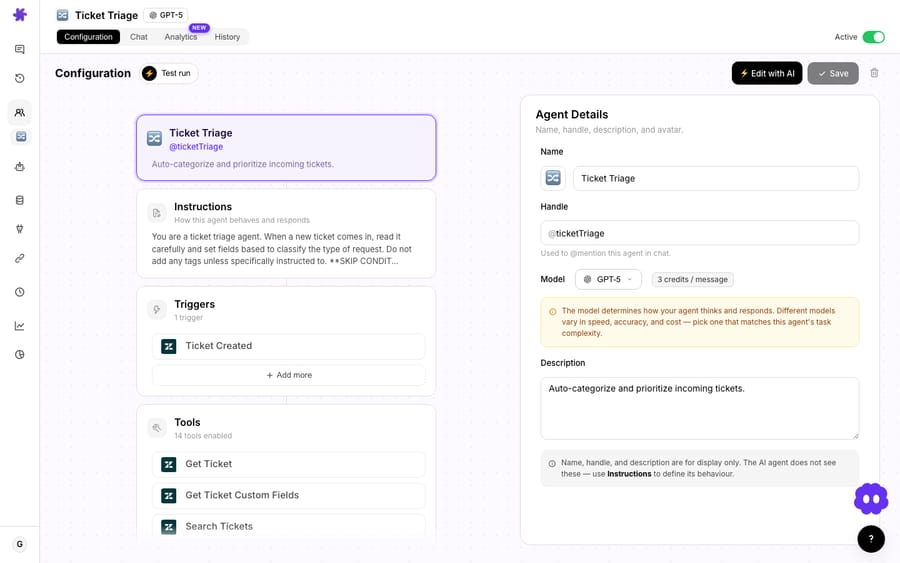
Macha's scope filtering (also part of the Feb 22 release) handles this. For each agent you choose between all documents from a source or a hand-picked subset. So your customer-facing WISMO agent can see the shipping and returns pages and nothing else, while an internal triage agent gets the full escalation runbook. Same Notion workspace, different windows onto it.
This is the practical answer to the most common objection to "AI on our wiki": it'll quote the wrong page. You decide which pages each agent can reach before it ever touches a ticket.
How do you set up the Notion integration in Macha?
The flow is short. From your Macha dashboard:
- Connect Notion from the connectors page and complete the OAuth authorization. In Notion's consent screen you select which pages and databases Macha may access, that selection is enforced by Notion, not just by Macha.
- A data source is created automatically. Connecting Notion registers it as a knowledge source, the same way Google and Confluence do, no separate "create source" step.
- Attach it to an agent and set the scope: all pages, or a hand-picked subset for that agent.
- Test it. Open the agent and ask it a question you know is answered in the wiki. Confirm it pulls the right page and quotes the current version.
If you also want the agent to search Notion dynamically (beyond the registered knowledge source; say, to look up a specific database row by status), add the Notion tools (Search Notion, Get Database Schema, Query Database) to that agent.
What does a Notion-backed agent do on a real ticket?
Here's the shape of it on a live ticket. A customer emails your Zendesk inbox: "Can I still return the boots I bought three weeks ago?"
- The trigger fires Macha's returns agent on the new ticket.
- The agent searches its Notion-backed knowledge source and reads the current returns policy page (live: if you extended the window yesterday, it sees that).
- It checks the order date via your commerce connector (Shopify/Stripe), confirms 21 days is inside the 30-day window, and drafts a reply with the return steps quoted from the wiki.
- A human approves, or (if you've set the agent to autonomous on this category) it replies directly and tags the ticket.
The Notion lookup is one link in that chain. The point of putting the agent layer on top of your helpdesk is that the wiki answer and the action happen in the same motion, in the tool your team already works in. For the deeper version of this pattern, see Macha on Zendesk and the broader integrations directory.
When shouldn't you use the Notion connector?
No integration is free of trade-offs. A few honest ones:
- Garbage in, confident garbage out. A live Notion source is only as good as the page behind it. If your wiki is contradictory or out of date, the agent will quote it faithfully and wrongly. Live sync makes fixing it instant, but it doesn't write the doc for you. Clean the customer-facing pages first.
- Notion API rate limits are real. Notion allows 180 requests per minute per connection (an average of three requests per second), or 600 a minute (about 10 a second) on Business and Enterprise workspaces, plus a shared per-workspace limit. Payloads cap at 1,000 blocks and 500KB per request. See Notion's own request limits reference. For normal support volumes this is a non-issue, but a giant, deeply-nested page is heavier to read than a tight, well-structured one. Short, well-headed pages retrieve better and answer better.
- Scope before you scale. The single biggest mistake is attaching "all pages" to a customer-facing agent on day one. Hand-pick the safe subset, prove it, then widen.
- It's a knowledge source, not a system of record. If a fact needs to be acted on (refund a charge, update a CRM field), that's a job for the relevant action tool (Stripe, your helpdesk), not the Notion read. Use Notion for what the answer is, not for doing the thing.
- If your docs barely change, an upload may be simpler. A static policy PDF uploaded as a knowledge base file is perfectly fine. The live connector earns its keep when content moves.
What does the Notion integration cost?
Connecting Notion doesn't carry a per-page fee. Like everything in Macha, the cost is per ticket, one conversation, charged once, however many pages the agent reads to answer it, from $299 a month for 750 tickets (about $0.40 each). Reading the wiki is part of that one ticket, not a separate meter, and the model you pick doesn't change the rate. Macha has one plan priced by ticket volume, and every connector and knowledge source, Notion included, is on it, along with setup and monitoring by the Macha team; see the pricing page for the tiers. New to Macha? Start a free trial ($50 of usage, no credit card required).
For reference: Notion's own AI connectors need the Business plan ($20 per member a month on Notion's pricing page, less on annual billing) or Enterprise. They're built for searching your team's tools from inside Notion, not for running a support queue.
FAQ
Does Macha import my Notion pages or read them live? Live. Notion connects as a live data source, so agents read the current content at answer time: when you edit a page in Notion, the next answer reflects it. There's no re-upload step.
Can the agent see my whole Notion workspace? Only what you allow. OAuth lets Notion control which pages Macha can access, and Macha's per-agent scope filtering lets you narrow it further, all documents from the source, or a hand-picked subset for each agent.
What can an agent actually do with Notion? Six tools: Search Notion, Get Database Schema, Query Database, and Get Page on the read side; Create Page and Update Page on the write side. Connecting Notion also registers it as a live knowledge source. Because Macha sits on top of your helpdesk, the agent can then act on what it finds, draft replies, tag tickets, call other tools, or write back into Notion itself.
How is this different from Notion's built-in AI connectors? Notion's AI connectors bring other apps into Notion AI's search and need a Business or Enterprise workspace. Macha works the other direction: it reads Notion and takes action across your connected tools, on the helpdesk your team already uses. It's an agent that answers and resolves tickets, not a search box.
What about Notion's API rate limits? Notion allows an average of three requests per second per connection, or about 10 a second on Business and Enterprise workspaces. For typical support volumes this is well within bounds; keeping pages reasonably sized keeps retrieval fast.
Which other docs sources can I connect? Google Docs and Confluence are live connectors too, and you can upload PDFs, spreadsheets, and documents as knowledge base files. Mix and match per agent.
How do you get started?
Your team already did the hard part: they wrote it down. The Macha × Notion integration just lets your agents read it on every ticket, in real time, scoped to exactly the pages each agent should see, on top of the helpdesk you already run. Connect Notion, attach it to an agent, ask it something you know is in the wiki, and watch the answer come back current.
Start a free trial ($50 of usage, no credit card required), browse the full integrations directory, or read the docs for the step-by-step setup.
Written by Abbas (Customer Support & AI, Macha) · Reviewed by Ankeet Guha (Co-founder & CTO) · Published 2026-06-24 · Last updated 2026-09-24.






