





 Shopify
 Stripe
 Slack
Slack Notion
 Google Workspace
 Confluence

What Are AI Agents for Zendesk, and How Do You Add One? (2026)


An AI agent reads a Zendesk ticket, decides what the customer needs and acts on it, where a chatbot only follows a script. You can use Zendesk's native AI agents, now included in every Suite and Support plan, or add a third-party agent from the Zendesk Marketplace.
Key takeaways
- An AI agent for Zendesk reads a ticket, works out what the customer needs and acts on its own, while a scripted chatbot only matches keywords or suggests articles.
- Zendesk's native AI agents are included in every Suite and Support plan and billed per verified resolution, at $1.50 committed according to Zendesk's pricing page.
- Zendesk's Copilot for human agents is a separate add-on at $50 per agent per month on Suite Professional and above.
- A well-built AI agent has five parts: instructions, knowledge, tools, a model, and triggers such as a new ticket, a comment, a status change or a webhook.
- Macha bills AI agents on Zendesk per ticket rather than per resolution, starting at $299 a month for up to 750 tickets, with setup by the Macha team and a dedicated success manager included, and $50 of free usage.

An AI agent for Zendesk is software that reads a ticket, works out what the customer needs, and acts on its own: it replies, tags, updates fields, looks up an order or escalates to a human. You add one in two ways: turn on Zendesk's native AI agents, which Zendesk now includes in every Suite and Support plan and bills per verified resolution, or install a third-party agent platform such as Macha from the Zendesk Marketplace and connect it with a trigger.
| Zendesk native AI agents | Third-party agent on top of Zendesk (e.g. Macha) | |
|---|---|---|
| How you get it | Included in every Suite and Support plan | Install from the Zendesk Marketplace and connect your account |
| How it's billed | Per verified resolution; $1.50 committed, $2.00 pay-as-you-go (Zendesk pricing page) | Macha: per ticket, from $299/mo for up to 750 tickets; setup done for you by the Macha team, with a dedicated success manager, included |
| Agent-assist | Copilot add-on, $50/agent/month on Suite Professional and above | Sidebar and Copilot included |
| Reach | Strongest on what lives inside Zendesk | Knowledge and actions across other tools (Shopify, Stripe, Slack, custom APIs) |
What is an AI agent, and how is it different from a chatbot?
A traditional chatbot follows a script: it matches keywords, walks a decision tree, or, like Zendesk's classic Answer Bot, suggests a help-center article and hopes the customer self-serves.
An AI agent works differently. Give it instructions and a set of tools, and it will:
- Understand the request in natural language: what the customer actually wants.
- Reason about what's needed to handle it.
- Use tools to act: look up an order, update a ticket, draft or send a reply.
- Work autonomously: run on its own when a ticket arrives, and escalate to a human when it's out of scope.
A chatbot talks; an agent does. That's why agents can resolve real tickets and automate work a scripted bot never could. (For the "what can it automate" view, see our practical guide to automating Zendesk with AI.)
What kinds of AI agents can you use with Zendesk?
1. Zendesk's native AI agents. Zendesk folded Answer Bot into its own AI agents, which work across messaging, email and voice and can take actions in connected systems. Zendesk's pricing page now says AI agents are included in every Suite and Support plan and billed per automated resolution, and lists the rate. Since 18 May 2026 only a verified resolution is billable, and each seat earns a monthly allowance of $2, $5 or $10 by plan, capped at $5,000 a year; the pricing page's plan table shows the same allowance as 5 included automated resolutions per agent a month on Support Team and Suite Team and 10 on Suite Professional. Past it, the pricing page lists $1.50 per committed resolution and $2.00 pay-as-you-go. The agent-assist Copilot is a separate $50 per agent per month on Suite Professional and above. Native agents are the most tightly integrated option and are strongest on what lives inside Zendesk.
2. Third-party AI agents on top of Zendesk. Tools like eesel, Fin and Macha install on top of Zendesk and add broader knowledge, cross-system actions and different pricing models. We compare them in the best AI agents for Zendesk; this page covers what an agent is and how to stand one up.
Update (September 2026): Salesforce completed its acquisition of Fin (the company that had already renamed itself from Intercom on May 12, 2026, before any deal was signed) on September 10, 2026, in a deal worth ~$3.6 billion, and plans to fold it into Salesforce's Agentforce. Worth weighing in any long-term Intercom/Fin decision.
What are the parts of an AI agent?
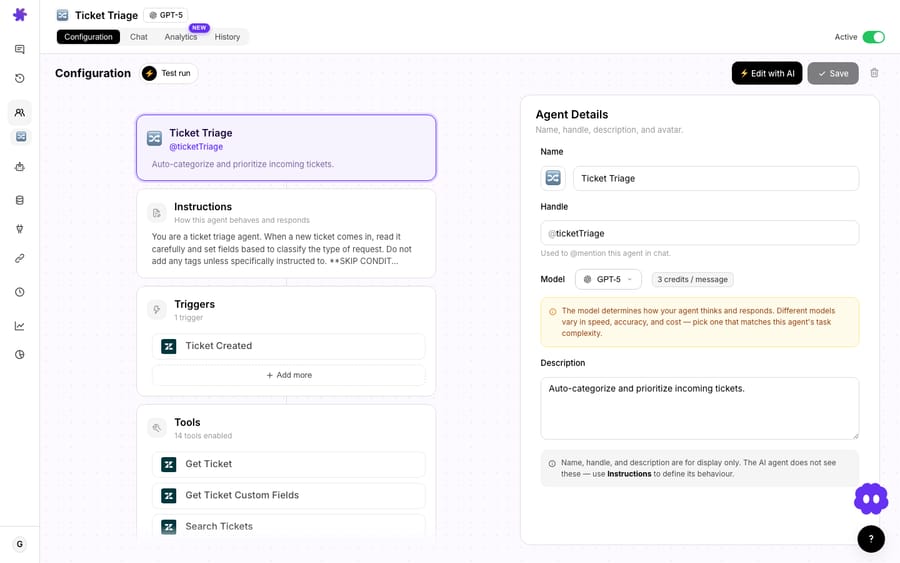
Whichever route you take, a well-built agent has five parts. Here's how they look on a platform like Macha:
- Instructions: what the agent should do, in plain English ("for order-status questions, look up the order and reply; tag billing issues and assign them to the Billing group").
- Knowledge: what it can read, such as your Zendesk Help Center plus docs you connect (Notion, Google Docs, uploaded files).
- Tools: what it's allowed to do, scoped per agent: reply, add an internal note, update status, priority, tags and custom fields, assign, plus actions in other systems (Shopify, Stripe, Slack).
- Model: the LLM behind it, for example a fast default or a stronger model for tricky cases.
- Triggers: when it runs, such as a new ticket, a new comment, a status change, a schedule or a webhook. On a trigger it runs on its own and acts immediately.
More advanced setups add sub-agents (a lead agent that hands billing or shipping questions to specialists) and custom API tools (wire any internal API into the agent).
How do you add an AI agent to Zendesk?
With Macha, the Macha team works through these steps for you on the trial and every plan. Your part is step 1 plus connecting the tools your answers come from, about 15 minutes. The steps are:
- Install and connect: add the Macha app from the Zendesk Marketplace and connect your Zendesk account.
- Build the agent: start from a template (such as Triage Agent or Refund Agent) or from scratch. Write its instructions, pick a model, and scope its tools and knowledge.
- Add knowledge: connect your Help Center and any other sources it should reference.
- Add a trigger: choose the event (for example Ticket Created) so the agent runs on its own. Add a unique tag when it fires and exclude that tag in the trigger's conditions so it can't loop on its own updates.
- Test, then go live: replay real past tickets in a simulation, start the agent on internal notes or with confirmation, and widen its scope as you build trust.
Macha is the done-for-you option: the Macha team analyzes about a month of your past tickets, builds the knowledge base and the agent, tests it on a sample of those tickets, and runs it in safe mode, with drafts as internal notes in Zendesk, until the drafts are right. It goes live in under a week. (For example recipes and guardrails, see how to automate Zendesk with AI.)
What agents do teams actually build?
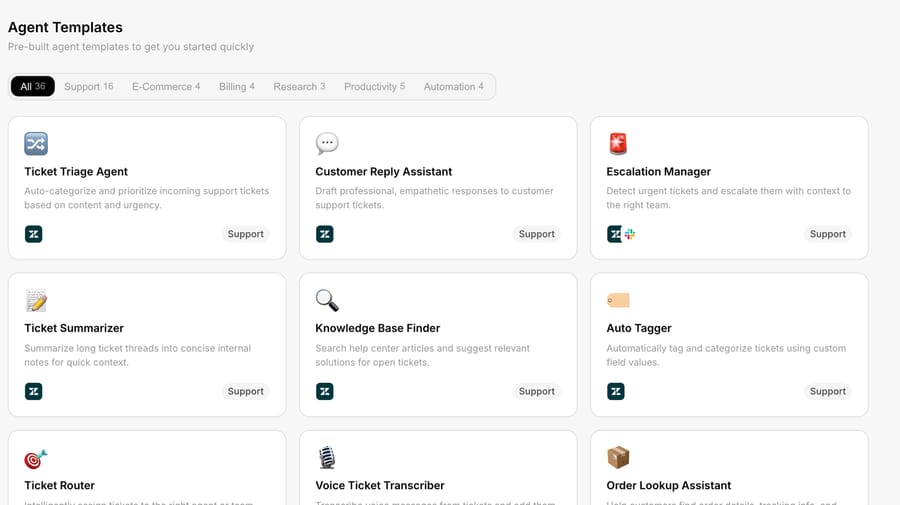
Each of these is its own agent with its own instructions, tools and trigger, and you can run several side by side:
- Ticket Triage: on every new ticket, classify topic and intent, set priority from sentiment, tag it and route it to the right group. Low-risk, so it's safe to run on its own from day one.
- Order Lookup (WISMO): when a customer asks "where's my order," the agent pulls the order from Shopify and replies with status and tracking.
- Refund Handler: issues a refund in Stripe for eligible requests, with a confirmation step so a human signs off before money moves.
- Thread Summarizer: on escalation, drops a one-paragraph summary as an internal note so the next agent catches up in seconds.
The pattern is always the same: instructions describe the job, tools let it act, and a trigger decides when it runs.
Where can an agent run?
A single agent isn't tied to one place. The same agent can:
- run autonomously on ticket triggers,
- assist a human in the Zendesk sidebar,
- answer in Slack, or
- power a website chat widget on your site or help center.
What does an AI agent for Zendesk cost?
On Zendesk's side, native AI agents come with your plan and you pay per verified resolution above your allowance, at the rate on Zendesk's pricing page ($1.50 committed, $2.00 pay-as-you-go). Because an agent handles whole conversations, not isolated steps, Macha prices per ticket: one thread with one person, charged once however many tags, summaries, lookups and replies it takes, and whichever model it runs on. It's one plan priced by volume: $299/mo for up to 750 tickets (about $0.40 each), $599 for 1,500, up to $3,999 for 10,000, custom above that. Cost tracks the volume you handle, not a meter that only counts closed tickets, and the price includes setup by the Macha team and a dedicated success manager who handles your changes: a new category, an instruction change, a new tool. You can start with $50 of free usage (about 125 tickets), no credit card required.
When is native enough, and when should you add a platform?
- Native Zendesk AI agents make sense if you want first-party only, modest volume, and everything you need lives in Zendesk.
- A third-party agent platform makes sense if you want broader knowledge, actions across your other systems, several specialized agents, and billing per ticket rather than per resolution.
Frequently asked questions
What's the difference between an AI agent and a chatbot? A chatbot follows a script and usually deflects (suggests an article). An AI agent understands the request, reasons about it, uses tools to take action, and can resolve the ticket on its own.
Does Zendesk have AI agents? Yes. Zendesk's native AI agents replaced Answer Bot and are included in every Suite and Support plan, billed per verified resolution. You can also add third-party AI agents on top of Zendesk.
How much do Zendesk's native AI agents cost? Zendesk's pricing page lists $1.50 per committed resolution and $2.00 pay-as-you-go, and each seat earns a small monthly allowance. Copilot for human agents is $50 per agent per month.
How do I add an AI agent to Zendesk? Install an AI agent platform (like Macha) from the Zendesk Marketplace, connect your account, build an agent with instructions, knowledge and tools, add a trigger, test it on past tickets and go live. With Macha the team does the build, testing and safe-mode rollout for you, included on the trial and every plan at about $0.40 a ticket, which also covers a dedicated success manager who handles your changes.
Are AI agents safe to run on their own? Yes, when scoped. You control exactly which actions an agent can take and can keep it on internal notes or require confirmation until you trust it.
Add your first AI agent to Zendesk: install the Macha app, connect your account, and the Macha team builds and tests your first agent for you. $50 of free usage, no credit card required. Start a free trial.






