





 Shopify
 Stripe
 Slack
Slack Notion
 Google Workspace
 Confluence

How Do You Set Up Order Management and Self-Service Actions in Gorgias?


Gorgias handles order self-service with two separate features: the Order Management portal, where shoppers track orders and submit requests, and AI Agent Actions, which let the AI change the order in Shopify. Both need a connected Shopify store, and only Actions execute a cancellation or address change without an agent.
Key takeaways
- Setting up Gorgias order self-service takes a Shopify connection, the Order Management portal, and AI Agent Actions enabled from AI Agent, then Actions, then See all templates.
- Clicking cancel or refund in the Gorgias Order Management portal only submits a request that an agent must still process; AI Agent Actions make the change in Shopify.
- Gorgias offers six Shopify order Action templates, and Cancel Order, Edit Shipping Address and Remove Order Item all require the order to be unfulfilled.
- Gorgias says the Order Management portal can automate up to 30% of live Chat ticket volume, mostly by answering where-is-my-order questions.
- Gorgias Order Management works only on Shopify stores and is not compatible with BigCommerce or Magento 2.

To set up order self-service in Gorgias, connect a Shopify store, turn on the Order Management portal (Track, Cancel, Return, Report order issue), then enable AI Agent Actions from AI Agent → Actions → See all templates so the AI can actually change orders in Shopify. The portal alone only files cancel and refund requests for an agent to process; the six Shopify Action templates are what execute the change.
| Feature | What it does | Where you enable it | Requirements |
|---|---|---|---|
| Order Management portal | Shopper tracks an order and submits cancel, return or issue requests | AI Agent / self-service settings; shown in Chat, Help Center or Contact Form | Shopify store, active AI Agent subscription |
| AI Agent Actions | AI makes the change in Shopify (cancel, edit address, reship and more) | AI Agent → Actions → See all templates | Shopify connection, Admin or Lead permissions in Gorgias |
What are the two things people mean by "order management"?
Before you touch a setting, separate the two features that both get called "order management," because they behave very differently.
The Order Management portal is a self-service surface shoppers reach through Chat, the Help Center or a Contact Form. Per Gorgias's Order Management 101 documentation, it gives a customer a timeline of order events and shipping information synced from Shopify, plus buttons to cancel, return or report an order issue. The catch, stated plainly in the same doc, is that clicking cancel or refund "will only submit a request and an agent will still need to intervene". The portal is excellent at tracking; for changes it mostly routes a well-formed request to your team.
AI Agent Actions close that gap. They let the AI Agent make the change in Shopify (cancel an unfulfilled order and restock it, edit a shipping address, reship a lost parcel) rather than filing a request. Both features depend on a connected Shopify store: Order Management is "not compatible with BigCommerce or Magento 2," and it needs an active AI Agent subscription. If you are still getting oriented on the platform, what is Gorgias covers the fundamentals.
Step 1: How do you connect Shopify and clear the gate?
Everything below sits behind a Shopify connection. Order Actions live inside the AI Agent module, and on an account with no store connected, that module shows a "connect a store" gate instead of the action templates.
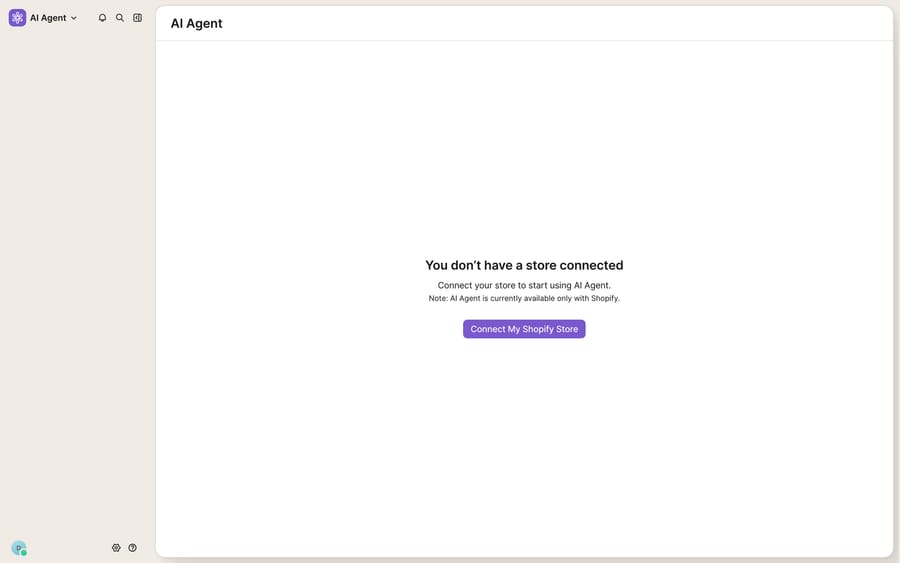
- In Gorgias, open Settings → Integrations → Shopify and connect (or reconnect) your store.
- If you connected Shopify before subscribing to AI Agent, update the app permissions so AI Agent can read the order data it needs. Stale permissions are a common reason actions fail quietly.
- Return to the AI Agent module. Once a store is attached, the gate is replaced by the Actions screens used in the next steps.
Step 2: How do you turn on the Order Management portal?
With Shopify connected, enable the tracking-and-requests portal so shoppers can serve themselves on the easy questions. Gorgias says Order Management can automate up to 30% of your live Chat ticket volume, mostly from "where's my order" deflection.
- Enable Order Management in your AI Agent / self-service settings and choose which of the four functions to show: Track, Cancel, Return, Report order issue.
- Shoppers log in with a one-time password (a 6-digit code sent by email or SMS) before they see any order data, so order details never reach an unverified visitor.
- For Report order issue, Gorgias tailors the list of selectable issues to each order, so a delivered order and an in-transit order offer different options.
- The return flow works with or without Loop Returns. If you run Loop, connect it so return requests land in your existing returns workflow instead of a raw ticket.
The portal usually renders inside your live chat widget, so it pairs naturally with your Gorgias Chat setup and any Flows you use to greet shoppers.
Step 3: How do you enable AI Agent order Actions?
Actions are where the AI stops filing requests and starts making changes. Per AI Agent Actions: make changes to Shopify orders, you enable them from a template gallery, and you need Admin or Lead permissions in Gorgias.
Setup path: dropdown menu → AI Agent → Actions → See all templates → pick a template → choose Shopify as the app → Continue → Create and Enable.
The six Shopify order Actions and their built-in conditions:
| Action | Eligibility condition | What it does |
|---|---|---|
| Cancel Order | Order must be unfulfilled | Cancels and restocks; issues a full refund; sends a confirmation email |
| Edit Shipping Address | Order must be unfulfilled; asks the shopper to confirm the address | Updates the address in Shopify |
| Remove Order Item | Order must be unfulfilled; confirms with the shopper | Removes an item, restocks and refunds it; sends a confirmation email |
| Replace Order Item | Replacement item must be in stock | Swaps an item; refunds the difference if the amount drops, hands over to your team if the amount increases |
| Reship Order for Free | Order lost in transit or arrived damaged | Duplicates the order at no charge; sends a confirmation email |
| Add to Order Note | None | Adds a note to the Shopify order record |
Notice the pattern on the three actions that change an order's contents or destination: the "unfulfilled" guardrail. Gorgias will not let the AI cancel, re-address or remove items from an order that has already shipped, which blocks the most expensive class of mistake.
Step 4: What eligibility rules and guardrails should you set?
The templates ship with those built-in conditions, and you add your own business rules on top. Gorgias's AI Agent guardrails guidance puts Guidance at the top of AI Agent's knowledge hierarchy and uses handover topics to send chosen conversations straight to your team. Two levers matter most:
- Eligibility rules. Write your policy into Guidance so the AI only acts inside it. For example, you might allow AI-handled returns only for orders under $200 and within 14 days; outside that window the AI collects the request and hands off. These numbers are an illustration, not a Gorgias default: use your own return policy.
- Handover for anything unclear. For irreversible actions like cancellation, tell the AI to hand the ticket to a human whenever the shopper's intent is ambiguous (for example, it is not clear they want a full cancellation) instead of acting.
Roll out conservatively: enable Track and read-only lookups for everyone, turn on Cancel Order and Edit Shipping Address with tight rules, and watch the handover rate for a week before loosening. If you also run deterministic Gorgias Rules, keep them for routing and tagging; they and Actions do different jobs.
Where do Gorgias's native order tools stop?
Gorgias's native order tooling is strong for a Shopify-first store, and the unfulfilled guardrail is the kind of safe default you want. The boundaries are still real.
First, it is Shopify-only. On BigCommerce, Magento 2, a headless stack or a custom order system, the portal and Actions do not apply; Gorgias states the incompatibility outright. Second, the portal's cancel and return buttons do not cancel or refund on their own. They submit a request an agent must still process, so for those flows the self-service is closer to self-ticketing. Third, Actions cover a fixed catalogue of six operations, and the ones that change an order only work before fulfillment. Anything past the fulfillment line, or any workflow Gorgias did not ship a template for (a warranty registration, a subscription swap, a 3PL status check, a loyalty-points credit), falls back to a human.
This is where an AI agent layer fits, and it helps to understand the wider category of AI agents for customer service before you pick one. Macha is one such layer, and its Gorgias connector is live. It runs on top of the Gorgias you already use and does not replace your help desk, your Order Management portal or your AI Agent Actions. Because Macha reaches any REST endpoint through a custom tool, an agent is not limited to Shopify or to unfulfilled orders: it can check a fulfillment status in your 3PL, look up a subscription in Recharge or call your own order service, then reply with that live data inside the same Gorgias ticket. If you would rather build the lookups yourself, the Gorgias API is the foundation those tools sit on. Macha bills per ticket (one conversation, charged once however many lookups it takes), starting at $299 a month for up to 750 tickets; see the pricing page.
The clean division of labour: let Gorgias own the Shopify-native track, cancel and return flows and the unfulfilled-order guardrails, and add an agent on top for order questions and actions that live outside Shopify or outside the six templates.
FAQ
Where do I set up Order Management and order Actions in Gorgias? The Order Management portal is enabled in your AI Agent / self-service settings. Order Actions live under the dropdown menu → AI Agent → Actions → See all templates, where you pick a template, choose Shopify, click Continue and select Create and Enable. Both need a connected Shopify store; the portal also needs an active AI Agent subscription.
Does the Order Management portal actually cancel or refund an order? Not on its own. Per Gorgias, clicking the cancel or refund button in the portal only submits a request, and an agent still has to process it. For hands-off changes, enable AI Agent Actions, which make the change in Shopify directly on eligible orders.
What eligibility rules and guardrails can I set? Each template has built-in conditions: Cancel Order, Edit Shipping Address and Remove Order Item need an unfulfilled order, and Replace Order Item hands over if the order amount goes up. On top of that you write your own rules in Guidance (for example, returns only under $200 and within 14 days) and use handover topics for anything ambiguous.
Does Gorgias order management work without Shopify? No. Gorgias states Order Management is only supported on Shopify stores and is not compatible with BigCommerce or Magento 2, and the order Actions are Shopify templates. For other stacks you need a custom lookup, through the Gorgias API or an AI layer that can call your own systems.
Can I add AI order actions beyond Shopify without replacing Gorgias? Yes. An AI agent layer like Macha connects to Gorgias as a live connector and runs on top of your existing help desk. Through custom tools it can call any REST API, such as your 3PL, subscription platform or custom order system, so lookups and actions are not limited to Shopify or to unfulfilled orders, while Gorgias stays the system of record.
Ready to answer order questions that live outside Shopify's happy path? Start a free trial of Macha and connect it to your Gorgias in minutes.






