



 Intercom
 Shopify
 Stripe
 Slack
Slack Notion
 Google Workspace
 Confluence

How to Use the Gorgias API (2026): Auth, Rate Limits, Webhooks and Retention


The Gorgias REST API sits at your own subdomain, authenticates with HTTP Basic using your account email and an API key, and pages with cursors. Since 8 September 2026 it also returns null for email bodies older than 30 days, so archive jobs built before then need a change.
Key takeaways
- The Gorgias REST API authenticates with HTTP Basic using the account email and an API key for private apps, while public apps listed for other accounts must use OAuth2.
- Gorgias rate limits API key integrations to 40 requests in a 20-second window and OAuth2 apps to 80, and Enterprise accounts get the same counts in a 10-second window.
- Gorgias HTTP integrations time out after 5 seconds, retry up to 3 times at 10, 20 and 40 seconds, and switch off after 500 consecutive failures.
- Since 8 September 2026, Gorgias archives email message bodies 30 days after sending or receipt and returns null in body_html and body_text when a stripped version exists.
- Gorgias keeps audit log events for 12 months, so GET /api/events returns only the last year and older event IDs return a 404.

To use the Gorgias API, call https://your-subdomain.gorgias.com/api/ with HTTP Basic auth (your account email as the username, an API key from Settings › Account › REST API as the password), page through results with next_cursor, and stay under 40 requests per 20 seconds on an API key or 80 on OAuth2. The part that breaks integrations in 2026 is retention: since 8 September 2026, email bodies older than 30 days come back as null.
| Question | Answer (Gorgias docs, checked 24 September 2026) |
|---|---|
| Base URL | https://acme.gorgias.com/api/, no version segment |
| Auth | HTTP Basic (email + API key) for private apps; OAuth2 required for public apps |
| Pagination | Cursor-based, limit defaults to 30; offset pagination deprecated |
| Rate limits | 40 per 20 s (API key), 80 per 20 s (OAuth2), same counts per 10 s on Enterprise |
| Webhooks | HTTP integrations, 5-second timeout, up to 3 retries, auto-disabled after 500 consecutive failures |
| Retention | Email bodies archived after 30 days (from 8 September 2026); audit log events kept 12 months |
Everything here is documented rather than measured. We have no Gorgias tenant, so we made no calls against a live account. Every figure is cited to Gorgias' own developer docs, help center or pricing page, first checked on 20 September 2026 and re-checked against the developer docs on 24 September 2026.
What is the Gorgias API base URL, and how do I authenticate?
Your base URL is your subdomain plus /api/, so an account at acme.gorgias.com reaches tickets at https://acme.gorgias.com/api/tickets. The documented resource paths carry no version segment.
Credentials live at Settings icon (bottom-left) › Account › REST API, under API Access & Credentials, which shows the Base API URL, your Username (your account email) and your Password (the API key). Only the account owner and admins can see or create one (Access your Gorgias REST API credentials). Gorgias is blunt about what the key is worth: it "grants full access to your account's data", and resetting it invalidates the old one immediately, which breaks anything still using it.
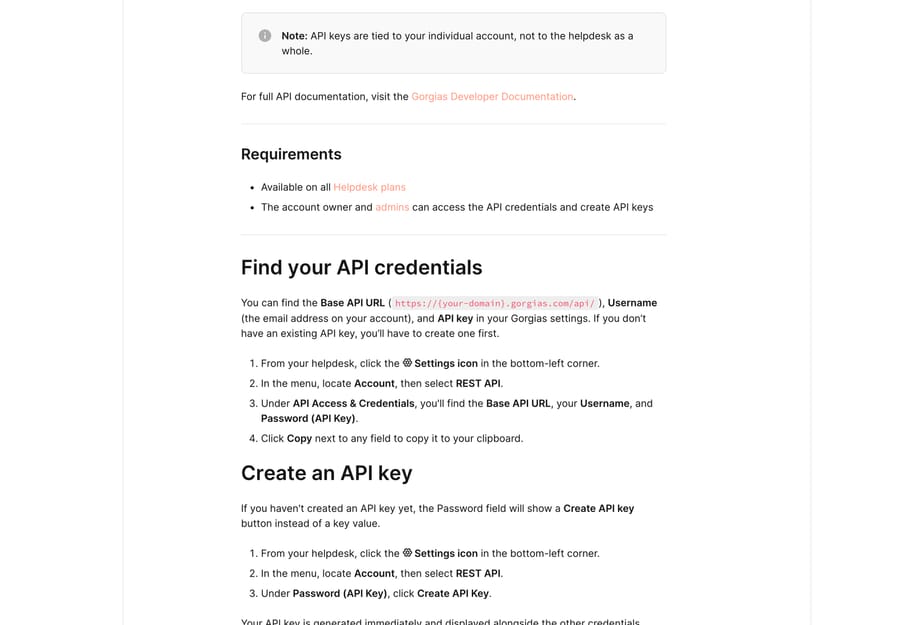
Authentication has two modes and the choice is made for you by what you are building. A private app uses the API key over HTTP Basic, with your email as the username. A public app, meaning one you list for other Gorgias accounts, must use OAuth2. Our step-by-step for finding the key is how to find your Gorgias API key.
curl -u '[email protected]:YOUR_API_KEY' \
  -H 'Accept: application/json' \
  'https://acme.gorgias.com/api/tickets?limit=5'
How do I create a ticket through the Gorgias API?
A ticket in Gorgias cannot exist without a message, so messages is required on POST /api/tickets. Which fields inside it are required depends on the channel, and the channels Gorgias documents for API ticket creation include api, email, chat, phone and sms.
curl -X POST -u '[email protected]:YOUR_API_KEY' \
  -H 'Content-Type: application/json' \
  'https://acme.gorgias.com/api/tickets' \
  -d '{
    "channel": "api",
    "from_agent": false,
    "messages": [{
      "channel": "api",
      "via": "api",
      "from_agent": false,
      "sender": {"email": "[email protected]"},
      "body_text": "Where is my order?"
    }]
  }'
One more constraint, added in a changelog rather than the reference: ticket subject is capped at 998 characters, and a longer one returns a 400 (Limit length of ticket subject).
How does Gorgias API pagination work?
List endpoints take cursor, limit and order_by, and return data, object, uri and a meta object holding prev_cursor and next_cursor (Pagination). limit defaults to 30, and the ticket endpoint's own schema caps it at 100.
{
  "data": [],
  "object": "list",
  "uri": "/api/macros",
  "meta": { "prev_cursor": null, "next_cursor": "WyJuZXh0IiwgMjksIDkyOV0=" }
}
Cursor pagination replaced offset pagination, so any script you inherited that walks page= numbers is running on a deprecated interface. Follow next_cursor until it comes back null, and don't store cursors between runs.
What are the Gorgias API rate limits?
Gorgias rate-limits with a leaky bucket, per account, and the numbers depend on how you authenticated (Rate Limits):
| Caller | Limit |
|---|---|
| OAuth2 apps | 80 requests in a 20-second window |
| API key integrations | 40 requests in a 20-second window |
| Enterprise accounts | The same counts in a 10-second window |
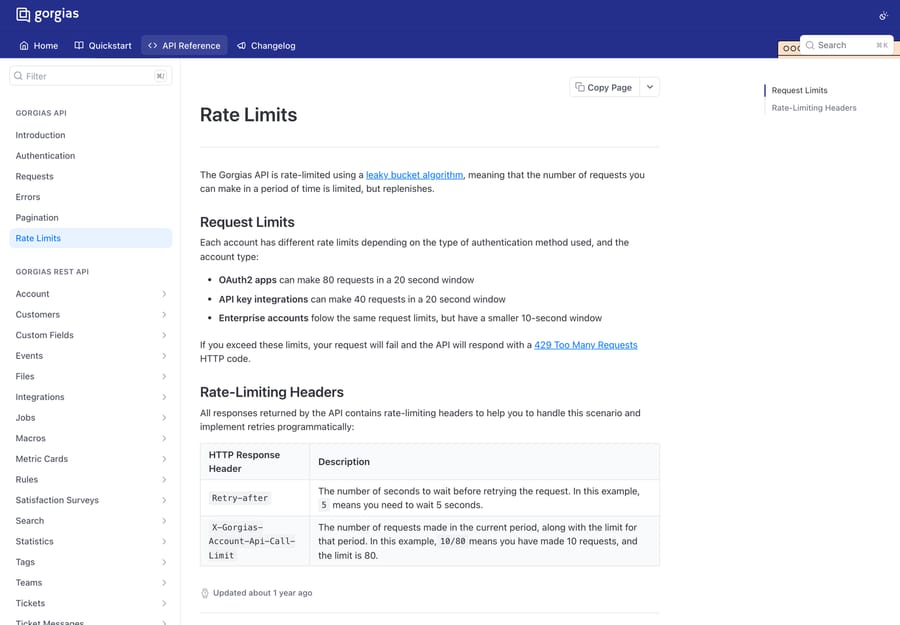
Two headers come back on every response. Retry-after gives the seconds to wait, and X-Gorgias-Account-Api-Call-Limit reads like 10/80, meaning ten requests made against a limit of eighty. Over the limit you get a 429.
The Enterprise row is worth doing the arithmetic on, because Gorgias states it two different ways. Forty requests in a ten-second window is four requests a second, which matches the line we saw in the Enterprise panel of Gorgias' pricing page on 20 September 2026: "Unlimited Help Centers, API at 4 requests per second". The two sources agreed then, and the practical read for everyone else is two requests a second on an API key, four on OAuth2.
That gap between 40 and 80 is not arbitrary, and the incentive behind it is easy to read. OAuth2 is what Gorgias requires for public apps, so the faster lane is optimized for integrations that went through app review, and the slower one is what's left for scripts nobody at Gorgias has seen. If you are building something that needs throughput and you were planning to hold it together with an API key, the limit is telling you which path Gorgias wants you on.
Does Gorgias have webhooks, and what happens when your endpoint is down?
Gorgias' outbound webhooks are called HTTP integrations, and they live at Settings icon › Account › HTTP integration › Manage › Add HTTP integration. They are on all Helpdesk plans, and the account owner and admins manage them (HTTP Integrations).
The trigger events are ticket created, ticket updated, ticket self unsnoozed, ticket message created and ticket message failed, plus ticket assignment updated and ticket status updated, which can't be combined with the other triggers. You can POST, PUT or DELETE, as application/json or application/x-www-form-urlencoded, and Gorgias template variables written in double curly braces, such as ticket.customer.email, work in both the URL and the body.
The delivery behavior is the part worth writing on a wall before you build anything on it:
- Every request has a 5-second timeout.
- If the endpoint can't be reached at all, Gorgias retries whatever your auth method.
- If the endpoint accepts the connection but doesn't answer within 5 seconds, Gorgias retries only for OAuth2 integrations. Header-based auth gets no retry.
- If the endpoint returns an error status such as 429 or 500, Gorgias doesn't retry at all, for either auth method.
- A retry runs up to 3 times with exponential backoff at 10, 20 and 40 seconds.
- After 500 consecutive failures, Gorgias disables the integration automatically. One successful delivery resets the counter to zero.
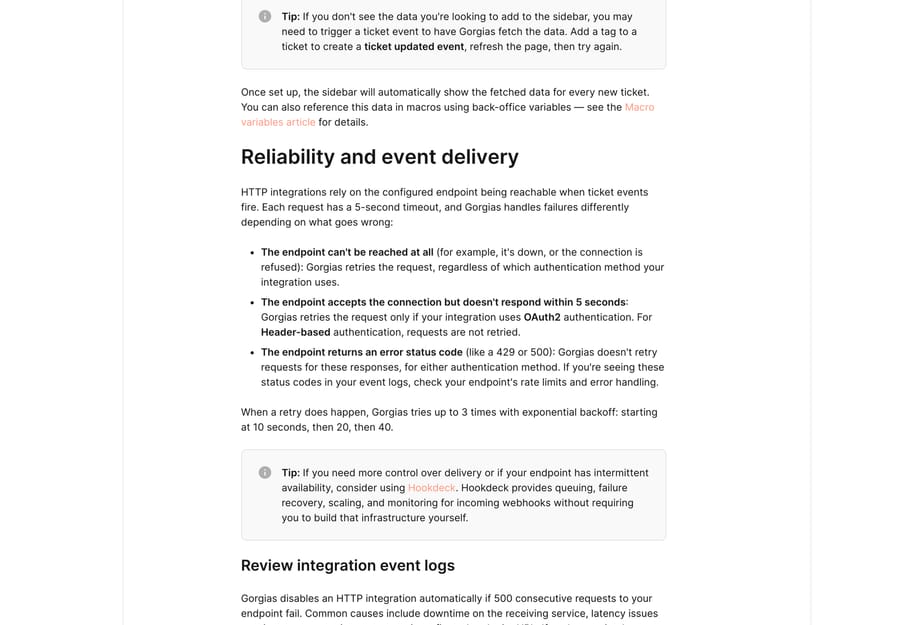
Read that list as a design brief. An endpoint that responds 202 in under a second and does the work asynchronously is the only shape that survives it, because a slow-but-successful handler on header-based auth loses the event with no retry and no error. Our longer piece on the event payloads is Gorgias webhooks explained, and the app-by-app view is in best Gorgias integrations.
Why does the Gorgias API return null message bodies in 2026?
Three changelog entries change what the API returns, and none of them will break a request. They will just hand you nulls.
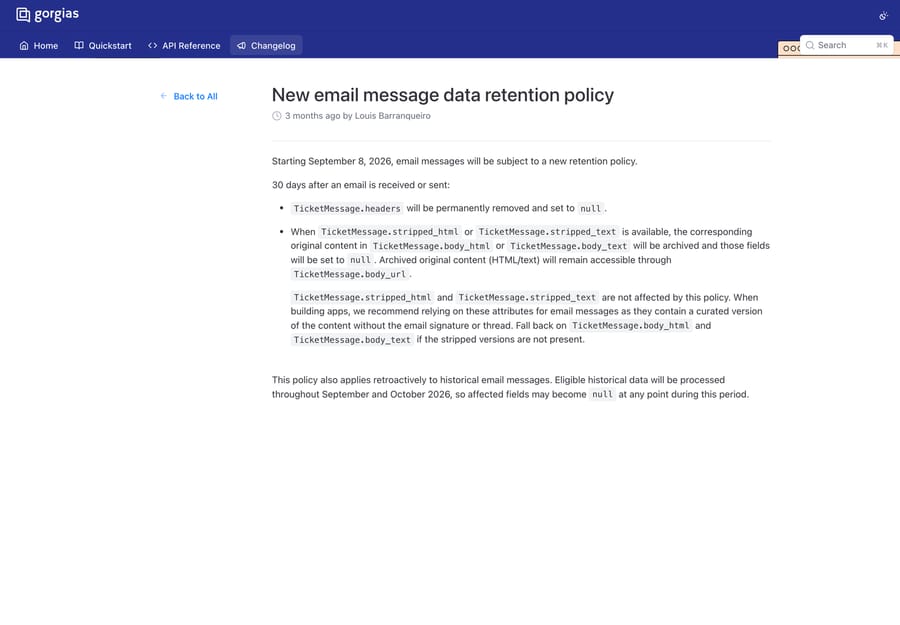
Email message bodies, from 8 September 2026. Thirty days after an email is sent or received, TicketMessage.headers is permanently removed and set to null. Where stripped_html or stripped_text exists, the original body_html or body_text is archived and set to null, and the archived original stays reachable through TicketMessage.body_url. Gorgias' own advice is to build on the stripped fields, which hold a curated version without the signature or the quoted thread, and to fall back to the body fields only when the stripped ones are absent. The policy applies retroactively, with historical data processed through September and October 2026 (New email message data retention policy).
Audit log events, from 25 February 2026. Events are kept for 12 months. GET /api/events returns only the last 12 months, GET /api/events/:id returns a 404 for anything older, and the deprecated Ticket.events attribute is trimmed the same way (Audit log events retention limited to 12 months).
Ticket custom fields. Updating them has replace-all semantics: the request body must contain every value the ticket should end up with, and any field with a current value that you leave out is deleted. Gorgias documents the safe pattern as GET /api/tickets/{ticket_id}/custom-fields, merge, then send the full list back. Some fields, including AI Agent Outcome and AI Intent, are system-managed and can only be deleted by Gorgias' internal apps.
Put together, these change what "archive our tickets with the API" means. A nightly job that has been storing body_html has been storing nulls since September on anything older than a month, and nobody gets an error about it. If your reason for touching the API at all is to keep a copy of your history, read how to export data from Gorgias alongside this, because the CSV export has its own gap: it carries ticket metadata without message bodies.
How can I read the Gorgias API docs faster?
Gorgias publishes a machine-readable index at developers.gorgias.com/llms.txt, and every documentation page has a markdown version if you append .md to its URL. That is the quickest way to diff the API surface between two dates, and it is how we checked the changelog entries above without clicking through a rendered site. Gorgias also warns that anything undocumented is off-limits: resources, attributes and operations not in the documentation "should not be used", because they are reserved for internal use and can change without notice.
When should you use an AI agent layer instead of the API?
The API is the right tool for moving records, syncing systems and building a widget your agents read. It is the wrong tool for the job people most often try to use it for, which is writing a script that decides what a ticket means and what to say back. That work ends up as a growing pile of keyword conditions that nobody wants to own.
Macha is an AI agent layer that runs on top of the help desk a team already uses, Gorgias included, and it never replaces the help desk. It suits teams who have already written the integration and found that the hard part was the reading, not the plumbing, and it is the wrong fit if what you actually need is a nightly data sync. One plan, priced on monthly ticket volume from $299 a month for 750 tickets, about $0.40 a ticket at every tier, setup and monitoring by the Macha team included, and a $50 free-usage trial with no credit card. See Macha on Gorgias or the tiers at /pricing.
Frequently asked questions
What is the Gorgias API base URL? Your own subdomain plus /api/, so an account at acme.gorgias.com reaches tickets at https://acme.gorgias.com/api/tickets. The documented paths carry no version segment, and your exact Base API URL is printed on the REST API credentials screen.
Where do I find my Gorgias API key? Settings icon at the bottom left, then Account › REST API, under API Access & Credentials. It shows the Base API URL, your Username (your account email) and your Password (the API key). Only the account owner and admins can access or create one, and resetting the key invalidates the old one immediately.
How does Gorgias API authentication work? Private apps use HTTP Basic: your account email is the username and the API key is the password. Public apps, the kind listed for other Gorgias accounts, must use OAuth2.
What are the Gorgias API rate limits? A leaky bucket per account: 80 requests in a 20-second window for OAuth2 apps, 40 in a 20-second window for API key integrations, and the same counts in a 10-second window on Enterprise, which works out to the 4 requests per second printed on Gorgias' pricing page. Over the limit you get a 429, with Retry-after and X-Gorgias-Account-Api-Call-Limit headers to work from.
How do I paginate Gorgias API results? With cursors. Pass limit (default 30, capped at 100 on tickets) and follow meta.next_cursor back as the cursor parameter until it returns null. Offset pagination is deprecated, so a script that walks page numbers is on an old interface.
Can I create a Gorgias ticket without a message? No. A ticket can't exist without a message, so the messages array is required on POST /api/tickets, and which fields inside it are required depends on the channel you pick.
Does Gorgias have webhooks? Yes, under the name HTTP integrations, at Settings › Account › HTTP integration. They fire on ticket created, ticket updated, ticket self unsnoozed, ticket message created and ticket message failed, plus ticket assignment updated and ticket status updated, which are mutually exclusive with the other triggers.
Why did my Gorgias HTTP integration turn itself off? Gorgias disables an HTTP integration automatically after 500 consecutive failed requests. Each request has a 5-second timeout, retries depend on your auth method, a single success resets the count, and an endpoint that answers with an error status is never retried, so a slow or erroring endpoint burns through that budget faster than it looks.
Why are message bodies empty in my Gorgias API responses? Because of the retention policy that took effect on 8 September 2026. Thirty days after an email is sent or received, headers are removed and, where a stripped version exists, body_html and body_text are archived and set to null, with the original reachable through body_url. Build on stripped_html and stripped_text instead.
Sources:
- Access your Gorgias REST API credentials: credentials path, base URL, role gate, key warnings
- Authentication: private app API key versus OAuth2 for public apps
- Pagination: cursor parameters, response shape, the replaced offset pagination
- Rate Limits: the 80/40 limits, Enterprise window, 429 and the two headers
- Gorgias pricing: the Enterprise "API at 4 requests per second" line, seen 20 September 2026 (not re-confirmed on 24 September)
- HTTP Integrations: path, trigger events, timeout, retry rules, auto-disable threshold
- New email message data retention policy: the 30-day body archival and the stripped-field advice
- Audit log events retention limited to 12 months: the events cutoff and the 404 behavior
- Limit length of ticket subject: the 998-character cap
- Create a ticket using API: the required messages array and per-channel fields
Add AI agents to your Gorgias
Macha reads the ticket, drafts the reply and takes the action, inside the Gorgias you already run.





