





 Shopify
 Stripe
 Slack
Slack Notion
 Google Workspace
 Confluence

How Do You Draft Ticket Replies from Google Docs with AI?


Most support teams keep their real answers in internal Google Docs: the API reference, the SLA matrix, the returns process someone wrote after a bad week. A Macha agent can read the ticket, pull the right doc and leave a sourced draft as an internal note, so the human only reviews and sends.
Key takeaways
- Macha drafts ticket replies from Google Docs by reading the ticket, fetching the relevant doc with Read Google Doc, and posting a sourced draft as an internal note for review.
- Macha offers two Google Docs patterns: Read Google Doc fetches one document live at request time, while Sync Docs to Knowledge indexes many docs so the agent can search them.
- A Macha drafting agent given Add Internal Note but no public-reply tool cannot send anything to the customer without a human approving the draft.
- Gemini in Google Docs can reference other Drive files, but it cannot see the support ticket or post a draft into the help desk.
- Macha pricing starts at $299 a month for 750 tickets, about $0.40 per ticket, charged once per conversation however many documents the agent reads.

To draft ticket replies from Google Docs, connect Google Workspace to Macha, give an agent the Read Google Doc tool (or sync your Docs as a knowledge source) plus Add Internal Note, and it reads each ticket, pulls the relevant doc and posts a sourced draft as an internal note for a human to review and send. Macha sits on top of the help desk you already use (Zendesk, Freshdesk, Gorgias, Front, HubSpot or Intercom), so nothing moves out of Google or your help desk.
The job it removes is the hunt. The doc is three folders deep, the section you need is halfway down, and you copy, paste and rephrase under a clock. Multiply that by a queue and you've lost an afternoon to retrieval, not to thinking. The agent can also cross-check Notion or Confluence before it drafts. You keep the judgment; the agent does the retrieval.
What does the Google Docs drafting workflow look like?
The shape of this use case is simple and it maps directly to one of Macha's prebuilt use-case templates:
| Step | What happens | Tool |
|---|---|---|
| Trigger | A ticket is created (or tagged for help) | Zendesk / Freshdesk |
| Read | Agent reads the full ticket and conversation | Get Ticket |
| Retrieve | Agent finds and reads the relevant Google Doc | Read Google Doc |
| Cross-check | (Optional) searches Notion/Confluence for related context | Search Pages |
| Draft | Writes a grounded reply as an internal note for review | Add Internal Note |
The customer-facing send stays with a human. The agent does everything up to that line — reads, retrieves, reasons, and drafts — so the agent's job shrinks to read the draft, tweak a sentence, hit send.
How does Macha read your Google Docs?
Connecting Google Workspace is an OAuth flow: you authorize once from the connectors screen, with no API keys to manage. Once it's live, your agents get three Google tools: Read Google Doc, Read Google Sheet, and Sync Docs to Knowledge. For reply drafting, the first and third matter most, and they represent two genuinely different patterns.

Pattern 1: read a specific doc on demand
The Read Google Doc tool fetches the full content of a document by its ID or URL, live, at the moment the agent needs it. This is the right pattern when you have a small set of canonical documents and you want the latest text every time — the API reference that engineering edits weekly, a pricing doc that changes mid-quarter. The agent reasons over the real, current document rather than a cached copy.
You can hand the agent specific docs (selected through the Google Picker) or let it choose from the ones you've made available. Either way, the content is read at request time, so an edit someone made this morning is already reflected in this afternoon's drafts.

Pattern 2: sync Docs as a live knowledge source
The second pattern is knowledge sync. Instead of pointing the agent at a single doc, you sync a set of Google Docs into Macha as a live knowledge source — they're indexed and kept in sync, so the agent can search across all of them semantically and pull the most relevant passage without you naming the file.
This is the better fit when the answer could live in any of dozens of docs and you don't know in advance which one. The agent searches, finds the relevant section across your synced docs, and grounds the draft on it. Because it's live sync, updates to the source docs flow through — you're not re-uploading PDFs every time policy changes.
Rule of thumb: a handful of canonical, frequently-edited docs → Read Google Doc on demand. A large, sprawling, "it's in there somewhere" library → sync to knowledge and let search do the work. Plenty of teams use both: one or two pinned docs read live, plus a synced knowledge base for everything else.
Why bother with a dedicated agent when Google Docs has Gemini built in? Gemini in Docs can now pull in other Drive files: you @-mention a file or add it as a source and it writes from that content. What it can't do is see the ticket, check your Notion wiki against it, or post a draft into your help desk. The value here is connecting the ticket to the right doc to a draft, inside the help desk, which a writing assistant inside Docs doesn't do.
How do you build the drafting agent?
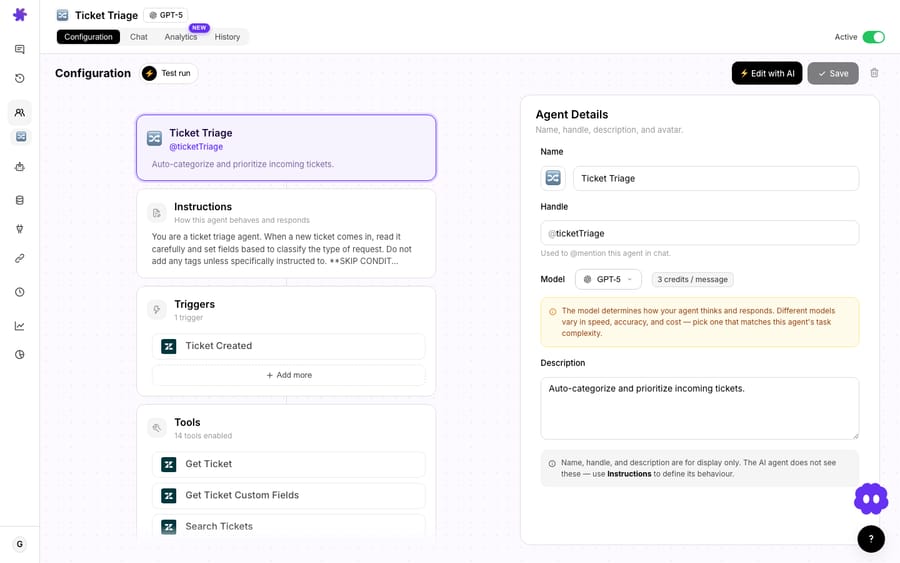
You don't script this workflow step by step. You describe the job and give the agent the tools and knowledge to do it. A practical configuration:
- Connect Google Workspace and your helpdesk (Zendesk shown here). Optionally connect Notion or Confluence if your context is spread across them.
- Knowledge: sync the Google Docs the agent should draw on, or pin specific docs for the Read Google Doc tool.
- Tools: give the agent Get Ticket, Read Google Doc (and/or knowledge search), and Add Internal Note. Crucially, don't grant a public-reply tool if you want every answer reviewed. Capability gating is your safety rail.
- Instructions: tell it to read the full thread, find the supporting doc, draft a reply in your brand voice, and cite which doc it used so the reviewing agent can verify in one click.
- Model: pick a model per the speed/quality trade-off you want. It doesn't change what you pay: Macha bills per ticket, one conversation charged once, whichever model runs the agent. So put a stronger model on a drafting agent that reasons over long docs, and pick whatever is fast enough for high-volume triage.
That instruction to cite the source doc is the highest-leverage line in the whole config. A draft that ends with "(based on: API Reference v4, 'Rate Limits' section)" turns review from "do I trust this?" into "does that section say what the draft claims?" — a five-second check instead of a fresh investigation.
What does a drafted reply look like?
Here's the template's own scenario, which is a good one because it's exactly the kind of ticket that can't be answered from a help-center FAQ — it needs the real internal reference.
The ticket: "A customer is asking about our API rate limits and pricing tiers for Enterprise. Can you help me draft a reply?"
What the agent does:
- Reads the ticket — pulls the full conversation and the customer's actual question.
- Reads the Google Doc — fetches "API Documentation" from Google Docs and locates the Enterprise rate-limit section.
- Cross-checks Notion — searches the wiki and finds the "Pricing Tiers" page to confirm the Enterprise tier details.
- Drafts an internal note:
"Hi Mark, thanks for reaching out about our API. Here are the details for the Enterprise tier: • Rate limit: 10,000 requests/minute • Monthly quota: 5M requests • Priority support and a dedicated endpoint available • Pricing: custom — happy to set up a call to scope your specific needs. Would Thursday at 2pm work for a quick chat?" — Drafted from: API Documentation (Google Docs) + Pricing Tiers (Notion). Post as the reply?
The reviewing agent sees a complete, sourced draft. They confirm the numbers match the doc (they came from the doc, so they will), maybe soften a line, and send. The retrieval — the part that actually ate the time — is already done, and it's done against the live document, not a half-remembered version of it.
Should the agent draft for review or reply on its own?
This use case deliberately stops at a draft in an internal note. That's a design choice, not a limitation, and it's the right default for context-heavy replies. Macha can auto-reply to customers, and that's the core of its Zendesk deflection agents, but the two modes suit different tickets:
- Auto-reply shines on high-volume, well-bounded questions where the answer is unambiguous and lives in a clean help-center article ("how do I reset my password?"). The risk of a wrong send is low and the volume payoff is high.
- Draft-for-review shines exactly where this workflow lives: detailed, account-specific, or commercially-sensitive answers pulled from internal docs, where a wrong number (an SLA, a rate limit, a price) is expensive and a human glance is cheap insurance.
The mechanism that enforces the choice is simply which tools you grant. Give the agent Add Internal Note and not a public-reply tool, and it physically cannot send to the customer. That's a stronger guarantee than a setting you hope nobody flips.
When is Google Docs drafting the wrong tool?
Honest caveats, because the pattern has edges:
- Garbage doc in, garbage draft out. The agent is only as accurate as the Google Docs you point it at. The OAuth connection reads the docs you pick through the Google Picker. If your internal docs are stale or contradictory, the draft inherits that. This workflow rewards teams who keep at least a few docs genuinely current — and punishes teams hoping AI will paper over a messy wiki.
- Permissions matter. The OAuth connection reads whatever the authorizing account can access. Scope it to the right docs; don't connect an account that can see HR or finance folders you'd never want quoted into a ticket.
- Review fatigue is real. "Draft for review" only saves time if review stays fast. Keep the source-citation instruction on, keep drafts short, and audit a sample weekly — if agents are rewriting from scratch every time, your instructions or knowledge need tuning, not your patience.
- Not for simple deflection. If a question is answered by a public help-center article, route it to a deflection agent that auto-replies. Reserve the Google-Docs drafting agent for the tickets that genuinely need internal context — that's where it earns its keep.
- Long docs slow the draft down. Reasoning over a 40-page reference takes longer, and pulls in more noise, than a one-paragraph lookup — the ticket is charged once either way, but the draft lands slower and less precisely. Sync to a knowledge source (which retrieves just the relevant passage) rather than reading whole giant docs end to end when you can.
Where does it fit in your stack?
This is one node in a broader knowledge-grounded support pattern. The same agent can lean on Notion and Confluence for context that isn't in Google Docs, and you can pair it with a retrieval agent that searches internal docs to help an agent mid-conversation. Google Sheets is in scope too — the Read Google Sheet tool means an agent can pull a value from a live pricing or inventory sheet and fold it into the same draft. Your answers already exist, scattered across the tools your team writes in. Macha's job is to connect them to the ticket — not to make you migrate everything into one more system.
See the full Google Workspace integration for the complete tool list, or the docs for setup.
FAQ
Does Macha replace Google Docs or my helpdesk? No. Macha is a layer on top of both. Your docs stay in Google, and your tickets stay in your help desk (Zendesk, Freshdesk, Gorgias, Front, HubSpot or Intercom). Macha reads from one and drafts into the other.
Will the agent send replies to customers automatically? Only if you let it. This workflow drafts into an internal note for agent review. If you don't grant a public-reply tool, the agent cannot send to the customer — it can only draft.
Read a specific doc or sync to knowledge — which should I use? Use Read Google Doc for a small set of canonical, frequently-edited docs you want read live each time. Use knowledge sync when the answer could be in any of many docs and you want the agent to search. Many teams use both.
Does it always use the latest version of the doc? Yes. Read Google Doc fetches content live at request time, and knowledge sync keeps synced Docs up to date, so edits flow through to future drafts without re-uploading anything.
What does it cost to run? Macha bills per ticket: one conversation, charged once, however many docs the agent reads to put the draft together. Pricing starts at $299 a month for 750 tickets, about $0.40 each. See the pricing page for plan details.
Can it cross-check Notion or Confluence too? Yes. Connect them and add their search tools, and the same agent will pull supporting context from Notion or Confluence alongside Google Docs in a single draft.
How do you try it?
If your best answers live in Google Docs and your agents spend their day fetching them, start a free trial ($50 of usage, no credit card required, and the Macha team helps with setup), connect Google Workspace and your helpdesk, point an agent at your docs, and let it draft the next hard ticket for review.
Written by Abbas (Customer Support & AI, Macha) · Reviewed by Ankeet Guha (Co-founder & CTO) · Published 2026-06-24 · Last updated 2026-09-24.






