





 Shopify
 Stripe
 Slack
Slack Notion
 Google Workspace
 Confluence

How Do You Keep AI Support Agents Safe? Scopes, Confirmations and Guardrails


A wrong answer from an AI support agent gets corrected in the next reply, but a wrong action, like a refund to the wrong customer or an internal note posted publicly, gets the whole project switched off. Tool scopes, confirmation gates and reversible actions are what stop that second kind of mistake.
Key takeaways
- AI support agents stay safe through four controls: a read or write scope on every tool, confirmation before writes in chat, write access only via enabled triggers, and reversible actions.
- Macha tags every connector tool as Read or Write, including all 17 tools on its Zendesk connector, so an agent gets only the access one job requires.
- Macha sub-agents stay read-only in interactive chat and only gain write access when they run autonomously through a trigger someone has deliberately enabled.
- Macha caps scheduled triggers at a 1-hour minimum interval, 24 runs a day and 3 concurrent runs per org, and switches a trigger off after 5 consecutive failures.
- Deleting an agent in Macha moves it to trash with a 30-day restore window, but a public reply that already reached a customer cannot be recalled.
An AI support agent stays safe when four controls sit around it: a read or write scope on every tool, a confirmation step before any write in chat, write access only inside a trigger you deliberately enable, and actions you can reverse. The prompt matters less than those controls, because a scope you never granted can't be talked around. Below, each guardrail uses how Macha implements it as the worked example. Macha is an AI agent layer on top of the help desk you already run (Zendesk, Freshdesk, Gorgias, Front, HubSpot or Intercom), so every example is about agents taking real actions in tools you already trust.
| Guardrail | What it prevents | How Macha applies it |
|---|---|---|
| Read/write scopes | An agent changing things it only needed to look at | Every connector tool tagged Read or Write, each with its own toggle (17 tools on Zendesk) |
| Confirmations | A write firing without a human seeing the payload | Confirm/Reject card in chat; custom POST, PUT, PATCH and DELETE tools flagged automatically |
| Interactive vs autonomous | Writes during testing | Sub-agents read-only in chat; writes only via an enabled trigger |
| Activation warnings | Switching on public replies by reflex | Warning modal plus a persistent advisory card |
| Reversibility | Permanent loss from one click | Deleted agents sit in trash for 30 days |
| Containment | Runaway loops overnight | Debounce cap, 24 scheduled runs a day, auto-disable after 5 failures |
How do read and write scopes limit what an agent can do?
Start with the single distinction that organizes everything else. An agent's capabilities come from tools — discrete functions it can call. And every tool falls into one of two buckets:
- Read tools observe. They fetch a ticket, search the knowledge base, look up an order, list recent comments. The worst case is they surface information the agent didn't need. They don't change anything.
- Write tools act. They post a reply, update a status, change a subject line, issue a refund, create a page. These have side effects in systems your customers and your business depend on.
This isn't a Macha invention — it's the same least-privilege principle every security team applies. OpenAI's own agents guidance says not to rely only on agent-level guardrails and to "put validation next to the tool that creates the side effect," and it lets you mark sensitive tools with needsApproval: true. The point is that read and write deserve different defaults, and a safe platform makes that distinction visible rather than burying it.
In Macha, that classification is right there on the connector. Open any connector — here's the Zendesk one with all 17 tools — and each tool is tagged Read or Write with its own toggle. You grant an agent exactly the tools it needs and nothing more.

Scroll down the same list and the write tools are tagged differently:

The practical payoff: a triage agent that only categorizes and routes never needs a single write tool. Give it Get Ticket, Search Tickets, and Search Articles, leave every Write toggle off, and there is no code path by which it can change a customer-facing thing. You've made an entire class of mistake structurally impossible instead of hoping the prompt holds.
How do confirmations on write actions work?
Reading is cheap to get wrong; writing isn't. So the first real gate is a confirmation: before the agent executes a write, a human has to approve the specific action.
In Macha's interactive chat, a write tool doesn't just fire. The agent proposes it, and you get a card showing exactly what's about to happen, with Confirm and Reject:
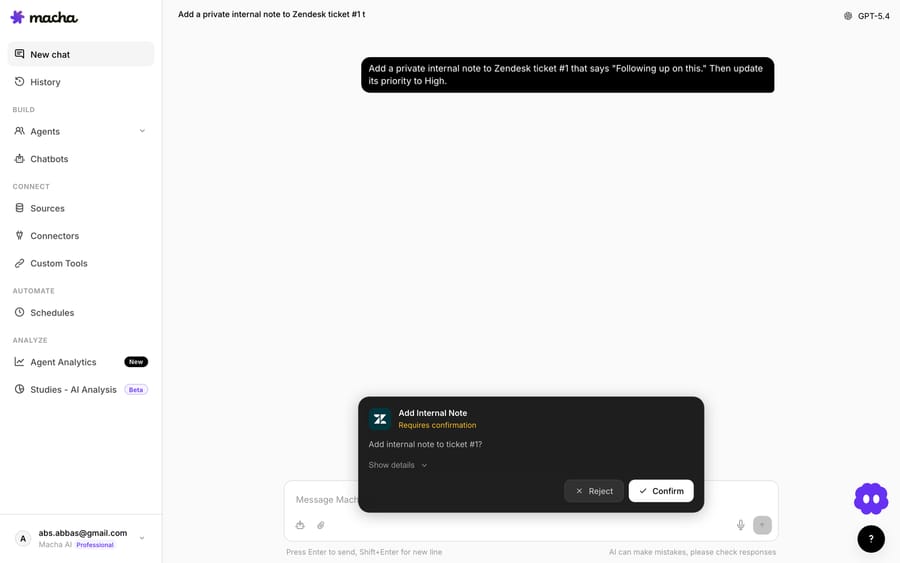
Two details make this trustworthy rather than theatrical. First, the card names the exact operation and target ("Add internal note to ticket #1?"), and a Show details expander reveals the full payload — so you're approving a specific change, not a vague intent. This mirrors the better practice in the field: replace a bare "Approve?" with the actual intent and blast radius so the human is making an informed call. Second, nothing is charged or sent until you click Confirm. Reject and the action evaporates.
This isn't limited to one tool. The pattern is wired into write operations across connectors:
- Zendesk — the subject-update tool "requires confirmation in chat mode" and validates the new subject is 1–150 characters before it'll even offer the action.
- Confluence — all write operations (create page, update page, add comment) require confirmation; the read tools (search, list spaces, get content) don't.
- Shopify —
create_refundships with confirmation baked in, while the order- and customer-lookup tools run freely.
And because Macha lets you connect any REST API as a custom tool, it doesn't make you remember to flag the dangerous ones. When you define an endpoint, Macha auto-detects the tool type from the HTTP method: GET is treated as a read, while POST, PUT, PATCH, and DELETE are automatically marked as write operations that require confirmation. Safe-by-default, even for tools you build yourself.
When does an agent get write access?
Here's the guardrail that most "human-in-the-loop" write-ups miss, and it's arguably the most important one for support.
There are two very different contexts an agent runs in:
- Interactive — a human is in the loop in real time (an agent in chat, a teammate drafting with the agent, you testing a flow).
- Autonomous — the agent runs on its own, fired by a trigger: a new ticket arrives, a customer message lands, a scheduled job kicks off. No human is watching that exact moment.
Macha treats these asymmetrically on purpose. Sub-agents stay read-only during interactive chat — they can look things up and reason, but they cannot execute writes when you're poking at them. They only gain the ability to perform write operations (replies, updates) when running autonomously via a trigger you've deliberately wired up and enabled. Write access is something the agent earns by being promoted into a production trigger, not a default it carries everywhere.
That ordering matches how careful teams actually roll out automation: explore and test with reads, prove the behavior, then turn on autonomous writing for a narrow, well-defined trigger. The EU AI Act's Article 14 codifies the same instinct for high-risk systems: humans must be able to oversee, intervene and override. The EU's Digital Omnibus, approved in June 2026, moved that deadline for standalone high-risk systems from August 2026 to 2 December 2027 (Jones Walker). Most support agents aren't high-risk systems under the Act anyway, but the override seam is cheaper to design in now than to retrofit.
What stops someone switching on a risky tool by accident?
Confirmations protect a single action. But some decisions are made once, at configuration time, and then run thousands of times — like enabling "Add Public Reply" on an agent that fires on every customer message. That's a high-blast-radius switch, and it deserves friction.
Macha adds it in two layers. When you toggle on a high-impact tool (Add Public Reply, Update Ticket Status) or a high-volume trigger (Every Customer Message, New Ticket), you get an activation confirmation modal — severity-themed, with a plain-language warning and custom confirm/cancel labels — so nobody flips on autonomous public replies by reflex.
Then, so the warning doesn't vanish the moment you click through, every enabled high-impact tool and trigger leaves a persistent advisory card on the agent's configuration page — a short, always-visible note on how to use it safely. The risk stays legible to the next teammate who opens the agent, not just to whoever set it up.
Can you undo an agent's action?
The honest truth about guardrails is that some bad action will eventually slip through — a confirmation clicked too fast, an edge case nobody scoped. A mature system assumes that and asks: can we undo it?
Macha leans on reversibility wherever it can. Deleting an agent doesn't nuke it — it moves to trash with a 30-day restore window, and the confirmation copy says so explicitly:
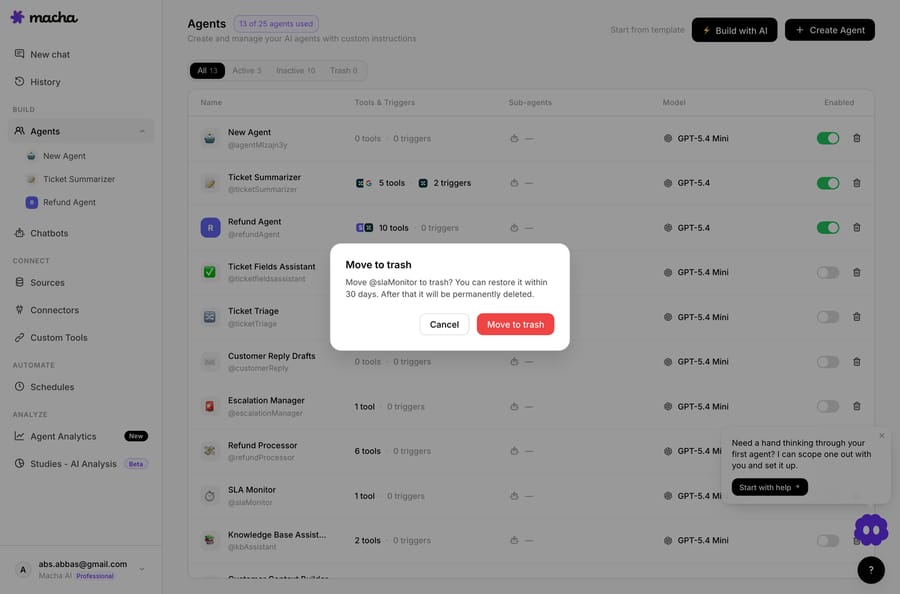
That's a deliberate design note from the changelog: the team rewrote the old "this cannot be undone" warning because, with the 30-day window, it now can be. The same philosophy runs through account and organization deletion (30-day scheduled deletion with cascade cleanup) and through frozen run snapshots in Studies, where editing a definition never rewrites the history of past runs. The pattern: prefer soft-delete and grace periods over irreversible destruction, and tell the user the truth about what's recoverable.
What limits stop autonomous runs from running away?
Autonomous agents introduce a failure mode interactive ones don't: runaway loops and stampedes. A misbehaving webhook source, a flapping integration, or an over-eager schedule can hammer your agent and your monthly ticket allowance. Macha boxes those in with hard limits rather than trust:
| Risk | Guardrail |
|---|---|
| A noisy event source firing endlessly | Debounce safeguard — a debounce bucket is force-fired once it hits 25 events, or after 10× the debounce window (capped at 2 minutes), so a malformed stream can't hold an agent open indefinitely. |
| A schedule running too hot | Scheduled-trigger limits — minimum 1-hour interval, a 24-runs/day cap, and a 3-concurrent-runs-per-org ceiling. |
| A trigger silently failing forever | Auto-disable — a trigger switches off after 5 consecutive failures and emails you; stale locks are cleaned up after 30 minutes. |
| A tool disabled at the connector but still wired to agents | Defense in depth — the backend silently skips connector-disabled tools at runtime, and the UI flags them in three places so teams don't waste time toggling tools the platform won't run. |
None of these require you to configure anything. They're the floor the platform enforces so that "the agent went haywire overnight" isn't a sentence you ever have to say.
What can the agent see, and what gets kept?
Guardrails aren't only about actions; they're about what the agent can see and what gets kept. A few defaults worth knowing:
- Scoped knowledge. Each data source can be set to "All documents" or hand-picked "Selected" documents per agent, so a given agent only retrieves from the corpus it's meant to. Least privilege for knowledge, not just tools.
- Encryption in logs. API keys and tokens that pass through internal agent logs are encrypted at rest with AES-256-GCM — credentials don't sit in plaintext anywhere.
- An audit trail. The full raw webhook payload is saved on every autonomous conversation for audit and debugging, and tool cards record success/error with the actual result — failed calls even show the "attempted payload (not sent)" so you can see what the agent tried to do.
- Retention with a clock. Conversations auto-delete after 45 days of inactivity; internal agent logs expire after 7 days.
- Your data, exportable and deletable. From Settings → Privacy you can export a complete JSON copy of your data (with credentials and embeddings stripped) or schedule account/org deletion.

Where can guardrails give false comfort?
Guardrails build trust, but they're not a substitute for judgment. A few honest caveats:
- Confirmations only work if a human reads them. In interactive mode that's fine. But the whole point of an autonomous trigger is that no one is clicking Confirm — so the safety there comes entirely from scope (which tools you enabled) and from the activation warnings you acknowledged at setup time. Don't enable autonomous public replies and assume a confirmation will still catch a mistake; it won't, because there's no one there to catch it.
- Read-only isn't risk-free. A read tool can still surface data into a reply that shouldn't be shared. Scope your knowledge sources and instruct the agent on what not to repeat; "it can only read" is not the same as "it can't leak."
- Auto-detected tool types are a default, not a verdict. Macha marks
POST/DELETEcustom tools as writes automatically — but a poorly designedGETthat triggers a side effect on someone's API will be treated as a read. Sanity-check custom tools against what the endpoint actually does. - Reversibility has limits. A 30-day restore window covers a deleted agent. It does not un-send a public reply that already reached a customer's inbox. Treat customer-facing writes as the highest-stakes category and gate them hardest.
The right posture is the one the 2026 production guidance keeps landing on: match the guardrail to the stakes. An internal triage agent can run wide open on reads; an agent that issues refunds or posts public replies should be scoped tight, confirmation-gated, and rolled out behind a deliberate trigger.
How should you roll out a new agent safely?
If you're standing up your first agents, this sequence keeps you safe without slowing you to a crawl:
- Start read-only. Build the agent with only read tools and prove its answers in interactive chat and test runs.
- Add writes one at a time, behind confirmation. Turn on a single write tool and exercise it in chat where every action shows a Confirm/Reject card.
- Promote to a narrow trigger. Only after the behavior is solid, wire one specific trigger and acknowledge the activation warning — that's where autonomous write access switches on.
- Keep the blast radius small. One trigger, one tightly-scoped agent, sub-agents for specialist tasks rather than one omnipotent agent.
- Watch the audit trail and the run history. Use the saved payloads and tool-result banners to review what ran, and lean on the built-in containment limits.
FAQ
What's the difference between a read tool and a write tool? Read tools only fetch information (get a ticket, search the knowledge base, look up an order) and have no side effects. Write tools change something (post a reply, update a status, issue a refund). In Macha every tool is tagged Read or Write on its connector, so you can grant exactly what an agent needs.
Does the AI need approval before it takes an action? For write actions in interactive chat, yes — Macha shows a confirmation card with the exact operation and a Confirm/Reject choice, and nothing executes until you confirm. Custom API tools using POST/PUT/PATCH/DELETE are auto-flagged to require confirmation too.
Can an agent take actions on its own without a human watching? Only when you deliberately enable it. Sub-agents are read-only in interactive chat and only gain write access when promoted into an autonomous trigger you've wired up — and high-impact tools and triggers throw an activation warning when you switch them on.
If the agent does something wrong, can I undo it? Where possible, actions are reversible: deleting an agent moves it to trash with a 30-day restore window, and account/org deletion is a scheduled 30-day process. Customer-facing writes that already reached someone (like a sent public reply) can't be recalled, which is why those are gated hardest.
How does Macha keep autonomous agents from running away? Built-in limits: debounce safeguards force-fire runaway event streams, scheduled triggers cap at a 1-hour minimum interval / 24 runs a day / 3 concurrent runs per org, and triggers auto-disable after 5 consecutive failures. Scheduled triggers and custom tools are included on every plan; the pricing page has the per-ticket tiers.
Do you have to replace your help desk to get these guardrails?
No. Macha layers agents on top of the help desk you already run (Zendesk, Freshdesk, Gorgias, Front, HubSpot or Intercom), with read/write scopes, confirmations, and audit trails as defaults rather than afterthoughts. Start a free trial ($50 of usage, no credit card required), connect read-only first, and promote to writing only when you're ready — or read the docs for the full agent-builder walkthrough.
Written by Abbas (Customer Support & AI, Macha) · Reviewed by Ankeet Guha (Co-founder & CTO) · Published 2026-06-24 · Last updated 2026-09-24.






