




 Confluence

Zendesk
Connect Zendesk to Macha and give your AI agents full access to your support stack. Read tickets with custom fields, view image attachments using AI vision, post public replies or internal notes, update statuses and tags, and sync Help Center articles as a live knowledge source. Set up triggers to run agents autonomously on every new ticket or customer message — no human in the loop required.
O que o Macha pode automatizar no Zendesk
Um agente do Macha lê o ticket do Zendesk, consulta as ferramentas que você conectar e depois responde, adiciona uma nota, aplica tags, encaminha o ticket ou executa a ação. Estas são as tarefas que as equipes mais delegam a ele. Cada uma tem um guia passo a passo.
Pedidos, reembolsos e cancelamentos
ShopifyStatus do pedido (WISMO)
Encontra o pedido no Shopify pelo número ou pelo e-mail do solicitante, confere se o e-mail corresponde ao pedido e responde com o status de envio e o rastreamento, ou deixa a resposta como rascunho em uma nota interna.
Guia de WISMO (em inglês)Reembolsos
Confere o pedido ou a cobrança com as suas regras de reembolso e então faz o reembolso ou deixa para alguém da sua equipe aprovar. Reembolsos no Shopify cobrem o pedido inteiro, então valores parciais vão pelo Stripe ou para uma pessoa.
Guia de reembolsos (em inglês)Cancelamento de pedidos
Cancela um pedido do Shopify que ainda não foi enviado, recusa um que já foi e passa para uma pessoa os pedidos acima do seu limite.
Guia de cancelamentos (em inglês)Cobrança e pagamentos
StripeDúvidas de cobrança e reembolsos
Consulta o cliente no Stripe, com pagamentos, faturas e assinaturas, para explicar uma cobrança. Quando as suas regras permitem, reembolsa um pagamento (total ou parcial), cancela uma assinatura ou envia um link de pagamento.
Guia de cobrança com Stripe (em inglês)Triagem e encaminhamento
ZendeskEncaminhamento e tags
Lê cada ticket novo, adiciona tags, define o tipo e a prioridade e atribui ao grupo certo do Zendesk, ou sinaliza quando não consegue decidir.
Guia de encaminhamento (em inglês)Spam e respostas de ausência
Aplica tags em segundos a propostas comerciais, spam de link building e respostas automáticas, para que um gatilho do Zendesk os resolva antes que alguém os abra.
Guia contra spam (em inglês)Ajuda para os seus agentes
ZendeskRascunhos de resposta para aprovação
Escreve a resposta completa como nota interna para um agente revisar e enviar. Quando os rascunhos estiverem sempre certos, você pode deixar que ele mesmo envie.
Guia de rascunhos (em inglês)Resumos de tickets
Publica como nota interna um resumo curto de uma conversa longa, por exemplo quando um ticket é escalado ou reatribuído.
Guia de resumos (em inglês)Tradução
Escreve o rascunho da resposta no idioma do cliente e adiciona uma tradução em inglês em uma nota interna, para que os agentes nunca precisem trocar de aba.
Guia de tradução (em inglês)Respostas, escalonamento e os seus próprios sistemas
Help Center, Jira, qualquer APIRespostas da base de conhecimento
Sincroniza os artigos do seu Help Center e responde com eles a perguntas de como fazer. O AI Knowledge Builder transforma tickets resolvidos em novos artigos.
AI Knowledge BuilderEscalonamento para o Jira
Cria um item no Jira a partir de um relato de bug, ou vincula o ticket ao item que já está aberto para o mesmo bug.
Guia do Jira (em inglês)Ferramentas personalizadas para qualquer API
Conecta sistemas sem conector nativo, como assinaturas no Recharge ou no Loop, um armazém ou a sua própria API de administração. Nossa equipe cria essas ferramentas para você durante a configuração.
Ferramentas personalizadasExemplo: um pedido de reembolso, passo a passo
Um cliente escreve dizendo que o pedido chegou danificado e que quer o dinheiro de volta. Veja o que um agente de reembolsos faz com o ticket.
- 1Um gatilho do Zendesk entrega o ticket novo ao agente. Ele lê a mensagem, os campos personalizados e qualquer foto que o cliente tenha anexado.
- 2Ele encontra o pedido no Shopify, ou a cobrança no Stripe, e confere se o e-mail do solicitante corresponde ao pedido.
- 3Ele compara a solicitação com a sua política de reembolso: o tempo desde a entrega, o que ainda pode ser reembolsado e o valor a partir do qual uma pessoa decide.
- 4Se todas as verificações passarem, ele faz o reembolso. No modo seguro, ou quando alguma verificação falha, ele deixa a decisão para alguém da sua equipe.
- 5Ele adiciona uma nota interna dizendo o que encontrou e o que fez, aplica uma tag ao ticket (por exemplo, refund_review) e responde ao cliente ou deixa um rascunho.
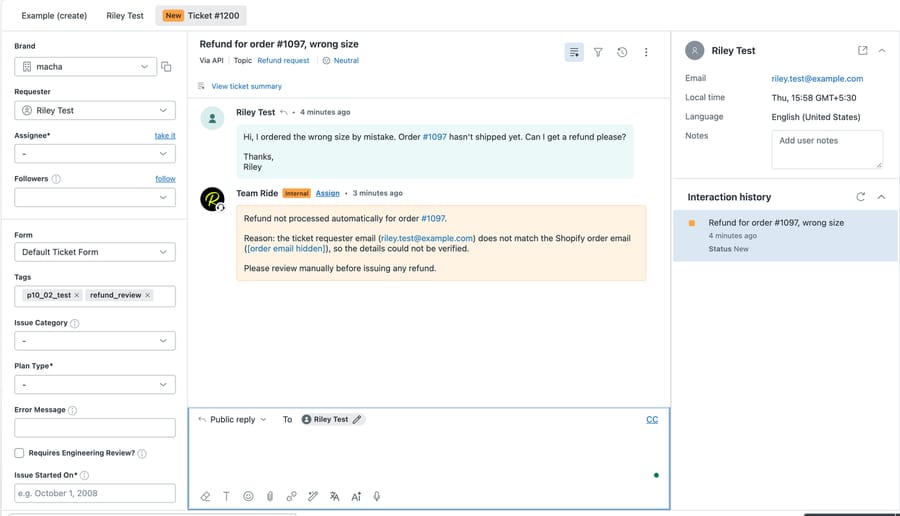
Você não precisa construir nada disso. Nossa equipe analisa seus tickets anteriores, cria os agentes e os mantém em modo seguro até os rascunhos ficarem certos, com um gerente de sucesso dedicado no teste e em todos os planos. Como funciona a configuração feita pela nossa equipe.
Triggers e ações
Ação
Get Ticket
Retrieve full ticket details including conversation history, tags, brand, and requester info.
Ação
Get Ticket Custom Fields
Read all custom field values on a ticket with labels resolved — order numbers, brands, languages, and more.
Ação
Get Ticket Fields
List the ticket field definitions in your Zendesk account — which custom fields exist, their IDs, and their options.
Ação
Read Attachment
Extract text from PDFs, DOCX, XLSX, and CSV files. Analyse image attachments using AI vision — the agent can see and describe screenshots, receipts, and product photos.
Ação
Search Tickets
Search across all Zendesk tickets by keyword, status, assignee, or any search syntax.
Ação
Search Users
Find Zendesk users by name, email, or role.
Ação
List Groups
List all active Zendesk groups so agents can resolve a group name to an ID before routing a ticket.
Ação
Add Public Reply
Post a customer-visible reply on a ticket.
Ação
Add Internal Note
Post a private internal note visible only to agents.
Ação
Update Status
Change a ticket's status — open, pending, hold, solved, or closed.
Ação
Update Subject
Change the subject line of a ticket.
Ação
Update Priority
Change a ticket's priority — urgent, high, normal, or low.
Ação
Update Type
Change a ticket's type — problem, incident, question, or task.
Ação
Update Tags
Add or remove tags on a ticket without overwriting existing ones.
Ação
Update Fields
Update custom field values with validation — dropdown options are checked, dates are formatted.
Ação
Assign Ticket
Assign a ticket to a specific agent and/or route it to a group queue.
Ação
Update Requester
Change the customer the ticket is for. Pass a known Zendesk user ID, or an email + name — Zendesk finds the existing end-user or creates one on the fly. Refuses to set an admin or agent as the requester to prevent notification-email loops.
Ação
Search Articles
Semantic search across Help Center articles using your knowledge base.
Ação
Sync Knowledge Base
Automatically sync Help Center articles to Macha's knowledge base with live webhook updates.
Trigger
New Ticket
Fires on the first customer message, before any agent replies.
Trigger
Customer Reply
Fires on every customer comment on any ticket.
Trigger
Status Changed
Fires when a ticket's status changes — e.g. open to pending.
Trigger
Priority Changed
Fires when a ticket's priority is updated.
Trigger
Ticket Assigned
Fires when a ticket is assigned to an agent or group.
Trigger
Ticket Closed
Fires when a ticket is marked solved or closed.
Trigger
Messaging
Fires on messages from WhatsApp, Messenger, Instagram, LINE, Telegram, and web chat.
Trigger
Custom Webhook
Generates a webhook URL you attach to any Zendesk trigger — full control over which tickets fire.
Seu agente de IA, configurado para você em menos de uma semana
Instruções do agente
Help customers who can't log in by searching the knowledge base and replying with reset steps
Escrevemos as instruções
A equipe Macha escreve as instruções do seu agente com base em como sua equipe já responde a esse tipo de ticket.
Get Ticket
Get Ticket Custom Fields
 Ferramentas para a IA
Conectamos as ferramentas
Escolhemos as ações do Zendesk que seu agente pode usar, buscar, atualizar, responder e mais, e testamos com seus tickets anteriores.
Ele começa a trabalhar
Os rascunhos chegam como notas privadas até estarem certos. Depois, o agente cuida dessa categoria de ponta a ponta, e seu gerente de sucesso cuida das mudanças.
Zendesk funciona com tudo o mais.
Zendesk fica ainda mais poderoso conectado às suas outras ferramentas. A Macha reúne todas elas, para que seu assistente de IA tenha contexto completo de toda a sua stack.
Ver todas as integrações







Perguntas sobre o Macha no Zendesk
O Macha consegue processar reembolsos no Zendesk?
Sim. Um agente do Macha lê a solicitação de reembolso, busca o pedido no Shopify ou a cobrança no Stripe, confere com a sua política e faz o reembolso quando as suas regras permitem. Reembolsos no Shopify cobrem tudo o que ainda pode ser reembolsado no pedido, então reembolsos parciais no Shopify vão para uma pessoa; no Stripe, o reembolso pode ser parcial. Até você confiar nele, o Macha pode deixar cada reembolso para a sua equipe aprovar.
Um agente de IA consegue consultar pedidos do Shopify e responder no Zendesk?
Sim. O Macha busca no Shopify pelo número do pedido ou pelo e-mail do cliente, lê o status de envio e o rastreamento e publica no ticket uma resposta pública ou um rascunho como nota interna. Você pode pedir que ele confira se o e-mail do solicitante corresponde ao pedido antes de compartilhar qualquer detalhe.
O Macha serve só para suporte de e-commerce?
Não. Pedidos e reembolsos são apenas um uso. As equipes também usam o Macha no Zendesk para dúvidas de cobrança no Stripe, triagem e encaminhamento, spam, rascunhos de resposta, resumos, tradução, respostas da base de conhecimento, escalonamento para o Jira e ferramentas personalizadas para as suas próprias APIs.
Ele responde aos clientes sozinho?
Só se você quiser. Os agentes podem começar no modo seguro, publicando rascunhos como notas internas para a sua equipe aprovar, e você escolhe quais ferramentas e ações cada agente recebe.
Quanto custa o Macha para Zendesk?
Um único plano com preço pelo volume de tickets, a partir de US$ 299 por mês para 750 tickets, cerca de US$ 0,40 por ticket. A configuração pela nossa equipe e um gerente de sucesso dedicado vêm incluídos no teste e em todos os planos, e o teste inclui US$ 50 de uso grátis, sem cartão.
Pronto para conectar
Zendesk?
Configuração em minutos. Sem código, sem equipe de implementação. É só conectar.
$50 de uso grátis · sem limite de tempo, sem cartão de crédito