




 Confluence

Zendesk
Connect Zendesk to Macha and give your AI agents full access to your support stack. Read tickets with custom fields, view image attachments using AI vision, post public replies or internal notes, update statuses and tags, and sync Help Center articles as a live knowledge source. Set up triggers to run agents autonomously on every new ticket or customer message — no human in the loop required.
Ce que Macha peut automatiser dans Zendesk
Un agent Macha lit le ticket Zendesk, va chercher les informations dans les outils que vous connectez, puis répond, ajoute une note, pose des tags, route le ticket ou effectue l'action. Voici les tâches que les équipes lui confient le plus souvent. Chacune renvoie vers un guide pas à pas.
Commandes, remboursements et annulations
ShopifyStatut de commande (WISMO)
Retrouve la commande dans Shopify par son numéro ou par l'e-mail du demandeur, vérifie que l'e-mail correspond à la commande, puis répond avec le statut d'expédition et le suivi, ou laisse la réponse en brouillon dans une note interne.
Guide WISMO (en anglais)Remboursements
Vérifie la commande ou le paiement par rapport à vos règles de remboursement, puis rembourse ou laisse un membre de votre équipe valider. Les remboursements Shopify portent sur la commande entière : les montants partiels passent par Stripe ou par une personne.
Guide des remboursements (en anglais)Annulations de commande
Annule une commande Shopify pas encore expédiée, refuse celle qui l'est déjà et transmet à une personne les commandes au-dessus de votre plafond.
Guide des annulations (en anglais)Facturation et paiements
StripeQuestions de facturation et remboursements
Consulte le client Stripe, ses paiements, ses factures et ses abonnements pour expliquer un prélèvement. Quand vos règles le permettent, il rembourse un paiement (en totalité ou en partie), résilie un abonnement ou envoie un lien de paiement.
Guide de facturation Stripe (en anglais)Tri et routage
ZendeskRoutage et tags
Lit chaque nouveau ticket, ajoute des tags, définit le type et la priorité et l'assigne au bon groupe Zendesk, ou le signale quand il ne sait pas trancher.
Guide du routage (en anglais)Spam et réponses d'absence
Tague en quelques secondes les démarchages commerciaux, le spam de netlinking et les réponses automatiques, pour qu'un déclencheur Zendesk les résolve avant que quiconque les ouvre.
Guide anti-spam (en anglais)Un coup de main pour vos agents
ZendeskBrouillons de réponse à valider
Rédige la réponse complète dans une note interne, qu'un agent vérifie puis envoie. Une fois les brouillons fiables, vous pouvez le laisser les envoyer lui-même.
Guide des brouillons (en anglais)Résumés de tickets
Publie en note interne un court résumé d'un long échange, par exemple quand un ticket est escaladé ou réassigné.
Guide des résumés (en anglais)Traduction
Rédige la réponse dans la langue du client et ajoute une traduction en anglais dans une note interne, pour que vos agents n'aient jamais à changer d'onglet.
Guide de traduction (en anglais)Réponses, escalade et vos propres systèmes
Help Center, Jira, toute APIRéponses issues de la base de connaissances
Synchronise les articles de votre Help Center et s'en sert pour répondre aux questions pratiques. AI Knowledge Builder transforme les tickets résolus en nouveaux articles.
AI Knowledge BuilderEscalade vers Jira
Crée une demande Jira à partir d'un signalement de bug, ou relie le ticket à la demande déjà ouverte pour le même bug.
Guide Jira (en anglais)Outils personnalisés pour n'importe quelle API
Connecte les systèmes qui n'ont pas de connecteur intégré, comme les abonnements Recharge ou Loop, un entrepôt ou votre propre API d'administration. Notre équipe crée ces outils pour vous pendant la mise en place.
Outils personnalisésExemple : une demande de remboursement, étape par étape
Un client écrit que sa commande est arrivée endommagée et qu'il veut être remboursé. Voici ce qu'un agent de remboursement fait du ticket.
- 1Un déclencheur Zendesk transmet le nouveau ticket à l'agent. Celui-ci lit le message, les champs personnalisés et les éventuelles photos jointes par le client.
- 2Il retrouve la commande dans Shopify, ou le paiement dans Stripe, et vérifie que l'e-mail du demandeur correspond à la commande.
- 3Il confronte la demande à votre politique de remboursement : délai depuis la livraison, ce qui reste remboursable et montant au-delà duquel une personne décide.
- 4Si tous les contrôles sont validés, il effectue le remboursement. En mode sécurisé, ou si un contrôle échoue, il laisse la décision à un membre de votre équipe.
- 5Il ajoute une note interne qui explique ce qu'il a trouvé et fait, tague le ticket (par exemple refund_review), puis répond au client ou laisse un brouillon.
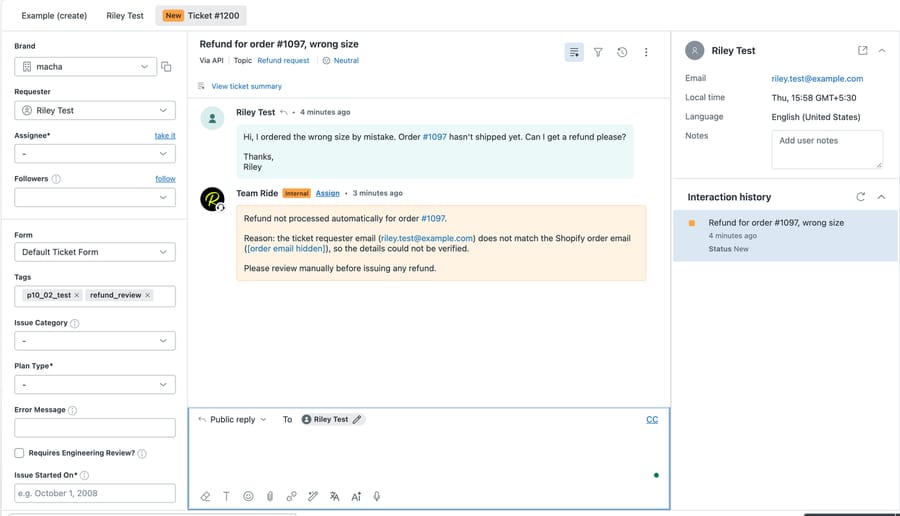
Vous n'avez rien à construire vous-même. Notre équipe analyse vos anciens tickets, construit les agents et les fait tourner en mode sécurisé jusqu'à ce que les brouillons soient justes, avec un responsable de compte dédié pendant l'essai et sur chaque offre. Comment fonctionne la mise en place clé en main.
Triggers et actions
Action
Get Ticket
Retrieve full ticket details including conversation history, tags, brand, and requester info.
Action
Get Ticket Custom Fields
Read all custom field values on a ticket with labels resolved — order numbers, brands, languages, and more.
Action
Get Ticket Fields
List the ticket field definitions in your Zendesk account — which custom fields exist, their IDs, and their options.
Action
Read Attachment
Extract text from PDFs, DOCX, XLSX, and CSV files. Analyse image attachments using AI vision — the agent can see and describe screenshots, receipts, and product photos.
Action
Search Tickets
Search across all Zendesk tickets by keyword, status, assignee, or any search syntax.
Action
Search Users
Find Zendesk users by name, email, or role.
Action
List Groups
List all active Zendesk groups so agents can resolve a group name to an ID before routing a ticket.
Action
Add Public Reply
Post a customer-visible reply on a ticket.
Action
Add Internal Note
Post a private internal note visible only to agents.
Action
Update Status
Change a ticket's status — open, pending, hold, solved, or closed.
Action
Update Subject
Change the subject line of a ticket.
Action
Update Priority
Change a ticket's priority — urgent, high, normal, or low.
Action
Update Type
Change a ticket's type — problem, incident, question, or task.
Action
Update Tags
Add or remove tags on a ticket without overwriting existing ones.
Action
Update Fields
Update custom field values with validation — dropdown options are checked, dates are formatted.
Action
Assign Ticket
Assign a ticket to a specific agent and/or route it to a group queue.
Action
Update Requester
Change the customer the ticket is for. Pass a known Zendesk user ID, or an email + name — Zendesk finds the existing end-user or creates one on the fly. Refuses to set an admin or agent as the requester to prevent notification-email loops.
Action
Search Articles
Semantic search across Help Center articles using your knowledge base.
Action
Sync Knowledge Base
Automatically sync Help Center articles to Macha's knowledge base with live webhook updates.
Trigger
New Ticket
Fires on the first customer message, before any agent replies.
Trigger
Customer Reply
Fires on every customer comment on any ticket.
Trigger
Status Changed
Fires when a ticket's status changes — e.g. open to pending.
Trigger
Priority Changed
Fires when a ticket's priority is updated.
Trigger
Ticket Assigned
Fires when a ticket is assigned to an agent or group.
Trigger
Ticket Closed
Fires when a ticket is marked solved or closed.
Trigger
Messaging
Fires on messages from WhatsApp, Messenger, Instagram, LINE, Telegram, and web chat.
Trigger
Custom Webhook
Generates a webhook URL you attach to any Zendesk trigger — full control over which tickets fire.
Votre agent IA, configuré pour vous en moins d'une semaine
Instructions de l'agent
Help customers who can't log in by searching the knowledge base and replying with reset steps
Nous rédigeons les instructions
L'équipe Macha rédige les instructions de votre agent à partir de la façon dont votre équipe répond déjà à ce type de ticket.
Get Ticket
Get Ticket Custom Fields
 Outils pour l'IA
Nous connectons les outils
Nous choisissons les actions Zendesk que votre agent peut utiliser, rechercher, mettre à jour, répondre et plus, et nous le testons sur vos anciens tickets.
Il se met au travail
Les brouillons arrivent en notes privées jusqu'à ce qu'ils soient justes. Ensuite, l'agent traite cette catégorie de bout en bout, et votre responsable du succès client gère les changements.
Zendesk fonctionne avec tout le reste.
Zendesk est encore plus puissant quand il est connecté à vos autres outils. Macha les réunit tous, pour que votre assistant IA ait un contexte complet sur toute votre stack.
Voir toutes les intégrations







Questions sur Macha dans Zendesk
Macha peut-il traiter des remboursements dans Zendesk ?
Oui. Un agent Macha lit la demande de remboursement, consulte la commande dans Shopify ou le paiement dans Stripe, la vérifie par rapport à votre politique et effectue le remboursement quand vos règles le permettent. Un remboursement Shopify couvre tout ce qui reste remboursable sur la commande : les remboursements partiels Shopify sont donc confiés à une personne. Les remboursements Stripe peuvent être partiels. Tant que vous n'avez pas confiance, Macha peut soumettre chaque remboursement à la validation de votre équipe.
Un agent IA peut-il consulter les commandes Shopify et répondre dans Zendesk ?
Oui. Macha recherche dans Shopify par numéro de commande ou e-mail du client, lit le statut d'expédition et le suivi, puis publie sur le ticket une réponse publique ou un brouillon en note interne. Vous pouvez lui demander de vérifier que l'e-mail du demandeur correspond à la commande avant de communiquer le moindre détail.
Macha est-il réservé au support e-commerce ?
Non. Les commandes et les remboursements ne sont qu'un usage parmi d'autres. Les équipes utilisent aussi Macha dans Zendesk pour les questions de facturation Stripe, le tri et le routage, le spam, les brouillons de réponse, les résumés, la traduction, les réponses issues de la base de connaissances, l'escalade vers Jira et des outils personnalisés pour leurs propres API.
Répond-il aux clients tout seul ?
Seulement si vous le souhaitez. Les agents peuvent démarrer en mode sécurisé et publier leurs brouillons en notes internes que votre équipe valide. Vous choisissez les outils et les actions auxquels chaque agent a accès.
Combien coûte Macha pour Zendesk ?
Une seule offre, dont le prix dépend du volume de tickets : à partir de 299 $ par mois pour 750 tickets, soit environ 0,40 $ par ticket. La mise en place par notre équipe et un responsable de compte dédié sont inclus pendant l'essai et dans chaque offre, et l'essai comprend 50 $ d'utilisation offerte, sans carte bancaire.
Prêt à connecter
Zendesk ?
Configuration en quelques minutes. Sans code, sans équipe d'intégration. Connectez et c'est parti.
50 $ d'utilisation offerte · sans limite de temps, sans carte de crédit