





 Shopify
 Stripe
 Slack
Slack Notion
 Google Workspace
 Confluence

What Is the Best Free Help Desk Software in 2026? Every Real Free Plan and Its Cap


Seven hosted help desks still have a free plan in 2026, each capped on seats or monthly volume, and tawk.to publishes no cap at all. Freshdesk and Zendesk have no free plan, and the self-hosted projects are free of license but not of work.
Key takeaways
- Zoho Desk, Help Scout, HubSpot Service Hub, Crisp, Chatwoot Cloud, Tidio and tawk.to all publish free help desk plans as of September 2026.
- Zoho Desk's Free Edition includes 3 users with no published contact or conversation cap, the most generous free help desk plan on volume.
- Help Scout's free plan covers 5 users, 1 Inbox, 1 Docs site and 100 contacts a month, more seats than any other capped hosted free plan.
- tawk.to publishes no seat cap or volume meter on its free plan and charges $29 a month only to remove the Powered by tawk.to badge.
- Freshdesk has no free plan in 2026, only a 14-day trial and a Free program for 2 agents for 6 months, while Zendesk starts at $19 per agent a month.

Yes, free help desk software exists, and each hosted free plan is capped on seats or volume: Zoho Desk gives 3 users, Help Scout 5 users and 100 contacts a month, HubSpot Service Hub 2 users, Crisp 2 seats, Chatwoot Cloud 2 agents and 500 conversations a month, Tidio 10 seats and 50 billable conversations a month, and tawk.to publishes no cap at all. Freshdesk and Zendesk have no free plan.
We checked every one of those limits on the vendor's own pricing page on September 20, 2026 and captured the plan tables the same day. This page is about desks that face customers. If your queue is fed by colleagues instead, with asset records and approvals, our free IT ticketing systems roundup is the right list.
Is help desk software actually free in 2026? Yes, with a cap on people or volume
Every free plan here is sized on one of two meters, and knowing which one applies to you decides the choice.
Seat caps are the obvious meter: two at HubSpot, Crisp and Chatwoot, three at Zoho Desk and Jira Service Management, five at Help Scout. Hiring is the event that ends the free plan, so the vendor's incentive is a tier good enough to build a workflow on and small enough that one more person breaks it.
Volume meters are the quieter one and usually break first: Help Scout's 100 contacts a month, Chatwoot's 500 conversations, Tidio's 50 billable conversations, Crisp's 100 customer profiles. These are the caps people hit without noticing, and the symptom is a customer saying nobody replied.
One product on this list is metered on neither. tawk.to's own page says it plainly: "If you would like to remove the tiny 'Powered by tawk.to' branding from our products, we charge $29/month. Don't remove it, and it is free for life."
Best free help desk software at a glance
| Tool | Free tier | Seat cap | Volume meter | Channels on free | Cheapest paid step |
|---|---|---|---|---|---|
| Zoho Desk | Free Edition, free forever | 3 users | None published | Email, help center | Express, shown in local currency |
| Help Scout | Free | 5 users | 100 contacts a month | Email, 1 Docs site | Standard $25 per user a month |
| HubSpot Service Hub | Free tools, $0 | 2 users | None published | Email, chat, tickets, with branding | Starter from $7 per seat a month |
| Crisp | Free forever | 2 seats | 100 customer profiles | Website chat widget | Mini $45 a month per workspace |
| Chatwoot Cloud | Hacker, $0 | 2 agents | 500 conversations a month | Live chat only | Startups $19 per agent a month |
| Tidio | Free | 10 seats | 50 billable conversations a month | Chat widget, ticketing, email | Starter $24.17 a month |
| tawk.to | Free for life | None published | None published | Chat widget | $29 a month to remove branding |
| Jira Service Management | Free forever | 3 agents | 100 emails a day | Portal, email | Standard $20 per agent a month |
| Chatwoot, Zammad, FreeScout, osTicket, Libredesk | Self-hosted, $0 license | Unlimited | Unlimited | All of them | A VPS, roughly $10 to $40 a month |
| Freshdesk | None as of 2026 | n/a | n/a | 14-day trial; a 6-month Free program for 2 agents | Growth $19 per agent a month |
| Zendesk | None | n/a | n/a | 14-day trial only | Support Team $19 per agent a month |
How did we check these free plans?
We opened each vendor's own pricing page in a scripted browser on September 20, 2026, read the free column instead of the marketing above it, and captured the plan table. Where a page rewrites its prices by IP address we read the server-rendered version with JavaScript disabled, or switched the page's own currency control to USD; Zoho refused both, which is why no Zoho dollar figure appears. For the self-hosted projects we queried the GitHub API for license, stars and last commit date. We did not create a test account on any of these products for this page, so nothing here is a claim about how the software feels to use.
Which free plans work for customer support?
Zoho Desk: the most capable free ticketing plan
Free Edition, free forever, three user licenses. Email ticketing, a help center, a knowledge base and basic workflows are included; light users, Zoho's cheap read-only internal seats, are paid-only. There is no published conversation or contact cap, which makes it the most generous free plan here on volume.
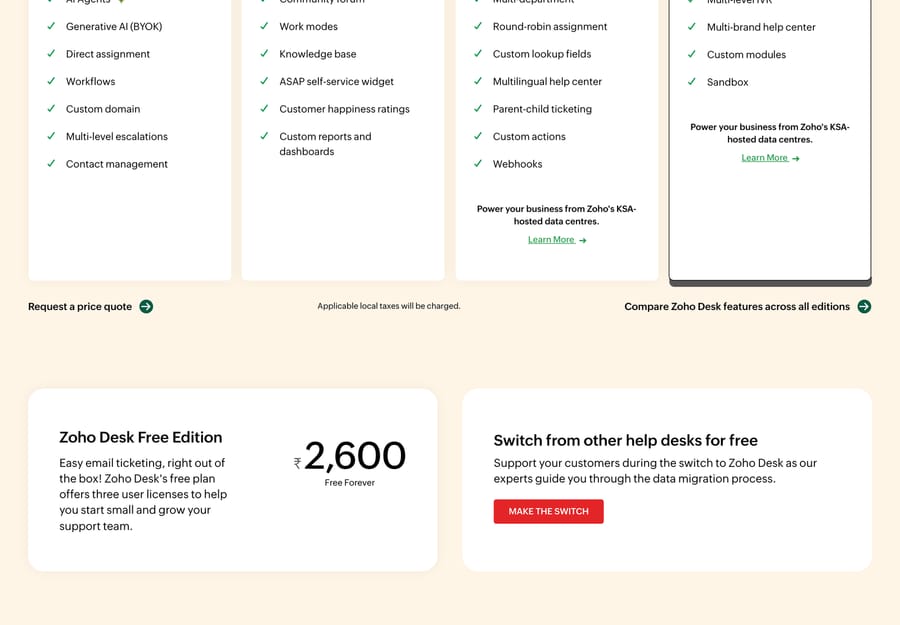
It suits teams whose support arrives by email and who can work inside three seats. It's the wrong fit if you need live chat, which Zoho sells separately.
Help Scout: five users, and a contact meter to watch
The free plan gives you 5 users, 1 Inbox, 1 Docs site, 100 contacts a month and 10 saved replies, stated in those words under the plan cards. That is the most seats anyone here gives away.
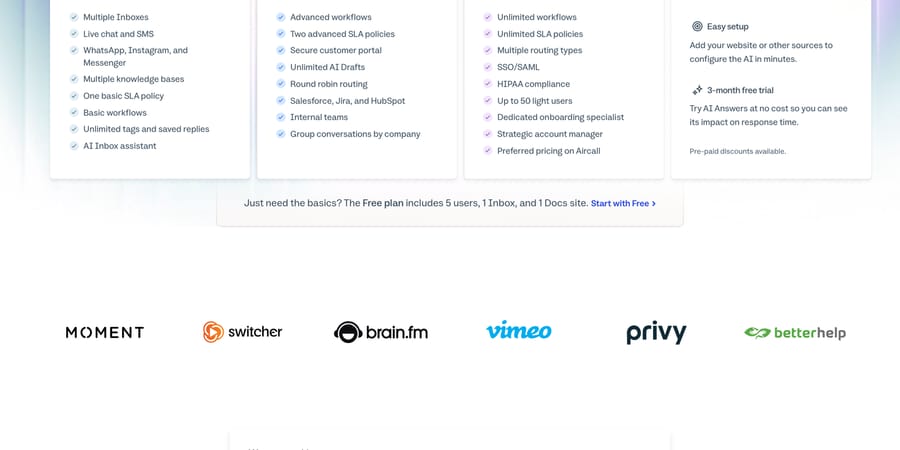
The contact meter is the one that ends it. A contact is a person, and repeat conversations with the same person count once, so a support queue with a stable customer base lasts a long time while a store serving a few hundred new buyers a month does not. Standard is $25 a user, Plus $45, Pro $75, and AI Answers is a separate add-on at $0.75 a resolution with a three-month free trial.
HubSpot Service Hub: two users, and a CRM underneath
HubSpot's free tools cover ticketing, a shared inbox and live chat with HubSpot branding on the widget. The card states the cap: "Free for up to 2 users. No credit card required."
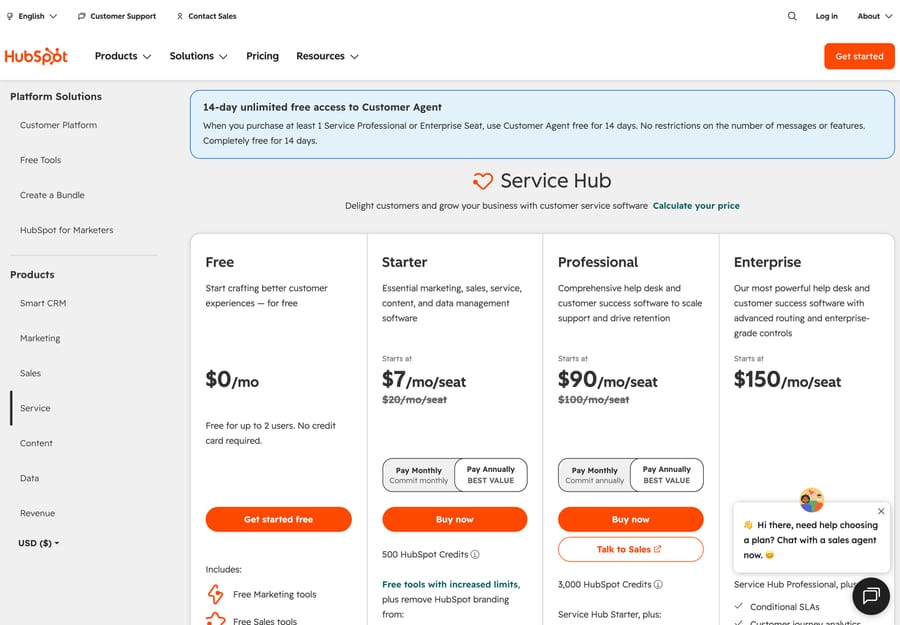
Two things the plan cards make easy to miss if you are treating Professional as the upgrade path. It carries a required one-time onboarding fee of $1,500, and Enterprise $3,500. And the Customer Agent, HubSpot's AI, is Professional and above at 50 HubSpot Credits per resolved conversation, with credits at $9.00 per 1,000 paid annually. That is roughly $0.45 a resolved conversation on top of the seat price, and HubSpot offers a 14-day unlimited trial of it once you hold at least one Professional or Enterprise seat.
Crisp: two seats, and no conversation cap that we could find
Crisp's Free plan is free forever with 2 seats included, a website chat widget, a shared inbox, mobile apps, chat SDKs, a contact form, e-commerce integrations and, in the card's own words, "No AI credits included". The feature table caps the free workspace at 100 customer profiles and zero sub-inboxes.
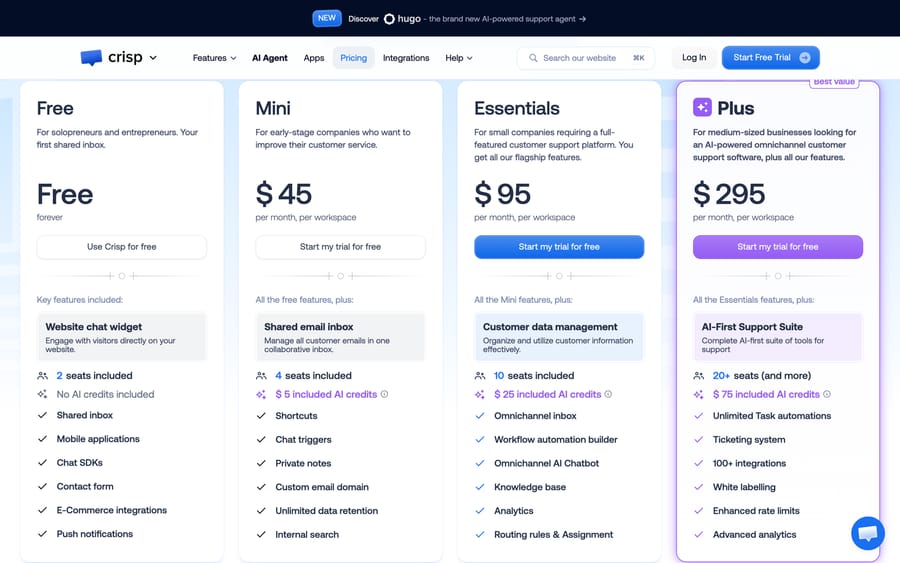
An earlier version of this page described Crisp as free live chat with unlimited conversations. Crisp's live page states no conversation figure for the Free plan at all, so we have dropped the claim and quoted the limit the page does publish. Above free, Crisp is the only product here priced flat per workspace, at $45, $95 and $295 a month with 4, 10 and 20-plus seats and $5, $25 and $75 of AI credit included.
Chatwoot: free for two, and free forever if you host it
Chatwoot Cloud's Hacker plan is $0 an agent a month for up to 2 agents, 500 conversations a month, live chat as the only channel, and 30 days of data retention. The help center, Captain AI, teams and automation rules all start at Startups, $19 an agent a month.
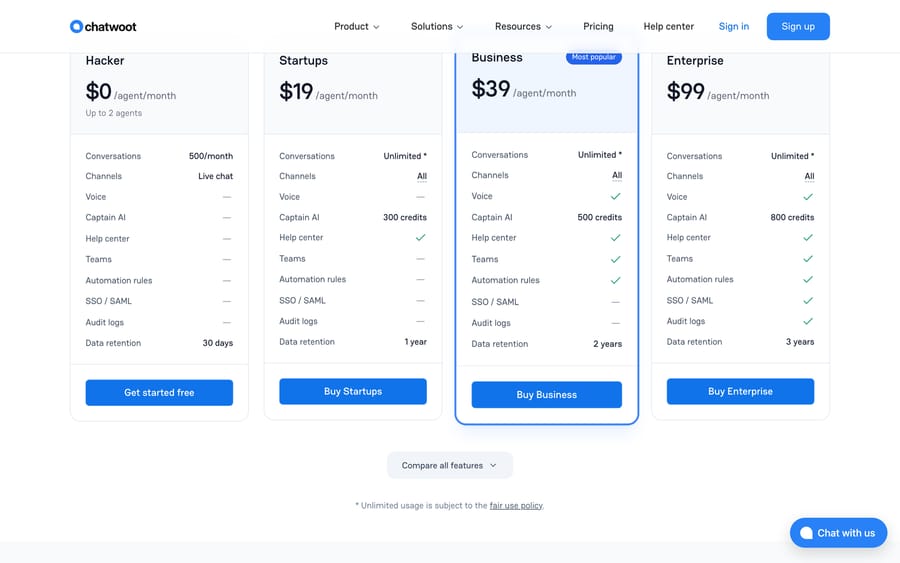
The reason Chatwoot appears in every thread on this topic is that the same product is free to self-host: everything outside the repository's enterprise/ directory is MIT Expat licensed, and self-hosting removes the agent cap, the conversation cap and the retention clock together. It is also by far the most active project in the category, at 37,002 GitHub stars with commits the week we checked. Our Chatwoot explainer covers the split.
Tidio: free, 50 conversations a month with 10 seats
Tidio's Free plan card states "50 Billable conversations / mo." with 10 seats included, covering live chat, ticketing and email. New accounts get seven days of the full feature set and are then downgraded to Free automatically. A separate 100-unique-visitors-a-month figure that circulates in roundups is real but belongs to Flows, Tidio's automation builder, not the plan's overall conversation quota; Tidio's own FAQ on Flows is explicit that the cap is for that feature.
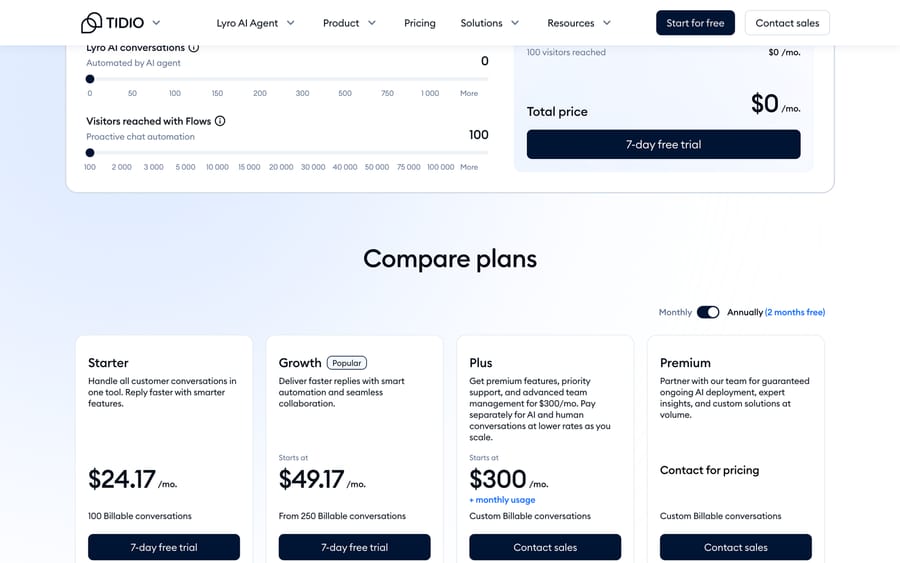
Paid starts at Starter $24.17 a month for 100 billable conversations and Growth from $49.17 at 250. Lyro, Tidio's AI agent, is a separate product from $32.50 a month for 50 Lyro conversations.
tawk.to: free for life, and the business model is printed on the page
tawk.to is the outlier on this list because it publishes no seat cap and no volume meter on its free product. Its own explanation of how it makes money is unusually direct: $29 a month to remove the "Powered by tawk.to" badge, AI Assist from $29 a month for a chatbot trained on your knowledge base, and human agents it trains and staffs at $1 an hour.
Name the incentive and this one is easy to read: tawk.to earns when you outgrow a badge or want somebody else to answer, and never when your volume grows. That's the cleanest alignment on this page, and the trade is that the free product is chat-led, with lighter ticketing than Zoho Desk or Help Scout.
Jira Service Management: free for three, if your requesters have accounts
Atlassian sells this inside a Service Collection bundle now. The Free column carries three agents, unlimited customers, one site, 2 GB of file storage and 100 emails a day, and it includes Jira Service Management Free plus Customer Service Management. Rovo Agents and Assets start at Standard, $20 an agent a month.
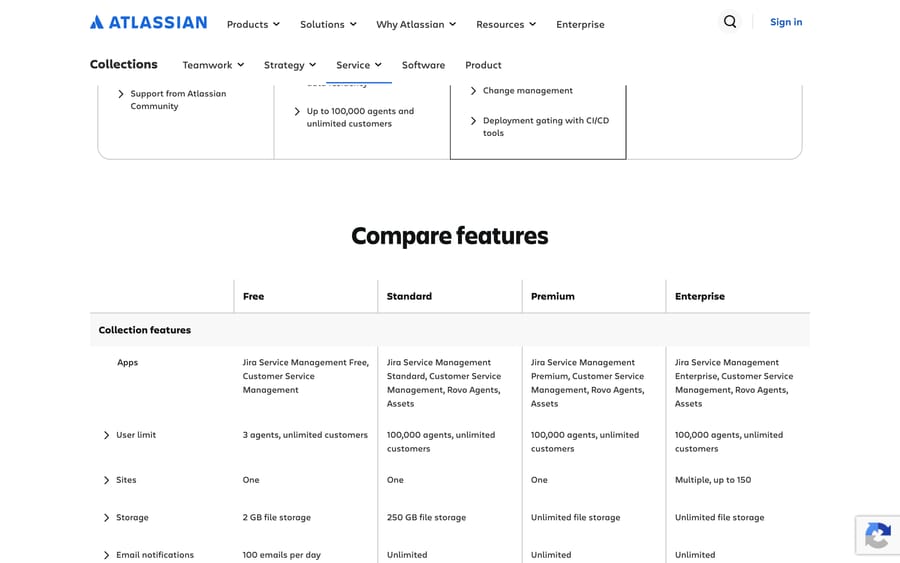
The 100-emails-a-day ceiling is what makes this an internal-support answer. If that is your situation, our free IT ticketing systems roundup has the ITSM tools with proper asset records.
Which free plans changed in 2026?
Three free tiers in this category moved this year, and most roundups have not caught up.
Freshdesk's free plan is gone. Freshworks' pricing page lists only Growth $19, Pro $55 and Enterprise $89 per agent a month billed annually, with a 14-day trial, and the old /freshdesk/free-help-desk-software/ URL now returns a 404. An earlier version of this page recommended Freshdesk's free program for two agents. That plan no longer exists. What Freshworks does run is a Free program covering up to 2 agents for 6 months, which is a time-limited offer, not a free plan, and the pricing page does not list it. The replacement shortlist is our free Freshdesk alternatives guide.
Tidio's free allowance is 50 billable conversations a month with 10 seats. A separate 100-visitors-a-month figure also circulates; that one is real too, but it caps Flows, Tidio's automation builder, not the general chat and ticketing quota, and it's easy to conflate the two.
HubSpot's free service tools are two users. Worth checking against anything written before this year, when the free tools were described more loosely.
Zendesk, for the record, has never had a free plan in this period and still does not. Its pricing starts at US$19 an agent a month on Support Team after a 14-day trial; the free replacements are in our free Zendesk alternatives guide.
Which help desks are free to self-host?
If your problem with free plans is the cap rather than the price, self-hosting removes it. Every project below is free to run and costs a server.
| Project | License | Stars | Last commit | Shape |
|---|---|---|---|---|
| Chatwoot | MIT Expat outside enterprise/ | 37,002 | 2026-09-19 | Omnichannel inbox and live chat |
| Zammad | AGPL-3.0 | 5,928 | 2026-09-18 | Structured ticketing |
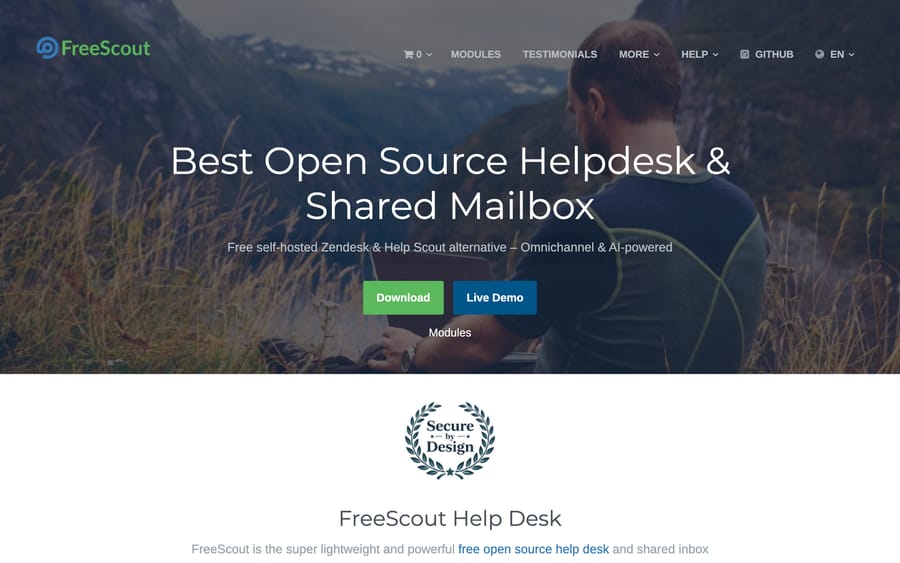
| FreeScout | AGPL-3.0 | 4,543 | 2026-09-19 | Shared mailbox, runs on shared hosting |
| osTicket | GPL-2.0 | 3,917 | 2026-06-17 | The classic, v1.18.4 |
| Libredesk | AGPL-3.0 | 2,946 | 2026-09-20 | One binary, no paid tiers |
The arithmetic is straightforward and the caveat always the same. A $10 to $40 a month server beats $1,500 a year of seats, as long as somebody owns upgrades, backups and outbound email deliverability. Our open-source ticketing roundup has the full comparison, including which projects are still being committed to.
What does a free help desk plan actually cost you?
- AI is never included. Crisp's free card says "No AI credits included". Chatwoot's Captain AI starts at Startups. HubSpot's Customer Agent needs Professional at 50 credits a conversation. Help Scout charges $0.75 a resolution. tawk.to's AI Assist is $29 a month. Free gets you the inbox.
- Retention has a clock. Chatwoot Hacker keeps 30 days of history. That's a migration problem the day you leave, not a feature gap today.
- Branding is a real cost, paid in attention. HubSpot puts its name on your chat widget; tawk.to charges $29 a month to take its badge off; Spiceworks, in the IT half of this market, runs ads at your technicians.
- One inbox means one queue. Help Scout Free is a single inbox, and extra inboxes are $10 a month on Standard. Splitting sales from support is the most common reason teams pay.
- Nobody is on call. Free plans get community support and documentation. That's usually fine, and it isn't fine during an outage.
Where does an AI agent layer fit?
Macha is our product and it isn't on this list, for two plain reasons: it isn't free, and it isn't a help desk. It's an AI agent layer that runs on top of a desk you already have, with integrations for Zendesk, Freshdesk, Gorgias, Front, HubSpot and Intercom. If you're picking your first free desk, this isn't your decision yet.
The reader it does fit is one step further along: a team already paying for a desk, where the repetitive half of the queue is what costs money. Macha prices on monthly ticket volume from $299 a month for 750 tickets, about $0.40 a ticket at every tier, where one ticket is one thread with one person however many replies it takes, with setup and monitoring by the Macha team included and a trial of $50 of free usage with no credit card. Compare that unit against $0.75 a resolution or 50 credits a conversation and it's arithmetic. Pricing has the tiers.
Which free help desk should you choose?
- Email support, up to three people. Zoho Desk Free Edition.
- Five people and one shared queue. Help Scout Free, and watch the contacts meter, not the seat count.
- You want the CRM too. HubSpot Service Hub free tools, and budget the $1,500 onboarding fee if Professional is where you're heading.
- Chat on a website, two people. Crisp Free or Chatwoot Hacker.
- Chat with no cap at all, and you don't mind a badge. tawk.to.
- More people than any free tier allows, and a server you can use. Self-hosted Chatwoot, Zammad or Libredesk.
- Internal IT with asset records. None of the above. Start with our free IT ticketing systems list.
Frequently asked questions
Is there genuinely free help desk software? Yes. Zoho Desk gives three users free forever, Help Scout five, HubSpot Service Hub two, Crisp and Chatwoot two each, and tawk.to publishes no seat cap at all. Self-hosted Chatwoot, Zammad, FreeScout, osTicket and Libredesk are free of license entirely.
What is the best free help desk software? Zoho Desk for email-led support, because three seats with no volume meter is the most usable free ticketing plan. Help Scout if you need five people. tawk.to if your support is chat and your team is larger than any free seat cap allows.
Does Freshdesk have a free plan? No, not any more. Its pricing page lists Growth $19, Pro $55 and Enterprise $89 per agent a month billed annually, plus a 14-day trial, and the old free-plan URL returns a 404. Freshworks separately runs a Free program for up to 2 agents for 6 months, which ends. Re-checked September 24, 2026.
Does Zendesk have a free plan? No. Zendesk runs a 14-day trial and then charges from US$19 an agent a month on Support Team, paid yearly. There is no permanently free tier.
Which free help desk has the most agents? Among hosted products, tawk.to publishes no seat cap, then Help Scout at five users. Self-hosted Chatwoot, Zammad, FreeScout, osTicket and Libredesk are uncapped, because nobody is counting seats on your own server.
Is Crisp free with unlimited conversations? Crisp's live pricing page does not say so. The Free plan card lists 2 seats and "No AI credits included", and the feature table caps a free workspace at 100 customer profiles with zero sub-inboxes. No conversation figure appears for Free anywhere on the page, so we stopped repeating the unlimited claim.
Can I get an AI agent on a free help desk plan? No. Every AI feature in this roundup sits behind a paid plan or its own meter: Crisp states "No AI credits included" on Free, Chatwoot's Captain AI starts at $19 an agent, HubSpot's Customer Agent needs Professional at 50 credits per resolved conversation, Help Scout charges $0.75 a resolution, and tawk.to's AI Assist is $29 a month.
What is the difference between free help desk software and a free ticketing system? In practice, who raises the ticket. The tools on this page are built for customers: contacts, conversations, a chat widget and a public help center. Free IT ticketing systems are built for colleagues, with technician seats, approvals and asset records, and those are covered in our free IT ticketing systems roundup.
When should I stop using a free plan? When the meter that breaks first starts breaking monthly. In practice that's a fourth or sixth hire, a second inbox, or the month your contact or conversation count crosses the line. Price the next step before you build a workflow on the free one: Chatwoot Startups $19 an agent, Atlassian Standard $20, Help Scout Standard $25, Crisp Mini $45 a workspace, HubSpot Starter from $7 a seat.
Sources:
- Zoho Desk pricing, Help Scout pricing, HubSpot Service Hub pricing, Crisp pricing
- Chatwoot pricing, Tidio pricing, tawk.to on why it is free, Jira Service Management pricing
- Freshdesk pricing (the old free-plan URL returns 404) and Zendesk pricing, both checked September 20, 2026
- GitHub, checked September 20, 2026: Chatwoot, Zammad, FreeScout, osTicket, Libredesk
- Community threads reached through search: r/ITManagers on free service desk software, r/sysadmin on free and cheap help desk options






