





 Shopify
 Stripe
 Slack
Slack Notion
 Google Workspace
 Confluence

How Do You Set Up Round-Robin Assignment in Front? (2026)


Front can assign every new conversation automatically with a rule, using either round robin or load balancing. The two behave very differently when your team goes offline or hits capacity, and load balancing needs the Professional plan.
Key takeaways
- To set up round robin in Front, create a Workspace rule from the Assign to teammate template, trigger it on an inbound message, and choose round robin as the method.
- Round robin works on every Front plan including Starter at $25 a seat, while load balancing needs the Professional plan at $65 a seat or above.
- If every teammate is offline, Front's round robin does not assign or queue the conversation, and a teammate who comes online later will not receive it.
- Front's assignment limits sit under Rules and macros in the Assignment limits tab, with a maximum of 100 conversations per teammate per workspace.
- Front's load balancing queues conversations when everyone is capped or offline and assigns the oldest unreplied conversation first when a teammate frees up.

To set up round robin in Front, go to Workspace settings → Rules and macros → Create rule, start from the Assign to teammate template, trigger it on An inbound message is received, pick your teammates, and set the distribution method to round robin. Round robin works on every Front plan, including Starter at $25 a seat a month; load balancing, which caps each teammate at up to 100 open conversations and queues the rest, needs Professional ($65 a seat) or Enterprise ($105 a seat), per front.com/pricing checked on 24 September 2026.
What is the difference between round robin and load balancing in Front?
Both methods auto-assign inbound conversations across a group of teammates, but the way they handle availability is where they split — and picking the wrong one is how conversations go missing.
Round robin cycles through teammates in order. Front assigns each new conversation to the next person in the group, then the next, evenly rotating. The catch, per Front's guide to round robin vs. load balancing, is that round robin only assigns to teammates who are online at the moment the message arrives. If everyone in the group is offline, the conversation simply isn't assigned — there's no queue to hold it, and a teammate who comes online a minute later won't be handed the one they missed. Round robin suits teams where someone is essentially always available and you want a clean, even rotation.
Load balancing assigns by current workload. Instead of a blind rotation, Front gives the new conversation to the teammate with the fewest open assigned shared conversations — up to a limit you set. Critically, load balancing queues conversations: if everyone has hit their cap, the rule pauses and resumes assigning as people clear bandwidth, so no conversation is missed. It's the better fit for teams with fluctuating availability or lumpy volume.
| Round robin | Load balancing | |
|---|---|---|
| How it picks | Even rotation, next in line | Teammate with fewest open conversations |
| Needs teammate online | Yes — skips offline people | Yes, but queues instead of dropping |
| If everyone's offline/capped | Not assigned, no queue | Held in a queue, assigned later |
| Per-teammate cap | No (ignores the limit) | Yes (you set it) |
| Plan | All plans (Starter and up) | Professional plan or above |
That last row matters: per Front's load balancing setup docs, the load balancing feature is available on the Professional plan or above, while assignments and real-time availability are listed on every plan. Front sells three plans: Starter ($25 a seat, up to 10 seats, up to 10 automation rules), Professional ($65 a seat, up to 50 seats, up to 20 rules) and Enterprise ($105 a seat, unlimited rules). Starter's 10-rule cap is worth knowing before you spend one on assignment. Front's pricing tiers spell out the rest.
How do you set up round-robin assignment in Front?
Round robin lives inside a workspace rule — the same When → If → Then engine covered in Front rules explained. Here's the build:
- Open Workspace settings → Rules and macros, then click Create rule. (Only workspace or company admins can create shared rules.)
- Choose the Assign to teammate rule template as your starting point.
- Set the When (trigger) to An inbound message is received — the moment a fresh conversation lands.
- Add an If (condition) to scope it, e.g. Conversation is in your Customer Support inbox, so the rule only fires for the right queue.
- In the Then (action), choose Assign to teammate, select the group of teammates who should share the load, and set the distribution method to round robin.
- Name the rule something legible ("Round-robin new support emails"), save, and toggle it on.
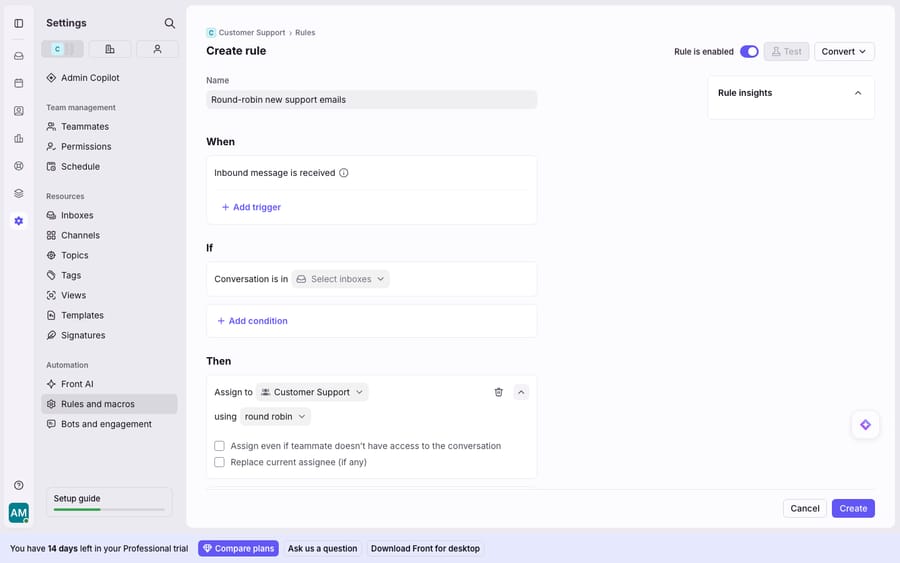
From then on, every inbound message matching that inbox rotates evenly across your selected teammates who are online. There's no cap here by design — round robin distributes evenly rather than by current workload, so it deliberately ignores the load-balance limit.
Does Front skip teammates who are away or busy?
Auto-assignment is only helpful if it hands work to people who can act on it. Front handles this with availability statuses, and the rule engine respects them.
Per Front's documentation, rules will not assign conversations to teammates who are marked as Out of office or Busy. So a teammate who flips their status to Busy for a focus block, or Out of office for the day, is automatically skipped by both round robin and load balancing — you don't need a separate condition for it. This is what stops the classic failure mode of a round-robin rule cheerfully assigning tickets to someone on vacation.
The practical upshot: encourage the team to keep their availability status honest. A load-balancing queue can only route around people who've marked themselves unavailable; if someone stays "online" while away, the rule will still route to them and the conversation stalls. Availability is the input that makes the whole system trustworthy.
How do you cap conversations per teammate?
Round robin distributes evenly no matter how buried anyone is. If you'd rather protect people from overload, you want load balancing with per-teammate limits — and the cap is set in its own place, not inside the rule.
- Go to Workspace settings → Rules and macros and open the Assignment limits tab.
- Under the Assignment limit column, enter a number for each teammate — the maximum open shared conversations they can hold at once. Use the checkboxes to apply the same limit to several teammates in one go.
- Note the ceiling: the maximum limit is 100 per teammate per workspace.
- Back in Rules, create (or edit) your Assign to teammate rule, and in the Then action pick Load balancing as the method instead of round robin.
Now Front assigns each new conversation to whoever currently holds the fewest open ones, never pushing anyone past their cap. When everyone is at their limit or offline, the rule doesn't drop the message. It queues it and resumes assigning as teammates free up, starting with the oldest unreplied conversation. One honest caveat worth repeating: the assignment limit applies only to the load-balancing action. A plain Assign to teammate rule or a round robin rule will happily blow past those numbers, because they don't consult the limit at all.
Where does Front's assignment stop, and where does an AI layer pick up?
Front's assignment engine is deterministic and dependable, which is exactly its virtue: it moves the right conversation to the right person in a predictable way, every time. But there are real edges worth naming.
The cap sits at 100 per teammate per workspace, and load balancing itself is Professional-plan-and-up — a smaller team on a lower tier gets round robin but not workload-aware distribution. Availability is only as good as the statuses people set; a stale "online" quietly breaks the routing. And most fundamentally, assignment decides who handles a conversation — it does nothing about the content. It can hand a billing question to the least-busy agent, but it can't read the question, pull the customer's invoice, and answer it. The teammate still starts from zero.
That's the seam where an AI agent layer fits — not to replace assignment, but to shrink and pre-solve the queue before it's ever distributed. The broader category of AI agents for customer service exists precisely for the reasoning work a rotation can't do. Macha is one such layer, running on Zendesk, Freshdesk, Gorgias, Front, HubSpot or Intercom: it runs on top of the Front you already use through the live Macha–Front connector — it does not replace Front, your shared inboxes, or your assignment rules. You keep round robin and load balancing doing what they're good at: fairly distributing whatever's left. But before a conversation is round-robined to a person, Macha's agent reads it, understands intent rather than keywords, and drafts or sends a grounded reply — pulling a real order or account status through a custom tool that turns your REST API into something the agent can call. Fewer conversations reach the rotation, and the ones that do arrive already triaged. If you want the mechanics, connecting Front to Macha to route conversations to AI walks through it, and Macha bills per ticket (one plan from $299 a month for up to 750 tickets; one conversation is charged once however many messages it takes), never per resolution, so the bill never hangs on an outcome definition you don't control.
The clean division of labour: let Front distribute conversations deterministically, and layer an agent on top to answer the ones a rotation can only hand off. For the systems assignment plugs into, see the wider Front shared inbox model and how SLA policies keep the distributed work on time.
FAQ
What's the difference between round robin and load balancing in Front? Round robin rotates conversations evenly through online teammates and ignores workload; if everyone is offline it doesn't assign and doesn't queue. Load balancing assigns each conversation to the teammate with the fewest open shared conversations, respects a per-teammate cap, and queues messages when everyone is at their limit so nothing is missed.
Where do I set up round-robin assignment? In a workspace rule. Go to Workspace settings → Rules and macros → Create rule, use the Assign to teammate template, trigger it on an inbound message, then in the Then action select your teammates and set the method to round robin. Only workspace or company admins can create shared rules.
How do I cap how many conversations a teammate gets? Open Workspace settings → Rules and macros → Assignment limits, and enter a maximum per teammate (up to 100 per workspace). That cap is only honoured by the load-balancing action — round robin and plain "Assign to teammate" rules ignore it.
Does Front skip teammates who are away? Yes. Rules will not assign conversations to teammates marked Out of office or Busy, so both round robin and load balancing route around anyone who's set themselves unavailable. Keeping availability statuses accurate is what makes the routing reliable.
Do I need a paid plan for this? Every Front plan is paid. Round robin works on all of them, including Starter at $25 a seat, but load balancing (workload-aware distribution with per-teammate limits) requires the Professional plan ($65 a seat) or above.
Which conversation gets assigned first when someone comes back online? With load balancing, the oldest unreplied conversation in the queue goes first. With round robin, nothing was queued, so conversations that arrived while everyone was offline stay unassigned until someone picks them up by hand.
Ready to turn "assigned to a person" into "already answered"? Start a free trial of Macha and connect it to your Front in minutes.






