





 Shopify
 Stripe
 Slack
Slack Notion
 Google Workspace
 Confluence

What Can an AI Agent Do in Freshdesk? Macha's 15-Tool Integration Explained


Macha connects to Freshdesk with an API key and gives AI agents 15 tools and three triggers, so they can read attachments, update fields, route and reply on tickets by themselves. Freshdesk stays your system of record, and Macha bills about $0.40 a ticket however many steps it takes.
Key takeaways
- Macha's Freshdesk integration gives AI agents 15 tools covering ticket reading, public replies, internal notes, field updates, assignment and knowledge base search, so agents work tickets rather than only deflect them.
- The Macha Freshdesk connector has been live since March 15, 2026 and authenticates with a Freshdesk API key plus the account's Freshdesk domain.
- Macha's Read Attachment tool extracts text from PDF, DOCX, XLSX, CSV and TXT files attached to a Freshdesk ticket, such as invoices or receipts.
- Three trigger types, Ticket Created, Ticket Updated and Custom Webhook, let Macha agents run on Freshdesk automatically, and a trigger disables itself after 5 consecutive errors.
- Macha bills per Freshdesk ticket, about $0.40 a ticket whatever the number of tool calls, and the $50 free trial covers about 125 tickets.

Macha's Freshdesk integration connects with a Freshdesk API key and gives AI agents 15 tools (read tickets, reply, add internal notes, update fields, assign, search the knowledge base, read attachments) plus three trigger types so agents run on their own when a ticket is created or updated. It's an AI agent layer on top of the Freshdesk you already run, not a replacement help desk, and it bills about $0.40 a ticket however many tool calls the agent makes.
| What you get | Detail |
|---|---|
| Authentication | Freshdesk API key plus your domain |
| Tools | 15: 5 read, 6 action, 2 routing lookups, assignment, knowledge base search |
| Attachments | Text extracted from PDF, DOCX, XLSX, CSV and TXT |
| Triggers | Ticket Created, Ticket Updated, Custom Webhook |
| Guardrails | Optional debounce; auto-disable after 5 consecutive errors |
| Price | Per ticket, from $299/month for up to 750 tickets |
| Live since | March 15, 2026 |
Most "AI for Freshdesk" tools stop at suggesting a reply or deflecting an FAQ. A Macha agent can search the knowledge base, read a PDF the customer attached, update fields, assign the ticket and reply: the full motion an L1 agent performs, inside the help desk your team already lives in.
What does "on top of Freshdesk" actually mean?
Macha doesn't move your tickets, agents, SLAs, or routing rules anywhere. Freshdesk stays the system of record. Macha connects through the Freshdesk API and calls the same endpoints your team uses in the UI — so when a Macha agent posts a reply or changes a status, it shows up in Freshdesk exactly as if a teammate did it, with full audit history.
That's the key distinction from Freshworks' own Freddy AI Agent, which answers customers inside Freshworks and is sold by the session: the first 500 sessions are a one-time allowance per account, then $49 per 100 sessions (Freshdesk pricing). Freddy answers questions; Macha works the ticket. A Macha agent can read a Freshdesk ticket, cross-check an order in Shopify, pull a policy from Notion, and then act back on the Freshdesk ticket — because Macha is the layer that spans all of those tools, not just one helpdesk. (You can keep using Freddy and Macha together; they operate at different layers.)
How do you connect Freshdesk to Macha?
The connector uses API key authentication, the method Freshdesk documents for its API (the key goes in HTTP Basic auth with a dummy password; see Freshdesk's API key guide). Setup is two fields:
- In Freshdesk, open Profile Settings (top-right avatar → Profile Settings) and copy Your API Key from the right-hand panel.
- In Macha, go to Connectors, pick Freshdesk, and paste the API key plus your Freshdesk domain (
yourcompany.freshdesk.com).

That's the entire connection. One security note worth stating plainly: a Freshdesk API key inherits the role of the user it belongs to — so the Macha agent can only do what that Freshdesk user can. If you generate the key from an account scoped to a single group or with view-only field permissions, the agent is bound by exactly those limits. Issue the key from a dedicated Freshdesk user whose role matches the scope you want the agent to have. Because Macha supports multi-instance connectors, you can link more than one Freshdesk account (say, a separate brand or region) — each instance gets its own credentials and name, and Macha auto-suffixes the tool names so an agent always knows which account it's acting on.
Once connected, you attach the Freshdesk tools to an agent and tell it what to do in plain language. The agent's system prompt is where you set scope — which statuses it may touch, when to escalate, what tone to use.
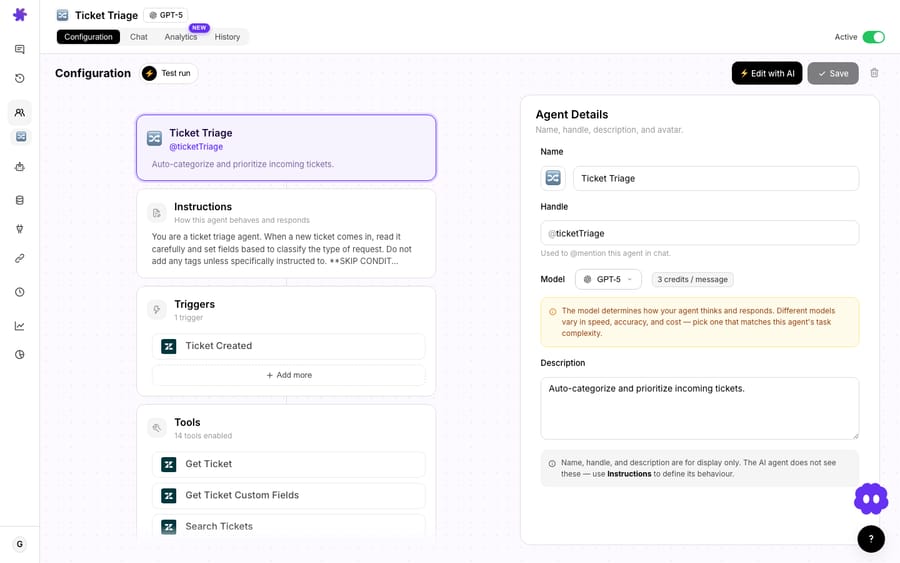
What can a Macha agent do with its 15 Freshdesk tools?
Here's the full Freshdesk action set your agents can call. It's grouped into four jobs an agent does on a ticket: read context, take action, route, and look things up.

| # | Tool | What the agent can do |
|---|---|---|
| 1 | Get Ticket | Retrieve full ticket details — conversations, tags, and custom fields — by ticket ID. |
| 2 | Search Tickets | Search across all tickets by keyword, status, priority, or assignee. |
| 3 | Search Contacts | Look up a contact by name, email, or phone to pull customer context. |
| 4 | Get Ticket Fields | List every available ticket field and its options for your account. |
| 5 | Read Attachment | Download and extract text from a file attached to a ticket. |
| 6 | Add Public Reply | Post a customer-visible reply on the ticket. |
| 7 | Add Internal Note | Add a private note visible only to agents. |
| 8 | Update Priority | Change the ticket's priority level. |
| 9 | Update Status | Move the ticket to open, pending, resolved, or closed. |
| 10 | Update Tags | Add, remove, or replace tags. |
| 11 | Update Fields | Write to custom fields on the ticket. |
| 12 | Assign Ticket | Assign the ticket to a specific agent or group. |
| 13 | List Agents | List all agents with their roles and groups (for routing decisions). |
| 14 | List Groups | List all agent groups (for routing decisions). |
| 15 | Search Articles | Search the Freshdesk knowledge base for solution articles by keyword. |
The reason this matters: a deflection bot needs maybe two of these (search articles, reply). Genuine ticket handling needs all of them. Consider a refund request — the agent uses Search Contacts to confirm the customer, Get Ticket to read the thread, Read Attachment to check the receipt, Search Articles to confirm the refund window, Add Internal Note to log its reasoning, Update Tags to mark it refund-reviewed, Assign Ticket to the billing group if it's over the threshold, and Add Public Reply to tell the customer what's happening. That's nine tool calls in one autonomous run — and one ticket, about $0.40, because Macha charges once per thread however many steps it takes — and it's exactly what an L1 agent does manually.
Notice the deliberate split between public replies and internal notes. Agents post to the customer with one tool and leave their working notes for humans with another, so a human teammate can always see why the agent did what it did before the ticket closes.
Reading attachments: PDF, DOCX, XLSX, CSV, TXT
The Read Attachment tool is the part most Freshdesk AI tools don't have. When a customer attaches a file, the agent can download it and extract the text from:
- PDF — invoices, shipping labels, signed forms
- DOCX — Word documents
- XLSX — spreadsheets
- CSV — exported data
- TXT — plain text logs
So when a ticket says "see attached receipt," the agent can actually read the receipt — pull the order number, the date, the amount — instead of telling the customer "a human will review your attachment shortly." This shipped alongside the connector on March 15, 2026, and it's what turns "AI that reads ticket text" into "AI that reads the whole ticket."
How do Macha agents run on Freshdesk tickets automatically?
Tools are what an agent can do; triggers are when it does it. The Freshdesk connector exposes three trigger types so agents run autonomously instead of waiting for a human to ask:
| Trigger | Fires when |
|---|---|
| Ticket Created | A new ticket is created in Freshdesk. |
| Ticket Updated | Any field on a ticket changes — status, assignee, priority, or tags. |
| Custom Webhook | A custom Freshdesk webhook fires from your own Automation rules. |
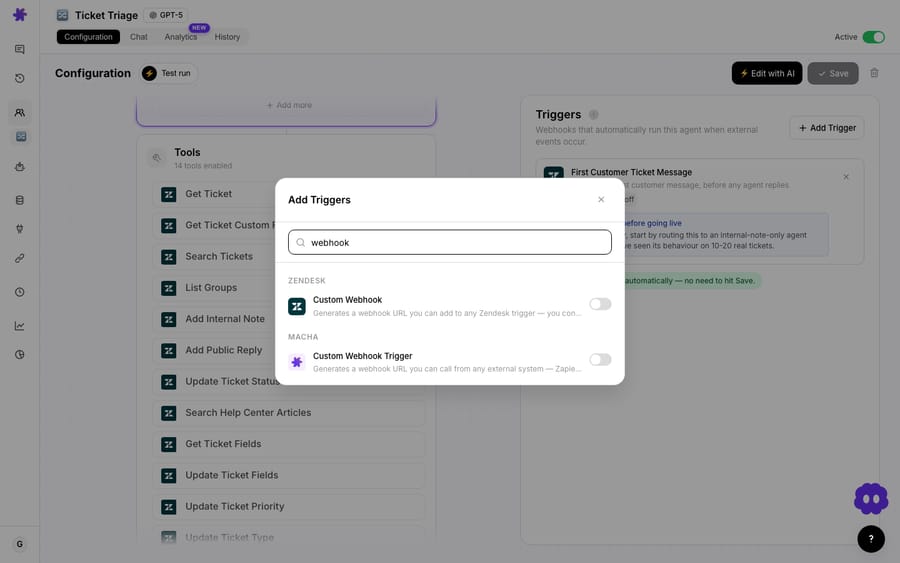
The Custom Webhook option is the flexible one. Macha generates a webhook URL with a signing secret, and you point a Freshdesk Automation rule at it. Because Freshdesk automations can fire on ticket.created, ticket.updated, ticket.resolved, ticket.closed, and ticket.reopened, you decide precisely which events wake the agent — and you can pre-filter in Freshdesk (e.g., only tickets in the "Billing" group) so the agent only runs when it should.
A few production-grade details worth knowing about Macha's trigger system, which arrived on March 1, 2026 and has been hardened since:
- Debounce. Every event-driven Freshdesk trigger has a debounce chip — set a delay in seconds to batch rapid updates before the agent fires. The default for ticket events is 0s (off), so you opt in only where you need it.
- Readable history. Freshdesk webhook conversations are titled with the ticket ID and subject from the payload, so an agent's run history is legible instead of a wall of "Custom Webhook."
- Auto-disable on failure. A trigger that throws 5 consecutive errors disables itself automatically, so a broken trigger can't quietly keep firing in the background.
- Triggers on every plan. Event and webhook triggers like the Freshdesk ones are the everyday workhorse, and scheduled triggers sit alongside them — every feature is on every tier, with unlimited agents and seats. See the pricing page for the tiers.
For the deeper mechanics — signing secrets, payload mapping, and debounce — the triggers documentation is the reference.
What does an autonomous first-response agent look like?
Put the pieces together and a realistic Freshdesk agent looks like this:
- Trigger —
Ticket Createdfires on every new ticket. - Read — the agent calls Get Ticket for the thread, Search Contacts for the customer's history, and Read Attachment if a file is present.
- Reason — it checks Search Articles in your Freshdesk knowledge base for a documented answer.
- Act — if it's confident, it posts an Add Public Reply and sets Update Status to pending; if not, it writes an Add Internal Note with a draft, applies Update Priority and Update Tags, and uses Assign Ticket to route to the right List Groups team.
Every one of those actions lands in Freshdesk natively. The customer sees a fast, accurate first response; your team sees a triaged, tagged, partially-handled ticket instead of a cold one. And because Macha spans tools, the same agent can check an order in Shopify or a subscription in Stripe before it ever replies — see the full integrations directory for what else it can reach.
When should you not point an agent at Freshdesk?
Honesty matters more than hype here. A few situations where you should slow down:
- Don't start fully autonomous on customer-facing replies. Begin with the agent writing internal notes / draft replies (Add Internal Note) and let humans send them. Promote it to Add Public Reply only after you've watched its judgment on real tickets. The toolset makes this graduation trivial — it's the same agent with one extra tool enabled.
- Scope the trigger tightly. A
Ticket Createdtrigger on every inbound ticket is a lot of volume. Use Freshdesk Automation rules (or the trigger's own filters) so the agent only runs on the categories it's actually good at, and lean on debounce for noisy update events. - Mind API rate limits. Freshdesk enforces a per-account API rate limit that scales with your plan (see the Freshdesk API rate-limit reference). High-volume autonomous runs that call many tools per ticket can bump these — stagger triggers and avoid firing on every minor field change.
- It's not a deflection-only widget. If all you want is an answer bot that never touches the rest of your stack, Freshworks' native Freddy AI Agent may be a simpler fit. Macha earns its keep when you want agents that take actions across the helpdesk and the rest of your stack.
- Size the plan to your ticket volume. Macha bills per ticket — one thread with one person, charged once however many tool calls it takes — so the nine-tool refund run above and an agent that only drafts a reply cost the same: about $0.40 a ticket. What you size to is the number of tickets a month, not the number of actions. Start with $50 of free usage (about 125 tickets, no card) to measure your real volume, and see the pricing page for the tiers.
FAQ
Does Macha replace Freshdesk? No. Macha is an AI agent layer that sits on top of Freshdesk. Freshdesk remains your helpdesk, system of record, and source of SLAs and routing — Macha's agents read and act on your tickets through the Freshdesk API.
How does Macha authenticate to Freshdesk? With an API key (HTTP Basic Auth, the method Freshdesk documents for its API). You copy the key from your Freshdesk Profile Settings and paste it, plus your domain, into Macha's Freshdesk connector.
How many Freshdesk tools does Macha have? Fifteen: Get Ticket, Search Tickets, Search Contacts, Get Ticket Fields, Read Attachment, Add Public Reply, Add Internal Note, Update Priority, Update Status, Update Tags, Update Fields, Assign Ticket, List Agents, List Groups, and Search Articles.
Can a Macha agent read files customers attach to a ticket? Yes. The Read Attachment tool extracts text from PDF, DOCX, XLSX, CSV, and TXT attachments directly off the Freshdesk ticket.
Can agents run automatically on new Freshdesk tickets? Yes. Three trigger types — Ticket Created, Ticket Updated, and Custom Webhook — let agents run autonomously. Custom webhooks use a signed URL you wire to a Freshdesk Automation rule, with debounce and auto-disable-on-error guardrails.
How much does Macha cost on Freshdesk? Macha has one plan priced by ticket volume, from $299 a month for up to 750 tickets, about $0.40 a ticket. A ticket is billed once however many tool calls or replies it takes, and setup and monitoring by the Macha team are included.
Can I connect more than one Freshdesk account? Yes. Macha supports multiple instances of the same connector, each with its own credentials and name, and disambiguates the tool names so agents act on the right account.
Macha turns Freshdesk from a place where tickets arrive into a place where they get worked — reading attachments, checking history, routing to the right team, and replying, all natively inside the helpdesk you already run. Point an agent at your queue with a free Macha trial (no card required), see the tiers on the pricing page, start with the Freshdesk integration page, and watch the docs for the trigger setup. The same agent layer runs on Zendesk, Freshdesk, Gorgias, Front, HubSpot or Intercom; if you also run Zendesk, see Macha on Zendesk.
Sources: Freshdesk API key authentication, Freshdesk webhook automation examples, Freshdesk API & Webhooks.






