





 Shopify
 Stripe
 Slack
Slack Notion
 Google Workspace
 Confluence

How Do You Add AI Support to a Shopify Store Running Gorgias? (2026)


Most Shopify support tickets ask about a specific order, and the answer lives in Shopify while the conversation lives in Gorgias. An AI agent that reads the ticket and looks up the real order can close those tickets, and the options differ mainly in how they bill.
Key takeaways
- A Shopify + Gorgias AI agent resolves order-status tickets by reading the Gorgias ticket, calling Shopify's Get Order or Search Orders tool, and replying with real tracking details.
- Gorgias's AI Agent costs $0.90 per resolved conversation on most plans and $1.00 on Starter ($1.00 monthly, $0.90 annual, per its pricing FAQ), with $1.50 overages on Support + Shopping Assistant plans.
- Richpanel charges $0.20 per AI-handled conversation plus $99 a seat, while Tidio's Lyro starts at $32.50 a month for 50 conversations.
- Macha bills per ticket rather than per resolution, starting at $299 a month for 750 tickets, about $0.40 each, on top of the Gorgias helpdesk a team already runs.
- Macha's Shopify connector can refund or cancel an order, and both tools ask a human to confirm in chat, so a team can still have cancellations drafted for a human to carry out.

The way to add AI to a Shopify store's Gorgias queue is an agent that reads the Gorgias ticket, looks up the real order with Shopify's Get Order or Search Orders tool, and replies with the actual tracking details. Gorgias's own AI Agent does this at $0.90 per resolved conversation on most plans ($1.00 on monthly billing); Macha does it as a layer on top of Gorgias, billed per ticket from $299 a month for 750 tickets. Here's how the main options price out:
| Approach | Examples | Pricing model | Rough rate (checked 24 Sept 2026) |
|---|---|---|---|
| Helpdesk-native AI | Gorgias AI Agent | Per resolved conversation | $0.90 on most plans, $1.00 on Starter (Gorgias) |
| Helpdesk-native AI | Richpanel | Seats + per AI conversation | $0.20 per AI-handled conversation, plus $99 a seat (Richpanel) |
| Helpdesk-native AI | Tidio Lyro | Conversation bundles | from $32.50/mo for 50 Lyro conversations, about $0.65 each (Tidio) |
| Shopify-native | Shopify Sidekick | Included with your Shopify plan | n/a (admin assist, not ticket resolution) |
| Cross-tool layer | Macha | Per ticket | from $299/mo for 750 tickets, about $0.40 each; see /pricing |
The gap between the Gorgias conversation and the Shopify order record is where AI earns its keep. Not by writing fluffier replies, but by reading the ticket, looking up the real order, and resolving the question with the actual answer — order #1042 shipped Tuesday, USPS, tracking here, delivers Thursday. For a Shopify-native team that means two tools you may already have side by side: Gorgias as your helpdesk and Shopify as your source of commerce truth, joined by an agent that can read both.
A note on what Macha is, because it matters here: Macha is not a Gorgias replacement. It's an AI agent layer that sits on top of the helpdesk you already run. You keep Gorgias. Macha connects to it, connects to Shopify alongside it, and builds agents that take real actions across both.
Why is Shopify support harder to automate than generic support?
Generic support automation treats a ticket as text: match it to a help-center article, paste a canned macro, done. That works for "what's your return policy." It falls apart the moment the customer asks something that depends on their specific order — which is most of e-commerce support.
To answer "where is my order?" properly, an agent needs to:
- Read the full ticket thread and figure out which order the customer means.
- Look that order up in Shopify — fulfillment status, tracking, line items.
- Write a reply with the real details, not a placeholder.
- Update the ticket — set status, apply a tag, maybe assign a team.
Step 2 is the part most chatbots skip. A reply that says "you can track your order in your account" is not a resolution; it's a deflection that bounces back as a second ticket. The whole point of pairing Gorgias with Shopify is to make step 2 first-class.
What are the three ways to add AI to Shopify support?
Before wiring anything up, it helps to know the terrain. "AI customer support for Shopify" isn't one product category — it's three different approaches, and they price very differently (see the table at the top). If you're shopping, sort tools into these buckets first.
1. Helpdesk-native AI agents. Your support platform ships its own AI that resolves tickets inside its own walls. Gorgias's AI Agent is the obvious one for Shopify-native teams — it reads Shopify order, customer, and catalog data natively and resolves common e-commerce tickets without an agent touching them. Richpanel and Tidio's Lyro play the same game from their own helpdesks. These are the path of least resistance if you're already on that helpdesk, and they're priced by the AI conversation: Gorgias per resolved conversation, Richpanel per AI-handled conversation, Tidio in bundles of Lyro conversations.
2. Shopify's own assistant. Shopify Sidekick is included with every Shopify plan (features and usage limits vary by plan), but it's scoped to helping you run the store from the admin (analytics, setup, copy) — it is not a front-line ticket-resolution agent for your customers. Useful, but a different job than the support queue.
3. Cross-tool AI layers. Tools like Macha don't replace your helpdesk — they sit on top of whatever you already run (Zendesk, Freshdesk, Gorgias, Front, HubSpot or Intercom) and reach across commerce, payments, knowledge, and comms tools. The agent that resolves a ticket can read Gorgias, look up Shopify, check Stripe, and ping Slack in one flow. Macha bills per ticket — one conversation, charged once however many messages, lookups and tool calls it takes — never per resolution, so the bill never hangs on an outcome definition you don't control.
A few honest reads on the pricing table. Per-conversation AI pricing (Gorgias, Richpanel, Tidio) ties cost to what the AI handles. Gorgias says a conversation its AI can't finish moves to your regular Helpdesk plan when it's handed to a human, and you're not charged for both, so the two line items don't double up on the same ticket. Richpanel's $0.20 sits on top of $99-a-seat helpdesk pricing, so the per-conversation number alone understates the bill. Per-ticket pricing (Macha) decouples cost from outcome without making it unpredictable: one conversation is charged once, however many lookups and replies it takes, so you're never paying a bounty on someone else's definition of “resolved.” Neither is universally cheaper — it depends on your volume and how many of your conversations the AI actually finishes. (For a deeper teardown of the helpdesk options, see our Gorgias alternatives and AI customer service for Shopify guides.)
The rest of this post is about approach 3, done well: pairing Gorgias (your helpdesk) with Shopify (your commerce truth) through Macha.
Which Macha connectors does a Gorgias + Shopify agent use?
Macha treats Gorgias and Shopify as two separate connections you authorize once, then hand to your agents as tools.
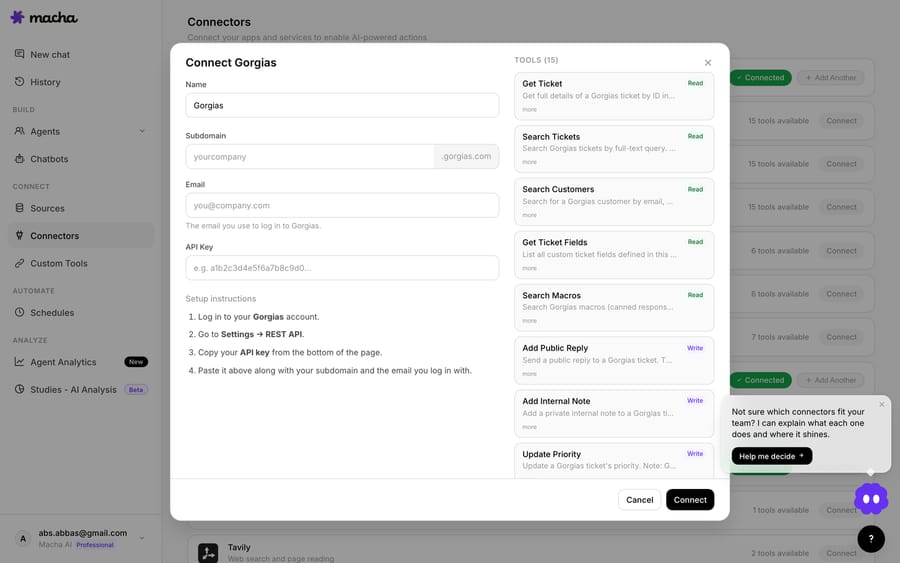
Gorgias — the helpdesk actions
The Gorgias connector authenticates with an API key and exposes the full set of helpdesk actions an agent needs to actually work a ticket, not just read it:
- Get Ticket — retrieve the entire message thread, customer info, assignee, and tags.
- Search Tickets / Search Customers — full-text search across tickets and find customers by email, phone, or name.
- Search Macros — find the right pre-written canned reply by name, so AI replies stay on-brand.
- Add Public Reply / Add Internal Note — respond to the customer on-channel, or leave a private note for human agents.
- Update Status / Priority / Tags / Fields and Assign Ticket — move the ticket through your workflow and route it to a user or team.
- List Agents / List Teams — make routing decisions based on who's available.
- Read Attachment — pull text out of PDF, DOCX, XLSX, CSV, and TXT files a customer attaches.
It also ships triggers — Ticket Created, Ticket Updated, New Message Added, and a Custom Webhook — so an agent can fire the moment a new ticket lands, not on a poll.
Shopify — the commerce context
The Shopify connector gives agents real-time, accurate store data, and its one money-moving action waits for a human to confirm it. Its actions:
- Get Order — look up an order by ID or number with full line items, fulfillment, and payment status.
- Search Orders — by customer email, fulfillment status, financial status, or date range.
- Search Products: products with their variants and live inventory.
- Get Discounts: look up the store's discount codes.
- Lookup Customer — a customer profile with order history and contact details.
- Customer Orders: list a customer's orders.
- create_refund: issue a refund against an order, behind a confirmation step.
- Cancel Order: cancel an order, behind the same confirmation step.
Put those two together and you have everything needed to resolve the high-volume order-status, availability, and cancellation tickets that dominate a Shopify queue.

How do you build a WISMO agent on Gorgias and Shopify?
The flagship pattern is "where is my order" (WISMO) — usually the single largest ticket category for a DTC brand. Here's the auto-resolve order-status flow wired across the two connectors:
Trigger: Gorgias Ticket Created (or New Message Added), with a condition that the ticket looks like an order-status question.
Steps the agent runs:
- Gorgias → Get Ticket to read the full thread and the customer's email.
- Shopify → Search Orders / Get Order to find the matching order and pull fulfillment + tracking.
- Gorgias → Add Public Reply with the real status, tracking link, and delivery estimate — optionally seeded from a Search Macros result so the tone matches your existing canned replies.
- Gorgias → Update Status / Update Tags to mark it solved and tag it
wismofor reporting.
What makes this hold up in production isn't the happy path — it's the instructions you give the agent for the messy cases. If there are multiple recent orders, ask which one. If the order is unfulfilled and past the expected ship date, don't promise a date — apologize, set priority to high, and assign to the fulfillment team instead of replying. Because the agent has both the conversation and the order record in front of it, those branches are decisions it can actually make, not guesses.
Beyond WISMO
Once the two connectors are in place, the same shape covers most of the queue:
| Ticket type | What the agent does | Connectors |
|---|---|---|
| Order status (WISMO) | Look up order, reply with tracking, mark solved | Gorgias + Shopify |
| Product availability | Check live inventory for the variant, reply | Gorgias + Shopify |
| Cancellation request | Check if order is still cancellable, verify payment, draft a reply for a human | Gorgias + Shopify + Stripe |
| VIP / high-value | Pull order history, flag priority, alert the team | Gorgias + Shopify + Slack |
| Reopened ticket | Rebuild context from prior thread + orders, summarize | Gorgias + Shopify |
Notice the cancellation row says draft, not send. Sensitive, money-touching actions are exactly where you want a human in the loop — Macha can do all the lookup legwork and hand the agent a finished draft with the order and payment facts attached, while the human keeps the final click. (For how to take cancellations further with guardrails, see self-serve cancellations for Shopify orders. Stripe and Slack are separate connectors you can add to the same agent; this post focuses on the Gorgias + Shopify core.)
If Gorgias already has an AI Agent, where does Macha fit?
Fair question, and an honest answer matters here. Gorgias ships its own native AI Agent that pulls Shopify order, customer, and catalog data, and it's tightly integrated. If your needs are squarely "resolve common e-commerce tickets inside Gorgias," its native automation is the path of least resistance and you may not need anything else.
Two things to weigh, both verifiable:
Pricing model. Gorgias's AI Agent is priced per resolution: $0.90 per resolved conversation on most plans and $1.00 on Starter, with overages at $1.50 per interaction on Support + Shopping Assistant plans once you pass the included automated interactions (Gorgias, updated 28 May 2026). Gorgias's pricing page puts AI Agent on every plan and scales its helpdesk from 50 to 5,000 tickets a month, never priced per agent. The incentive in that model is plain: the vendor earns when its AI closes a conversation, so it decides what counts as closed. Macha is priced differently: per ticket — one conversation, charged once however many messages, lookups and tool calls it takes — not per resolution. Pricing starts at $299 a month for 750 tickets, about $0.40 each. The practical difference: the bill tracks the volume of conversations you hand the agent, not an outcome definition set by the vendor. Neither is universally cheaper; model your own volume against the pricing page.
Scope. Gorgias's native AI lives in the Gorgias world. Macha is built to reach across tools — the same agent can touch Shopify and Stripe and Slack and a Notion knowledge base, choose its own model, and run multi-step logic you define. And because Macha is a layer rather than a helpdesk, the agents you build aren't locked to one vendor: if you also run a Zendesk or Freshdesk brand, the same patterns port over.
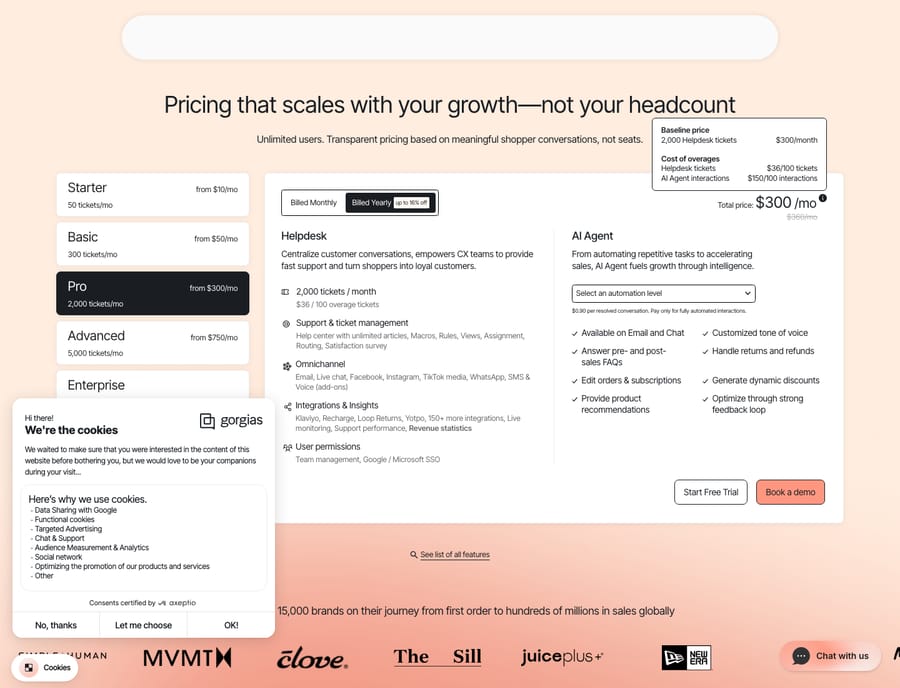
So the framing isn't "Macha vs. Gorgias." It's: keep Gorgias as your helpdesk, and choose your automation layer based on how much cross-tool, multi-model orchestration you need on top of it.
When is Macha the wrong tool for a Gorgias + Shopify team?
A few honest caveats before you build:
- Shopify refunds wait for a human. The connector looks up orders, customers, products, and inventory, and it can issue a refund, but only after a confirmation step. It does not cancel orders or edit fulfillment. If your dream is "AI auto-refunds without a human," this isn't that, and frankly that shouldn't be fully autonomous anyway.
- The Gorgias connector has no native order trigger. Triggers fire on ticket events (created, updated, new message) — not on Shopify order events. If you want proactive "your order is delayed" outreach, that's driven from a different source, not the Gorgias side.
- You need clean data to disambiguate. If a customer emails from an address that doesn't match their Shopify account, order lookup gets fuzzy. Build the "ask which order" fallback; don't assume one email = one order.
- Volume math is real. Per-ticket billing means a chatty multi-step agent costs the same as a one-shot reply — the bill tracks how many conversations you hand the agent, not how many steps each one takes. Start with one high-volume category (WISMO), measure, then expand — don't wire up all five patterns on day one.
- If you're tiny and your tickets are simple, Gorgias's native AI Agent or even good macros may be all you need. Macha pays off when you have volume and cross-tool complexity.
FAQ
Do I have to replace Gorgias to use Macha? No. Macha sits on top of Gorgias. You keep your helpdesk, your macros, your agents, and your workflows — Macha connects in via API key and adds an AI agent layer that reads tickets and takes actions.
Can the AI actually look up a customer's specific Shopify order? Yes — that's the core of it. The Shopify connector's Get Order and Search Orders actions pull real fulfillment, tracking, and line-item data, so replies contain the actual status instead of a generic "check your account" deflection.
Can it cancel an order or issue a refund automatically? It can issue a refund with a confirmation step: the Shopify connector's create_refund action runs only after someone approves it. It can also cancel an order with the connector's Cancel Order tool, which asks for confirmation in chat the same way. Many teams still have Macha gather the context (order state, payment via Stripe) and draft a reply for cancellations, and a human keeps the final action.
How is Macha's pricing different from Gorgias's AI Agent? Gorgias charges per resolved conversation ($0.90 on most plans, per its AI Agent pricing guide; $1.00 on monthly plans and $0.90 on annual, per its pricing FAQ in October 2026). Macha charges per ticket — one conversation, charged once however many messages it takes — from $299 a month for 750 tickets, about $0.40 each. You're paying for the conversation, not for someone else's definition of a resolution. Compare both against your own volume on the pricing page.
Does this work if I'm on Zendesk or Freshdesk instead of Gorgias? Yes. Macha connects to Zendesk, Freshdesk, Gorgias, Front, HubSpot or Intercom. The Gorgias + Shopify pattern here ports directly; only the helpdesk connector changes.
Which ticket type should you automate first?
You don't need a grand automation strategy to get value here. Connect Gorgias, connect Shopify, build one WISMO agent, and let it work your single biggest ticket category for a week. That's the honest test: did it resolve order-status questions with real tracking details, and did your team stop tab-hopping to Shopify? Start a free trial ($50 of usage, no credit card, no time limit), or read the connector docs for the full setup walkthrough.
Written by Abbas (Customer Support & AI, Macha) · Reviewed by Ankeet Guha (Co-founder & CTO) · Published 2026-06-24 · Last updated 2026-09-24.






