





 Shopify
 Stripe
 Slack
Slack Notion
 Google Workspace
 Confluence

How Do SLA Rules Work in Front? Time Goal Rules Explained (2026)


Front handles SLAs with time goal rules, which count down a reply or resolution target and tag, notify or reassign when a conversation runs over. They need the Professional plan or above, and custom SLA reporting sits on Enterprise.
Key takeaways
- Front's SLA feature is the time goal rule, available on the Professional plan at $65 a seat a month billed annually or above, and not on the $25 Starter plan.
- Each Front time goal rule runs either within business hours, pausing outside the workspace's hours, or regardless of business hours, counting continuously.
- A breached Front reply time goal gets the auto-created 🔥SLA Breach tag, while resolution time goals use a separate 🔥 Resolution goal overdue tag.
- Front Professional caps at 50 seats and up to 20 automation rules, so growing teams move to Enterprise at $105 a seat for unlimited rules and custom reports.

Front's SLA feature is called a time goal rule: it sets a reply-time or resolution-time target, and it is available on the Professional plan ($65 a seat a month billed annually, up to 50 seats) or above. When a conversation misses its goal, the rule tags it 🔥SLA Breach (or 🔥 Resolution goal overdue for resolution goals) and can notify or reassign a teammate. Each rule counts the clock either within business hours or around the clock. Plan details below are from front.com/pricing and Front's time goal rules article, checked 24 September 2026.
| Front plan (billed annually) | Seats | Time goal rules | Rules cap | Reporting |
|---|---|---|---|---|
| Starter, $25 a seat/month | Up to 10 | No | Up to 10 automation rules | Basic analytics |
| Professional, $65 a seat/month | Up to 50 | Yes | Up to 20 automation rules | Advanced analytics |
| Enterprise, $105 a seat/month | Unlimited | Yes | Unlimited rules and macros | Custom reports |
What are SLA rules called in Front?
If you go looking for an "SLA" toggle in Front's menus, you won't find one under that name. As Front's help center puts it, "time goal rules (previously named SLA rules)" are the mechanism, and they're built on the same When / If / Then rule engine that powers the rest of Front's automation. You create them from the gear icon → workspace settings → Rules and macros → Create rule, where two prebuilt recipes wait for you.
A reply time goal tracks "how much time it takes your team to send an outbound reply to a message" — the classic first-response-time SLA. A resolution time goal tracks how long it takes to actually resolve the conversation. Per Front's time goal rules documentation, those are the two prebuilt templates, and they map cleanly onto the two SLA types every support org negotiates: response-time SLAs ("we'll acknowledge you within 15 minutes") and resolution-time SLAs ("we'll close this out within 24 hours"). Front's own SLA guide frames them the same way — response time as "the maximum time allowed to respond to initial client inquiries" and resolution time as "the maximum time frame for resolving client issues from the moment they are reported."
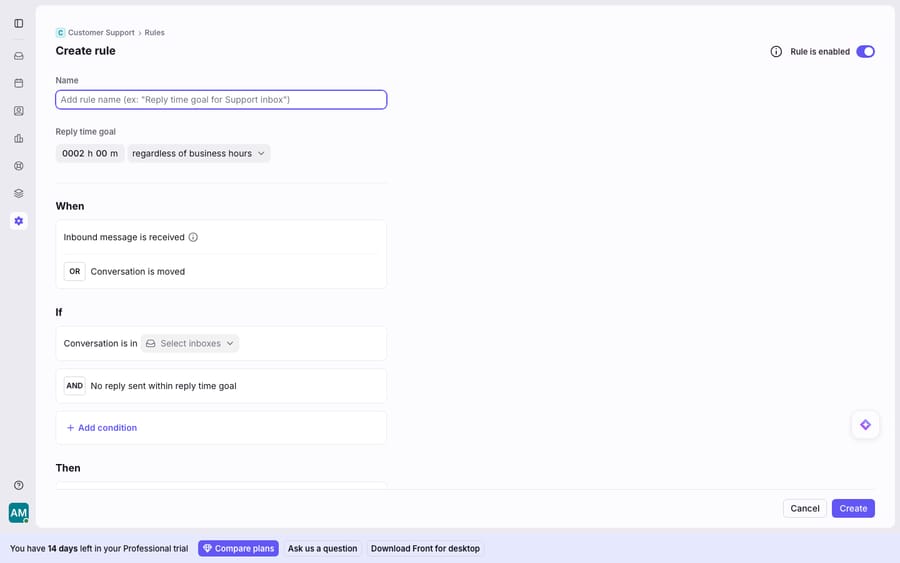
Because it's a rule, an SLA target inherits the full When (trigger) / If (condition) / Then (action) structure. You pick when the clock starts (an inbound message is received, a conversation is moved into a given inbox), which conversations it applies to (a specific inbox, a customer segment, a tag), the goal itself (say, 2h), and what happens if the goal is missed.
How do business hours change a Front SLA countdown?
A two-hour SLA means one thing at 10am on a Tuesday and something very different at 11pm on a Saturday. Front handles this with a per-rule toggle: each time goal rule runs either within business hours — pausing the countdown during off-hours — or regardless of business hours, tracking continuously around the clock.
The business hours themselves are defined once, in workspace settings, and Front is explicit that "changing your business hours here will adjust business hours for the workspace as a whole, and will impact your analytics." That's the subtle bit: your business-hours definition isn't just cosmetic on a single rule; it's the shared calendar every "within business hours" SLA — and your reporting — is measured against. A support team promising same-business-day resolution wants the pausing behaviour so weekends don't count as breaches; a 24/7 NOC or an ops team on an external contract usually wants regardless of business hours so the timer never sleeps.
Practical guidance: set business hours before you build SLA rules, not after. Retrofitting a workspace calendar changes the meaning of every "within business hours" goal already running.
What happens when a Front SLA is breached?
The point of a countdown is what happens when it runs out. Front's SLA rules handle this in two moves — flag, then escalate.
The breach flag is a tag. When a conversation blows past its goal, the recommended action is Front's Add tag action, which "will automatically create an 🔥SLA Breach tag if it doesn't exist." Front explicitly advises keeping this one consistent — "we don't recommend using a different tag for this rule" — because a single, canonical breach tag is what makes overdue work filterable and reportable later. Every breached conversation now carries a visible, searchable marker. Resolution time goals use a separate auto-created tag, 🔥 Resolution goal overdue, so you can filter the two breach types apart.
Escalation is just more Then actions. On top of the tag, a time goal rule can stack resulting actions: "notifying specific teammates, automatically assigning overdue conversations, and more." Front's SLA guide adds moving a breaching conversation "to an urgent inbox or reassign to another teammate," and setting a warning window — flagging a conversation as urgent before the SLA actually expires so someone can save it. A well-built SLA rule therefore has three layers: a pre-breach warning nudge, a breach tag, and a breach escalation (notify + reassign).
Which Front plan do you need for SLA rules and SLA reporting?
Here's the honest part, and it's the thing most teams don't discover until they're mid-implementation. The distinction that matters is enforcement versus attainment reporting.
Enforcement — the rule-based reply-time and resolution-time goal builder shown above, with its breach tags and escalation actions — is available on Front's Professional plan or above. Front's docs confirm "time goal rules are available on the Professional plan or above." If you can build rules, you can build SLA targets and act on breaches in real time. That's genuinely useful and it ships without an add-on. One practical limit: Professional allows up to 20 automation rules, so a team with separate reply and resolution goals per inbox can use up that allowance quickly. Enterprise has unlimited rules and macros.
Attainment reporting — the dashboards that tell a manager "we hit our 2-hour SLA 94% of the time last month, here's the trend by inbox and teammate" — is a different animal. Front Analytics includes a dedicated Time goals report, but the deeper custom-dashboard reporting that most SLA programs are actually accountable to lands higher up the plan ladder. On the pricing page, Professional comes with "Advanced analytics" and only Enterprise lists "Custom reports." And there's a hard structural gate underneath it: the Professional plan caps at 50 seats (front.com/pricing). As independent pricing breakdowns note, "Hire agent #51 and your entire org upgrades to Front Enterprise" (Hiver's Front pricing analysis; see also Desk365's breakdown), which moves every seat from $65 to $105 a month. So a growing team crosses two thresholds at once — the seat cap and the reporting tier — right when its SLA program is getting serious.
| SLA capability | Where it lives |
|---|---|
| Reply / resolution time goal rules | Professional plan or above |
| Business-hours-aware countdown | Professional plan or above |
| 🔥SLA Breach tag + escalation actions | Professional plan or above |
| Dedicated Time goals report | Front Analytics (Professional+) |
| Custom reports for SLA attainment at scale | Enterprise tier (Professional caps at 50 seats) |
For the full tier picture, Front's pricing tiers lay out what unlocks where, and Front analytics explained covers what the reporting surface actually shows.
Can SLA rules stop a breach from happening?
Even at their best, SLA rules are a stopwatch, not a support agent. They can tell you a conversation is 90 minutes into a 2-hour window, tag it, and page a teammate — but they can't read the customer's question and answer it. The breach never gets prevented by the rule itself; it only gets announced. Every minute of that countdown still depends on a human being free to pick up the conversation and reply.
This is the seam where an AI agent layer earns its place — not by replacing the SLA engine, but by attacking the number the SLA is measuring. The broader category of AI agents for customer service exists precisely to compress first-response and resolution times. Macha is one such layer: it runs on top of the Front you already use, through the live Macha–Front connector — it does not replace Front, your shared inboxes, your rules, or your SLA policies. You keep your time goal rules doing what they do best: enforcing the promise and escalating when it's at risk. Then Macha's agent reads the incoming conversation, understands intent rather than keywords, and drafts or sends a grounded reply — pulling a real order or account status through a custom tool that turns your REST API into something the agent can call. The reply-time clock that used to depend on a human being free now often stops in seconds. If you want the mechanics, connecting Front to Macha to route conversations to AI walks through it, and Macha bills per ticket: one conversation, charged once however many messages it takes, never per resolution. One plan is priced by volume, from $299 a month for up to 750 tickets, with setup and monitoring by the Macha team included.
The clean division of labour: let Front's SLA rules be the timer and the escalation, and layer an agent on top to actually beat the clock. For how this fits the wider system, see Front rules explained and the Front shared inbox model.
FAQ
Does Front have SLAs? Yes — Front calls them time goal rules (previously named SLA rules). You build them under the gear icon → workspace settings → Rules and macros → Create rule, using the prebuilt reply time goal or resolution time goal recipes. Each sets a response-time or resolution-time target and fires actions when it's breached.
What's the difference between a reply time goal and a resolution time goal? A reply time goal tracks how long it takes your team to send an outbound reply — a first-response SLA. A resolution time goal tracks how long it takes to actually resolve and close the conversation. You can run both on the same inbox.
How do business hours affect Front SLAs? Each time goal rule runs either "within business hours" (the countdown pauses outside your workspace's defined hours) or "regardless of business hours" (it tracks continuously). Business hours are set once in workspace settings and also affect your analytics, so define them before building SLA rules.
What happens when a Front SLA is breached? The recommended action auto-applies a 🔥SLA Breach tag (🔥 Resolution goal overdue for resolution goals) so the conversation is visible and filterable, and you can stack escalation actions — notifying teammates, auto-assigning the overdue conversation, moving it to an urgent inbox, or reassigning it. You can also set a warning before the SLA fully expires.
Do I need an expensive plan for Front SLAs? The reply and resolution time goal builder and breach escalation need the Professional plan or above, $65 a seat a month billed annually; Starter at $25 does not include them. Custom reports are an Enterprise feature at $105 a seat, and Professional caps at 50 seats, so a growing team crosses the seat cap and the reporting tier at roughly the same point.
Ready to stop announcing breaches and start beating the clock? Start a free trial of Macha and connect it to your Front in minutes.






