Shopify
 Stripe
 Slack
Slack Notion
 Google Workspace
 Confluence

What Does AI Customer Support Cost per Resolution in 2026? Pricing Models Compared


AI support vendors bill on different units, so a $0.99 per-resolution price and a per-conversation price cannot be compared until both are turned into cost per resolved ticket. The worked numbers below use vendor rates rechecked on 13 October 2026.
Key takeaways
- Published AI support rates per resolution run from $0.49 on Fini's Enterprise plan ($0.89 on Growth) to $0.99 with Intercom Fin, with Zendesk AI agents at $1.50 committed (October 2026).
- Intercom counts a billable Fin outcome when the customer confirms resolution, asks for no further help after Fin's response, or Fin completes a workflow.
- Zendesk's pricing page bills AI agents per automated resolution and lists the rate: $1.50 committed and $2.00 pay-as-you-go.
- At 100,000 monthly resolutions, the gap between Intercom Fin at $0.99 and Zendesk's $1.50 committed rate is roughly $51,000 a month.
- Macha charges $299 a month for 750 tickets, about $0.40 a ticket, or about $0.57 per resolved ticket at 70% resolution, with setup and a dedicated success manager included.

Cost per resolution is what you pay the AI vendor divided by the tickets its AI actually resolves, and on published rates (checked September and October 2026) it runs from $0.49 (Fini's Enterprise rate; its Growth plan is $0.89) to $0.99 (Intercom Fin) and $1.50 to $2.00 (Zendesk). Per-ticket pricing needs one more step: Macha's $0.40 a ticket works out to about $0.57 per resolved ticket at a 70% resolution rate. Macha is an AI agent layer on top of the help desk you already run (Zendesk, Freshdesk, Gorgias, Front, HubSpot or Intercom), so the question here is what each resolved ticket costs once an AI agent does the work, not what the help desk costs.
How is AI customer support priced?
There are really only a handful of billing units in this market, plus the platform fee that usually sits underneath them.
| Model | Billable unit | You pay when… | Best when |
|---|---|---|---|
| Per-resolution | A closed/resolved issue | The AI ends the conversation successfully | Resolution rate is high and stable |
| Per-conversation | Any conversation the AI touches | The AI engages at all (resolved or not) | Volume is predictable, escalation rare |
| Per-seat | A human agent license | Per month, per agent, regardless of AI work | AI is a small add-on to human teams |
| Credit / usage | An AI action (a response or tool call) | The model does a unit of work | You want granular control over spend |
| Per-ticket | One thread with one person | An agent handles a conversation, however long | You want a unit you can count and forecast |
The trap is comparing across rows. A "$0.99 per resolution" rate and a "$2.00 per conversation" rate are not two prices for the same thing; they price different events. As Fin's own pricing breakdown puts it, a $1-per-conversation fee costs more than a $1-per-resolution fee whenever your AI resolves fewer than 100% of conversations, because the per-conversation meter still runs on the 40% that fail and escalate. The only number that lets you compare apples to apples is fully-loaded cost per resolved ticket, and getting there means reading the fine print on every model.
What counts as a resolution, and who decides?
Per-resolution (sometimes "outcome-based") pricing is the headline model of the moment, and the logic is genuinely appealing: you only pay when the AI actually closes an issue. Escalations to a human are, in theory, free.
The catch is the word "resolution." Who defines it, and what counts? Intercom's Fin charges $0.99 per outcome. Intercom's pricing page counts an outcome when the customer confirms the issue is resolved, when the customer does not ask for more help after Fin's response, or when Fin completes a workflow (the outcomes article has the detail). The middle clause means a customer who simply stops replying counts. That assumed-resolution clause matters: a customer who gives up in frustration and never comes back can look identical to a customer who was genuinely helped. Both bill $0.99.
Per-resolution rates, rechecked 13 October 2026:
| Vendor | Per-resolution rate | Notes |
|---|---|---|
| Fini (Growth / Scale / Enterprise) | $0.89 / $0.69 / $0.49 | Per resolved ticket; Growth covers up to 3,000 tickets a month, Scale up to 10,000; plan billed in advance, no fee on the cards but $3,600/mo Growth in the page data (14 October 2026); implementation included (checked 13 October 2026) |
| Intercom Fin | $0.99 | Per outcome; confirmed, no further help requested, or workflow completed |
| Lorikeet (Start) | $0.99 chat/email/SMS, $1.50 voice | On top of a $2,100/mo platform fee; Scale plan $0.90 / $1.20 |
| Zendesk AI agents | $1.50 committed / $2.00 pay-as-you-go (Zendesk pricing page) | Billed per automated resolution; seats include 5 automated resolutions per agent a month on Support Team and Suite Team and 10 on Suite Professional (checked 13 October 2026) |
(Fini, Intercom, Lorikeet and Zendesk pay-as-you-go rates rechecked on each vendor's pricing page on 13 October 2026; Zendesk's $1.50 committed rate is from our 25 September 2026 check. Fini's page no longer lists the $0.39 Resolve add-on. Re-check before you budget. Sources linked at the end.)
Two things worth flagging. First, Zendesk's pricing page says AI agents are included and billed per automated resolution, and its plan comparison table lists the rate ($1.50 committed, $2.00 pay-as-you-go); its Copilot agent-assist add-on is a separate $50 per agent per month on Suite Professional and above. Second, at scale these gaps compound fast. At 100,000 monthly resolutions, the spread between Fin at $0.99 and Zendesk's $1.50 committed rate is roughly $51,000 a month. The headline cents are not rounding errors.
If you are choosing between pay-per-resolution and a per-ticket price, compute one number first: the break-even resolution rate, which is the price per worked ticket divided by the price per resolution. Our per-resolution vs per-ticket break-even guide works it for every published rate; we checked each one on the vendor's pricing page on 13 October 2026. Against about $0.40 a ticket, per-ticket pricing costs less per resolved ticket above 20% resolution against Zendesk's $2.00, 40% against Fin, 45% against Fini Growth, 58% against Fini Scale and 82% against Fini Enterprise; below those rates, per-resolution is the cheaper bill. Per-ticket pricing suits teams whose agent already resolves most of a category; per-resolution suits teams early in a rollout.
How do per-conversation and per-seat pricing compare?
Per-conversation pricing (Tidio's Lyro agent is the usual example: its Growth and Plus plans start at $32.50 a month for 50 Lyro conversations, per Tidio's pricing page) bills for every conversation the AI handles, resolved or not. Tidio's Premium tier switches to pay-per-resolution. It's simpler to forecast if your volume is steady, but you explicitly pay for failure: every escalation still costs you the full conversation fee. The model rewards vendors whose AI resolves less, which is an awkward incentive to be on the wrong side of.
Per-seat is the legacy helpdesk model, a fixed monthly license per human agent, and it's increasingly where AI shows up as a bolt-on rather than the main event. It decouples your bill from AI work entirely, which is fine when AI is marginal and misleading when it isn't.
Underneath all of this sits a benchmark worth keeping in view: a human-handled resolution is far from cheap. Channel benchmarks put email/ticket resolution at roughly $6–$16, live chat at $5–$14, and phone at $17–$25 once re-contacts are included; the much-quoted $1–$4 figure is self-service only, not a human touching the ticket (Unthread's channel benchmarks, The Office Gurus 2026 benchmarks). Blended across channels, most teams land around $3–$6 per human-handled resolution. That's the number every AI pricing model is implicitly competing against. If an AI resolution costs you $0.99 and a blended human one costs ~$5, the AI pays for itself the moment it resolves anything a human would have had to.
How does per-ticket pricing work?
Macha uses a different unit, the ticket, and it's worth being precise about what that means, because it's a genuinely different philosophy.
A ticket is one thread between Macha and one person, charged once. Not per reply, not per tool call, not per step in the agent's instructions. Three things count as a ticket: an email ticket and every follow-up on that thread, a whole live chat, and a whole Copilot session with one of your own agents. Fair use is 50 messages in a ticket; past that the agent asks the person to open a new one.
The part that surprises people: the model doesn't change the price. Putting a stronger model behind a gnarly billing agent and a fast one behind triage costs exactly the same per ticket. Neither does the number of tools the agent calls, nor how long the conversation runs.
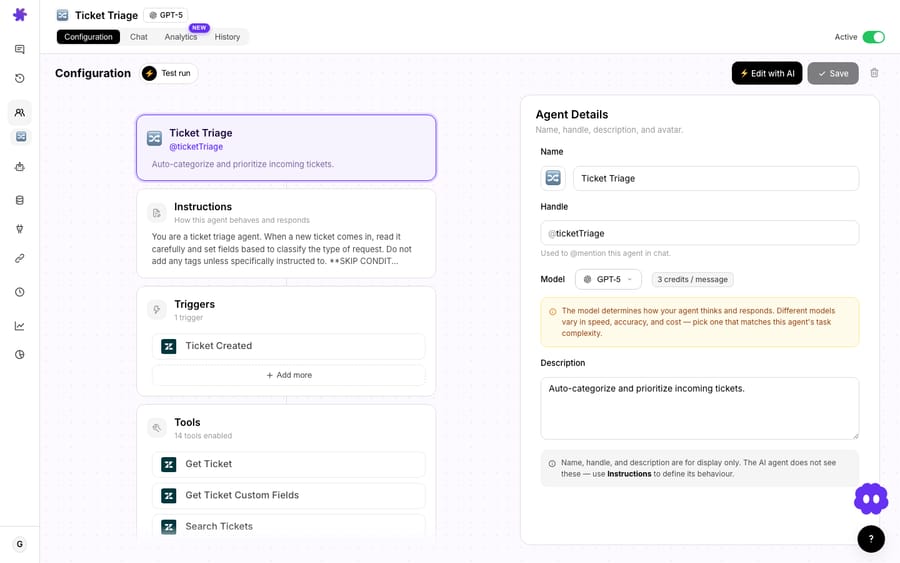
The honest distinction from per-resolution pricing: tickets don't track outcomes. Macha bills for the conversations an agent handles, not for whether one ended "resolved." A deflection, a triage, a routed-to-human handoff, and a fully tool-driven fix all cost the same single ticket. That's a feature for buyers who want a unit they can count on their own helpdesk, and a trade-off for buyers who specifically want outcome-only billing. We think it's the more honest framing (you're not paying against a resolution definition you can't audit), but you should know which one you're choosing.
How do you turn a per-ticket price into cost per resolution?
Here's the arithmetic that turns tickets into the apples-to-apples number. Cost per resolution on a per-ticket model is:
(price per ticket) ÷ (share of tickets the agent resolves)
That's the whole formula. There's nothing to count per conversation, because the conversation is the unit. Macha is $299 a month for 750 tickets and scales up from there, which works out at about $0.40 a ticket on every tier. Take the three resolution shapes people usually model:
| Resolution type | Agent replies | Tool calls | Tickets billed | Cost |
|---|---|---|---|---|
| Simple FAQ deflection | 1 | 0 | 1 | ~$0.40 |
| Order-status fix with a tool call | 3 | 2 | 1 | ~$0.40 |
| Multi-turn troubleshooting | 6 | 4 | 1 | ~$0.40 |
That sameness is the point. The expensive-looking case costs what the cheap one costs, so the number you forecast is simply your ticket volume. Every per-action model asks you to guess how many steps a conversation will take; this one doesn't, because the steps are free and the conversation is the meter.
The catch, and this is the per-conversation critique turned on Macha, is that a ticket is billed whether or not the agent resolves it. A long, meandering conversation that ends in a human handoff is still one ticket. So the honest cost per resolution is your ticket price divided by your resolution rate: at ~$0.40 a ticket and a 70% resolution rate, that's about $0.57 per resolved ticket. Cheap tickets only translate to a cheap cost per resolution if your resolution rate is healthy, which is the same discipline that makes agents good: tight instructions, real knowledge behind them, and a clean handoff so the agent doesn't keep talking after it should have escalated. On Macha that work isn't left to your team. Macha is the done-for-you option: the Macha team analyzes your past tickets, builds the knowledge base and the agent on your existing help desk, and runs it in safe mode until the drafts are right. The $0.40 also covers a dedicated success manager who handles your changes after go-live: tuning, new categories, instruction changes, new tools.
How do you keep AI support spend under control?
Usage models live or die on visibility, so a few of the guardrails matter as much as the rate.
The usage card splits your monthly plan allowance (which resets each cycle, with a progress bar) from any persistent top-up balance, so you always know which bucket you're spending from.

There are no overages. When the month's tickets are used, agents pause until the next billing date rather than quietly running up a bill; you move up a tier or add a one-time top-up, and nothing is charged without you choosing it. And for batch jobs like Studies, which run an AI analysis across many conversations at once, Macha shows a pre-run estimate before you commit.
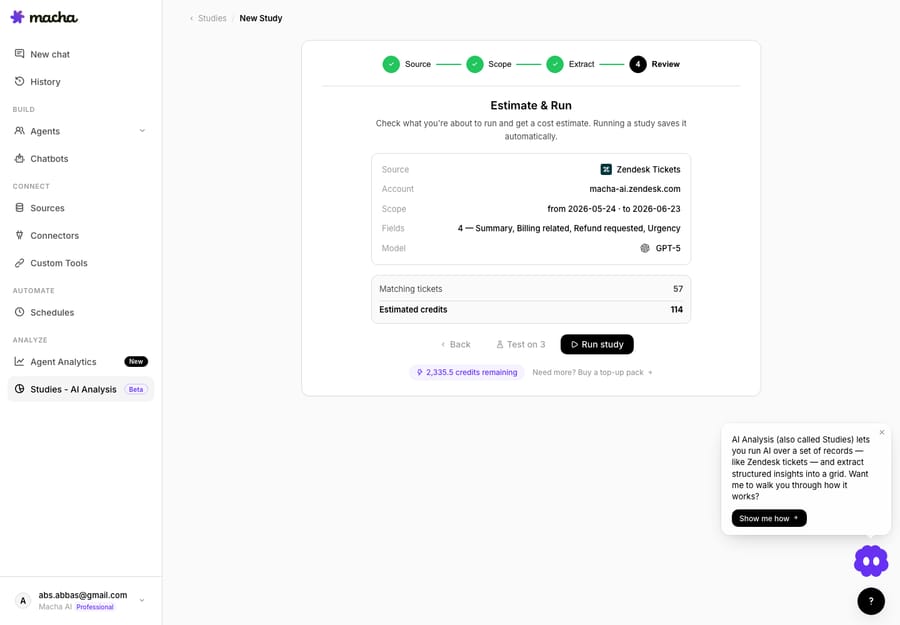
Above 10,000 tickets a month, pricing is custom, the right shape for teams that want a negotiated line item instead of a published tier.
What does total cost of ownership include?
Here's the watch-out that no single headline rate captures, and the one most specific to Macha: total cost of ownership has more than one layer. A per-resolution vendor's $0.99 is just their slice. You still pay for the platform underneath it.
Macha is explicit about this because it's structural to what we are: Macha is an AI agent layer on top of your existing helpdesk, not a replacement for it. If you run Macha on Zendesk, your true cost per resolution includes your Zendesk seats plus your Macha plan: two line items, not one. That sounds like a disadvantage until you compare it to the alternative: ripping out a helpdesk your team knows to chase a marginally lower headline AI rate is almost never worth it, and the per-seat helpdesk cost is one you're already paying. The layered model means you add AI economics on top of infrastructure you keep, rather than betting the whole stack on one vendor's resolution definition.
What it looks like annualized
Headline cents are easy to dismiss until you run them at volume. Take a team resolving 5,000 tickets a month with AI, and price the AI layer alone (everyone here still sits on top of, or beside, a helpdesk you also pay for). For Macha we assume an 80% resolution rate, so the agents handle about 6,250 tickets to land 5,000 resolutions, which puts you on the 7,500-ticket tier at $2,999 a month.
| Vendor (AI layer only) | Effective cost / resolution | Monthly @ 5,000 res | Annualized | Also pay for |
|---|---|---|---|---|
| Fini (Scale) | $0.69 | ~$3,450 | ~$41,400 | Your help desk; implementation included, with a dedicated AI engineer on Scale |
| Macha (per ticket, ~80% resolved) | ~$0.60 | ~$2,999 | ~$35,988 | Your existing help desk seats (setup and a dedicated success manager are included) |
| Intercom Fin | $0.99 | $4,950 | $59,400 | Intercom seats ($29 a seat billed annually and up) |
| Zendesk AI agents (committed rate) | ~$1.50 | ~$7,500 | ~$90,000 | Zendesk seats, less the per-seat allowance |
(Vendor rates rechecked 13 October 2026; treat as approximate. Fini's Growth plan ($0.89) covers up to 3,000 tickets a month, so 5,000 resolutions lands on Scale at $0.69; Fini bills its plan in advance; its cards show no fee, but the page's structured data lists $3,600 a month for Growth (14 October 2026). Both Fini and Macha include setup, but Fini's dedicated AI engineer starts at Scale (Growth gets shared customer success) and it quotes about 14 days to go live, while Macha's dedicated success manager comes with every plan and the trial, and Macha goes live in under a week. Macha's figure is a model, not a quote: an escalation-heavy queue pushes tickets-per-resolution up, and it excludes the helpdesk seats you keep paying. The point isn't a precise winner; it's that the per-ticket number is one you can work out from your own helpdesk's volume before you sign anything.)
The breadth point matters as much as the dollars. A per-resolution vendor like Fin prices one event well; Macha prices the full range of agent work (deflections, triage, routing, and tool-driven fixes) across whichever helpdesk you already run, so the annualized number above is the AI layer for your whole queue, not just the slice that ends in a clean resolution.
So when you build the comparison, build it in full:
- Platform / helpdesk subscription (per-seat, you likely already pay this)
- AI agent cost (per-resolution, per-conversation, credits, or per ticket)
- Add-ons and platform fees (Zendesk Copilot at $50 per agent, Lorikeet's platform fee, voice surcharges)
- The escalation tax (what you pay on the conversations the AI doesn't resolve)
Only the sum of those four is a real cost per resolution. A vendor quoting you one layer and calling it the price is the most common way these comparisons go wrong.
When is per-ticket pricing the wrong fit?
To be straight about it: per-ticket isn't the right model for everyone.
- If you want pure outcome-based billing (pay nothing unless a ticket is resolved), a per-resolution vendor matches that intent more directly. A ticket bills for the conversation, not the result.
- If your volume is tiny and spiky, a monthly tier can feel oversized in a quiet month; a flat per-seat add-on may be simpler to reason about.
- If you can't or won't tune agents, a low resolution rate quietly inflates your cost per resolution even though your cost per ticket never moves. Per-ticket pricing rewards operators who tune; it mildly punishes set-and-forget. On Macha the tuning is done for you by a dedicated success manager, included in the per-ticket price.
Per-ticket pricing pays off when you value predictability (a unit you can count in your own helpdesk, a bill that doesn't move when a conversation takes six replies instead of one, and no arguments about what counted as a resolution) over the simplicity of a single outcome fee. For most teams running real volume on top of an existing helpdesk, that predictability is what keeps cost per resolution genuinely low. But it's a choice, and it's worth making with eyes open.
FAQ
What's the difference between per-resolution and per-ticket pricing? Per-resolution charges a fixed fee each time the AI closes an issue (e.g., $0.99). Per-ticket charges once for each conversation an agent handles, however many messages, tool calls or follow-ups it takes. Per-resolution ties cost to outcomes; per-ticket ties cost to conversations, which you derive into a cost per resolution yourself.
How do I calculate Macha's cost per resolution? Divide the price per ticket by your resolution rate. At about $0.40 a ticket and a 70% resolution rate, that's roughly $0.57 per resolved ticket, and the price includes setup by the Macha team and a dedicated success manager who handles your changes. See the pricing page for the tiers and the docs for what counts as a ticket.
Do I pay for conversations the AI can't resolve? Yes: a ticket is billed for the conversation, so one that ends in a handoff still counts. It counts once, though, no matter how long it ran before the handoff.
Does a more expensive model cost more per ticket? No. The model an agent runs on, the tools it calls and the length of the conversation don't change the ticket count.
Does Macha replace my helpdesk, so I stop paying Zendesk? No. Macha is an AI agent layer on top of Zendesk, Freshdesk, Gorgias, Front, HubSpot or Intercom. Your true cost per resolution includes both your helpdesk seats and your Macha plan, but you keep the helpdesk your team already runs.
What happens if I use up the month's tickets? Agents pause until the next billing date; there are no overages. Move up a tier or add a one-time top-up; nothing is charged without you choosing it.
Which pricing model gives the lowest cost per resolution?
There is no single "price of AI support"; there are several pricing models measuring different events, and the only number that compares them is fully-loaded cost per resolution. Per-resolution rates are clean headlines hiding a definition you don't control. Per-ticket pricing gives you a unit you can count in your own helpdesk and asks you to do one division. The lowest published per-resolution rate today is Fini's Enterprise rate of $0.49 (Growth is $0.89), Macha lands near $0.57 to $0.60 at a 70% to 80% resolution rate, with setup done for you and a dedicated success manager included, and Fin and Zendesk sit higher, before platform fees. Either way, do the full TCO: platform, AI, add-ons, and the escalation tax.
Want to run the numbers on your own queue? Start a free trial ($50 of usage, no credit card, no time limit), connect your helpdesk, and watch it work on real tickets, or read the billing docs for exactly what counts as a ticket.
Written by Abbas (Customer Support & AI, Macha) · Reviewed by Ankeet Guha (Co-founder & CTO) · Published 2026-06-24 · Last updated 2026-10-13.
Sources: Fin: per-resolution vs per-conversation · Fin: AI agent pricing comparison · Intercom: Fin AI Agent outcomes · Lorikeet: per-resolution platforms · Unthread: cost per resolution channel benchmarks · The Office Gurus: 2026 support cost benchmarks · Intercom pricing and seats · Fini pricing · Lorikeet pricing · Tidio pricing · Zendesk pricing. Vendor rates checked 24 September 2026 and rechecked 13 October 2026; verify current published terms before budgeting.