Shopify
 Stripe
 Slack
Slack Notion
 Google Workspace
 Confluence

Do You Need Front, or Is a Shared Gmail Inbox Enough? (2026)


If two to ten people share a mailbox at low to moderate volume, a shared Gmail or Google Collaborative Inbox is fine and comes with Google Workspace. Front earns its per-seat price once replies collide, threads have no owner and nobody can report response times.
Key takeaways
- A shared Gmail or Google Collaborative Inbox, included with Google Workspace, is enough for roughly two to ten people at low to moderate volume where a missed email is not a lost customer.
- Front sells three plans billed annually per seat: Starter at $25 for up to 10 seats, Professional at $65 for up to 50 seats, and Enterprise at $105.
- A ten-person team on Front's Professional plan costs $650 a month on annual billing, because Front prices every plan per seat.
- Front's Copilot and Smart QA add-ons cost $20 per seat per month each below Enterprise, and the Autopilot AI agent is priced per conversation starting at $0.05.
- Google Collaborative Inbox lacks the three features that most often push teams to Front: real-time collision detection, an automation rules engine, and reporting on response time and workload.

You don't need Front if two to ten people share a mailbox at low to moderate volume: a shared Gmail or Google Collaborative Inbox does the job at no extra cost on Google Workspace, while Front starts at $25 per seat per month billed annually. You outgrow Gmail when teammates start replying to the same email, nobody can see who owns a thread, and you can't say how fast you respond without a spreadsheet.
| Shared Gmail / Collaborative Inbox | Front | |
|---|---|---|
| Price | Included with Google Workspace | $25 / $65 / $105 per seat per month, billed annually |
| Collision detection | No | Yes, real time |
| Automation rules | No | Up to 10, up to 20, or unlimited by plan |
| Reporting | No | Yes |
| Right size | 2–10 people, low volume | Busy shared addresses, multiple channels, SLAs |
What does "shared Gmail" actually mean?
There are two free ways to share a mailbox inside Google Workspace, and they behave differently. Gmail delegation lets one person grant others access to their inbox, which suits one to five people covering a single address. Google Collaborative Inbox is a Google Groups feature: a shared address several people manage together, with the ability to assign a conversation to a member and mark it resolved.
The catch, as Emailmeter's Google Workspace guide explains, is that Collaborative Inbox lives inside the Google Groups interface, which is separate from Gmail. Team members switch between their personal Gmail and the Groups view to work shared email, a friction point that shows up in nearly every honest review of the tool. It works. It is just not built for a support or sales team that lives in the inbox all day.
What does Front add over a shared Gmail inbox?
Front is a dedicated shared-inbox platform, so the features it layers on are the exact ones free Gmail sharing lacks. Three matter most.
Collision detection. This is the single clearest reason teams leave Gmail. Google Collaborative Inbox has no collision detection: nothing warns you that a colleague is already drafting a reply to the thread you just opened, per Hiver's breakdown of the tool. Front does this in real time. Front's help center describes indicators that appear the moment a teammate is working on a message, so two people do not send the customer two different answers. On a busy shared address, that alone prevents a daily category of embarrassment.
Automation. Front's rules engine routes, tags, assigns (with round-robin), and auto-replies based on message content, the kind of hands-off triage a Google Group cannot do. Rule counts are capped by plan: up to 10 on Starter, up to 20 on Professional, unlimited on Enterprise. If you want the mechanics, Front's rules and the shared-inbox model go deep on how conversations get moved and labelled without anyone touching them.
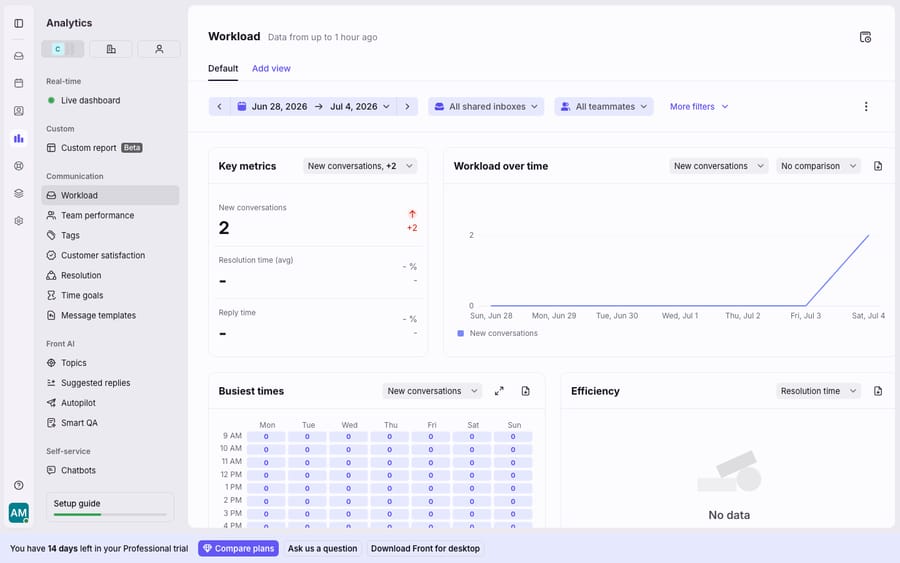
Reporting. This is the other hard wall. Response time, conversation volume, SLA breaches, per-agent workload: none of it is visible in a Google Collaborative Inbox, as Missive notes in its candid write-up of why teams dislike the tool. Front gives you an analytics layer for exactly this, which is what the screenshot below shows.
Beyond those three, Front adds structured internal notes (comment on a conversation instead of forwarding it around), a shared contact/CRM view, and integrations, all documented in our fuller Front app review and what Front is explainer.
When is a free shared inbox enough?
It is worth being just as honest in the other direction, because a lot of Front-versus-Gmail comparisons quietly skip this part. A shared Gmail or Collaborative Inbox is the right call when:
- Your team is small, roughly two to ten people, per the sizing most guides converge on.
- Volume is low to moderate and no single email carries much revenue.
- You already pay for Google Workspace, so the marginal cost is zero.
- You do not need analytics to justify headcount or hit an SLA.
If that is you, paying $25 to $105 per seat per month for Front buys polish you will not use. The Emailmeter guide frames the tipping point well: the moment a missed email equals a lost customer, the free options stop being free. Until then, they are not.
How much does Front cost compared with shared Gmail?
Google's shared options come with Workspace at no extra charge. Front sells three plans, priced per seat, and front.com/pricing lists them like this today:
| Shared Gmail / Collaborative Inbox | Front Starter | Front Professional | Front Enterprise | |
|---|---|---|---|---|
| Price (billed annually) | Free with Workspace | $25/seat/mo | $65/seat/mo | $105/seat/mo |
| Price (billed monthly) | Free with Workspace | $35/seat/mo | $85/seat/mo | Annual only |
| Collision detection | No | Yes | Yes | Yes |
| Automation / rules | No | Up to 10 rules | Macros + up to 20 rules | Unlimited |
| Reporting / analytics | No | Basic | Advanced | Custom reports |
| Channels | Single channel type, up to 10 seats | Omnichannel, up to 50 seats | Omnichannel | |
| Best for | 2–10 people, low volume | Small email-only teams | Growing multi-channel support | Larger orgs |
Two fair caveats before you commit. Front's per-seat model scales with headcount, so a ten-person team on Professional is $650 a month on annual billing, the cost cliff reviewers most often flag. And most of Front's AI is sold separately below Enterprise: Copilot and Smart QA are $20 per seat per month each, Smart CSAT is $10 (or $25 for the QA and CSAT bundle), all three are included on Enterprise, and the Autopilot AI agent is priced per conversation, starting at $0.05. Our full Front pricing explainer has the tier-by-tier detail, and if the number gives you pause, the best Front alternatives is worth a read.
So should you buy Front?
Front is a good product, and the features that justify it (real-time collision detection, a proper rules engine, and analytics a Google Group cannot produce) are the exact things that break down when a shared Gmail inbox gets busy. If you are past ten people, running multiple channels, or answerable to an SLA, Front is a defensible buy, and the migration usually pays for itself in fewer dropped and duplicated threads.
But do not buy it out of anxiety. If you are a small team on low volume, the free Collaborative Inbox does the core job, and the honest move is to stay put until the pain is real: duplicate replies, no owner on threads, no idea how fast you respond. Buy Front when you feel that, not before. Front's 14-day trial includes Professional features and needs no card, so you can test it against a real week of mail.
Who writes the reply, Front or Gmail?
Neither. Front (and Gmail) get the right conversation to the right person; neither reads the message and drafts the answer. That is where an AI agent layer fits, and it is a layer, not a replacement. The broader category of AI agents for customer service exists for the reasoning a routing tool cannot do. Macha is one such layer: it runs on top of the Front you already use (and on Zendesk, Freshdesk, Gorgias, Front, HubSpot or Intercom), reads the conversation, and drafts or sends a grounded reply pulled from your help content or a live custom tool. It is billed per ticket, one conversation charged once however many messages it takes and never per seat, from $299 a month for up to 750 tickets. The cost tracks the volume you handle rather than the size of your team. Macha does not run on a bare Google Group, so a team staying on shared Gmail would need a help desk first.
FAQ
Do I actually need Front, or is a shared Gmail enough? For two to ten people at low-to-moderate volume where a missed email is not a lost customer, a shared Gmail or Google Collaborative Inbox is enough, and it comes with Workspace. You need Front (or a similar tool) once you require collision detection, automated routing, or reporting, or when missed email starts costing revenue.
What is the biggest thing Front has that Gmail sharing does not? Real-time collision detection, automation rules, and analytics. Google Collaborative Inbox has none of the three: it cannot warn you a teammate is already replying, cannot auto-route by content, and cannot report on response time or agent workload.
Is Google Collaborative Inbox the same as Gmail? No. Collaborative Inbox is a Google Groups feature and lives in the Groups interface, separate from your Gmail. Team members switch between the two, which is a common friction complaint.
How much does Front cost versus a shared Gmail? Shared Gmail comes with Google Workspace. Front costs $25 (Starter), $65 (Professional) or $105 (Enterprise) per seat per month billed annually, or $35 and $85 billed monthly for Starter and Professional. Copilot, Smart QA and Smart CSAT are paid add-ons below Enterprise.
Can I add AI without leaving Front? Yes. An AI agent layer like Macha connects on top of Front and drafts grounded replies from your own content. It does not replace your inbox; it handles the part the inbox doesn't: writing the answer. A plain shared Gmail needs a help desk in front of it first.
Does Front have a free trial? Yes. Front's 14-day trial includes the features of the Professional plan and does not ask for a credit card.
Want to see where your team's time actually goes before you pay per seat? Start a free trial of Macha with $50 of free usage and point it at your help desk.