Shopify
 Stripe
 Slack
Slack Notion
 Google Workspace
 Confluence

Freshdesk vs Hiver (2026): Which Help Desk Should a Gmail Team Pick?


Freshdesk and Hiver split on where the support team works: Hiver keeps it inside Gmail, while Freshdesk moves it into a standalone help desk that covers chat, phone and social. Freshdesk is cheaper at the door, but Hiver includes its AI in the plan price.
Key takeaways
- Hiver suits Gmail-based teams where email dominates, while Freshdesk suits multichannel support, and Freshdesk Growth costs $19 per agent per month against Hiver Growth at $25 billed annually.
- Freshdesk's Freddy AI Agent includes 500 sessions once per account and then charges $49 per 100, while Hiver includes AI Copilot and AI Agents on every plan without metering.
- Freddy AI Copilot is a Freshdesk add-on at $29 per agent per month billed annually, so Freshdesk's AI cost grows with both seats and conversations.
- Neither Freshdesk nor Hiver lists a free plan as of 24 September 2026: Freshdesk offers a 14-day Enterprise trial and Hiver a 7-day Elite trial.
- The clearest signal to move from Hiver to a standalone platform like Freshdesk is when chat, phone and social volume rivals email or routing outgrows simple inbox rules.

Choose Hiver if your team works in Gmail and email is the main channel; choose Freshdesk if support runs across chat, phone and social and needs deeper automation. On price, Freshdesk Growth costs $19 per agent per month billed annually against Hiver Growth at $25 per user per month billed annually ($35 monthly), and Hiver includes its AI Copilot and AI Agents in every plan while Freshdesk meters Freddy AI Agent sessions past a one-time 500 (prices checked on both vendors' pages, 24 September 2026).
How do Freshdesk and Hiver compare at a glance?
| Freshdesk | Hiver | |
|---|---|---|
| Best for | Multichannel teams treating support as a core function | Small-to-mid teams that live in Gmail all day |
| Pricing entry (paid) | Growth $19/agent/mo (annual) | Growth $25/user/mo (annual), $35 monthly; 2-seat minimum |
| Free option | No free plan; 14-day trial of Enterprise | No free plan; 7-day trial of Elite |
| AI / automation | Freddy AI Agent: 500 sessions once per account, then $49 per 100; Copilot $29/agent/mo add-on | AI Copilot and AI Agents included on all plans, not metered |
| Omnichannel | Email, chat, phone, WhatsApp, Instagram, Facebook | Email-first; chat, help center, voice ($30 per voice seat add-on) via Omni |
| Ease / admin | More to configure; steeper ramp | Fast setup; reviewers rate it easier to use and administer |
| Standout strength | Depth, channel breadth, mature reporting | No context-switching: support lives inside Gmail |
Prices and plan details checked on 24 September 2026; both vendors revise them, so confirm on the official pages linked below.
How much do Freshdesk and Hiver cost?
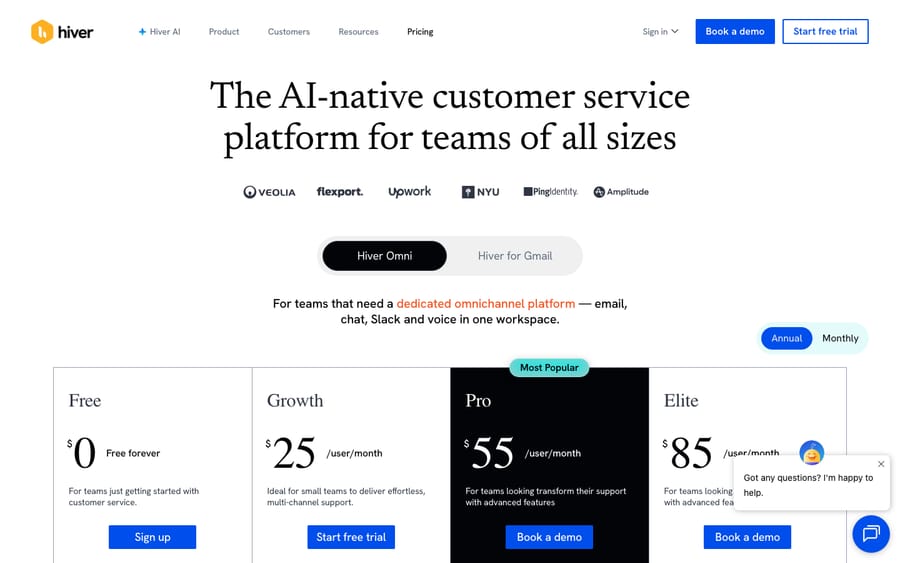
Start with Hiver, because its simplicity is the whole pitch. On its official pricing page, Hiver's Omni plans run Growth at $25/user/month, Pro at $55/user/month (marked most popular) and Elite at $85/user/month on annual billing. Monthly billing costs $10 more on each tier: $35, $65 and $95. Every plan starts at 2 seats, and the free plan Hiver used to list is gone; instead there's a 7-day trial of Elite with no credit card.
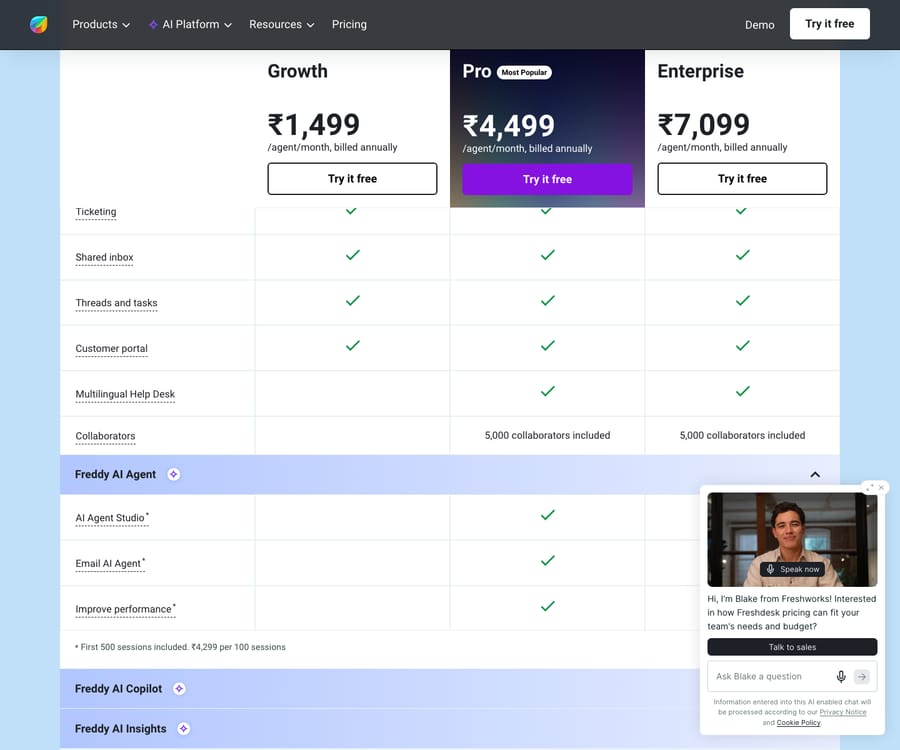
Freshdesk's ladder, per Freshworks' official pricing, is Growth at $19/agent/month, Pro at $55/agent/month and Enterprise at $89/agent/month, all on annual billing. The pricing page no longer shows a free plan; it offers a 14-day trial of Enterprise, and a separate Free program covers up to 2 agents for 6 months. On paper Freshdesk's entry tier undercuts Hiver's, but the comparison isn't like for like: Hiver includes its AI and 24/7 support in the plan price, while Freshdesk's Copilot is a paid add-on and some of its stronger automation, routing and reporting land higher up the ladder. Hiver charges a flat, predictable rate for a focused product; Freshdesk charges less at the door but asks you to climb for depth.
How do Freshdesk's and Hiver's AI features differ?
Both vendors now lead with AI, and the difference is in how they bill it. Freshdesk's Freddy AI Agent comes with 500 sessions, a one-time allowance per account, and additional sessions cost $49 per 100 (per Freshworks' pricing page), so budget for it if volume is high. Freddy AI Copilot, which assists agents inside the ticket, is an add-on at $29 per agent per month billed annually. Freddy Insights surfaces analytics.
Hiver counters with AI Agents and an AI Copilot, both included on every plan and not metered separately, positioned around inbox deflection and drafting replies without leaving Gmail. That keeps the bill predictable. The trade is scope: Freshdesk's AI reaches across more channels and deeper reporting, while Hiver's AI is tuned tightly to the email-in-Gmail workflow it's built around.
If you're evaluating AI seriously on either side, it helps to understand what an autonomous AI agent for customer service can and can't do before you weigh session economics. The deflection numbers both vendors quote depend heavily on your ticket mix.
Which has stronger automation and routing?
This is where the platform gap shows most clearly. Freshdesk carries a mature automation engine: ticket-creation rules, time-triggered rules and scenario automations, plus multiple routing mechanisms (round-robin, load-based, and skills-based on higher tiers). Combined with SLA policies, escalations and custom objects, it's built for teams whose workflows have real branching logic. That depth is exactly why some of it sits on Pro and Enterprise.
Hiver's automation is lighter by design: rule-based automations, round-robin assignment and SLA tracking that live inside the Gmail experience. For a team whose process is "route the shared inbox, hold response times, and don't drop anything," that's often enough, and because it runs where agents already work, adoption rarely stalls. Teams with intricate, multi-channel routing or heavy conditional logic will feel the ceiling sooner on Hiver than on Freshdesk.
Which is easier to set up and administer?
Here the verdict flips in Hiver's favor. Reviews aggregated on G2's Freshdesk-vs-Hiver comparison show reviewers finding Hiver easier to use, set up and administer. That tracks with the architecture: Hiver installs as a layer over Gmail, so there's no new interface to roll out.
Freshdesk is more powerful but asks more of you up front. It's a full platform with more surface area (channels to connect, automations to author, portals to brand), which means a longer ramp and, usually, an admin who owns it. That's the cost of a higher ceiling. The question is whether your team needs that ceiling now.
How do their support and ecosystems compare?
Freshdesk sits inside the broader Freshworks ecosystem, with a large marketplace of integrations, a mature developer platform, and multichannel reach across email, chat, phone, WhatsApp, Instagram and Facebook. Hiver, serving a smaller and more focused set of teams, leans on tight Google Workspace integration, and its pricing page lists round-the-clock support over email and chat from the Growth plan up, which smaller teams often value more than a sprawling marketplace they'll never fully use.
What are the pros and cons of each?
Freshdesk pros: genuine multichannel support in one dashboard; deep automation and routing; mature reporting and a large integration marketplace; Freddy AI across the suite; a low entry price on Growth. Freshdesk cons: steeper setup and admin overhead; the strongest automation and reporting sit on pricier tiers; AI Agent sessions are metered past the one-time 500 and Copilot costs extra; it's a context switch away from the inbox for email-first teams.
Hiver pros: lives inside Gmail, so adoption is nearly frictionless; fast setup; 24/7 support on every plan; AI Copilot and AI Agents included in the plan price; predictable, flat per-user pricing. Hiver cons: email-first by nature, with voice as a paid add-on; a 2-seat minimum and no free plan; lighter automation ceiling than a full platform; less suited to large teams with complex, multi-channel routing; tied to the Google/Outlook inbox model.
Which should you choose?
Choose Hiver if your team already lives in Gmail all day, email is your dominant channel, and moving to a separate help desk would create more friction than it removes. Small and mid-sized teams that want assignment, SLAs and reporting without retraining anyone, and want a predictable bill with AI included, are Hiver's sweet spot.
Choose Freshdesk if support is a core function with real volume across multiple channels, you need deep automation and routing, and you want mature reporting and a big integration ecosystem to grow into. Teams that have outgrown a shared inbox, or know they will, get more headroom here.
On graduating: the clearest signal to move from Hiver to a standalone help desk is channel pressure. When customers start reaching you on chat, phone and social as much as email, when your routing logic outgrows simple rules, or when a Gmail-bound workflow can't express the SLAs and escalations you now need, a dedicated platform like Freshdesk earns its added complexity. Until then, the inbox-native simplicity of Hiver is a feature, not a limitation. If you're weighing whether to assemble that capability yourself instead, the build-versus-buy tradeoff is worth reading before you commit either way.
Can you add an AI layer on top of whichever you pick?
Here's the part neither Freshdesk nor Hiver changes: the help desk you choose is your system of record for tickets, SLAs and routing, but the reasoning-heavy work of reading a ticket, fetching an order status and drafting a grounded reply is a separate layer that sits on top of your help desk rather than replacing it. Macha is one such AI agent layer. It connects natively to Zendesk, Freshdesk, Gorgias, Front, HubSpot and Intercom, including the Freshdesk you already use, reading and writing the same tickets, so you can keep the help desk that fits your team and add autonomous answering on top. It's not a help desk itself and not one of the two tools compared here.
Because that layer works by acting on real data, the interesting part is what it can reach: a custom tool turns your order or account API into something the agent can call mid-conversation. Macha charges per ticket, one conversation charged once however many messages it takes, rather than per resolution, starting at $299 a month for up to 750 tickets, so the pricing stays tied to volume you can count, not outcomes promised.
FAQ
Is Hiver a help desk or just a Gmail plugin? Both, depending on how you look at it. Hiver started as a shared-inbox layer inside Gmail and has grown into an omnichannel workspace (its Omni plans add chat, a help center, and voice as a $30-per-seat add-on). For email-first teams it functions as a full help desk that happens to live inside Gmail rather than a separate app.
Is Freshdesk cheaper than Hiver? At the entry tier, yes: Freshdesk Growth is $19/agent/month billed annually and Hiver Growth is $25/user/month billed annually. But the plans aren't identical. Hiver includes its AI Copilot and AI Agents, while Freshdesk charges $29/agent/month for Copilot and $49 per 100 AI Agent sessions after the first 500. Confirm current numbers on each vendor's pricing page, as both change.
Does Freshdesk or Hiver have a free plan? Neither pricing page lists one as of 24 September 2026. Freshdesk offers a 14-day Enterprise trial and a Free program for up to 2 agents for 6 months; Hiver offers a 7-day Elite trial with no credit card.
Which is easier to set up, Freshdesk or Hiver? Reviewers on G2 generally rate Hiver easier to use, set up and administer, largely because it installs as a layer over Gmail with no new interface to learn. Freshdesk is more powerful but has more surface area to configure.
When should I switch from Hiver to Freshdesk? The usual trigger is channel and complexity pressure: when chat, phone and social volume rivals email, or when your routing and SLA logic outgrows simple inbox rules. Until then, Hiver's inbox-native simplicity is an advantage rather than a constraint.
Can I add AI to either without replacing my help desk? Yes. An AI agent layer like Macha connects to Freshdesk as a native connector and runs on top of your existing help desk; it doesn't replace Freshdesk or Hiver. It helps meet response targets by drafting or sending grounded replies while the help desk stays the system of record.
Ready to add autonomous answering on top of the help desk you choose? Start a free trial of Macha and connect it to your Freshdesk in minutes.