





 Shopify
 Stripe
 Slack
Slack Notion
 Google Workspace
 Confluence

Freshdesk vs Groove (2026): Which Help Desk Costs Less and Does More?


Freshdesk is a full help desk from $19 an agent a month, while Groove Classic is a simpler shared inbox from $28 a user a month, both billed annually. Groove's company now trades as Helply, which adds a separate AI-first product priced by credits instead of seats.
Key takeaways
- Freshdesk starts at $19 an agent a month on Growth, billed annually, which undercuts Groove Classic Standard at $28 a user a month.
- Freshdesk no longer lists a free plan; a Free program covers up to 2 agents for 6 months, and Freddy AI Agent's 500 sessions are a one-time allowance.
- Groove's founder announced on 29 May 2026 that Helply is the new master brand, and Groove Classic keeps its login, data and per-seat pricing.
- Helply plans start at $49 a month with unlimited users, charging credits for AI work: 1 per simple action, 4 per lookup, 12 per full investigation.
- Freshdesk suits growing teams that need SLA automation and more channels, while Groove Classic suits small teams that want a simple shared inbox.

Freshdesk is the cheaper and broader help desk on paper: paid plans start at $19 an agent a month billed annually, while Groove Classic, the per-seat product Groove customers still use, starts at $28 a user a month billed annually ($35 monthly). Groove's company now trades as Helply, and its new AI-first product has no seat fees at all: plans run from $49 a month plus credits for AI work. Pick Freshdesk if you want channels and automation to grow into, Groove Classic if you want a simple shared inbox, and Helply only if you are a B2B software company happy to pay for AI by the action.
How do Freshdesk and Groove compare at a glance?
Prices below were checked on each vendor's page on 24 September 2026. Both vendors change them, so confirm against the official pages linked in the next section.
| Freshdesk | Groove Classic | Helply (Groove's new AI product) | |
|---|---|---|---|
| Best for | Growing SMBs that want a full help desk to scale into | Small teams that want a simple shared inbox | B2B software companies buying AI-first support |
| Pricing entry | $19/agent/mo (Growth, annual) | $28/user/mo (Standard, annual); $35 monthly | $49/mo (Starter), unlimited users, credits for AI work |
| Top listed tier | $89/agent/mo (Enterprise, annual) | $64/user/mo (Pro, annual) | $449/mo (Scale); Enterprise custom |
| AI | Freddy AI Agent: 500 sessions once, then $49 per 100 | Copilot add-on: $79/mo per account for new users | 1 credit per simple action, 4 per lookup, 12 per full investigation |
| Channels | Email, chat, phone, social, WhatsApp | Email, live chat, Facebook and Instagram messaging | Email, chat, Slack, Teams, WhatsApp, phone and SMS, more |
| Trial | 14 days of Enterprise | Not stated in the pricing FAQ | 14 days with 1,000 credits, no card |
How much do Freshdesk and Groove cost in 2026?
Freshdesk. Per Freshworks' official Freshdesk pricing, the paid tiers are Growth at $19/agent/month, Pro at $55/agent/month and Enterprise at $89/agent/month, all billed annually. There is no free plan on the pricing page any more. A Free program covers up to 2 agents for 6 months, and new signups get the Enterprise plan for 14 days. AI is a layer on top: Freddy AI Agent comes with 500 sessions as a one-time allowance per account, then $49 per 100 sessions. The model is classic per-seat SaaS, so cost scales with headcount.
Groove Classic. Groove's pricing FAQ lists three per-user plans: Standard at $28, Plus at $44 and Pro at $64 per user a month billed annually, or $35, $55 and $80 billed monthly. Standard includes 2 channels, Plus 5 and Pro 25; each extra inbox, chat or social channel is $10 a month. View-only Lite users are $12 a month. The Copilot AI assistant is an add-on at $79 a month per account for new users ($49 for existing Groove customers).
Helply. Groove's founder explained the change in a 29 May 2026 note to customers: Helply is now the master brand, with two products under it. Groove Classic keeps its name, login URL and seat pricing, and prepaid annual plans run to the end of their term. Helply itself is "sold only to B2B software companies that want outcome-based pricing instead of seats." On the Helply pricing page, every plan has unlimited users: Starter $49/month, Pro $199/month, Scale $449/month and custom Enterprise, each with a block of credits (500 to 32,000). One credit is one simple AI action such as drafting a reply; a lookup across one or two systems is 4 credits and a full investigation is 12. Helply estimates about 7 credits per B2B conversation and about 4 per B2C conversation. A monthly spending cap defaults to your plan price. Annual billing is 15% off.
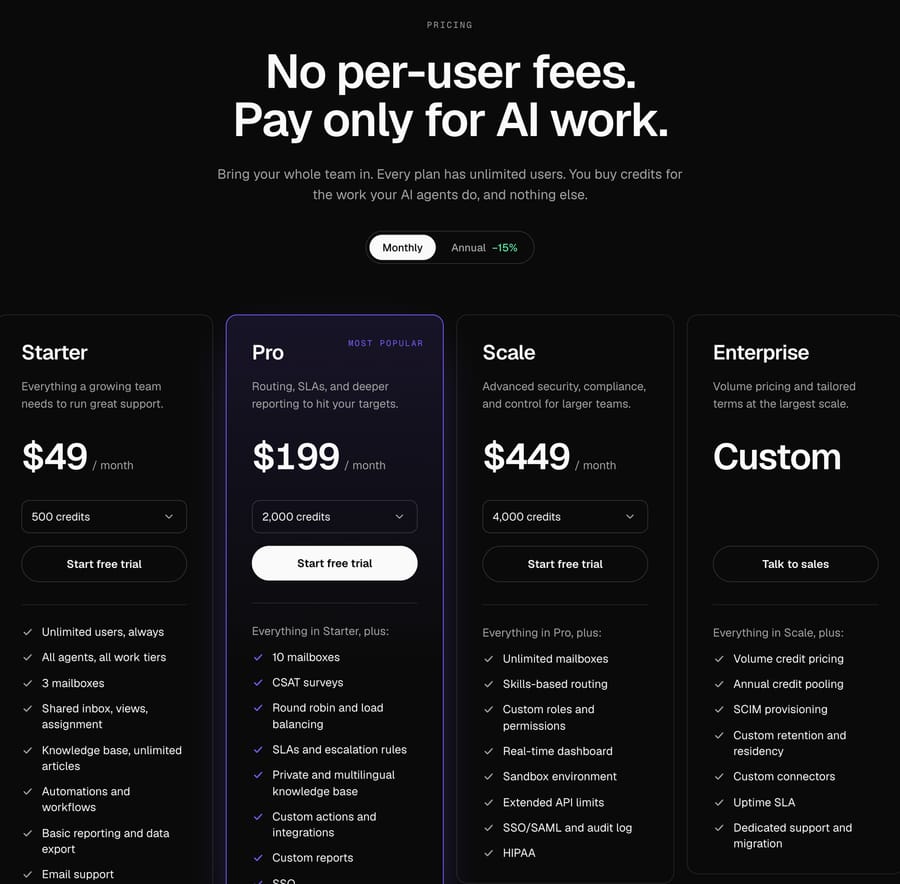
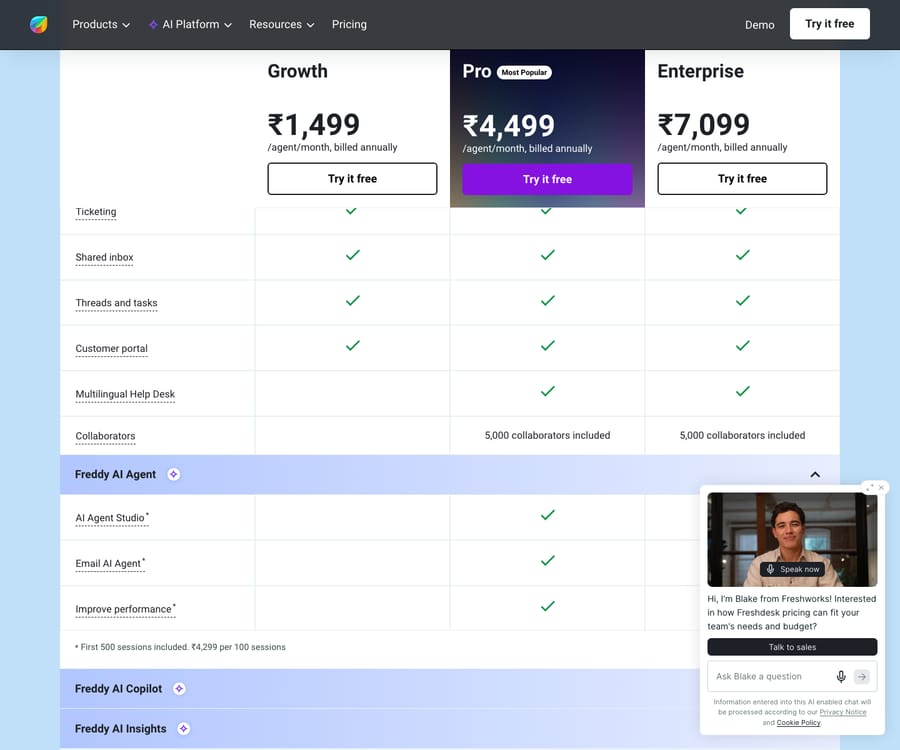
The practical takeaway: on seats, Freshdesk Growth at $19 undercuts Groove Classic Standard at $28. A five-person team pays $95 a month on Freshdesk Growth against $140 on Groove Standard, both billed annually. Helply prices a different thing entirely: a flat plan for the help desk plus AI credits, so it gets cheaper per person as you add teammates and more expensive as the AI does more work.
Which has better features and AI?
Freshdesk is the broader product. It is a true ticketing system with a knowledge base, canned responses, a customer portal, multiple SLA policies on higher tiers, and Freddy AI for suggested replies, summaries and a customer-facing bot. If you expect to graduate from "answering emails" to "running a support operation," Freshdesk has the surface area for it.
Groove Classic is deliberately narrower and better for it. Reviewers on aggregators like Software Advice's Groove vs Freshdesk comparison tend to praise Groove for feeling like a shared inbox rather than a ticketing system: clean, fast and pleasant to use daily. Its AI is the Copilot add-on, which drafts and improves replies inside the inbox. Helply pushes AI much harder, with background agents and a credit price for each action, but Groove itself says it targets B2B software companies, so it is a different buyer from the typical small-team inbox user.
Where they diverge most: Freshdesk bundles a one-time pool of AI sessions and then charges per session; Groove Classic charges a flat monthly fee for Copilot; Helply makes AI the product and charges per action. None of these is wrong. They suit different volumes and risk appetites.
Which handles automation and workflows better?
Freshdesk's automation is the more mature of the two. You get ticket-routing rules, time-triggered automations (SLA reminders and escalations on Pro and above), scenario automations, and dispatch rules that fire on ticket creation. For a team that wants tickets to sort, assign and escalate themselves, this is real depth.
Groove Classic keeps automation lightweight. It has rules for tagging, routing and canned replies, and it avoids the multi-step, time-sensitive workflow builder that Freshdesk offers. For many small teams that simplicity is the point; you are not going to build a rules maze by accident. If your goal is a queue that escalates itself on SLA breaches, Freshdesk supports that natively.
Which is easier to set up and run?
This is Groove's home turf. Most teams can be live within a day, and the admin surface is small enough that a founder or first support hire can own it without a dedicated ops person. There is very little to misconfigure.
Freshdesk is more powerful and, predictably, asks more of you. Setting up business hours, SLA policies, groups, automations and channels takes real configuration time, and the Enterprise plan in particular assumes someone will own admin. That is the fair trade: you are buying room to grow, and room to grow means dials to turn. Groove wins on time-to-first-value; Freshdesk wins on ceiling.
How do their integrations and support compare?
Freshdesk's ecosystem is far larger. The Freshworks Marketplace carries apps for most CRMs, e-commerce platforms and internal tools, so odds are your stack already connects. Groove Classic covers the essentials (Slack, HubSpot, Shopify and similar), which is plenty for most small teams but a real gap if you have a sprawling stack. Helply's integration list leans toward B2B tooling: Salesforce, HubSpot, Linear, Stripe and Snowflake.
On support experience, Groove has long had a reputation for responsive, human help, fitting for a company that built its brand on the small-business support story; its founder says Groove Classic serves 2,000+ companies with a dedicated team. Freshworks offers tiered support with faster SLAs on higher plans. Both are solid; the difference is scale of ecosystem, not quality of help.
What are the honest pros and cons?
Freshdesk, pros: a genuine full help desk, strong automation and SLA tooling, omnichannel (email, chat, phone, social, WhatsApp), a large integration marketplace, and the lowest per-seat entry price here. Cons: no permanent free plan any more, per-seat cost scales with headcount, more to configure, and AI sessions add up once the one-time 500 are gone.
Groove Classic, pros: effortless setup, a clean shared-inbox experience users like, and a product its owner has committed to keep building. Cons: a higher per-seat entry than Freshdesk, channel limits per plan with $10 add-ons, lighter automation, fewer integrations, and AI only through a paid add-on.
Helply, pros: unlimited users on every plan, AI priced by the action, and a spending cap that defaults to your plan price. Cons: sold only to B2B software companies, and credit costs are harder to forecast than seats.
Which should you choose?
- Pick Freshdesk if you are a growing SMB that expects more agents, more channels and real automation over the next year or two. You will use the depth, it costs less per seat, and starting on a platform you can scale into beats migrating later.
- Pick Groove Classic if you are a small team (or a founder doing support) who wants a friendly shared inbox live today with minimal admin, and you value that simplicity more than the $9-a-seat difference at entry level.
- Look at Helply if you are a B2B software company that wants AI to be the headline of your support operation and prefers paying for AI work over paying per seat.
There is no universally correct answer here. A two-person team that will still be two people next year should probably not buy Enterprise anything; a team about to add channels and headcount should not box itself into an inbox.
Can you add an AI layer to whichever help desk you pick?
The help desk you choose and the AI that answers tickets do not have to be the same decision. Freshdesk bundles Freddy; Helply makes AI its whole pitch. If you land on Freshdesk for its depth and channels, you can still add a dedicated AI agent layer on top, and that is where Macha fits. Macha runs AI agents for customer service on top of the Freshdesk you already use as a native connector: it reads and writes the same tickets, drafts or sends grounded replies, triages by intent, and can look up order or account data through a custom tool, without replacing your help desk. Macha connects to Zendesk, Freshdesk, Gorgias, Front, HubSpot or Intercom; Groove and Helply are not on that list. It is worth weighing the build-versus-buy tradeoff before you add any AI layer. Macha bills per ticket, one conversation charged once however many messages it takes, from $299 a month for up to 750 tickets, with setup and monitoring by the Macha team included; see the pricing breakdown.
FAQ
Is Groove the same as Helply now? Not exactly. Helply is now the company's master brand, with two products under it. Groove Classic is the help desk existing Groove customers use, with the same login, data and per-seat pricing. Helply is a separate AI-first product sold to B2B software companies on credit pricing. "Groove" today usually means Groove Classic, so check which one you are evaluating.
Which is cheaper, Freshdesk or Groove? On seats, Freshdesk. Growth is $19 an agent a month billed annually, against $28 a user a month for Groove Classic Standard. Helply starts at $49 a month for unlimited users plus AI credits, so it can come out cheaper for a larger team that uses little AI. Check current prices on each vendor's page, as they change.
Does Freshdesk still have a free plan? Not on its pricing page. Freshworks runs a Free program for up to 2 agents for 6 months, and every signup gets a 14-day Enterprise trial.
Does Groove have as much automation as Freshdesk? No. Groove Classic keeps automation deliberately lightweight (tagging, routing, canned replies), while Freshdesk offers time-triggered automations, SLA reminders and escalations, and dispatch rules on its higher tiers. If self-driving queues matter to you, Freshdesk is the deeper tool.
Is Freshdesk or Groove better for a small business? If you want the simplest possible shared inbox live today, Groove Classic is hard to beat. If you expect to grow into more channels, agents and automation, Freshdesk gives you a platform to scale into at a lower seat price. Match the tool to where you are heading, not just where you are.
Can I add AI to Freshdesk without replacing it? Yes. An AI agent layer like Macha connects to Freshdesk as a native connector and runs on top of your existing help desk, drafting or sending grounded replies and triaging by intent, while Freshdesk stays your system of record.
Ready to add an AI layer on top of your help desk? Start a free trial of Macha ($50 of usage, no credit card) and connect it to your Freshdesk in minutes.






