





 Shopify
 Stripe
 Slack
Slack Notion
 Google Workspace
 Confluence

How Do Gorgias Webhooks Work? HTTP Integrations, Payloads, Retries and Rules (2026)


Gorgias webhooks are called HTTP Integrations, and they can push ticket events to your systems or pull external data into the ticket sidebar. They time out after 5 seconds, retry unreachable endpoints three times, and switch off after 500 consecutive failures.
Key takeaways
- Gorgias calls its webhooks HTTP Integrations, added under Settings, Account, HTTP integration, then Add HTTP integration, with no separate Webhooks menu item.
- A Gorgias HTTP Integration request times out after 5 seconds, and unreachable endpoints are retried up to 3 times at 10, 20 and 40 seconds.
- Gorgias never retries a webhook when the endpoint returns an error status code, and it retries timeouts only on OAuth2 integrations, not header-authenticated ones.
- A Gorgias HTTP Integration disables itself after 500 consecutive failures, and the failure counter resets to zero after any successful request.
- Gorgias API-key integrations are limited to 40 requests per 20-second window, which caps how often a thin webhook payload can call back for full ticket data.

Gorgias webhooks are called HTTP Integrations, and you add one under Settings, Account, HTTP integration, then Add HTTP integration. Each request has a 5-second timeout, unreachable endpoints are retried at 10, 20 and 40 seconds, error status codes are never retried, and 500 consecutive failures disable the integration. The feature is available on all Helpdesk plans.
| Question | Answer (Gorgias docs, checked 24 September 2026) |
|---|---|
| Where is it? | Settings, Account, HTTP integration, Add HTTP integration |
| Methods | GET, POST, PUT, DELETE |
| Authentication | Header key/value pairs or OAuth2 |
| Trigger events | Ticket created, updated, self unsnoozed, message created, message failed; assignment updated and status updated are exclusive options |
| Timeout | 5 seconds per request |
| Retries | Up to 3, at 10s, 20s and 40s; error status codes are not retried |
| Auto-disable | After 500 consecutive failures; the counter resets on any success |
| Plans | All Helpdesk plans |
What are webhooks called in Gorgias?
If you go looking for a menu item labeled "Webhooks," you won't find it. Gorgias bundles both directions of the exchange, outbound event notifications and outbound API calls, under one name. Per the Gorgias HTTP Integrations documentation, the feature lets Gorgias send and fetch data over HTTP and lets you subscribe to Gorgias events to trigger API calls to a third-party endpoint.
In practice there are two things you'll build here:
- An event webhook. Gorgias fires an HTTP request to your URL when a ticket is created, updated, or gets a new message. This is the classic webhook: your system finds out about a change without polling.
- A sidebar/data integration. Gorgias calls an external API and displays the JSON it gets back inside the ticket, so agents see a customer's last order or lifetime value without leaving the conversation.
Both are configured in the same place, which is worth seeing before you build anything.
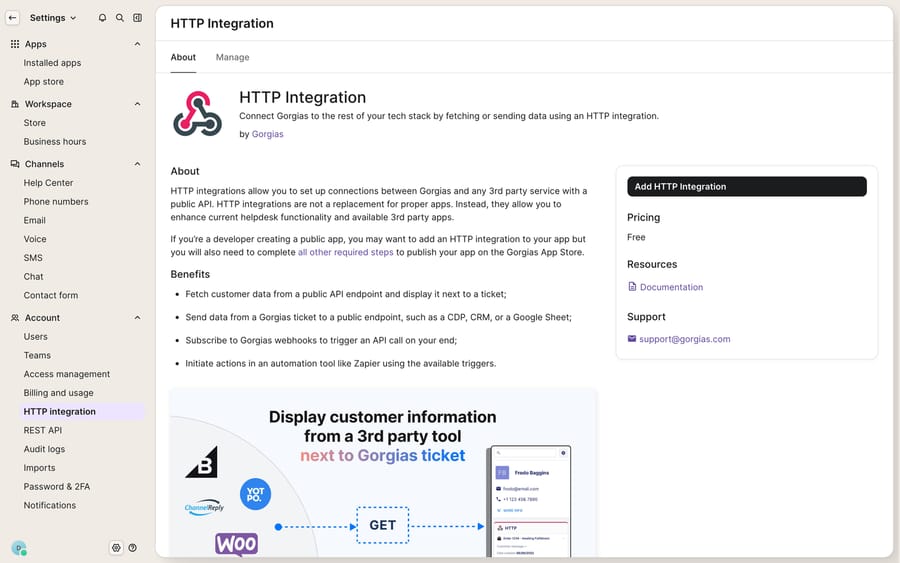
Where do you add an HTTP integration in Gorgias?
The path from the docs: click the Settings icon (bottom-left), find Account, select HTTP integration, then click Add HTTP integration.
Each integration asks for a small, predictable set of fields:
- Integration name: a label you'll reference later (from Rules, and in the sidebar).
- URL: the third-party endpoint Gorgias will call.
- HTTP method:
GET,POST,PUT, orDELETE. - Request content type:
application/jsonorapplication/x-www-form-urlencodedfor any non-GET method. - Authentication: either header-based key/value pairs (for example an
Authorization: Bearerheader) or OAuth2, where you supply a Token URL, Client ID, Client Secret, token location (header or query string) and token key.
That's the whole contract. The setup docs describe no HMAC signing secret of the kind some platforms use, so if your endpoint is public, protect it with a header token you set here and verify on your side.
What goes in a Gorgias webhook payload?
You decide what's in it. Gorgias exposes template variables, the same double-brace syntax used across the product, and you drop them anywhere in the URL or the request body. A variable like {{ticket.customer.email}} gets filled in at send time with that ticket's actual data.
This gives you a genuine choice about payload weight. You can send a thin payload, just an ID, and let your service call back into the Gorgias API for the full object. Or you can send a fat payload with everything your downstream system needs, avoiding a round trip. A thin POST body on a ticket-created event might look like this:
{
  "event": "ticket-created",
  "ticket_id": {{ticket.id}},
  "customer_email": "{{ticket.customer.email}}",
  "channel": "{{ticket.channel}}",
  "subject": "{{ticket.subject}}"
}
Your endpoint receives that, and if it needs more, it authenticates back to Gorgias with HTTP Basic auth (your account email as the username, your API key as the password) against the base URL https://{your-domain}.gorgias.com/api/:
curl -u "[email protected]:YOUR_API_KEY" \
  "https://yourstore.gorgias.com/api/tickets/1234567"
Keep that callback pattern in mind for the limits section: Gorgias rate-limits the API, so a chatty "thin payload plus call back for everything" design can bump into ceilings on a busy store.
How do you trigger an HTTP call from a Gorgias Rule?
Beyond fixed event subscriptions, the more useful pattern is triggering an HTTP call conditionally from Gorgias Rules. Rules are Gorgias's if-this-then-that automation engine, and one of the actions a Rule can perform is making an HTTP request with an integration you've defined.
That combination turns a raw webhook into something targeted. Instead of firing on every ticket-created event and filtering downstream, you let the Rule's conditions do the gating first:
- Build the HTTP Integration under Settings (as above).
- Create a Rule with conditions, for example channel is email and customer tag contains VIP.
- Add the action Trigger HTTP integration and select your integration.
- Set the Rule to run on ticket creation (or message created).
Now only VIP email tickets hit your endpoint. The integration's own trigger list covers Ticket created, Ticket updated, Ticket self unsnoozed, Ticket message created, and Ticket message failed. Two more, Ticket assignment updated and Ticket status updated, are mutually exclusive with the others: selecting either one disables the rest, so check the toggles when you configure.
How does Gorgias handle retries, timeouts and failures?
A webhook you can't trust is worse than no webhook, so it's worth knowing exactly how Gorgias behaves when your endpoint misbehaves. Per the HTTP Integrations docs:
| Behavior | Value |
|---|---|
| Request timeout | 5 seconds per request |
| Endpoint unreachable | Retried, whichever authentication method you use |
| Request times out | Retried for OAuth2 integrations only, not header-based ones |
| Endpoint returns an error status | Not retried, for either authentication method |
| Retry intervals | Up to 3 retries: 10s, then 20s, then 40s |
| Auto-disable threshold | 500 consecutive failures |
| Failure counter | Resets to zero after any successful request |
Three practical takeaways. First, the 5-second timeout is strict, and on a header-authenticated integration a timed-out request is not retried at all. If your endpoint does slow work (a database write, a call to a slow 3PL), acknowledge the webhook fast with a 200 and process asynchronously. Second, a 500 or 400 from your side is final: Gorgias will not send that event again, so log failures on your end and reconcile through the API. Third, the auto-disable is forgiving by design: because the counter resets on any success, an endpoint that's mostly up won't slowly march toward being shut off. An endpoint that's fully down for a stretch will hit 500 and go dark, so monitor from your side.
Where do Gorgias HTTP Integrations stop, and where does an AI layer pick up?
Gorgias's HTTP Integration is a dependable primitive. It fires reliably, it retries unreachable endpoints sensibly, and the template-variable model gives you real control over payloads. For surfacing a customer's order history in the sidebar or notifying an internal system, it's the right tool, and it pairs naturally with the customer sidebar to give agents context.
But notice what it is and isn't. A webhook is plumbing: it moves JSON from A to B. It does not read the customer's message, work out what they're asking, decide which of your systems to query, interpret the response, and write a reply. Every HTTP Integration still ends at either a sidebar widget an agent reads, or a downstream system that does its own narrow thing. The reasoning ("this is a where-is-my-order question, so call the 3PL, parse the tracking status, and phrase a helpful answer") is not something a webhook does.
There are native limits too. The integration's trigger list covers ticket events only, with no agent-created or agent-deactivated events. The 5-second timeout rules out synchronous heavy lifting. And the API's rate limits cap API-key integrations at 40 requests per 20-second window and OAuth2 apps at 80, with Enterprise accounts getting the same counts in a 10-second window, so the thin-payload/call-back pattern has a real budget on a high-volume store.
This is the seam where an AI agent layer fits, and it's worth weighing the build-versus-buy tradeoff before you hand-roll a fleet of webhooks into custom services. The broader category of AI agents for customer service exists to do the reasoning a webhook can't. Macha is one such layer: it runs on top of the Gorgias you already use as a native connector, and it does not replace your help desk, your Rules, or your HTTP Integrations. Where a webhook hands off raw JSON, Macha reads the ticket, calls your external systems through a custom tool that turns a REST endpoint into something an agent can invoke and reason over, then drafts or posts a grounded reply. Macha bills per ticket, from $299 a month for 750 tickets: one conversation, charged once however many messages it takes, never per resolution. The clean division of labor: keep Gorgias's HTTP Integrations as the transport and system-of-record events, and layer an agent on top for the part the plumbing can't do, which is deciding and answering.
FAQ
Where are webhooks configured in Gorgias? Under Settings → Account → HTTP integration, then Add HTTP integration. Gorgias calls webhooks "HTTP Integrations," so there's no separate "Webhooks" menu item.
What events can a Gorgias webhook fire on? Ticket created, Ticket updated, Ticket self unsnoozed, Ticket message created, and Ticket message failed. Ticket assignment updated and Ticket status updated are also available but disable the others when selected. You can also trigger an HTTP request conditionally from a Rule so it only fires on tickets that match your conditions.
How does Gorgias handle webhook failures? Each request has a 5-second timeout. Unreachable endpoints are retried up to 3 times at 10, 20 and 40 seconds; timeouts are retried only on OAuth2 integrations; error status codes are never retried. An integration auto-disables after 500 consecutive failures, and the counter resets after any successful request.
Can I control what data the webhook sends? Yes. You build the payload yourself using template variables like {{ticket.id}} and {{ticket.customer.email}} in the URL or request body, so you can send a thin ID-only payload and call back into the API, or a fuller object.
Can I add AI on top of Gorgias webhooks without replacing Gorgias? Yes. An AI agent layer like Macha connects to Gorgias as a native connector and consumes your events and tools: reading tickets, calling APIs, and drafting or sending grounded replies, while Gorgias stays the system of record for tickets, Rules, and HTTP Integrations.
Ready to turn raw webhook events into real resolutions? Start a free trial of Macha and connect it to your Gorgias in minutes.






