





 Shopify
 Stripe
 Slack
Slack Notion
 Google Workspace
 Confluence

How Does the Front API Work? Auth, Rate Limits and Core Endpoints (2026)


The Front API lets your own code read conversations, send replies, sync contacts and receive live events from Front, using a Bearer token against api2.frontapp.com. Rate limits are set per company by plan, so the number of tokens you create does not change your throughput.
Key takeaways
- The Front API uses the base URL https://api2.frontapp.com and authenticates every request with a Bearer token, either an API token or an OAuth token for public apps.
- Front enforces its API rate limit per company, not per token, at 50 requests a minute on Starter, 100 on Professional and 200 on Enterprise.
- Front's analytics exports are limited to 1 request every 3 seconds, while conversations, messages and channels allow 5 requests per resource per second.
- Front's API burst allowance equals half the plan's per-minute limit and takes 10 minutes to replenish once used up.
- Front API tokens are scoped by features, by namespaces such as Global, Shared or Private resources, and by four permissions: Read, Write, Delete and Send.

The Front API is a JSON REST API at https://api2.frontapp.com that you call with a Bearer token (an API token, or OAuth for public apps), and it allows 50, 100 or 200 requests a minute per company depending on your Front plan. Per Front's authentication docs and rate limit documentation (both checked 24 September 2026), the numbers you will build around are these:
| Item | What Front documents |
|---|---|
| Base URL | https://api2.frontapp.com, JSON over HTTPS |
| Auth | Authorization: Bearer with an API token or an OAuth access token |
| Rate limit | 50 rpm (Starter), 100 rpm (Professional), 200 rpm (Enterprise), per company |
| Partner OAuth apps | Separate 120 rpm, per company |
| Burst | Half the plan limit, 10 minutes to replenish |
| Over the limit | 429 Too Many Requests with a retry-after header |
How do you authenticate with the Front API?
Every request goes to the same host, and there are two ways to prove who you are.
API tokens are the simplest. You generate a token in Front under Settings → Developers → API tokens (Company settings), and you send it on every request in the Authorization header, prefixed with the word Bearer. Front says API tokens suit testing, single-customer integrations and internal use: anything where you control both ends and talk to one Front company.
OAuth is the other route. Front's docs say it is "required for public integrations available to all Front customers unless you obtain an exception," and recommended when feasible for everything else, because it plugs into Front's application framework and App Store. OAuth trades a longer setup for the ability to serve many customers without each of them minting a raw token.
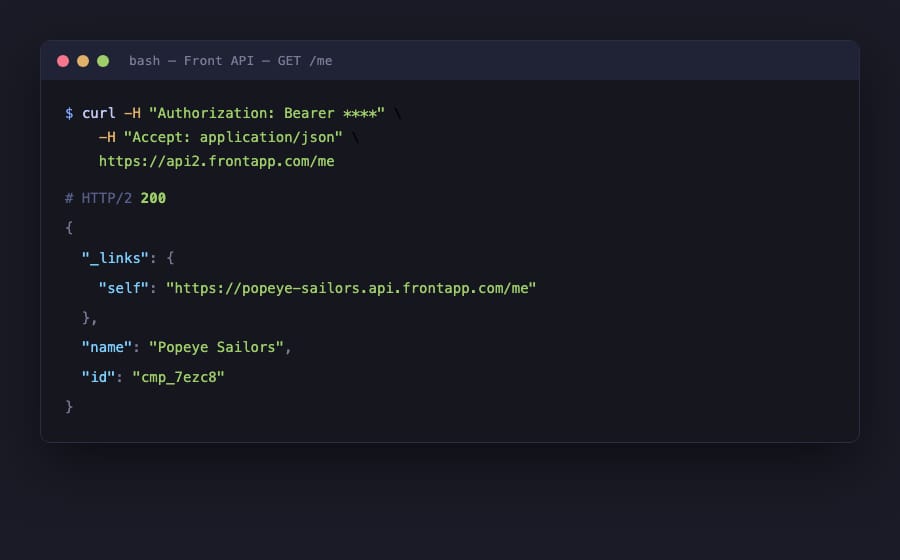
For most internal automations, the kind a support or ops team wires up against their own Front, an API token is the right choice. Here's the simplest possible authenticated call:
curl --request GET \
  --url https://api2.frontapp.com/me \
  --header 'Authorization: Bearer YOUR_API_TOKEN' \
  --header 'Accept: application/json'
A 200 comes back with the company the token belongs to. That single call, GET /me, is the standard "am I authenticated?" smoke test before you build anything heavier.
What can a Front API token access?
A Front API token is shaped along three axes, and understanding them saves you a lot of confusing 403s. Front's token model breaks down into features, namespaces, and granular permissions.
Features decide what kind of work the token can do: Access resources for ordinary Core API reads and writes, Auto-provisioning for SCIM user management, Application triggers for event-driven apps, and an MCP server feature for connecting Front to LLM clients. Namespaces decide which slice of data the token can touch: Global resources (company-level), Shared resources (a specific workspace), or Private resources (a single teammate's data). Within all that, four granular permissions control the verbs, as Front documents them:
- Read: retrieving resource information.
- Write: creating and updating resources.
- Delete: removing API resources.
- Send: creating and sending messages (starting or replying to conversations), which Front deliberately separates from historical message import.
The practical takeaway: scope tokens tightly. A token that only needs to read conversations should carry Read on the right namespace and nothing else. Our own demo token, scoped to global company resources, returns a clean 200 on GET /me but a 403 on GET /conversations. The token was never granted that reach, so the 403 is the security model doing its job.
What are the Front API rate limits?
The default per-minute allowance depends on your plan, and Front enforces it per company, not per token. Spinning up more tokens does not buy you more throughput.
| Plan | Rate limit |
|---|---|
| Starter | 50 requests/min |
| Professional | 100 requests/min |
| Enterprise | 200 requests/min |
| Partner integration (OAuth, on behalf of a company) | 120 requests/min (separate allocation) |
On top of the per-minute ceiling there are extra guards. Analytics exports and reports (Tier 1) are throttled to 1 request every 3 seconds. High-traffic resources like conversations, messages, and channels (Tier 2) allow 5 requests per resource per second. The "mark as seen" endpoint is capped at 10 requests per message per hour.
Front also gives you a burst allowance equal to half your plan's per-minute limit for temporary spikes, and once you exhaust it, it takes 10 minutes to replenish. When you go over, Front returns 429 Too Many Requests with a retry-after header telling you how many seconds to wait, and sometimes an x-front-tier header naming which limit you hit. Every response carries x-ratelimit-limit, x-ratelimit-remaining, x-ratelimit-reset, x-ratelimit-burst-limit and x-ratelimit-burst-remaining, so you never have to guess how close you are. Read them, back off on 429, and honour retry-after. That's the whole discipline.
Which Front API endpoints do most integrations use?
Front's Core API gives control over nearly every entity in Front. A handful of resource families cover most real integrations, per Front's Core API overview:
- Conversations: the central object. Read, create, update, and delete threads across email, SMS, chat, and social, plus actions like assign, archive, restore, snooze, follow, and merge.
- Messages: send and reply on new or existing conversations across any channel. There's also an inbound import path for syncing history without sending anything to a customer.
- Contacts: create and update the people (and their handles) your conversations are with; the natural sync point between Front and your CRM.
- Drafts: create, edit, and delete draft replies assigned to a teammate or a shared inbox. An assistive tool uses this endpoint to suggest a reply that a human then approves.
- Channels, teammates, tags, comments, and analytics round out the surface for routing, internal notes, and reporting.
A typical read looks like this:
curl --request GET \
  --url 'https://api2.frontapp.com/conversations?limit=25' \
  --header 'Authorization: Bearer YOUR_API_TOKEN'
Responses are JSON and cursor-paginated (follow _pagination.next), and every object carries an _links block of related resource URLs, so you can move from a conversation to its messages, its assignee, or its inbox without hand-building paths.
How do Front webhooks replace polling?
Polling the conversations endpoint on a timer works, but it wastes requests and always runs a little behind. Front's webhooks push real-time notifications to a URL you own when specific events happen: a new inbound message, a conversation assigned, a tag added, an archive. You configure them as an event-driven rule action (the webhook Then-action in Front's rules) or as an application trigger if you're building on the app framework.
A webhook payload is a JSON POST describing the event and the affected object, so your endpoint can react immediately (post to Slack, kick off a downstream workflow, or hand the conversation to an agent) without burning rate-limit budget on a polling loop. For anything near real time, use webhooks, and save direct endpoint calls for when you need to act on the conversation the webhook told you about.
Where does the Front API stop, and where does an AI layer pick up?
The Front API is complete and well documented, and for moving data and firing actions it does what a good REST API should. But it's plumbing, and its edges are worth knowing.
The rate limits are per company: a chatty integration on a Starter plan (50 rpm) can starve the rest of your automations, and burst exhaustion means a 10-minute cool-off, so heavy syncs need real backoff logic. Token scoping is easy to under-grant: a 403 on an endpoint that "should" work is almost always a missing permission or the wrong namespace, not a server problem. And the API can fetch a conversation and send a draft, but it has no opinion about what the reply should say. That reasoning is yours to build.
That last gap is where an AI agent layer fits, and it works through this same API. The broader category of AI agents for customer service exists for the reading-and-answering work no endpoint performs on its own. Macha is one such layer: it runs on top of the Front you already use via the live Macha–Front connector, consuming the conversations, messages, and drafts endpoints described above. It does not replace Front, your inboxes, or your API access. Front and its API keep holding the conversations and moving the data. Macha's agent reads the conversation, works out intent, and pulls a real order or account status through a custom tool that turns your own REST API into something the agent can call, before drafting or sending a grounded reply. Macha bills per ticket, from $299 a month for up to 750 tickets: one conversation is charged once however many messages, lookups and drafts it takes, never per resolution.
If you're wiring this up yourself, the companion guide to using the Front API walks through your first authenticated calls step by step, and it pairs with how Front rules and the shared inbox model behave underneath the API.
FAQ
What is the base URL for the Front API? Every Core API request goes to https://api2.frontapp.com. It's a JSON-over-HTTPS REST API, and you authenticate every call with an Authorization: Bearer <token> header.
How do I authenticate with the Front API? Two ways. For testing, internal use or a single-customer integration, generate an API token under Settings → Developers → API tokens and send it as a Bearer token. For public integrations offered to all Front customers, OAuth is required unless Front grants an exception.
What are Front's API rate limits? They're per company, not per token: 50 requests/min on Starter, 100 on Professional, and 200 on Enterprise, with partner OAuth integrations getting a separate 120 rpm. There are also extra guards (5 requests per resource per second for conversations, messages, and channels; 1 request every 3 seconds for analytics) and a burst allowance equal to half your plan limit. Exceeding a limit returns 429 with a retry-after header.
Which Front API endpoints do I actually need? For most integrations: conversations (the central object), messages (send/reply), contacts (sync people), and drafts (suggest replies). Channels, teammates, tags, comments, and analytics cover the rest. Webhooks push real-time events so you don't have to poll.
Can I add AI to Front through its API without replacing Front? Yes. An agent layer like Macha connects to Front as a live connector and uses the same conversations, messages, and drafts endpoints, running on top of your existing inboxes. Front and its API keep holding and moving the data; the agent reads intent and drafts or sends a grounded reply.
Ready to turn API calls into answered conversations? Start a free trial of Macha and connect it to your Front in minutes.






