





 Shopify
 Stripe
 Slack
Slack Notion
 Google Workspace
 Confluence

Which Freshdesk Workflows Can You Fully Automate With AI? 5 That Work in 2026


Freshdesk's built-in rules move tickets around based on properties you define in advance, but they don't read a ticket, look up the order and write the reply. An AI agent layer adds that last step, so a ticket can be resolved end to end without a human touching it.
Key takeaways
- Five Freshdesk workflows an AI agent can run end to end are triage and routing, how-to answers, order-status lookups, small refunds and scheduled reporting.
- Macha's automations run in either draft mode, where the agent writes an internal note for a human to approve, or autonomous mode, where it posts the public reply and resolves the ticket.
- Freshdesk's paid plans cost $19 for Growth, $55 for Pro and $89 for Enterprise per agent a month billed annually, and Freddy AI Copilot adds $29 per agent on Pro and Enterprise only.
- Freddy AI Agent gives each Freshdesk account 500 sessions once, then charges $49 per 100 sessions.
- Macha charges per ticket rather than per agent seat, starting at $299 a month for 750 tickets, about $0.40 a ticket however many tools or steps the agent uses.

Five Freshdesk workflows an AI agent can run end to end today are triage and routing, how-to and policy answers, "where is my order?" lookups, small refunds, and scheduled reporting. Each one starts from a Freshdesk trigger (Ticket Created, Ticket Updated or a Custom Webhook) or a Macha schedule, and ends with the agent writing back to the ticket through the Freshdesk API. Freshdesk's own rules can tag, assign and escalate, but they don't read a ticket, fetch the order from Shopify and write the reply.
| Workflow | Trigger | Tools beyond Freshdesk | Safe to run autonomously? |
|---|---|---|---|
| 1. Triage, prioritize, route | Ticket Created | None | Yes, reversible and invisible to the customer |
| 2. How-to and policy answers | Ticket Created | Notion, Confluence or Google Docs | Yes, with an escalation rule when no article matches |
| 3. Where is my order? | Ticket Created | Shopify | Yes, it's a live lookup |
| 4. Small refunds | Ticket Created | Stripe or Razorpay | Only under a cap you set |
| 5. Reporting and alerts | Macha schedule | Slack, File Tools | Yes, no customer reply involved |
Macha is the layer that runs these. It sits on top of the Freshdesk you already run (it is not a Freshdesk replacement, and it doesn't migrate your data), connects to the commerce, billing, and knowledge tools where the answers live, and runs AI agents that take real actions on tickets: public replies, internal notes, status and priority changes, tags, field updates, and assignments. Freshdesk stays your system of record; the agents do the work inside it. Below are the five workflows, where to keep a human in the loop, and how this compares to Freshdesk's own Freddy AI.

How does "full automation" actually work in Macha?
"AI resolves your tickets" is a claim worth being precise about, so here are the mechanics.
A Macha automation has three parts:
- A trigger. For Freshdesk, that's Ticket Created, Ticket Updated, or a Custom Webhook you fire from a Freshdesk automation rule (so you decide exactly which tickets wake the agent). Macha also has its own scheduled triggers for time-based jobs.
- An agent. A configured AI agent with instructions, a chosen model, the knowledge sources it can search, and the tools it's allowed to call.
- Tools and actions. The agent reads the ticket, optionally calls out to Shopify, Stripe, Notion, Confluence, or Google Docs, and then writes back to Freshdesk —
Add Public Reply,Add Internal Note,Update Status,Update Priority,Update Tags,Update FieldsandAssign Ticket.
The "fully automated" part is a setting, not a leap of faith. You can run any agent in draft mode (it writes the reply as an internal note for an agent to approve) or autonomous mode (it posts the public reply and closes the ticket). The sensible path is to start every workflow below in draft, read what it would have sent for a week, and only flip it to autonomous once you trust it. Pricing is usage-based, charged per ticket — one conversation, charged once however many messages, lookups and drafts it takes, whichever model the agent runs on. A simple triage and a multi-step refund flow cost the same: one ticket, about $0.40, starting at $299 a month for 750 tickets. There are no per-seat fees, agents and seats are unlimited, and setup and monitoring by the Macha team are included. See the pricing page for the current plans.
1. Triage, prioritize, and route every new ticket
This is the workflow most teams automate first, because it's high-volume, low-risk, and it makes every other workflow better.
Trigger: Ticket Created. What the agent does: reads the subject and description, classifies the topic, infers urgency and sentiment, then sets priority, applies tags, and assigns the ticket to the right group, all before an agent ever opens it.
Freshdesk's own dispatch rules can route on keywords and properties. The difference here is comprehension: the agent reads "my account was charged but I never got access to the features I paid for" and understands it's a high-priority billing-and-access problem from a frustrated customer, not just a ticket containing the word "charged." It uses Update Priority, Update Tags, and Assign Ticket to act on that.
Why it's safe to fully automate: triage is reversible and invisible to the customer. The worst case is a misrouted ticket a human re-routes — no bad reply goes out. That's exactly why it's the right place to build confidence before automating anything customer-facing.
2. Auto-resolve repetitive how-to and policy questions
A large share of any Freshdesk queue is the same dozen questions: how do I reset my password, what's your return window, how do I change my plan. These are fully resolvable when the agent has access to your real documentation.
Trigger: Ticket Created, filtered to your common intents. What the agent does: searches your knowledge for the matching answer, writes a clear, specific reply with the actual steps, posts it as a public reply, and sets the ticket to resolved.
One nuance specific to Freshdesk: Macha's Freshdesk connector includes a Search Articles action that queries your Freshdesk solution articles live, but unlike the Zendesk connector it does not auto-sync your Freshdesk knowledge base into Macha as a managed knowledge source. In practice you get the best answers by also pointing the agent at a knowledge source it does sync natively (Notion, Confluence, or Google Docs) so it draws on both your public articles and your internal wiki. Answers are grounded in your content, not the model's training data, which is what keeps them accurate.
Watch-out: only auto-send when the agent is confident. Configure it to escalate (Assign Ticket to a human group and add an Internal Note with what it found) when no article clears a relevance bar, rather than guessing. A wrong policy answer sent autonomously is worse than a five-minute human reply.
3. Answer "where is my order?" end-to-end
WISMO ("where is my order") is the highest-volume ticket type for most e-commerce teams, and it's a clean fit for full automation because the answer is a deterministic lookup the customer simply can't do themselves.
Trigger: Ticket Created, order-status intent. Tools: Freshdesk + Shopify. What the agent does: extracts the order number (or looks the customer up by email), calls Shopify's Get Order, reads fulfillment and tracking, then replies with the carrier, tracking number, and delivery estimate and marks the ticket resolved.
Because the agent reads live commerce data rather than a canned macro, the reply is specific — "Your order #1847 shipped March 2 via FedEx, tracking 7829401, arriving tomorrow" — which is the whole point. This is the single workflow most likely to take a measurable bite out of your ticket volume on day one. (We catalogue more order, billing, and knowledge patterns in the use-case library if you want to see the full set.)
4. Process straightforward refunds with a payment lookup
Refunds feel risky to automate, and high-value or disputed ones should stay human. But the long tail of small, clearly-eligible refunds is automatable when the agent can see the payment.
Trigger: Ticket Created, refund intent. Tools: Freshdesk + Stripe (or Razorpay). What the agent does: looks up the customer in Stripe, confirms the charge and that it's within your refund policy, issues the refund via Create Refund, then posts a confirmation on the Freshdesk ticket and resolves it.
Where to draw the line (this matters): put guardrails in the agent's instructions. Cap the auto-refund amount (e.g. only under a threshold you set), only act when the charge clearly maps to the requester, and route anything above the cap, anything disputed, or anything ambiguous to a human with the payment context already attached as an internal note. The fully automated version should handle the obvious cases and hand off the judgment calls, not attempt them. Done this way, your agents clear the volume of trivial refunds while a human still owns every real decision.
5. Scheduled reporting and proactive alerts
Not every automation is triggered by a customer. Some of the highest-leverage ones run on a clock.
Trigger: a Macha scheduled trigger (Freshdesk has no native scheduled trigger, so this runs on Macha's scheduler). Tools: Freshdesk Search Tickets + Slack and/or File Tools. What the agent does: every morning, queries the previous day's Freshdesk tickets (created, resolved, first-response time, backlog, top topics) and posts a clean summary to a Slack channel, or generates a CSV/PDF with File Tools for a weekly review.
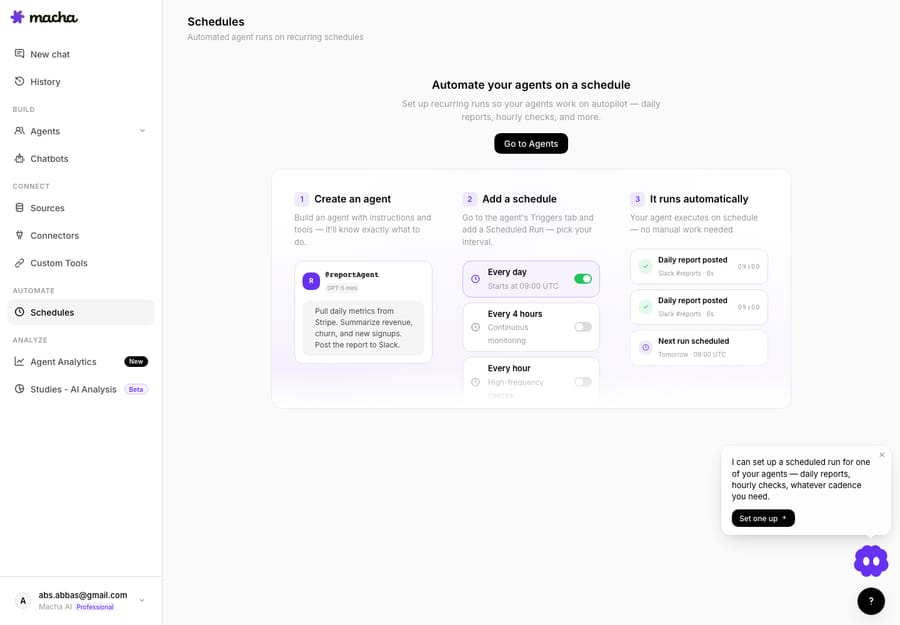
The same pattern powers proactive alerts: a scheduled agent that watches ticket volume and pings the team in Slack when a topic spikes (a likely outage or shipping problem) hours before it becomes a flood. This is fully automated by nature; there's no customer reply to second-guess, just reporting that used to eat an analyst's morning.
Which Freshdesk tickets should you not fully automate?
A roundup that only sells automation is dishonest. Keep a human firmly in the loop for:
- Angry, high-stakes, or VIP tickets. Use an agent to triage and alert (workflow 1), but let a person own the reply. A good pattern: detect the VIP or the frustration, escalate with full context, and stop there.
- Anything irreversible above a threshold: large refunds, account deletions, plan cancellations. Automate the lookup and the draft; gate the action behind approval.
- Topics with no grounded source. If the agent can't find the answer in your knowledge, it should escalate, not improvise. Configure the relevance bar deliberately.
- The first week of any workflow. Run new agents in draft mode and read their would-be replies before going autonomous. The cost of a week in draft is trivial next to one confidently-wrong public reply.
The honest framing is deflection and automation, not magic resolution: these workflows take real, repetitive volume off your team and resolve the clear cases end-to-end, while routing the judgment calls to humans with context already attached. Outcomes vary by how clean your data and docs are: an agent is only as good as the Shopify order it can read and the policy article it can find.
How does this compare to Freshdesk's own Freddy AI?
Freshdesk has its own AI layer: Freddy AI Agent with agentic Workflows built from six block types (Trigger, Collect info, Condition path, API action, Custom response and Agent handoff), so a workflow can collect details, check conditions, call APIs and hand off to a human. It's a capable native option, and if you're all-in on the Freshworks stack it's worth evaluating first.
Two practical differences shape the decision. First, reach beyond Freshworks: Macha's value is the agent reaching outside the helpdesk into Shopify, Stripe, Razorpay, Notion, Confluence, Google Workspace, Airtable, and Slack — and acting across them in one workflow. If your answers live in those tools, that breadth is the point. Second, pricing model: Freshdesk's paid plans cost $19 (Growth), $55 (Pro), and $89 (Enterprise) per agent per month, billed annually. Freddy AI Copilot is an extra $29 per agent a month and is sold only on Pro and Enterprise. Freddy AI Agent is billed per session: each account gets 500 sessions once, then pays $49 per 100 sessions (Freshworks pricing, checked 24 September 2026). Macha charges per ticket (one conversation, charged once however many steps it takes) with no per-agent seat fee, which tends to favor teams running many lightweight automations across multiple tools.
This isn't an either/or. Macha layers on top of your existing Freshdesk plan: you can keep Freshdesk's rules and Freddy and still run Macha agents on the tickets they don't cover.
How do you get started?
You can stand up workflow 1 (triage) in well under an hour: connect Freshdesk with an API key on the integrations page, point a Ticket Created trigger at an agent, and run it in draft for a few days. Add the order-status and knowledge workflows once you trust the triage. The docs walk through agents, triggers, and knowledge sources step by step, and there are more patterns in our blog.
Start a free trial ($50 of usage, roughly 125 tickets, no credit card required), connect your Freshdesk, and automate the first workflow this week.
FAQ
Does Macha replace Freshdesk? No. Macha is an AI agent layer that runs on top of Freshdesk through its API. Freshdesk stays your helpdesk and system of record; Macha's agents read and act on tickets inside it.
Can the AI actually close tickets on its own, or just draft replies? Both. It's a per-agent setting. Run an agent in draft mode (it writes an internal note for a human to approve) or autonomous mode (it posts the public reply and resolves the ticket). Start in draft, then flip to autonomous once you trust it.
Which Freshdesk plan do I need? Any Freshdesk plan that lets you create an API key and automation rules works, since Macha connects over the Freshdesk API. You don't need Freshdesk's Freddy AI add-ons (Copilot is Pro and Enterprise only) to use Macha.
Does Macha sync my Freshdesk knowledge base? The Freshdesk connector can Search Articles (your solution articles) live, but it doesn't auto-sync them as a managed knowledge source the way the Zendesk connector does. For the most reliable answers, also connect Notion, Confluence, or Google Docs as a synced knowledge source.
How is it priced? Per ticket (one conversation, charged once however many steps the agent takes, whichever model it runs on) with no per-seat fee and unlimited agents. Pricing starts at $299 a month for 750 tickets, about $0.40 each. See the pricing page for current plans.
Written by Abbas (Customer Support & AI, Macha) · Reviewed by Ankeet Guha (Co-founder & CTO) · Published 2026-06-24 · Last updated 2026-09-24.






