





 Shopify
 Stripe
 Slack
Slack Notion
 Google Workspace
 Confluence

What Is the Best Free Live Chat Software in 2026? Real Limits of 7 Free Tiers


Seven live chat tools still have a real $0 tier in 2026, and tawk.to is the only one with no seat cap. The rest cap you at 2, 3 or 10 agents, or at 50 to 500 conversations a month, and almost all of them charge for the AI separately.
Key takeaways
- tawk.to is the best free live chat software for most small teams in 2026, because it is the only one of seven $0 tiers with no seat cap.
- tawk.to charges only for add-ons: AI Assist and Whitelabel branding removal each cost $29 a month, Voice Agents start at $49 and Data Enrichment at $59.
- Freshchat's Free plan covers up to 10 agents at $0 with a shared inbox, while Freshdesk has no free plan and only a Free program covering 2 agents for 6 months.
- Crisp's Free plan covers 2 seats and 100 customer profiles with no AI credits, and its paid Mini plan is a flat $45 a month per workspace.
- Intercom has no free plan: Essential is $29 a seat billed annually, and Fin costs $0.99 per outcome on top of the seats.

tawk.to is the best free live chat software in 2026 for most small teams, because it is the only one of seven tools with a real $0 tier that has no seat cap. Freshchat Free covers up to 10 agents, Crisp Free covers 2 seats, and Chatwoot, Zoho SalesIQ, Tidio and HubSpot round out the set, each with a conversation or feature cap listed below.
A disclosure: we make Macha, an AI agent layer that runs on top of a help desk you already have. It isn't a chat widget and it isn't on this list; it gets one clearly marked section near the end.
Which live chat tools are actually free in 2026?
The free tiers split into three shapes: free-forever with a seat cap, free-forever with a conversation cap, and open source where the license is free and the server is yours.
| Tool | Free tier | Seat limit | Volume limit | What the free tier removes |
|---|---|---|---|---|
| tawk.to | Free platform | None | None stated | Branding removal ($29/mo), AI Assist ($29/mo) |
| Freshchat | Free | 10 agents | None stated | Freddy AI Agent, social and SMS channels, reporting |
| Crisp | Free forever | 2 seats | 100 customer profiles | AI credits, shared email inbox, sub-inboxes |
| Chatwoot | Hacker | 2 agents | 500 conversations/mo | Every channel but live chat, help center, Captain AI, teams, automation, 30-day retention |
| Zoho SalesIQ | Free | 3 operators | 100 operator chat sessions/mo | Chatbots beyond the basics, 10K visitor tracking cap |
| Tidio | Free | 10 seats | 50 billable conversations/mo | Lyro AI beyond a one-off 50, Flows beyond 100 visitors |
| HubSpot | Free CRM tools | Free users | Branded widget | Chat routing depth, automation, the paid Service Hub features |
Every limit in that table came off the vendor's own live pricing page on September 20, 2026. Two of them contradict what most roundups still say, so they get their own paragraphs below.
What does each free tier include, and what does it cost you elsewhere?
tawk.to: free, with no seat cap
tawk.to is the answer people actually give each other. It's a full chat widget, ticketing, a knowledge base and a chat page, with no plan wall in front of them. Its add-ons page states the model in its own words: "The platform is free. These are the extras," and "99% of businesses use tawk.to entirely for free."
The extras are four, and the page prices them per property rather than per seat: AI Assist at $29 a month, Whitelabel at $29 a month to remove the "Powered by tawk.to" badge and run your own domains, Voice Agents from $49 a month plus usage, and Data Enrichment from $59 a month. The last two are on a waitlist as of the date we checked.
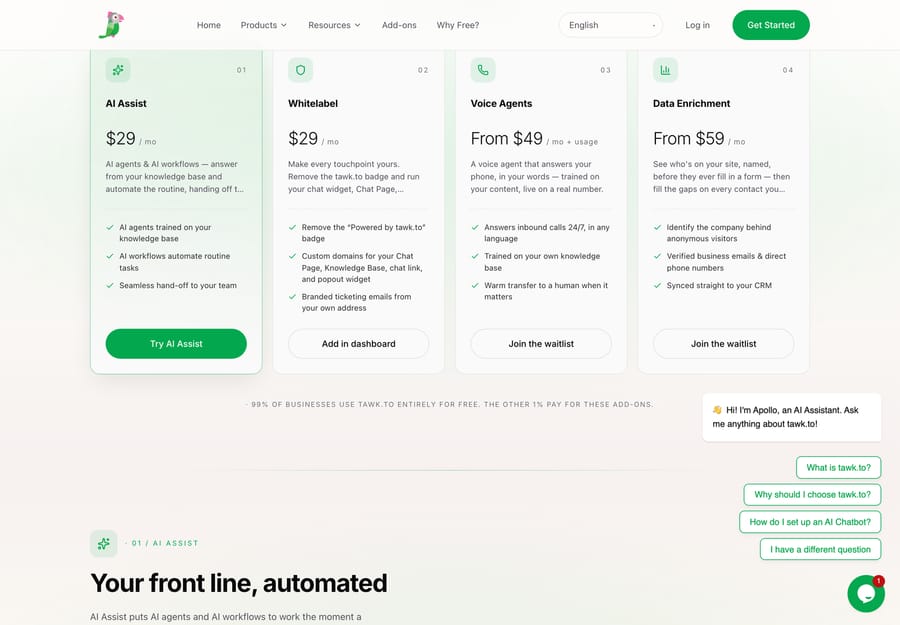
Name the incentive here, because it's unusual. tawk.to earns nothing from seats, so it has no reason to cap your team, and every reason to sell you branding removal and AI once the widget is load-bearing on your site. That's a healthier trade for a small team than a seat meter, and it's why the r/SaaS threads on free chat widgets and affordable good-looking widgets keep landing on it. Reddit blocks our crawler, so we reached both threads through search and linked them rather than quoting.
The catch is the badge. Free tawk.to puts its own brand on your widget, which is a real cost on a site selling a premium product. Budget the $29 if that matters.
Freshchat Free: $0 for up to 10 agents
This one surprises people, because Freshdesk's free plan is gone and most roundups now assume every Freshworks free tier went with it. Freshchat's did not. The Free plan is $0 for up to 10 agents and includes the chat widget on web and mobile apps, a shared inbox, connected email, and roles and permissions.
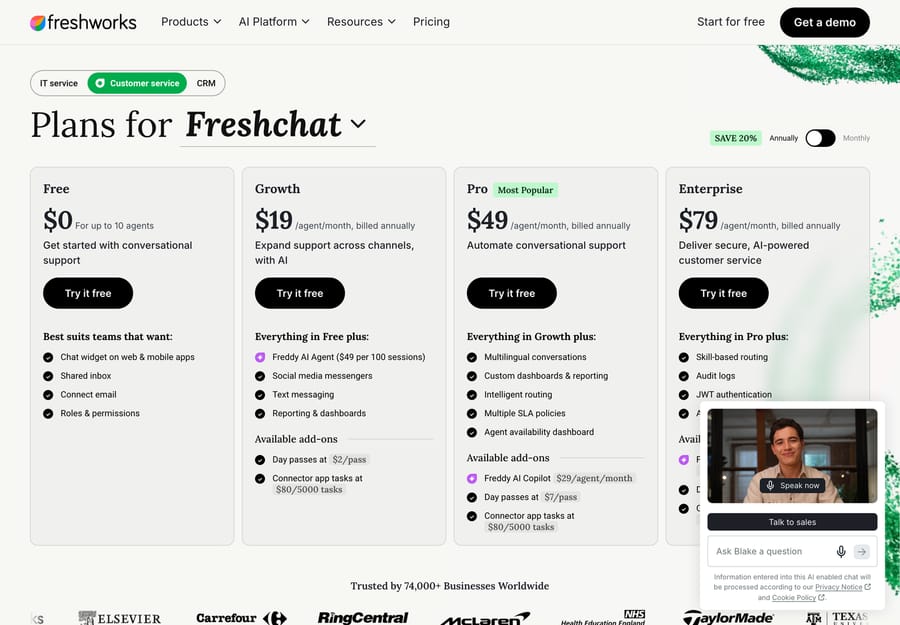
Paid starts at Growth $19 an agent a month on annual billing, then Pro $49 and Enterprise $79. What Growth buys you is the part the free tier removes: Freddy AI Agent, social messengers, text messaging, and reporting and dashboards. Freddy AI Agent is $49 per 100 sessions on top.
Ten free seats with a shared inbox is the most generous free tier here by headcount. It suits a small team that wants web chat handled properly and doesn't need social or SMS yet. It's the wrong fit if you want the bot doing real work, because that's a paid plan plus a session bill.
Crisp Free: two seats, flat pricing above that
Crisp's Free plan is free forever with 2 seats, the website chat widget, mobile apps, chat SDKs, a contact form, ecommerce integrations and push notifications, capped at 100 customer profiles. Its own card is blunt about the gap: "No AI credits included."
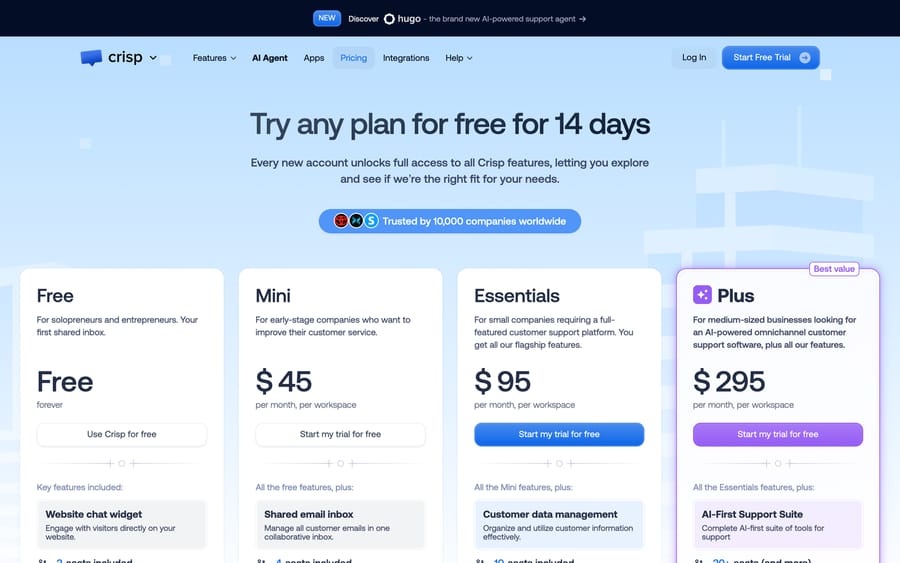
Above free, Crisp is the flat-rate option, and the prices are dollars per workspace, not euros per seat: Mini $45 with 4 agents, Essentials $95 with 10, Plus $295 with 20 or more. For a team of 10, Essentials at $95 a month total is a different universe from ten Intercom seats. That flat model is the reason Crisp shows up in every "cheaper than Intercom" thread, and it's covered further in our cheaper Intercom alternatives guide.
Chatwoot Hacker: free for two agents, or self-host for nothing
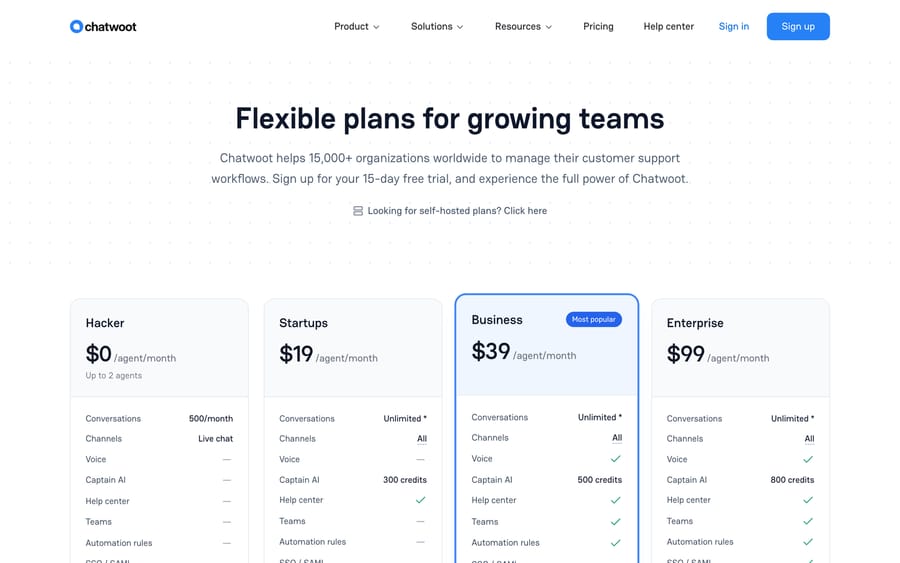
Chatwoot's cloud Hacker plan is $0 an agent for up to 2 agents and 500 conversations a month, on the live chat channel only, with 30-day data retention. The free tier removes voice, Captain AI, the help center, teams, automation rules, SSO and audit logs.
The more interesting route is self-hosting, where the license costs nothing and you pay in server and maintenance instead. That's the open-source answer to "free live chat with no caps," and it's the reason Chatwoot is the page Google picks for open-source chat queries. Our Chatwoot explainer covers the self-hosted setup properly, and the wider self-hosted market is in open-source ticketing systems.
Cloud paid tiers are Startups $19, Business $39 and Enterprise $99 an agent a month. Captain AI is sold in credits on top.
Zoho SalesIQ Free: three operators, 100 chat sessions
Zoho's live chat product has a genuine free plan: 3 operator licenses, 100 operator chat sessions a month, 3 profiles, and visitor tracking up to 10,000 visitors a month. Zoho's own FAQ confirms the seat count: "Our free plan gives you 3 operator licenses."
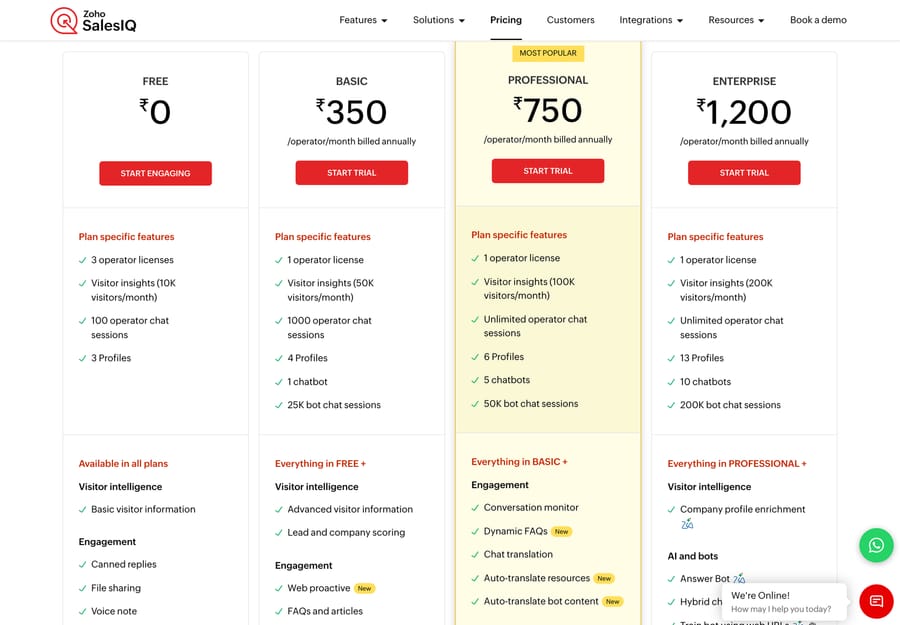
We're not quoting SalesIQ's paid prices, because Zoho's pricing page geolocates and served us Indian rupees in both a scripted fetch and a real browser session. The free column is currency-neutral, so it's the part we can state.
Worth knowing: 100 operator chat sessions is the tightest volume cap in the free set after Tidio's. A store doing 20 chats a day will burn it in the first week of the month.
Tidio Free: 50 conversations a month, 10 seats
Tidio's Free plan is $0 with 50 billable conversations a month and 10 seats, covering live chat, ticketing and email management. The AI is separate and it's a taster: Tidio's own comparison table says "Your first 50 conversations are free (lifetime)" for the Lyro AI Agent, and the first 100 Flows visitors are free.
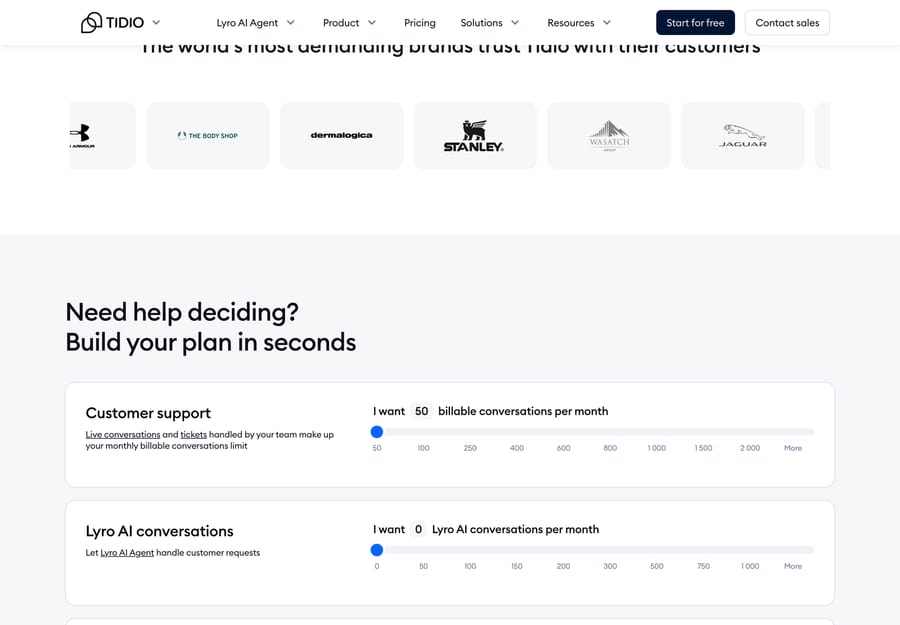
That lifetime-versus-monthly distinction is the thing most roundups get wrong, including an earlier version of this one. The 50 billable conversations reset every month; the 50 Lyro conversations do not. Paid starts at Starter $24.17 a month for 100 billable conversations, with Growth from $49.17 and Plus from $300 a month plus usage.
HubSpot: free live chat inside the free CRM
HubSpot's live chat is part of the free CRM tools, not a trial. Every conversation lands in a shared inbox tied to the contact record, which is the actual reason to pick it: if your team already runs HubSpot, the chat is free and the customer context is already there. The widget carries HubSpot branding on the free tier, and the routing and automation depth sits in the paid Service Hub, which starts at Starter for $7 a seat a month billed annually ($20 monthly).
What changed in free live chat pricing recently?
Free tiers in this category move. Three changes are worth knowing before you copy a 2024 shortlist.
Freshdesk lost its free plan; Freshchat kept one. Freshworks' Freshdesk pricing page now lists Growth $19, Pro $55 and Enterprise $89 with a 14-day trial and no free plan, and the old free-help-desk URL 404s. What remains is a Free program that covers up to 2 agents for 6 months, not a free-forever plan. The Freshchat page still opens with Free at $0 for 10 agents. If you want a Freshworks product at $0, chat is the one left.
Crisp's free plan lost its AI. The Free card now reads "No AI credits included," so the free tier is a chat widget and a shared inbox, and anything agentic starts at Mini.
Intercom became Fin, then Salesforce. The company renamed itself Fin on May 12, 2026, and Salesforce completed the acquisition on September 10, 2026. Intercom is still the help desk's name. There's no free plan on either side of that. Essential, Intercom's entry plan, is $29 a seat a month billed annually ($39 monthly), and Intercom has also shown $19 in a live pricing test. Fin is billed at $0.99 per outcome, and its 50-outcome monthly minimum applies only when Fin runs on a help desk other than Intercom.
Which paid live chat tools are worth moving to?
Free tiers break in three predictable places: the seat cap, the conversation cap, and the bot. Here is the paid field, with prices from each vendor's own page on September 20, 2026.
| Tool | Pricing model | Entry price | Free tier? | Best for |
|---|---|---|---|---|
| tawk.to | Free platform plus add-ons | $0, add-ons $29/mo | Yes, no seat cap | Any team that can live with the badge |
| Freshchat | Per agent | $0 (10 agents), then $19 | Yes | Omnichannel on a budget |
| Crisp | Flat per workspace | $0 (2 seats), then $45 | Yes | Teams of 4 to 20 who hate seat math |
| Chatwoot | Per agent, or self-host | $0 (2 agents), then $19 | Yes | Open-source teams with a server |
| Tidio | Per billable conversation | $0 (50/mo), then $24.17 | Yes | Small stores with low chat volume |
| LiveChat | Per person | $19/person/mo annual | No, 14-day trial | Sales capture on a marketing site |
| Intercom | Per seat plus Fin outcomes | $29/seat/mo annual | No | AI-first, chat-led SaaS |
| Zendesk | Per agent, AI billed separately | $19/agent/mo (Support Team) | No | Chat inside a full support platform |
| Gorgias | Per ticket volume | $40/mo for 50 tickets | No | Shopify and DTC stores |
| Front | Per seat | $25/seat/mo annual | No | Collaborative, email-heavy operations |
| Help Scout | Per user | Free (no chat), then $25 | Chat is Standard and up | Small teams wanting simplicity |
A few notes on that table that the prices alone don't tell you.
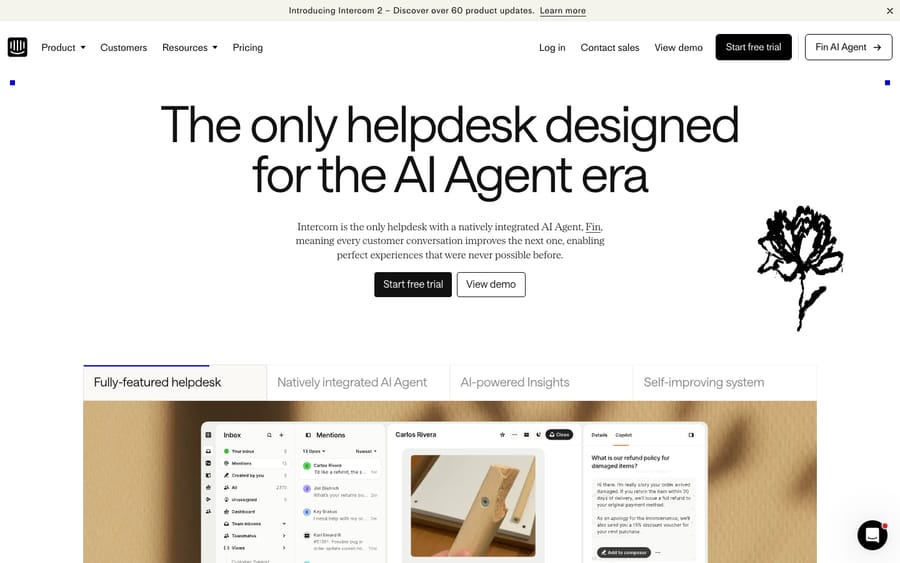
Intercom is still the best-known AI agent in chat, and the bill is the complaint. Fin is charged per outcome on top of the seat, so your cost tracks resolution volume. A verified Customer Support Team Lead on Capterra, quoted when we first published this guide in June 2026, wrote that they "like the live chat in Intercom, which allows me to respond to customer queries in real time and see their details in one spot"; the recurring con in the same reviews is that the per-resolution charge "adds up rapidly" at scale.
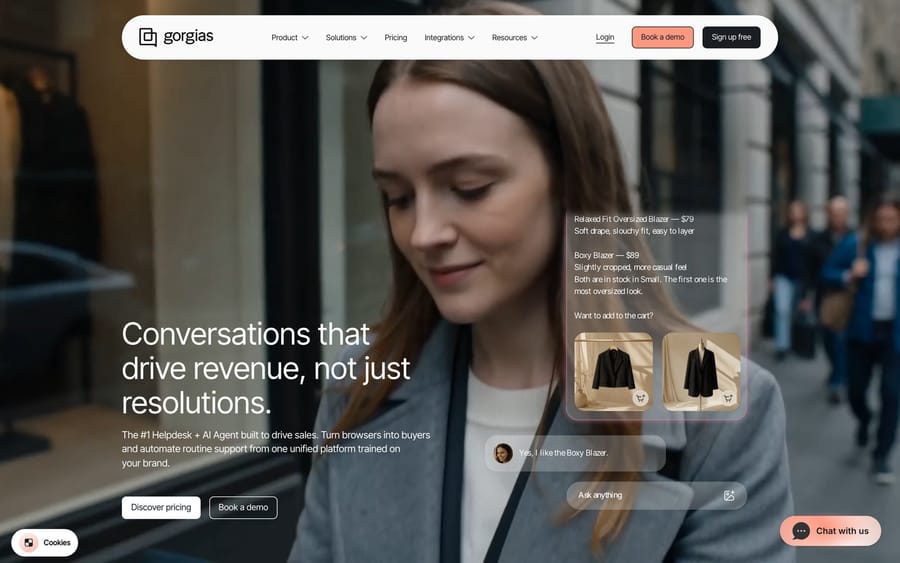
Gorgias is the ecommerce pick and prices on ticket volume rather than seats: Starter $40 a month for 50 tickets, Basic $90, Pro $550, Advanced $1,430, with AI Agent interactions at $1.50 each past the included allowance. It suits Shopify and DTC brands whose chat is mostly order questions, and it's a poor fit outside retail.
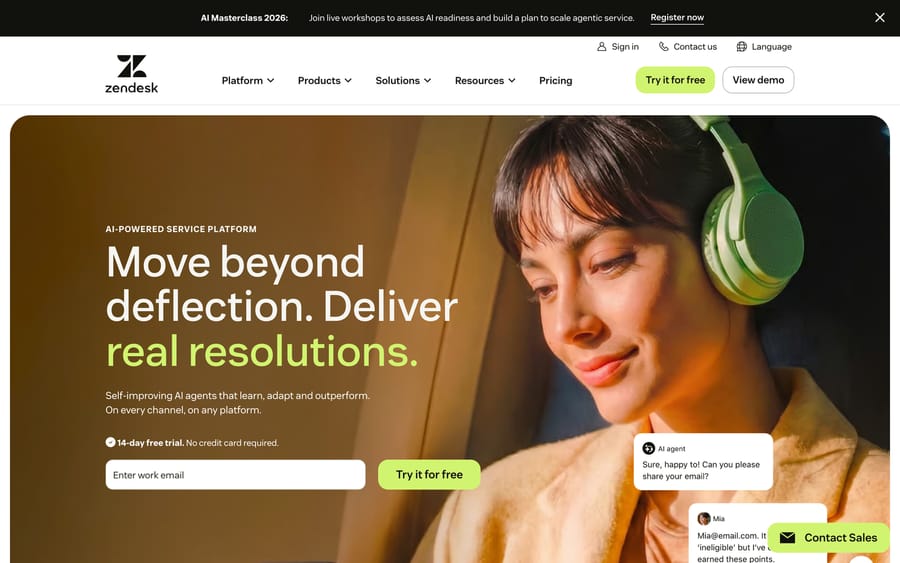
Zendesk puts chat in the same workspace as ticketing, help center and voice. Support Team is $19 an agent a month annually and Suite Team $55, with AI agents billed per automated resolution. Zendesk's pricing page lists that rate: $1.50 on a committed plan and $2.00 pay-as-you-go. Its plan table includes 5 automated resolutions per agent a month on Support Team and Suite Team and 10 on Suite Professional (up to 10,000 a year), which Zendesk's help center describes as a monthly dollar allowance per seat of $2, $5 or $10 depending on the plan, since May 18, 2026.
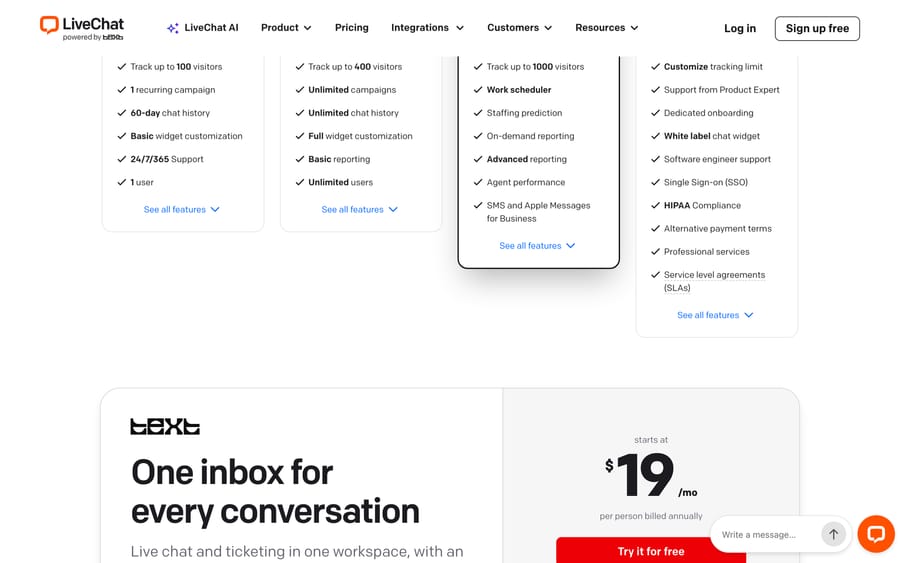
LiveChat is the dedicated sales-chat tool: $19, $49 and $79 per person per month on annual billing, with a 14-day trial and no permanent free plan. Starter tracks 100 visitors and keeps 60 days of chat history, which is the limit that pushes teams to Team.
Help Scout has a Free plan, but not a free chat: the plan cards list live chat among Standard's core features, so $0 gets you a shared inbox, one Docs site and 100 contacts a month rather than a widget.
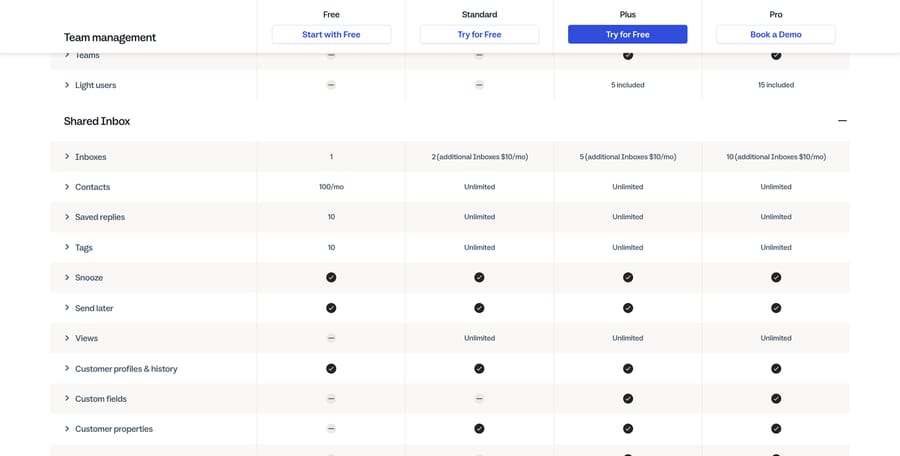
Front is $25, $65 and $105 a seat a month on annual billing, with Autopilot from $0.05 a conversation. It suits operations-heavy teams where conversations need internal comments and shared drafts.
How did we check these prices?
We pulled every price and every free-tier limit from the vendor's own live pricing page on September 20, 2026, and captured the screenshots the same day. Two pages geolocate: Freshworks and Zoho both served us Indian rupees, so we read the Freshworks pages again in a browser session pinned to a US locale and timezone with geo-lookup requests blocked, and we left Zoho's paid dollar figures out rather than convert them. G2's review pages are bot-walled, so the verbatim reviewer quotes carried over from this guide's first publication in June 2026 come from Capterra and are labeled with that date. Reddit blocks our crawler too; the two community threads are linked, not quoted.
We did not build an agent on any of these tools for this guide.
How do you choose the right free live chat software?
- Count your seats first. Two agents fits Crisp or Chatwoot. Three fits Zoho SalesIQ. Ten fits Freshchat or Tidio. More than ten, and tawk.to is the only free option left.
- Then count your conversations. Tidio's 50 a month and SalesIQ's 100 sessions are the caps you'll hit first. Chatwoot's 500 is roomier. Freshchat and tawk.to don't publish one.
- Decide whether the badge matters. Free tiers pay for themselves with your widget's footer. If you're selling something premium, price the removal in: $29 a month on tawk.to, a paid plan everywhere else.
- Check which channels the free tier includes. Chatwoot Free is live chat only. Freshchat Free is web and mobile only, with social and SMS on Growth. If WhatsApp is your main channel, no free plan here covers you.
- Model the AI separately from the chat. Almost every tool now charges for the bot on its own meter: per outcome at Intercom, per automated interaction at Gorgias, per resolution at Zendesk and Help Scout, per session at Freshworks, per conversation at Tidio. Two tools with the same sticker produce very different bills once the bot is working.
- Pilot on real conversations. Run your shortlist on live chats for a week and measure resolution rate, response time and CSAT before you commit.
Where does an AI agent layer fit?
The disclosure again: this is the part we make.
Look at the pattern across the paid tools. The widget is close to a commodity, and the money has moved to the resolution. If your chat already flows into a help desk, the question isn't which widget to buy, it's how much gets resolved without a human and what that costs per resolution.
Macha is an AI agent layer that runs on top of the help desk you already use. It reads the customer's actual question, pulls from your connected knowledge and past tickets, resolves routine conversations inside your existing workflow, and hands off to a human with full context when it isn't confident. It runs on Zendesk, Freshdesk, Gorgias, Front, HubSpot or Intercom, and connects to the tools listed on our integrations page.
It suits teams already running one of those desks who want agents acting inside the ticket rather than a separate widget. It's the wrong choice if your problem is the widget itself, or if you're at $0 and want to stay there: it's one plan priced on monthly ticket volume, from $299 a month for 750 tickets, about $0.40 a ticket at every tier, with setup and monitoring by our team included. There's $50 of free usage to try it, no credit card, and the pricing page has the full table. You can see how the layer works on Zendesk.
Frequently asked questions
What is the best free live chat software in 2026? tawk.to, because it's the only free plan here with no seat cap: full widget, ticketing and a knowledge base at $0, paid only for branding removal and AI. If the badge is a problem, Freshchat's Free plan gives you 10 agents at $0, and Crisp gives 2 seats with a flat $45 plan above it.
Is there a free live chat widget with unlimited agents? tawk.to is the one that ships that way, and it prices its add-ons per property rather than per seat. Self-hosted Chatwoot also has no seat cap, but you run the server. Every other free tier here caps seats at 2, 3 or 10.
What is the best open source live chat? Chatwoot. Self-hosting removes the cloud plan's 2-agent and 500-conversation caps, and the license costs nothing. Budget a server and someone to run upgrades. Our Chatwoot guide walks through what self-hosting actually involves.
Does Freshdesk still have a free plan for chat? No. Freshdesk's free plan ended and its pricing page now starts at $19 an agent a month. Freshchat, the separate Freshworks chat product, still has a Free plan at $0 for up to 10 agents.
Does Help Scout's free plan include live chat? No. Help Scout's Free plan covers 5 users, 1 inbox, 1 Docs site and 100 contacts a month. Live chat is listed among the Standard plan's core features, which is $25 a user a month on annual billing or $30 monthly.
How many conversations do the free plans allow? Tidio allows 50 billable conversations a month, Zoho SalesIQ 100 operator chat sessions, and Chatwoot 500 conversations. tawk.to and Freshchat don't publish a conversation cap on their free tiers.
Do free live chat tools include an AI agent? Barely. Crisp's free plan says "No AI credits included." Tidio gives 50 Lyro conversations once, for the life of the account. tawk.to sells AI Assist as a $29 add-on. Freshchat puts Freddy AI Agent on Growth and up at $49 per 100 sessions. Treat the bot as a separate line item from the chat in every case.
What is the cheapest paid live chat software? LiveChat Starter and Zendesk Support Team both start at $19 a seat a month on annual billing, and Chatwoot Startups is $19 an agent. For teams above four people, Crisp's flat $45 or $95 a month per workspace usually beats all three, because it doesn't scale with headcount.
So which free live chat tool should you pick?
Free live chat is real in 2026, and the differences between free tiers are bigger than the differences between the paid products. tawk.to gives you the whole platform with no seat cap and sells branding and AI on the side. Freshchat gives 10 agents at $0. Crisp gives 2 seats and the cheapest flat plan above them. Chatwoot gives 2 agents and 500 conversations, or everything if you self-host. Tidio and Zoho SalesIQ give the tightest volume caps, 50 and 100 a month. Count your seats, then your conversations, then price the bot on its own meter, and buy the smallest thing that clears all three.
Sources: tawk.to add-ons, Freshchat pricing, Freshdesk pricing, Crisp pricing, Chatwoot pricing, Tidio pricing, Zoho SalesIQ pricing, HubSpot live chat, LiveChat pricing, Zendesk pricing, Gorgias pricing, Front pricing, Help Scout pricing, all read 2026-09-20; Zendesk on outcome-based pricing; r/SaaS, "Suggest customer support tool, live chat with free…" and "Affordable good looking chat widget".






