





 Shopify
 Stripe
 Slack
Slack Notion
 Google Workspace
 Confluence

Freshchat vs Freshdesk: What's the Difference? (2026)


Freshdesk is Freshworks' ticketing help desk and Freshchat is its real-time messaging tool, and a native integration lets a chat become a ticket. Here is what each one does, what each costs, and when a team needs both.
Key takeaways
- Freshdesk is an asynchronous, ticket-led help desk for email, portal, phone and social, while Freshchat handles real-time messaging on web chat, WhatsApp, Instagram and SMS.
- Freshdesk costs $19, $55 or $89 per agent a month billed annually, and Freshchat costs $19, $49 or $79, with a free Freshchat plan for up to 10 agents.
- The native Freshdesk-Freshchat integration lets agents convert a resolved chat into a new Freshdesk ticket or append it to an existing one.
- Connecting Freshdesk and Freshchat requires both accounts to sit in the same Freshworks organization and is set up under Admin, Channels, Messaging on Freshdesk Growth or higher.
- Freshchat's Freddy AI Agent is priced at $49 per 100 sessions and Freddy AI Copilot at $29 per agent a month, both separate from the base plans.

Freshdesk is Freshworks' ticketing help desk for asynchronous support (email, portal, phone, social), and Freshchat is its real-time messaging product for web chat, WhatsApp, Instagram and SMS; both start at $19 per agent a month billed annually, and a native integration lets agents turn a resolved chat into a Freshdesk ticket. Most teams that outgrow one end up running both.
What is the core difference between Freshchat and Freshdesk?
Strip away the marketing and the split is clean.
| Freshdesk | Freshchat | |
|---|---|---|
| Primary job | Ticketing help desk | Real-time messaging |
| Rhythm | Asynchronous | Synchronous (live) |
| Posture | Reactive | Proactive + reactive |
| Main channels | Email, portal, phone, social > tickets | Web/in-app widget, WhatsApp, Instagram, FB Messenger, SMS, LINE |
| Unit of work | Ticket (persistent, with SLA + history) | Conversation (live, ephemeral) |
| Best for | Investigations, bugs, billing, hand-offs | Quick answers, sales queries, 24/7 bot deflection |
| Paid plans (annual, per agent/month) | Growth $19, Pro $55, Enterprise $89 | Growth $19, Pro $49, Enterprise $79 |
| Free option | No free plan on the pricing page; 14-day trial | Free plan for up to 10 agents |
| Former name | Freshdesk | Freshdesk Messaging |
Neither column is "better." They describe two different shapes of customer contact, and most growing teams eventually feel the pull of both: chat for the fast front door, tickets for the work that can't be finished in one sitting. Prices are from Freshworks' Freshdesk pricing and Freshchat pricing pages.
What is Freshdesk for?
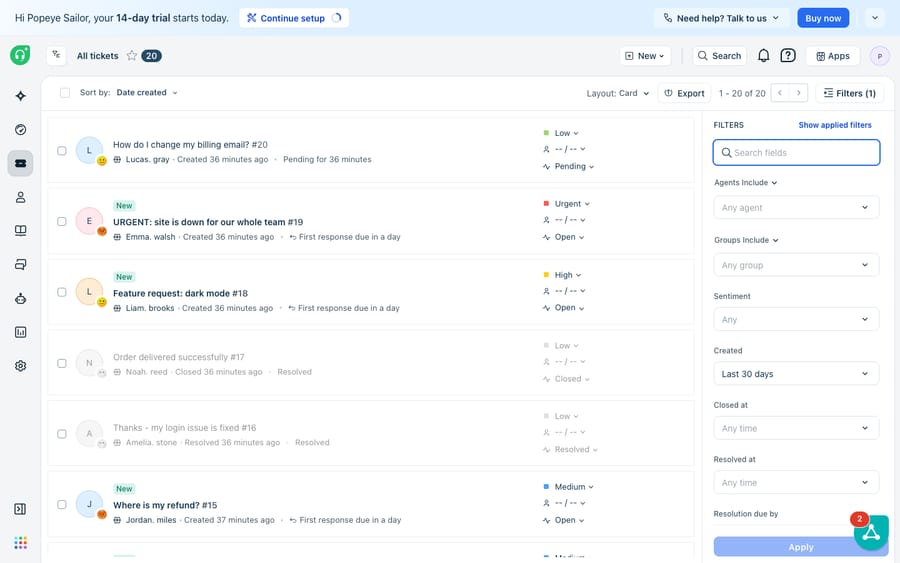
Freshdesk is the classic ticket-led help desk. A customer emails, fills out a portal form, mentions you on social, or calls, and Freshdesk turns that into a ticket: a persistent record with a subject, priority, status, assignee, and a full conversation history. From there the machinery kicks in. SLA policies put a clock on it, automations route it to the right group, and agents work it to a resolution that might take a few replies over a day or two. For the fuller tour, see what Freshdesk is.
The defining trait is that Freshdesk is asynchronous and reactive. The customer sends something, then goes about their day; the agent picks it up, replies, and the customer answers whenever they next check their inbox. That model suits anything that needs investigation, documentation, or hand-offs: billing disputes, bug reports, warranty claims. It's also why business hours matter so much in Freshdesk. The whole system assumes replies happen on a working calendar, not in the next thirty seconds.
What is Freshchat for?
Freshchat, which Freshworks previously marketed as Freshdesk Messaging, has the opposite temperament. It's built for synchronous, real-time conversation. Its natural home is the chat bubble in the corner of your website or app, but it also pulls in WhatsApp, Facebook Messenger, Instagram, SMS and LINE, funneling all of them into one agent inbox. On top sits Freddy AI Agent, a bot that answers common questions around the clock without an agent present.
Freshchat is also proactive in a way Freshdesk never is. Instead of waiting to be contacted, it can trigger a message based on behavior, the classic example being a "Need a hand?" prompt that fires when someone lingers on your pricing page. That makes Freshchat as much a sales-and-engagement tool as a support one. The trade-off is that a live chat is ephemeral: once it's resolved and the window closes, there's no ticket clock, no SLA report, and no durable case record unless you deliberately create one.
How do Freshchat and Freshdesk work together?
Because both products live inside Freshworks, they're designed to interlock. Freshworks ships a native Freshdesk-Freshchat integration whose purpose, per the Freshworks partner documentation, is to let a support team "chat with website visitors and take charge of their support tickets from one place." Connecting them gets you:
- The Freshchat inbox inside Freshdesk. Agents see conversations (new, all assigned, assigned to me, resolved) without leaving the help desk, and get notified of new chats while they work tickets.
- Reply with the same toolkit. Canned responses, emojis, and images work in chat, and agents can see the visitor's user profile and related Freshdesk tickets alongside the conversation.
- Convert a chat into a ticket. Agents can turn a resolved conversation into a new ticket or append it to an existing one. This is the most important bridge, because it moves work from the ephemeral world of chat into the tracked world of tickets.
- Shared routing signals. You can manage IntelliAssign (Freshchat's skill-based routing) status from the integrated view.
Setup, per Freshworks' Freshdesk-Freshchat integration guide: in Freshdesk go to Admin > Channels > Messaging, switch on "Link Freshdesk with your Freshchat account", paste the Freshchat App ID and Token, then add your Freshdesk portal URL and API key on the Freshchat side. The integration is available on Freshdesk Growth, Pro and Enterprise. One caveat: both accounts must sit in the same Freshworks organization. If your Freshchat account doesn't appear, the Freshdesk account has to be moved into Freshchat's org first.
Which one do you actually need?
A quick decision guide:
- Just tickets, no live chat? Freshdesk alone is plenty. Email, portal, phone, and social all land as tickets, and you get SLAs, automations, and reporting out of the box.
- Mostly quick questions and sales chats on your site or WhatsApp? Freshchat is built for that rhythm, and its free plan covers up to 10 agents on the web widget and shared inbox.
- Both a fast chat front door and durable case tracking? Run the two together and switch on the integration so conversations can graduate into tickets. This is where most scaling support teams end up.
The catch: running both is two products to license, staff, and keep in sync. The AI that makes Freshchat useful out of hours is priced separately. Freshchat's pricing page lists Freddy AI Agent at $49 per 100 sessions and Freddy AI Copilot at $29 per agent a month, billed annually. The 500 free AI Agent sessions are a one-time allowance per account, not a monthly one. And the native integration links the two inboxes but does not give you one intelligence reasoning across both. A bot in Freshchat and an agent in Freshdesk are still two separate brains looking at two views of the same customer.
Where does the native setup stop, and where does an AI layer help?
Freshworks' integration handles the plumbing: it puts chat and tickets in one place and lets a human move work between them. It doesn't think across the boundary. If a customer resolves something in chat and then emails about the same order two days later, nothing automatically connects the two; an agent has to notice. And answering is still manual on the Freshdesk side. The ticket sits in a queue until a person reads it, understands it, and writes back.
That's the gap an AI agent layer fills. The broader category of AI agents for customer service exists to do the reasoning-heavy work (reading a ticket, understanding intent, drafting a grounded reply) that neither the ticket queue nor a rule-based chat bot handles on its own. Macha is one such layer, and its scope is deliberately narrow: it connects to Freshdesk as a native connector (you provide your subdomain and API key) and works the same tickets your team already works. It doesn't replace Freshdesk, and for this comparison it's worth saying plainly that it connects to Freshdesk, not Freshchat, Freshservice, or Freshcaller. The same agents run on Zendesk, Freshdesk, Gorgias, Front, HubSpot or Intercom, so the setup carries over if you ever change desks.
On top of Freshdesk, Macha can draft or post grounded first replies, triage tickets by intent, and look up order or account status through a custom tool that turns a REST API into something the agent can call. That's the automation we walk through in how to automate Freshdesk with AI and on the Macha for Freshdesk page. Macha bills per ticket, never per resolution or per session: one conversation is charged once however many messages it takes, starting at $299 a month for up to 750 tickets, with setup and monitoring by the Macha team included (see pricing). Compare that with Freddy's session model, where the vendor earns more the more sessions your customers open. Keep Freshworks' products for the channels, Freshdesk for tickets and Freshchat for live chat, and let an AI layer handle the answering on the ticketing side.
For the AI side of Freshchat, see our guide to the Freshchat AI chatbot and its session pricing.
FAQ
Is Freshchat the same as Freshdesk? No. Freshdesk is a ticketing help desk for asynchronous support; Freshchat is a real-time messaging product for live chat and channels like WhatsApp and Instagram. Freshchat was formerly marketed as "Freshdesk Messaging," which is where much of the confusion comes from.
Can Freshchat and Freshdesk work together? Yes. Freshworks' native integration surfaces the Freshchat inbox inside Freshdesk, lets agents handle chats and tickets from one place, and lets them convert a resolved chat into a new Freshdesk ticket or append it to an existing one. Both accounts must be in the same Freshworks organization, and the integration needs Freshdesk Growth or higher.
How much do Freshchat and Freshdesk cost? Billed annually, Freshdesk is $19, $55 or $89 per agent a month (Growth, Pro, Enterprise) and Freshchat is $19, $49 or $79. Freshchat also has a free plan for up to 10 agents; Freshdesk's pricing page offers a 14-day trial instead of a free plan.
Do I need both Freshchat and Freshdesk? Only if your support spans both rhythms. If you handle everything via email or portal tickets, Freshdesk alone works. If you mostly field quick live-chat questions, Freshchat fits. Teams that want a fast chat front door and durable case tracking run both and switch on the integration.
Does Macha work with Freshchat? No. Macha connects to Freshdesk as a native connector, not Freshchat, Freshservice, or Freshcaller. It runs an AI agent layer on top of the Freshdesk tickets you already have; it doesn't replace your help desk or your chat tool.
Which is better for 24/7 support? Freshchat, because Freddy AI Agent can answer common questions instantly when no agent is online, at $49 per 100 sessions after the one-time free allowance. Freshdesk keeps working asynchronously overnight, but replies wait for a human unless you add an AI layer on top.
Want your Freshdesk tickets answered as fast as a live chat? Start a free trial of Macha and connect it to your Freshdesk in minutes.






