





 Shopify
 Stripe
 Slack
Slack Notion
 Google Workspace
 Confluence

Front vs Hiver (2026): Which Shared Inbox Should Your Team Pick?


Front and Hiver both turn a shared email address into an organized queue, but Front asks your team to move into its own app while Hiver adds assignment, notes and SLAs inside Gmail. That one choice drives price, learning curve, channel reach and how deep your automation can go.
Key takeaways
- Front and Hiver both start at $25 a seat per month billed annually, but Front is a standalone omnichannel inbox and Hiver runs inside Gmail.
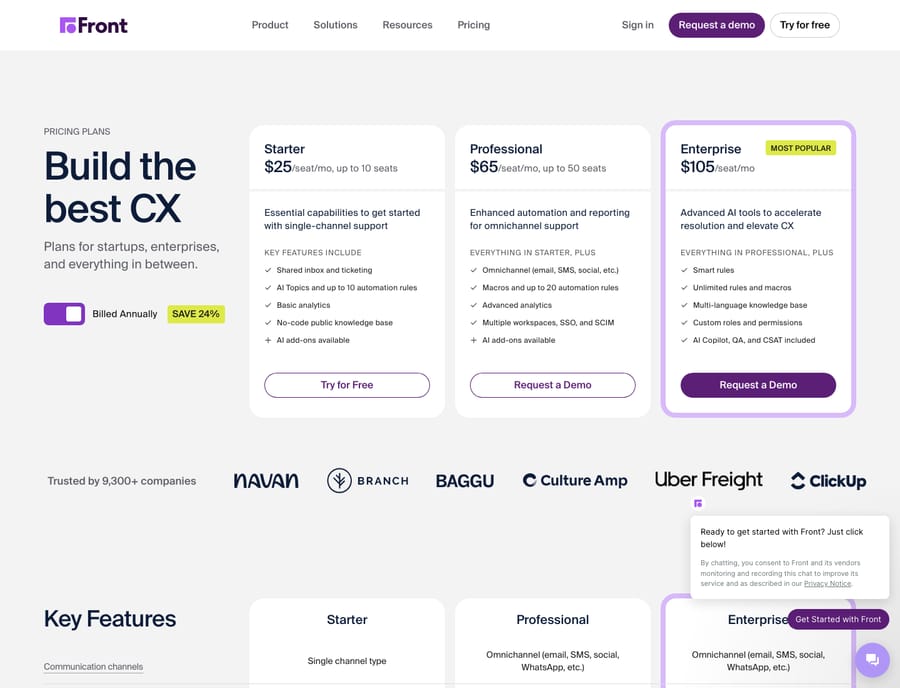
- Front runs Starter at $25, Professional at $65 and Enterprise at $105 per seat monthly, billed annually, with 10, 20 and unlimited automation rules.
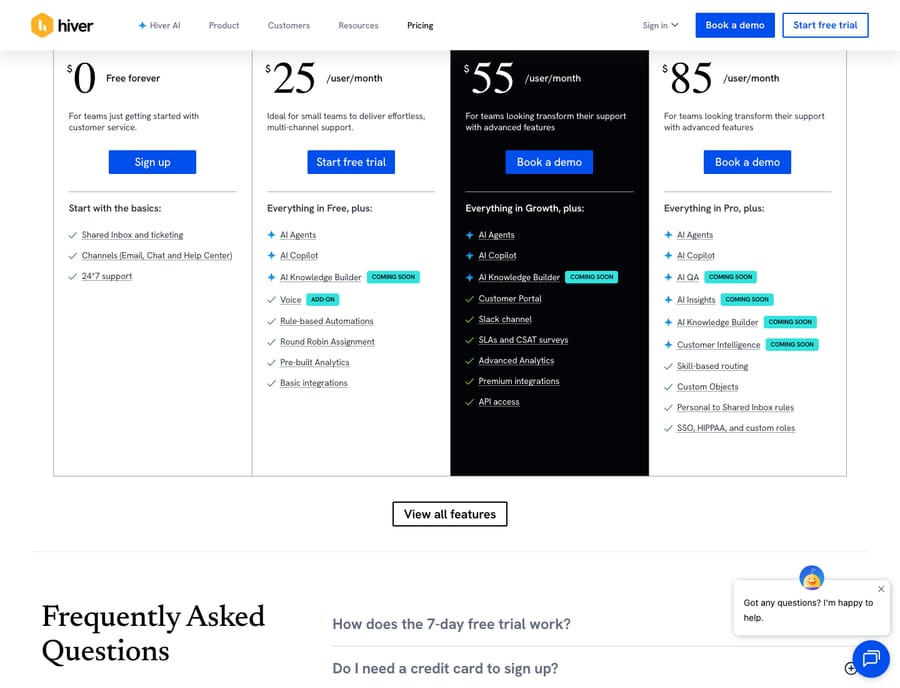
- Hiver no longer has a free plan: Growth is $25, Pro $55 and Elite $85 per user monthly billed annually, each with a 2-seat minimum.
- Front sells Copilot and Smart QA at $20 per seat and Smart CSAT at $10 below Enterprise, while Hiver includes AI Agents and AI Copilot on every plan.
- On Capterra, Hiver rates 4.7/5 from 148 reviews and Front 4.5/5 from 289, so both are well-liked and the choice is about fit.

Front and Hiver both start at $25 a seat per month billed annually, but Front is a standalone multichannel inbox with its own app, while Hiver runs inside Gmail and bundles AI Agents and AI Copilot into every plan. Pick Hiver if your team lives in Google Workspace and mostly handles email; pick Front if you need email, SMS, chat, social and WhatsApp in one queue with a deeper rules engine.
How do Front and Hiver compare at a glance?
| Front | Hiver | |
|---|---|---|
| Best for | Multichannel support/ops teams that want a dedicated hub | Google Workspace teams that want to stay inside Gmail |
| Pricing entry | $25/seat/mo (Starter, annual, up to 10 seats) | $25/user/mo (Growth, annual; $35 monthly), 2-seat minimum |
| Free plan | No | No; 7-day trial of Elite |
| Shared-inbox depth | Deep: assignments, comments, drafts, SLAs across channels | Deep for email: assignments, notes, collision alerts in Gmail |
| Automation | Rules engine (10, 20, then unlimited by tier) plus macros | Rule-based automations on every plan; round-robin assignment |
| AI | Copilot $20, Smart QA $20, Smart CSAT $10 per seat below Enterprise; Autopilot from $0.05 per conversation | AI Agents and AI Copilot included on every plan |
| Channels | Email, SMS, chat, social, WhatsApp, voice (omnichannel) | Email-first, plus chat and help center; voice add-on at $30 a seat |
| Standout strength | One inbox for every channel your customers use | Zero-relocation setup: it is Gmail |
Both tools are well-liked. On Capterra, Hiver rates 4.7/5 from 148 reviews and Front 4.5/5 from 289 (24 September 2026), so this isn't a good-versus-bad question. It's a question of shape.
How much do Front and Hiver cost?
Both tools start at the same number: $25 per seat a month on their entry tier, billed annually. What you get for it, and what you pay after it, diverges quickly. Prices below were read from each vendor's pricing page on 24 September 2026.
Front (per front.com/pricing) runs three published tiers billed annually, which Front says saves 24%: Starter at $25/seat/mo for up to 10 seats, Professional at $65 for up to 50 seats, and Enterprise at $105. Starter is limited to a single channel type and up to 10 automation rules; Professional unlocks omnichannel and 20 rules; Enterprise gives you unlimited rules. The catch buyers miss is Front's AI. On Starter and Professional, Copilot and Smart QA cost $20 per seat each and Smart CSAT $10; all three are included on Enterprise. Autopilot is an add-on on every plan, from $0.05 per conversation. Native WhatsApp is available on Professional and Enterprise only, at Meta's costs plus a 20% admin fee. Layer AI onto a Professional plan and your effective per-seat cost climbs well past the sticker.
Hiver (per hiverhq.com/pricing) now publishes three paid plans and no free plan: Growth at $25/user/mo, Pro at $55 and Elite at $85 billed annually, or $35, $65 and $95 billed monthly. Every plan starts at 2 seats, and the trial is 7 days on Elite. Hiver's pitch is bundling: AI Agents, AI Copilot and rule-based automations are included on every plan rather than sold as separate line items, so there is none of the per-seat AI math Front asks you to do. Voice is an add-on at $30 per voice seat a month with 1,000 pooled minutes.
Net: at the entry tier they tie on list price, but Hiver's bundled AI tends to make it the cheaper total cost for a small Gmail team, while Front's per-seat AI add-ons can push a multichannel deployment materially higher. For a deeper breakdown of Front's plans and add-ons, see our Front pricing explained guide. Prices are set by each vendor, so check their pages before you buy.
Which is better for shared inbox collaboration?
This is where the architectural split matters most. Front consolidates every channel (email, SMS, chat, social, WhatsApp, voice) into a single dedicated inbox, then layers assignments, internal comments, shared drafts and SLA tracking on top. Because it's a purpose-built hub, collaboration feels native rather than grafted on: you can @-mention a teammate on a customer thread, draft a reply together, and see the whole conversation history across channels in one pane. Our Front shared inbox explained piece goes deeper on how that model works.
Hiver does the same core jobs (assigning emails to owners, adding private notes, flagging collisions when two agents open the same thread, tracking SLAs) but it does them inside Gmail. For a team already living in Google Workspace, that's a genuine advantage: there's no second login, no context switch, and agents keep the Gmail keyboard shortcuts and search they already know. Reviewers repeatedly praise exactly this, calling assignment, status tracking and duplicate avoidance "effortless." The trade-off is scope: Hiver's collaboration is excellent for email but doesn't span the same breadth of channels in one surface.
Which has the stronger automation?
Front's automation is the more powerful of the two. Its rules engine supports branching logic and routing based on keywords, sender, priority or AI-detected topic, and the number of rules you can run scales with your plan (10 on Starter, 20 on Professional, unlimited on Enterprise), alongside reusable macros. If your team runs high-volume, multi-condition routing, Front has more headroom.
Hiver offers rule-based automations and round-robin assignment on every plan, which covers the common jobs (route by address, auto-assign, apply tags, escalate on SLA breach). It's closer to smart Gmail-level filtering than a deep branching engine. Earlier reviews knocked Hiver for gating automation behind its old Free plan; that plan is gone, and every paid plan now includes rules.
Which channels does each support?
If you only run email, this section is a tie and you can skip to onboarding. If you don't, it's decisive. Front is genuinely omnichannel: email, SMS, live chat, social media, WhatsApp and voice all land in the same queue, which is why teams handling customers across many surfaces gravitate to it. Hiver is email-first by design (it is, after all, a Gmail layer), with chat and a help center on its plans, WhatsApp listed as a supported channel, and voice as a paid add-on. It covers more than email now, but Front remains the broader multichannel hub.
Which is easier to onboard?
Here Hiver wins cleanly, and it's the whole point of the product. Because it lives inside Gmail, onboarding is close to instant: install, connect your shared addresses, and your team is working in an interface they already know. Capterra reviewers call it "really user friendly and easy to use," and there's no training project attached.
Front asks more up front. Reviewers are candid that "the initial launch can be intimidating without a little in-depth training," because your team is adopting a new home rather than extending an old one. That investment pays off once you're running multichannel workflows and deep automation, but it is a real cost in the first few weeks. If you'd like a fuller picture before deciding, our Front app review and what is Front explainer cover the day-to-day experience.
What are the pros and cons of each?
Front pros: true omnichannel inbox; powerful, scalable rules engine; strong native collaboration; polished dedicated UI. Front cons: steeper learning curve; AI features are paid add-ons below Enterprise; Starter caps at 10 seats and one channel type; occasional performance issues on very long threads.
Hiver pros: near-zero learning curve for Gmail teams; no separate login or context switch; AI Agents and Copilot bundled on every plan; excellent email collaboration. Hiver cons: email-first, so narrower multichannel reach; no free plan and a 2-seat minimum; automation is shallower than Front's engine; reviewers note sync lag on high-volume inboxes.
Which should you choose?
- You live in Google Workspace and mostly do email. Pick Hiver. The zero-relocation setup, familiar Gmail surface and bundled AI make it the lower-friction, often lower-cost choice, and it's the natural Front alternative for Gmail-first teams.
- You need one inbox for email, SMS, chat, social and WhatsApp. Pick Front. Nothing about Hiver's Gmail-layer model matches Front's multichannel breadth.
- You run complex, high-volume routing. Pick Front for the deeper rules engine, but budget for the AI add-ons if you want Copilot below Enterprise and Autopilot on any plan.
- You want to try before paying. Neither has a free plan now. Hiver offers a 7-day trial of Elite; run it on a real shared address before you commit to annual billing.
The honest summary: Hiver is the better fit for Gmail-committed teams that value simplicity and cost; Front is the better fit for teams that have outgrown email alone and need a true multichannel operations hub.
Do you still need an AI agent on top of Front or Hiver?
Front and Hiver both organize the human queue well, but neither is primarily an AI agent that resolves tickets end to end. That's a separate layer. Macha is that layer: it runs on Zendesk, Freshdesk, Gorgias, Front, HubSpot or Intercom, reads your knowledge, and drafts or resolves the repetitive conversations so your team spends its time on the ones that need a person. It bills per ticket from $299 a month for up to 750 tickets, with setup and monitoring by the Macha team included. If you land on Front, our Macha + Front integration shows how the two fit together; if you'd rather understand the concept first, start with AI agents for customer service or explore building your own with custom tools.
FAQ
Is Front or Hiver cheaper? At list price they tie at $25 a seat per month on their entry tier, billed annually. But Hiver bundles AI Agents and AI Copilot into every plan, while Front sells Copilot, Smart QA and Smart CSAT as per-seat add-ons below Enterprise and meters Autopilot from $0.05 per conversation. A small Gmail team usually pays less on Hiver, while a multichannel Front deployment with AI can run materially higher. Check both vendors' pricing pages for current numbers.
Does Hiver work outside Gmail? Hiver is built as a layer inside Google Workspace and Gmail; that's its core design. It has expanded to chat and a help center, but if your team isn't on Google Workspace, Front's standalone app is the more natural fit.
When should I graduate from Hiver to Front? When email alone stops covering you (you're adding SMS, social, WhatsApp or voice) or when your routing gets too complex for Hiver's rule set. That's the signal you've outgrown a Gmail layer and want a dedicated multichannel hub.
Which is easier to onboard? Hiver, by a wide margin, because your team keeps working inside the Gmail they already use. Front requires adopting a new interface, and reviewers note it can be "intimidating without a little in-depth training."
Do I still need an AI tool if I pick one of these? Front and Hiver both offer built-in AI, but they're inbox tools first. If your goal is to resolve repetitive tickets automatically, an agent layer like Macha runs on top of the help desk you use.
Does Hiver still have a free plan? No. Hiver's pricing page lists Growth, Pro and Elite only, each with a 2-seat minimum, and offers a 7-day trial of Elite instead of a free tier.
Ready to add an AI agent layer to your support stack? Start a free trial with $50 of free usage and no credit card.






