





 Shopify
 Stripe
 Slack
Slack Notion
 Google Workspace
 Confluence

Gorgias Macros vs Rules vs Flows: When Should You Use Which? (2026)


Gorgias Macros handle replies an agent still sends, Rules fire actions on their own when a ticket matches conditions, Flows let shoppers self-serve through a fixed path, and AI agents handle requests that need judgment. Macros and Rules come with every Helpdesk plan, while Flows and Gorgias's AI Agent are billed per automated interaction.
Key takeaways
- Gorgias Macros suit repeated replies an agent sends by hand, Rules suit actions that should fire without a human, Flows suit fixed self-service paths, and AI agents suit varied requests.
- Gorgias Macros are available on all Helpdesk plans and are built under Workflows, Tools, Macros, and only owners, admins and leads can create them.
- Gorgias Rules can trigger on message body, detected sentiment, detected intent, channel and Shopify order data, then apply a macro, tag, assign or auto-close a ticket.
- Gorgias bills Flows and AI Agent work as automated interactions, about $1.00 each on monthly plans and $0.90 on annual plans, then $1.50 past the included bundle.
- Macha adds an AI agent on top of Gorgias without replacing Macros or Rules, billed per ticket from $299/mo for up to 750 tickets, with setup by the Macha team and a dedicated success manager included.

Use a Gorgias Macro (Gorgias's name for a quick response) when an agent sends the same reply by hand, a Rule when the reply or action should fire on its own when a ticket matches conditions, a Flow when the shopper can click through a fixed self-service path, and an AI agent when the request varies in wording and needs judgment. Macros and Rules come with every Gorgias Helpdesk plan; Flows and Gorgias's AI Agent are billed as automated interactions, about $1.00 each on monthly plans and $0.90 on annual ones, with $1.50 past the included bundle.
| Tool | Who triggers it | Best for | Cost |
|---|---|---|---|
| Macro | An agent, with one click | Repeated replies a human still sends | All Helpdesk plans |
| Rule | Ticket conditions, no human | Tagging, routing, auto-replies on predictable triggers | All Helpdesk plans |
| Flow | The shopper, clicking through | Fixed self-service paths (returns, order status) | Counts as an automated interaction |
| AI agent | The incoming message | Varied, multi-part requests that need reasoning | Gorgias AI Agent add-on, or a layer like Macha |
What are the four tools, in one sentence each?
Before the framework, the vocabulary, because "quick response," "macro," and "template" get used interchangeably in Gorgias and it causes real confusion.
- A Macro is a saved, reusable response-plus-actions block that an agent applies with one click. In Gorgias, "quick response" and "macro" refer to the same thing: a pre-written reply you drop into the composer, optionally carrying actions like tagging or setting status. Per the Gorgias macros documentation, you build them under Dropdown menu (top-left) → Workflows → Tools → Macros.
- A Rule is backend if/then automation: when a ticket matches conditions, then do something, including applying a macro, tagging, assigning, or auto-replying, all with no agent present.
- A Flow is a customer-facing, interactive self-service path: a scripted series of questions and answers the shopper clicks through before a ticket ever reaches an agent.
- An AI agent is the reasoning layer: it reads the actual message, decides what the shopper wants, fetches what it needs, and answers, with no keyword list or fixed script required.
The cleanest way to hold it in your head: Macros are agent-assist, Rules are backend automation, Flows are customer self-service, and AI is judgment. For a fuller grounding on the platform itself, see what is Gorgias.
When should you use a Macro?
Reach for a Macro when a human is in the loop and the wording repeats. Macros exist to kill the retyping. If ten agents answer "where's my order?" fifty times a day, a WISMO macro gives them one consistent, on-brand reply, and macros do more than paste text. Per the macro actions documentation, a single macro can add or remove tags, set status, priority or subject, assign an agent or team, snooze, post an internal note, set ticket and customer fields, add attachments, and fire HTTP hooks. On Shopify-connected accounts it can cancel or duplicate an order, refund shipping, or edit an address; on Recharge, manage subscriptions.
Macros are available on all Gorgias Helpdesk plans, though only owners, admins, and leads can create them; every agent can apply them. That governance split is deliberate: you want a curated library, not fifty personal variants of the same return-policy reply.
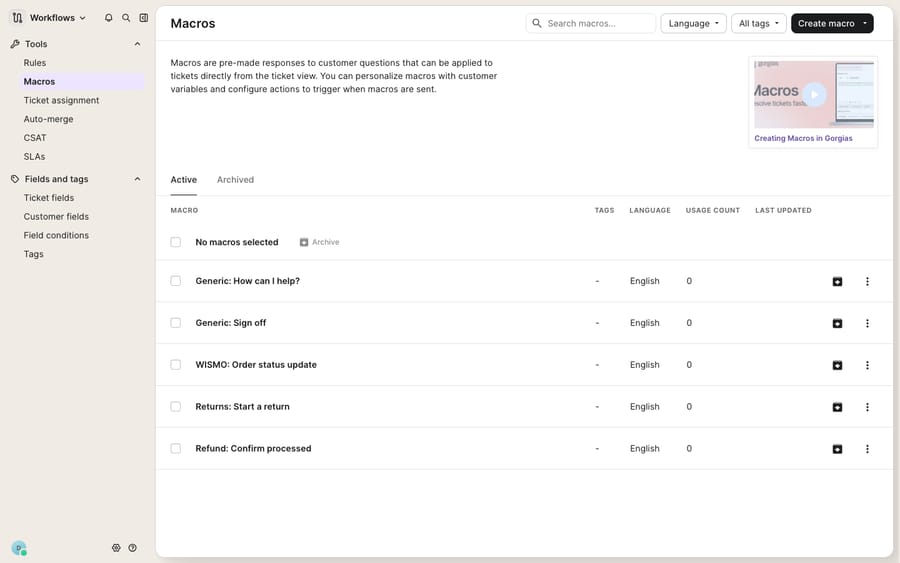
The catch is that a macro sits there until an agent chooses it. It has no opinion about which ticket it belongs to. That's the gap Rules fill. If you want the step-by-step build, our Gorgias macros explained walkthrough covers variables and composition in detail.
When should you use a Rule?
Reach for a Rule when the trigger is predictable and you don't want to wait for a click. A Rule is the "if this, then that" engine. Per the Gorgias Rules product page, you can build conditions on the message body, detected sentiment, detected intent (exchanges, refunds, discounts), the channel (chat, contact form, Help Center, social), and Shopify order data such as last order amount, then attach actions. The most useful action here is Apply macro: a Rule can watch for "order status" phrasing, detect the WISMO intent, and fire the WISMO macro with the tracking link filled in, hands-free. One limit to know: macros that carry Shopify, Recharge or HTTP-hook actions can't be applied by a Rule.
Rules also do the unglamorous backend work: auto-tagging by intent (which pairs neatly with a deliberate tag taxonomy; see Gorgias tags explained), auto-assigning to the returns team, auto-closing spam, and hiding negative Facebook and Instagram comments. The mental model: a Macro is the what; a Rule is the when. Bolt them together and a repetitive ticket answers itself. Our Gorgias rules explained post goes deeper on conditions and ordering.
When should you use a Flow?
Reach for a Flow when the path is fixed and the shopper is happy to click through it. Flows are customer-facing and interactive: a scripted branch of questions and answers that lets a shopper self-serve before a human is involved, such as a returns walkthrough, a sizing guide, or a "start a return" or "check my order" path. They're excellent for high-volume, low-variance journeys where the steps never change.
The cost caveat: Gorgias bills a completed Flow as an automated interaction, drawn from the AI Agent bundle that now comes on every plan. Per the Gorgias pricing page, that bundle is 30 interactions for $30 on Starter and Basic, 190 on Pro ($190 monthly, $171 annual) and 530 on Advanced ($530), then $1.50 per interaction past the limit. The older "Automate" add-on name no longer appears on the pricing page. So "just use a Flow" isn't free the way a Macro or Rule is. Budget for it, and check how many interactions your plan includes.
Which tool fits which ecommerce ticket?
Here's the framework applied to the requests every Shopify support team sees daily.
| Scenario | Best tool | Why |
|---|---|---|
| Agent answers a WISMO ticket by hand, same wording each time | Macro | Human in the loop; you just want to stop retyping and auto-tag it |
| Every "where's my order" ticket should auto-reply with tracking, no agent | Rule + Macro | Predictable trigger; fire the macro on detected intent, hands-free |
| Shopper wants to start a return and the steps never change | Flow | Fixed, clickable self-service path that deflects before it's a ticket (billed as an automated interaction) |
| Ticket says "changed my mind on the blue one, can I swap sizes and keep the subscription?" | AI agent | Multi-part, non-keyword request needing reasoning plus an order and subscription lookup |
| Auto-assign all refund-intent tickets to the finance team | Rule | Pure backend routing, no reply needed |
| Answer a policy question that's phrased fifty different ways | AI agent | Keyword rules miss the phrasing; the answer needs understanding, not matching |
Read top to bottom and the pattern is clear: the more the request varies in wording and the more judgment it needs, the further right you move, from Macro, to Rule, to Flow, to an AI agent that reasons.
Where do Macros, Rules and Flows run out, and what does AI cost?
None of these tools is a weakness; each is good at its job, and Rules especially are the deterministic, auditable backbone of a well-run Gorgias instance. But it's worth naming where they run out of road, because that's where teams over-invest and get frustrated.
Macros don't understand context. A macro is a static block; it can't decide it's the wrong reply for this particular customer's history or situation. Rules are rigid condition matching. As eesel's guide to Gorgias workflows puts it, a rule watching for "order status" quietly misses "any update on my delivery?": same intent, different words, no trigger. Gorgias's intent detection narrows that gap, but every phrasing you didn't anticipate is still a rule that may not fire. Flows only work when the path is truly fixed; the moment a shopper steps off-script, they're back in the queue.
There's also a billing shape to understand before you lean hard on native AI. Gorgias's AI Agent is billed per automated interaction: the included bundle works out to about $1.00 per interaction on monthly billing and $0.90 on annual, with $1.50 for each one past the bundle, per the pricing page. Gorgias's billing documentation adds that an AI Agent resolution can count as both a helpdesk ticket and an automated interaction, while a Flow is charged only the automation fee. The incentive is plain: the vendor's revenue grows with every conversation its AI closes, so your automation cost scales with volume. Model it before you commit. Our Gorgias AI agent explained post covers the native option in full.
This is the seam where an AI agent layer fits, and the broader category of AI agents for customer service exists to do the reasoning that a macro, rule, or fixed flow can't. Macha is one such layer, and the Macha ↔ Gorgias connector is live: it runs on top of the Gorgias you already use and does not replace your help desk, your macros, or your rules. You connect it to Gorgias, and it reads and writes the same tickets: understanding a request by meaning rather than keyword, looking up an order or subscription through a custom tool that turns your REST API into something the agent can call, and drafting or sending a grounded reply. Two contrasts worth flagging. Macha bills per ticket, not per resolution, starting at $299/mo for up to 750 tickets, about $0.40 a ticket; one conversation is charged once however many messages it takes (see the pricing breakdown). And Macha is the done-for-you option: the Macha team analyzes your past Gorgias tickets, builds the knowledge base and the agent, and runs it in safe mode, with drafts as internal notes, until the drafts are right. The per-ticket price includes that setup and a dedicated success manager who handles your changes afterwards. The connector is designed to augment your existing Rules and Macros, not compete with them.
The clean division of labor: keep Macros for agent-assist, Rules for backend automation, and Flows for fixed self-service, then layer an AI agent on top for the varied, reasoning-heavy tickets the first three can't touch.
FAQ
What's the difference between a Gorgias macro and a rule? A macro is a saved response-and-actions block an agent applies with one click (the what); a rule is backend if/then automation that fires on its own when a ticket matches conditions (the when). You often combine them: a rule detects an intent and automatically applies the matching macro.
Are "quick responses" and "macros" the same thing in Gorgias? Effectively yes. Gorgias's pre-written, reusable agent replies are called macros, and "quick response" is the everyday term for the same thing. You create and manage them under Workflows → Tools → Macros.
When should I use a Flow instead of a Rule? Use a Flow when you want the shopper to self-serve through a fixed, clickable path (a returns walkthrough or order-status check) before a ticket is created. Use a Rule when you want backend automation, such as tagging, routing, or auto-replying, without the customer clicking through anything. A completed Flow counts as an automated interaction on your Gorgias bill.
Do macros cost extra on Gorgias? No. Macros are available on all Gorgias Helpdesk plans. Only owners, admins, and leads can create them, but every agent can apply them. Gorgias's AI Agent and Flows are billed per automated interaction, about $1.00 each on monthly plans and $0.90 on annual, then $1.50 past the included bundle.
Can a Gorgias rule apply any macro? No. A rule can apply a macro that replies, tags, assigns or sets fields, but macros carrying Shopify, Recharge or HTTP-hook actions can't be applied by a rule; an agent has to run those.
Can I add AI to Gorgias without replacing my macros and rules? Yes. An AI agent layer like Macha connects to Gorgias as a live connector and runs on top of your existing setup. It augments your macros and rules rather than replacing them, handling the varied, reasoning-heavy tickets that keyword rules and static macros miss. The Macha team sets it up for you on the trial and every plan, at about $0.40 a ticket, which includes setup and a dedicated success manager who handles your changes.
Ready to add reasoning on top of the automation you already run? Start a free trial of Macha and connect it to your Gorgias in minutes. The Macha team builds your first agent and runs it in safe mode until the drafts are right.






