



 Intercom
 Shopify
 Stripe
 Slack
Slack Notion
 Google Workspace
 Confluence

How Do Freshdesk Agents, Roles, and Groups Work? (2026)


Freshdesk splits team setup into agents (who works tickets), roles (what they may do) and groups (where tickets land), plus a per-agent ticket scope that controls visibility. Mixing them up is how an agent ends up able to delete your knowledge base, or how billing tickets sit unassigned because no group owns them.
Key takeaways
- Freshdesk agents are the people who work tickets, roles are permission bundles that set what each agent may do, and groups are the queues that tickets route into.
- Freshdesk ships seven default roles, including Agent, Supervisor, Administrator and Account Administrator, and at least one Account Administrator must exist at all times.
- Freshdesk ticket scope is set on each agent record, separate from the role, at one of three levels: All tickets, Tickets in a group, or Assigned tickets.
- Freshdesk occasional agents use Day Passes instead of a paid license; every plan includes 3 free passes, then each costs $2 on Growth, $7 on Pro and $12 on Enterprise.
- Round-robin and load-balanced assignment and group-specific business hours are on the Freshdesk Pro and Enterprise plans, while custom roles are on Growth too.

In Freshdesk, agents are the people who work tickets, roles are the permission bundles that decide what each agent can do (Freshdesk ships seven default roles, from Agent up to Account Administrator), and groups are the queues tickets route into, such as Billing or Tier 2. A fourth setting, ticket scope, sits on each agent record and controls which tickets that person can see at all.
| Setting | What it answers | Where it lives | Plan notes (current plans) |
|---|---|---|---|
| Agent | Who works tickets | Admin > Team > Agents | Full-time agents take a paid seat; occasional agents use Day Passes (3 free, then $2 on Growth, $7 on Pro, $12 on Enterprise) |
| Role | What that person may do | Admin > Team > Roles | Seven default roles; custom roles on Growth, Pro and Enterprise |
| Ticket scope | Which tickets they can see | The agent's record | All tickets, Tickets in a group, or Assigned tickets |
| Group | Where tickets land | Admin > Team > Groups | Round-robin and load-balanced assignment plus group-specific business hours on Pro and Enterprise |
What are agents, roles, and groups in Freshdesk?
The three concepts stack on top of each other, so pin down each one before you touch any settings.
An agent is a person with a login who works on tickets: replies, adds notes, changes status, closes things out. Freshdesk has two kinds. A full-time agent holds a paid user license and is your day-in, day-out support staff. An occasional agent logs in now and then, like a developer who fields the odd escalation or a CEO who checks in on a key account, and consumes a Day Pass instead of a license. Per Freshdesk's full-time vs occasional agents article, a pass is used when the agent logs into the portal and lasts until 23:59 that day; replying to an email notification does not use one. Every plan includes 3 free Day Passes, and extra passes cost $2 on Growth, $7 on Pro and $12 on Enterprise.
A role is a named bundle of permissions that answers "what is this person allowed to do?" Freshdesk's roles documentation lists seven default roles:
- Agent: view, respond to, assign and update tickets.
- Supervisor: manage tickets, generate reports and configure automatic ticket assignment.
- Administrator: configure everything under the Admin tab, but not billing.
- Account Administrator: all settings, including billing and account management. At least one must exist at all times, and only an Account Administrator can grant the role.
- Freddy AI Copilot User: uses Freddy AI Copilot features and consumes a Copilot license.
- Ticket Collaborator: can be assigned tickets and edit related information within scope.
- Analytics Collaborator: views reports in the Analytics module.
Roles gate concrete privileges: managing tickets, creating and publishing solution (knowledge base) articles, viewing reports and reaching admin configuration. You can also build custom roles. Freshdesk's pricing page lists role-based access control on Growth, Pro and Enterprise, so a QA reviewer can read every ticket and see reports without being able to edit automations, whatever plan you are on.
A group is a set of agents that tickets get routed to: Billing, Tier 2, Onboarding, EU Support. Groups are the backbone of routing. Your automation rules assign an incoming ticket to a group, and it lands in front of the agents who belong to it. On Pro and Enterprise a group can also carry its own business hours and automatic assignment, so tickets are handed out round-robin or by load instead of sitting in a shared pile.
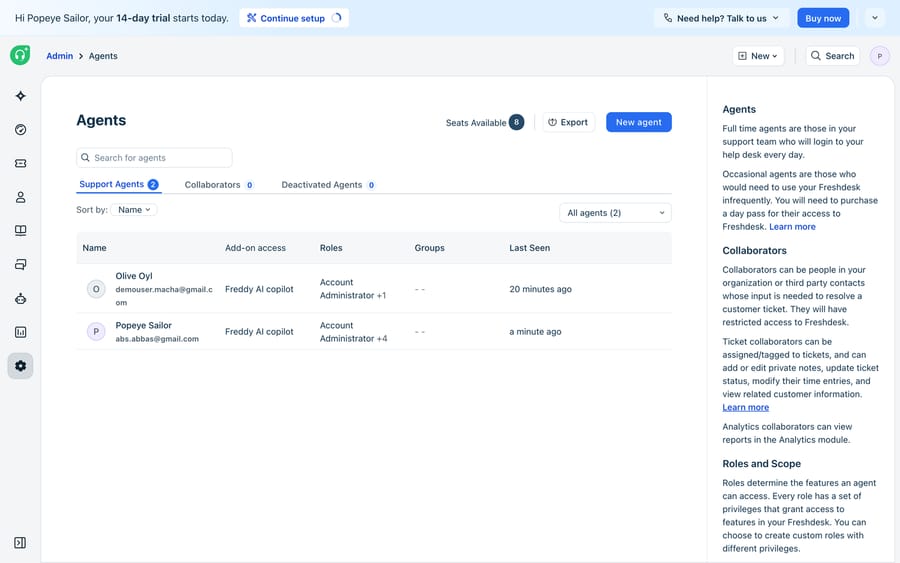
How do you set up agents, scope, and groups in Freshdesk?
You manage all three under Admin > Team, where Agents, Roles and Groups each have their own page.
Adding an agent. Invite them by email and, on the agent's record, set three things: their role, the groups they belong to, and their ticket scope. Scope is separate from the role and easy to miss. Freshdesk's ticket scope article names three levels:
- All tickets: the agent can view and edit every ticket in the help desk.
- Tickets in a group: the agent sees tickets assigned to their groups plus tickets assigned to them directly. You can give some groups view-only access.
- Assigned tickets: the agent sees only tickets assigned to them, tickets where they are tagged, or tickets where they hold secondary ownership.
Older Freshdesk material calls these Global, Group and Restricted access. Scope is the privacy dial; the role is the capability dial. A Supervisor with group scope can do supervisory things, but only inside their own groups' queues. For more on the scope side, see Freshdesk agent roles and scopes explained.
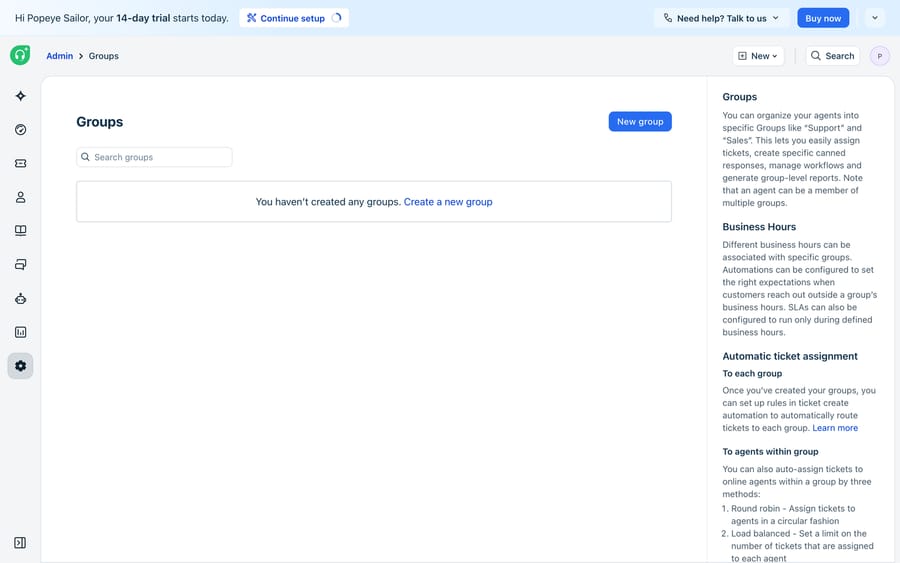
Building routing with groups. Create a group, add its members and, on Pro or Enterprise, turn on round-robin or load-balanced assignment so new tickets are distributed rather than cherry-picked. Your automation rules do the sorting: "if Type is Billing, assign to the Billing group," "if the requester's plan is Enterprise, assign to Tier 2." The rule targets the group, and the group's assignment logic (or an agent picking manually) chooses the person. Groups are the join between your routing rules and your actual staff, which is why they matter more than they first appear. Enterprise adds skill-based assignment on top.
Setting roles and permissions. Give each agent a default role, or create a custom role by ticking the exact privileges it should carry and assign that instead. Work on least privilege: front-line agents get what they need to resolve tickets and nothing that lets them reshape the account. Keep Account Administrator to one or two people, since it is the only role that reaches billing. For where all of this sits in the wider product, see our Freshdesk features overview.
What can't agents, roles, and groups do on their own?
Agents, roles and groups give you structure, but the structure is static. Freshdesk can route a ticket to the Billing group; it can't read the message, decide it is really a refund question, draft the answer from your policy and escalate only the hard ones. Routing rules match on fields and keywords, so anything ambiguous still lands in a human queue to be read and answered from scratch. Roles and groups govern who works a ticket. They do nothing to reduce how many tickets a human has to work.
That gap is what Macha fills. Macha is an AI agent layer that runs on top of Freshdesk as a native connector, not a replacement for it. (It connects to Freshdesk itself, not Freshchat, Freshservice or Freshcaller.) Because it reads and writes real tickets through the Freshdesk API, a Macha agent works like an extra teammate in your account: it picks up an incoming ticket, classifies it, replies from your documented policy and, for anything it shouldn't handle, leaves a note and hands a triaged ticket to the right human group. Your roles and groups keep governing the humans; fewer tickets reach them.
A few pieces make this checkable rather than a black box. Custom tools turn any REST API into an action the agent can call, so it can look up an order or subscription in your own systems before answering. Knowledge sources ground replies in your help center so answers match your real policy. Simulations replay past tickets against the agent before it touches a live queue, so you see how it would have classified and answered them. Macha is one plan priced by ticket volume, starting at $299 a month for up to 750 tickets, with setup and monitoring by the Macha team included. If you're weighing whether to build this yourself, our guide on building an AI agent from scratch versus using a platform walks through the trade-offs, and AI agents for customer service covers the category. For the Freshdesk-specific setup, see how to automate Freshdesk with AI.
FAQ
What's the difference between agents, roles, and groups in Freshdesk? Agents are the people who work tickets. Roles are permission bundles that define what each agent may do, from Agent up to Account Administrator. Groups are the sets of agents that tickets route to, like Billing or Tier 2. Agents are who, roles are what they can do, and groups are where tickets land.
What is an occasional agent in Freshdesk? An occasional agent logs in now and then instead of daily and uses a Day Pass rather than a paid license. A pass lasts until 23:59 on the day it is used. Every plan includes 3 free passes; extra passes cost $2 on Growth, $7 on Pro and $12 on Enterprise.
What ticket scopes does Freshdesk offer? Three: All tickets, Tickets in a group (the agent's groups plus tickets assigned to them), and Assigned tickets (only tickets assigned to them, tagged to them or where they hold secondary ownership). Scope is set on the agent record, separately from the role.
How does ticket routing to groups work in Freshdesk? Automation rules assign an incoming ticket to a group based on its fields, for example sending all Billing-type tickets to the Billing group. On Pro and Enterprise, round-robin or load-balanced assignment then hands the ticket to a specific agent; otherwise agents pick from the shared group queue. The rule targets the group, and the group distributes to the person.
Can Macha act as an agent inside Freshdesk? Yes. Macha runs as an AI agent layer on top of Freshdesk (Freshdesk itself, not Freshchat, Freshservice or Freshcaller). It reads incoming tickets, classifies them, replies from your help center and hands anything it shouldn't handle to the right human group with a note. Your existing roles and groups still govern your human agents. You can replay past tickets against it in a simulation before going live; see pricing for the per-ticket tiers.
Add AI agents to your Freshdesk
Macha reads the ticket, drafts the reply and takes the action, inside the Freshdesk you already run.





