



 Intercom
 Shopify
 Stripe
 Slack
Slack Notion
 Google Workspace
 Confluence

How Do Gorgias Ticket Fields and Custom Fields Work?


Gorgias ticket fields are the dropdowns, numbers, text boxes and toggles on each ticket that let you filter, route and report on why customers write in. Here is how the managed and custom fields work, how they differ from customer fields, and how Rules and Flows use them.
Key takeaways
- Gorgias creates three managed ticket fields for every account: Contact Reason, Resolution and Product, and lets admins add custom fields of four types: Dropdown, Number, Text and Yes/No.
- A Gorgias account can hold 25 active ticket fields and four active customer fields at once, and fields can only be archived, never deleted.
- Gorgias Rules can use ticket fields as both conditions and actions, but only ticket fields created in Gorgias can be used in Rules.
- Gorgias ticket fields are not supported on the mobile app, so a field set to always required can only be completed from a desktop browser.
- Gorgias lists AI Agent on every plan from $30 a month for 30 automated interactions, while Macha bills per ticket from $299 a month for 750 tickets.

Gorgias ticket fields are structured properties on a single ticket: Gorgias creates three managed ones for you (Contact Reason, Resolution and Product), you can add your own of four types (Dropdown, Number, Text, Yes/No), and you can keep up to 25 active at a time. Customer fields are the per-shopper equivalent, capped at four active. Both can drive Rules, which is where fields stop being labels and start routing tickets.
| Question | Answer (Gorgias docs, September 2026) |
|---|---|
| Built-in fields | Contact Reason, Resolution, Product |
| Custom field types | Dropdown (nests up to 5 levels), Number, Text (2,000 characters), Yes/No |
| Active ticket fields | 25 maximum |
| Active customer fields | 4 maximum |
| Conditions on a conditionally visible field | Up to 70 |
| Delete a field? | No, archive only; unarchiving restores values |
| Mobile app | Ticket fields not supported |
What is the difference between ticket fields, custom fields and customer fields?
Gorgias uses three related terms that people mix up. A ticket field is a property attached to a single conversation. It describes this ticket. Some ticket fields ship with Gorgias (the "managed" ones); others you create yourself, which is what most people mean by "custom fields." So a "custom ticket field" is a ticket field you built rather than one Gorgias pre-installed.
A customer field is different in scope. Per Gorgias' customer fields documentation, a customer field lives on the shopper's profile and follows them from ticket to ticket. A ticket field answers "what is this conversation about?" and a customer field answers "who is this person, across every conversation?": VIP status, loyalty tier, a preferred contact note. One is per-conversation, one is per-person.
Which ticket fields does Gorgias create for you?
Gorgias doesn't start you from a blank slate. Out of the box, it creates three managed, ecommerce-specific ticket fields:
- Contact Reason: why the customer reached out (return, WISMO, refund, product question, subscription change).
- Resolution: how the ticket was closed out.
- Product: which product the conversation was about.
These three are the backbone of most Gorgias analytics. Once agents fill them in consistently, your reporting can answer "what percentage of our volume is returns?" or "which product drives the most WISMO?" You can edit or archive the managed fields like any other, but they exist so a new store gets structured data on day one without designing a taxonomy first.
Where do ticket fields live and how do agents fill them?
To create and manage ticket fields, click the dropdown menu in the top-left of the helpdesk, then Workflows → Fields and tags → Ticket fields, per the Manage Gorgias ticket fields documentation. From there you build fields of four types: Dropdown (single-select; each value can nest up to five levels deep, max 225 characters per value, for taxonomies like Return → Wrong size → Exchange), Number, Text (up to 2,000 characters of free-form notes), and Yes/No.
Each field carries a visibility rule. You can make it always optional, always required (the agent has to populate it before they can close the ticket, which is the mechanism that keeps your data clean), or conditionally visible, where the field only appears when the ticket meets conditions you set. Conditional visibility keeps the sidebar uncluttered: a "Return reason" field only shows up on tickets already tagged as returns. Gorgias lets you stack up to 70 conditions on conditionally visible fields.
In the agent view, all of this shows up in the right-hand sidebar of the ticket, alongside tags and the customer's details.
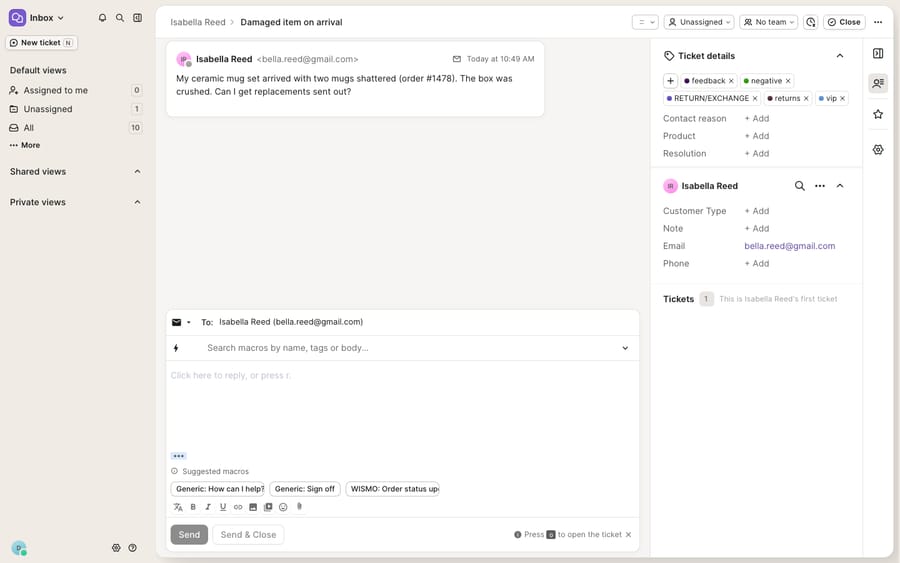
Two limits matter before you design a big taxonomy. Only 25 ticket fields can be active at a time, and you can hold a maximum of four active customer fields. Fields can't be deleted, only archived. Archiving removes a field from tickets and reports, and when you unarchive it, previously entered values are restored and automations resume. One more gotcha: ticket fields are not supported on the Gorgias mobile app, so a required field can only be completed from a desktop browser.
How do Gorgias Rules use ticket fields?
In Gorgias, Rules can use ticket fields in both directions, which is the detail most guides skip.
Ticket fields as a condition. A Rule can fire because a field has a certain value. Per Gorgias' Use Ticket Fields in Rules documentation, you might create a rule that routes tickets with the Contact Reason: Refund request field to a specific team or agent. A refund lands with your finance-savvy agents; a WISMO ticket routes to a fulfillment specialist, all off the field value.
Ticket fields as an action. A Rule can also set a field. The docs note you can "automatically set Ticket Fields based on a series of conditions" to standardize the fields used on each ticket. In practice, a Rule detects an order-status keyword and stamps Contact Reason: WISMO, so your reporting stays consistent when agents forget.
There is one hard constraint, and it's the most important line on that docs page: "Only Ticket Fields created in Gorgias can be used in Rules." Fields pushed in from an external system or API won't work as Rule conditions or actions. If you want automation to key off a field, it has to be a native Gorgias ticket field. Customer fields, meanwhile, work as attributes in Views, Rules, Macros, and Search, so a VIP customer field can drive routing the same way. Once a Rule has routed the ticket, a well-built Macro can insert the field-aware reply.
Do Flows and the Gorgias AI Agent use fields?
Rules are deterministic if-this-then-that logic; Flows are the conversational, self-service side of Gorgias, running in Chat, the Help Center, and the Contact Form. Flows and the Gorgias AI Agent can read context and take actions. Gorgias' pricing page lists AI Agent on every plan and says you pay only when it resolves a conversation; AI Agent starts at $30 a month for 30 automated interactions, with extra ones at $1.50. That changes the cost model as volume grows, because the AI line is billed on top of the helpdesk's own ticket-based plan.
One caveat: the richest self-service actions (order tracking, cancellations, returns) lean on your Shopify (or other ecommerce platform) connection to fetch and change order data. Fields describe the ticket, but they don't call your store's API by themselves. Check the current Gorgias pricing breakdown for the tier sizes before you model it.
Which field type should you use for which job?
| You want to capture… | Use | Why |
|---|---|---|
| Why the customer wrote in (return, WISMO, refund) | Managed Contact Reason ticket field | Feeds analytics + Rule routing out of the box |
| A structured return reason with sub-options | Dropdown ticket field (nested) | Nesting up to 5 levels keeps taxonomy tidy |
| A free-text internal note about this ticket | Text ticket field (2,000 chars) | Flexible, but hard to report on |
| Whether this ticket needs a manager review | Yes/No ticket field | Cheap flag a Rule can trigger on |
| VIP / loyalty tier that follows the shopper | Customer field | Persists ticket-to-ticket on the profile |
| A field that must be set before closing | Any ticket field set to always required | Enforces clean data at close |
What can't ticket fields do, and where does an AI layer help?
Gorgias' fields engine is structured, enforceable at close, drives Rules in both directions, and the three managed fields give ecommerce teams a sensible starting taxonomy for free. For organizing and routing, it does the job.
But a field is a label, not an answer. A ticket field can tell you "this is a WISMO question"; it can't find where the order is, read the tracking status, and write the reply that resolves it. A required field makes sure someone categorizes the ticket at close; it doesn't stop that categorization from being wrong when an agent picks the nearest dropdown in a hurry. And the "only Gorgias-created fields work in Rules" constraint means data living outside Gorgias (in your OMS, your 3PL, your subscription platform) can't drive native automation until you've mirrored it into a Gorgias field.
That gap is what the broader category of AI agents for customer service exists to fill. Macha is one such layer: it runs on top of the Gorgias you already use through a native connector and doesn't replace your help desk, your fields, or your Rules. Connected to Gorgias, Macha reads the ticket fields you've set (so it knows a ticket is a WISMO or a refund when it opens), then does the part a field can't: it looks up the real order or subscription status through a custom tool that turns your store or OMS API into something the agent can call, drafts or posts a grounded reply, and can suggest the correct field value so your taxonomy stays honest. The Macha–Gorgias integration is built for that division of labor, and the same setup runs on Zendesk, Freshdesk, Gorgias, Front, HubSpot or Intercom.
The cost models differ. Gorgias' AI Agent charges when it resolves a conversation, which means the vendor earns more as more tickets end in automation; Macha bills per ticket, so the lookups, the draft and the field update all belong to one conversation, charged once whether or not the ticket "resolves." Macha's one plan starts at $299 a month for 750 tickets, with setup and monitoring by the Macha team included (see pricing). Neither is universally cheaper; they price different things.
Keep Gorgias' ticket and customer fields as the source of truth for how tickets are categorized and who the customer is, and layer an agent on top for reading the data and writing the answer.
FAQ
Where do I create ticket fields in Gorgias? Click the dropdown menu in the top-left of the helpdesk, then Workflows → Fields and tags → Ticket fields. You'll find the three managed ecommerce fields (Contact Reason, Resolution, Product) already there, plus the option to create your own of type Dropdown, Number, Text, or Yes/No.
What's the difference between ticket fields and customer fields? A ticket field describes a single conversation and lives on that ticket; a customer field describes the shopper and follows them from ticket to ticket on their profile. Ticket fields cap at 25 active; customer fields cap at four active. Customer fields are set under Settings → Ticket & Customer data → Customer Fields.
Can I use ticket fields to trigger Rules? Yes. Ticket fields work in Rules both as a condition (a Rule fires when a field has a value, such as routing "Contact Reason: Refund request" to a team) and as an action (a Rule auto-sets a field to standardize data). Only ticket fields created in Gorgias can be used in Rules.
How many ticket fields can I have, and can I delete them? Up to 25 active ticket fields at a time. You can't delete a field, only archive it; unarchiving restores the values already saved on tickets and resumes automations. Ticket fields are also not supported on the Gorgias mobile app.
Can I add AI to Gorgias fields without replacing Gorgias? Yes. An AI agent layer like Macha connects to Gorgias as a native connector and runs on top of your existing fields, Rules, and Macros. It reads the fields you've set, fetches real order data via custom tools, drafts grounded replies, and can suggest the right field value, while Gorgias stays the system of record for categorization.
Want your fields to do more than sit in a sidebar? Start a free trial of Macha with $50 of free usage and connect it to your Gorgias.
Add AI agents to your Gorgias
Macha reads the ticket, drafts the reply and takes the action, inside the Gorgias you already run.





