Shopify
 Stripe
 Slack
Slack Notion
 Google Workspace
 Confluence

Freshdesk Canned Responses Explained


Every support team ends up answering the same questions over and over: how to reset a password, where to find an invoice, why a page is throwing a 404. Typing the same reply for the hundredth time is slow, error-prone, and quietly demoralizing. Freshdesk canned responses are the built-in fix — pre-written reply templates your agents drop into a ticket in a couple of clicks, so a well-crafted answer gets reused instead of rewritten. This guide explains exactly what they are, how to create and organize them, how the dynamic bits work, and — honestly — where they stop scaling and an AI layer takes over.

What a canned response is in Freshdesk
A canned response is a saved reply template. Instead of writing an answer from scratch, an agent picks a template from a list and it drops straight into the reply editor, ready to send or tweak. Think of it as a snippet library for support: the phrasing, tone, links, and even attachments are decided once, then reused by everyone on the team.
A few things make Freshdesk's version more than a plain text macro:
- Rich formatting. Canned responses aren't limited to plain text. You can bold, add bullet lists, embed images and screenshots, and include links — the same rich editor you'd use writing a reply by hand.
- Attachments. A template can carry files with it — a PDF setup guide, a returns form, a troubleshooting checklist — so agents don't have to hunt for the right document each time.
- Dynamic placeholders. A template can auto-fill ticket details when it's inserted: a requester-name placeholder becomes the customer's name, an agent-name placeholder becomes the agent's, and so on. The reply reads as personal even though the skeleton is reused.
- Folders. Templates are grouped into folders — for example Billing, Onboarding, Bugs — so a big library stays findable instead of turning into an unscrollable list.
- Sharing scope. A canned response can be personal (just yours) or shared with the whole account or specific groups, so a team can standardize on approved wording.
Crucially, a canned response only ever does one thing: it inserts content into a reply. It doesn't change the ticket's status, reassign it, or fire a workflow — that's the job of Scenario Automations and the automation rules, which are a separate topic covered in our Freshdesk features overview.
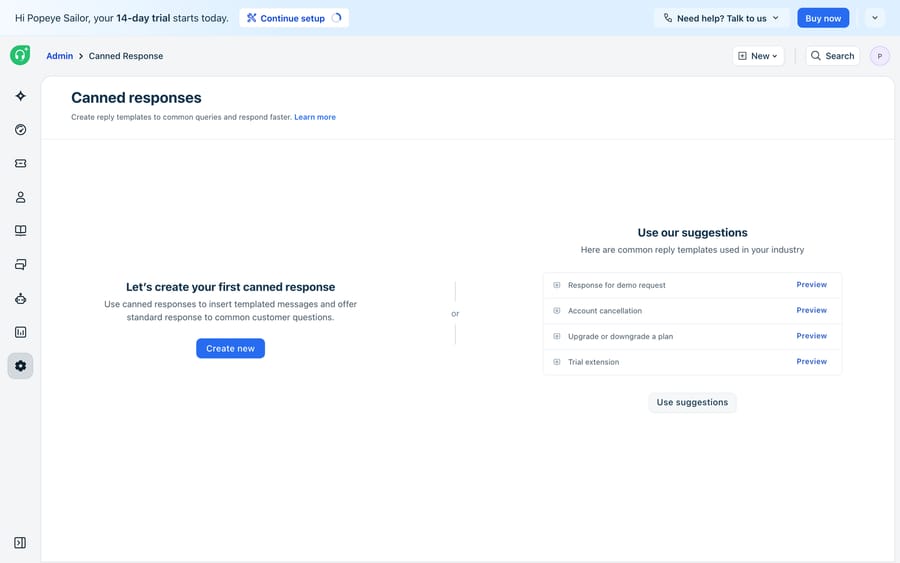
How to create and use canned responses
Following Freshdesk's own Using canned responses documentation, the two halves of the feature are managing templates and inserting them.
Creating a template. Head to the canned-responses management area, choose or create a folder to file it under, give the response a clear name (agents will search by this, so "Password reset — steps" beats "Response 4"), then compose the body in the rich-text editor. Add any placeholders you want auto-filled, attach supporting files, and set the sharing scope — personal, or shared with the whole team or a specific group. Save it, and it's immediately available to anyone in scope.
Inserting one into a reply. Open a ticket and start a reply. From inside the reply editor you can pull up your canned responses — Freshdesk lets you type a shortcut (the / key) or click the canned-response icon to browse folders and pick the template you want. It drops into the editor, placeholders resolve to the real ticket values, and you can edit anything before hitting send. Nothing is sent automatically; the agent stays in control of the final message.
In practice, teams build a library around their most repetitive tickets. Looking at a live Freshdesk instance, the recurring subjects tell you exactly which templates to write first — things like "Authentication failure," "404 error when on a specific page," and "Issues with reports" are the kind of high-frequency, well-understood questions that deserve a polished saved reply. A good rule of thumb: if you've typed roughly the same answer three times this week, it should be a canned response.
Where native canned responses stop scaling
Canned responses are genuinely useful, but it's worth being clear-eyed about their ceiling — the honest limits kick in fast on a busy queue:
- An agent still has to be in the loop. A canned response is a shortcut for a human, not an automation. Someone has to open the ticket, recognize the pattern, find the right template, and send it. On volume, that's still real agent minutes per ticket.
- They don't understand the ticket. A template is static. It can't read a customer's specific error, decide the reply doesn't quite fit, or pull the right answer when the question is phrased in a way no folder anticipated. Pick the wrong template and you've sent a confidently irrelevant reply.
- They go stale. Product changes, the docs move, a policy updates — and every affected template has to be found and hand-edited. Libraries rot quietly.
- They can't look anything up. A canned response can't check an order status, hit an internal API, or confirm a customer's plan. It only knows the text you saved.
This is the point where an AI agent layer earns its keep — and importantly, not as a replacement for Freshdesk. Macha for Freshdesk is a native connector that runs on top of Freshdesk: it reads incoming tickets, drafts or sends replies, and works inside the help desk you already run. (To be precise, Macha connects to Freshdesk, the support product — not Freshchat, Freshservice, or Freshcaller.) Instead of an agent hunting for the right saved reply, an AI agent reads the actual question, grounds its answer on your live help center and knowledge sources, and either drafts a reply for one-click approval or resolves the ticket outright. It's the difference between a snippet you paste and an agent that reasons — the distinction we unpack in AI agents for customer service.
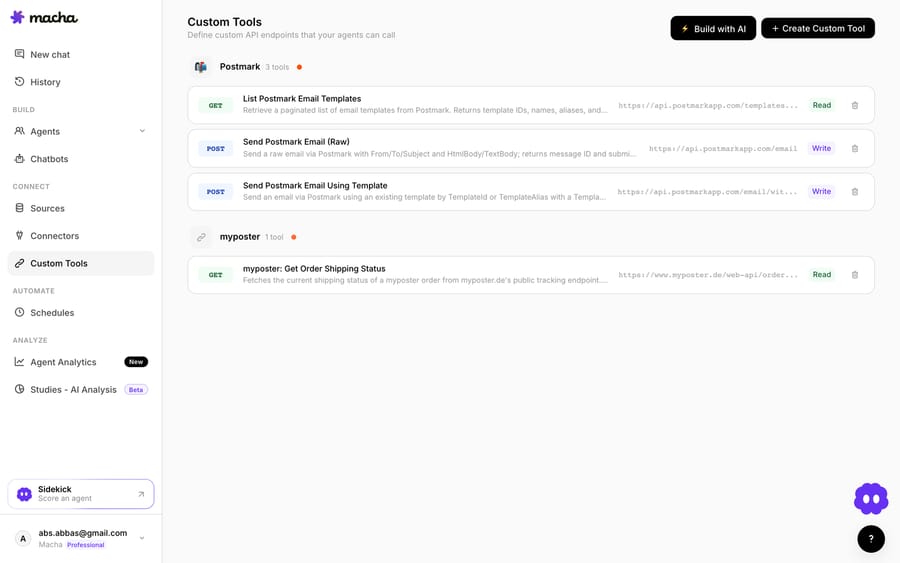
That last capability is the real gap-filler. Where a canned response is frozen text, an agent can do things: with custom tools, Macha turns any REST API into an action an agent can call — so instead of pasting "please check your order status," the agent actually looks the order up and answers with the real detail. Every run is logged in analytics, and before anything touches a customer you can batch-grade the agent against your real historical tickets with Studies. If you're weighing whether to wire this up yourself or use a platform, building an AI agent from scratch versus using a platform walks through the trade-offs; for the hands-on setup, see how to automate Freshdesk with AI.
The pragmatic play is to keep both. Canned responses stay perfect for the handful of answers that never change and always need a human hand on the send button. The AI layer takes the long tail — the volume, the variations, the lookups — that a static template was never going to cover. You can see how the credits work for that automation on the pricing page.
Frequently asked questions
What is a canned response in Freshdesk? A canned response is a saved reply template an agent inserts into a ticket instead of typing the same answer from scratch. It supports rich text, images, attachments, and dynamic placeholders that auto-fill ticket details (like the requester's or agent's name), and templates are grouped into folders for easy searching. Full detail is in Freshdesk's Using canned responses doc.
How do I organize canned responses in Freshdesk? Group them into folders — for example by topic (Billing, Onboarding, Bugs) — and give each template a searchable name. You also set a sharing scope, keeping a response personal or sharing it with the whole account or a specific group so your team standardizes on approved wording.
Are canned responses the same as Scenario Automations? No. A canned response only inserts text into a reply. A Scenario Automation bundles multiple ticket actions (change status, set priority, add a tag, reply, and more) that an agent triggers in one click. They're often used together, but they do different jobs.
When should I use an AI agent instead of canned responses? Keep canned responses for stable, high-frequency answers where you still want a human to hit send. Reach for an AI agent layer like Macha when volume is high, questions vary in phrasing, answers change often, or a reply needs a real lookup (order status, account plan) that static text can't provide — Macha reads the ticket, grounds on your knowledge sources, and can draft or resolve automatically.
Add AI agents to your Freshdesk
Macha reads the ticket, drafts the reply and takes the action, inside the Freshdesk you already run.