



 Intercom
 Shopify
 Stripe
 Slack
Slack Notion
 Google Workspace
 Confluence

What Is the Freshdesk Customer Portal? Features, Plans and Setup (2026)


The Freshdesk customer portal is the branded self-service site every Freshdesk plan includes: a knowledge base, a ticket form and a My tickets view, with community forums and multiple portals on Pro and Enterprise. It answers customers who search it, but it can't look up an individual customer's account or take action on it.
Key takeaways
- The Freshdesk customer portal combines a knowledge base labeled Solutions, a ticket form and a My tickets view, and every Freshdesk plan includes it.
- Freshdesk community forums and multi-product portals start on the Pro plan at $55 per agent per month billed annually, against $19 for Growth.
- Every new Freshdesk account gets a primary portal on the Marina theme, which passes WCAG 2.0 AA, and admins can manage up to 10 custom themes per portal.
- Freshworks' pricing page shows no free Freshdesk plan in September 2026; new accounts start with a 14-day trial of the Enterprise plan.
- The native Freshdesk portal can't look up an individual customer's order, subscription or last ticket, so account-specific questions still become tickets.

The Freshdesk customer portal is the branded self-service site that comes with every Freshdesk plan: a searchable knowledge base (labeled Solutions by default), a ticket form, a My tickets tracking view, and, on Pro ($55/agent/month billed annually) and Enterprise, community forums and multiple product portals. It switches on at signup with the Marina theme, which passes WCAG 2.0 AA, and it stops short of answering anything account-specific, which is where an AI agent layer takes over.
| Portal feature | Growth ($19) | Pro ($55) | Enterprise ($89) |
|---|---|---|---|
| Customer portal + knowledge base | Yes | Yes | Yes |
| Ticket submission and My tickets | Yes | Yes | Yes |
| Portal customization (logo, brand colors) | Not listed | Yes | Yes |
| Community forums | No | Yes | Yes |
| Multi-product portals | No | Yes | Yes |
| Multilingual knowledge base | No | Yes | Yes |
Prices are per agent per month, billed annually, from Freshworks' pricing page, checked 24 September 2026. The pricing page shows no free plan; new accounts get a 14-day trial of Enterprise.
What does the Freshdesk customer portal include?
The customer portal (Freshworks also calls it the support portal or self-service portal) is the customer-facing counterpart to the agent workspace. Agents work inside tickets; customers work in the portal. It bundles four capabilities into one branded site:
- Self-service knowledge base: your published Solutions articles, organized into categories and folders and searchable from the portal. Every answer a customer finds here is a ticket that never opens. (For the article side, see our Freshdesk knowledge base explained guide.)
- Ticket submission: a "Contact us" / "Submit a ticket" form for when self-service didn't cut it. You control the fields, so incoming tickets arrive pre-categorized.
- Ticket tracking: logged-in customers get a My tickets view to check the status of open and past requests, reply, and reopen, which cuts down "any update?" follow-ups.
- Community: optional forums where customers answer each other and post feature requests. Freshworks lists community forums on the Pro and Enterprise plans only.
Portal-wide search runs across the knowledge base (and community), and a custom, branded URL puts the whole thing on your domain instead of a generic Freshdesk address. One naming note: the portal labels the knowledge base Solutions by default, but you can rename it to "Knowledge base" if that reads better to your customers.
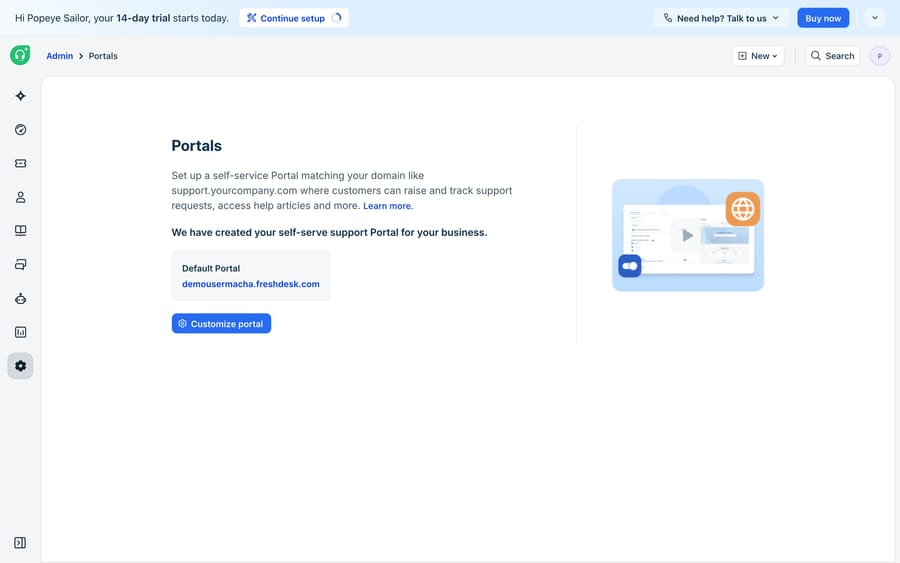
How do you set up and customize the Freshdesk portal?
When you sign up for Freshdesk, a primary portal is enabled out of the box on the Marina theme, Freshworks' native design that passes WCAG 2.0 AA and works with no setup (Freshdesk docs). From there you make it yours in the portal settings, and the customization ladder has two rungs:
- Basic styling: the no-code layer. You set your logo, brand colors, and fonts for each section of the portal (home page, knowledge base, community). Most teams launch on this alone. Freshworks lets you import and manage up to 10 custom themes per portal, so you can stage a redesign without breaking the live one. Note that the pricing page lists "portal customization" (logo and brand colors) under Pro and Enterprise, so check what your Growth account shows before planning a rebrand on it.
- Advanced customization: the developer layer. A code editor gives you full CSS control over layout and structure (how buttons, forms, filters, and articles render), with pre-defined placeholders and collision detection so two admins don't overwrite each other (advanced portal customization docs). This is where you match the portal pixel-for-pixel to your main website.
A Manage Sections area controls what appears and who can see it: which fields show on the ticket form, and whether the knowledge base and community are public, gated to logged-in users, or hidden. That access control is how one Freshdesk account serves a public help center and a customer-only portal from the same place.
A practical setup order: brand the primary portal with your logo and colors, point it at your custom domain, publish your top 15 to 20 answers in the knowledge base, configure the ticket form so submissions arrive triaged, decide what's public and what's login-gated, and only open the CSS editor once the basics are live.
Can you run more than one portal on one Freshdesk account?
Yes, from the Pro plan. Freshdesk's docs state that multi-product portal management is available from the Pro plan (Freshdesk docs), so a company with two brands or product lines can give each its own portal, knowledge base, and look from one account. Pro is $55 per agent per month billed annually, against $19 for Growth, so a 10-agent team pays $360 a month more to get separate portals and community forums. That gap is Freshworks' main lever for moving teams off Growth, and it's worth pricing before you promise marketing a second branded help center. Our how to automate Freshdesk with AI guide covers the automation side, and Macha's own costs are on our pricing page.
Where does the native Freshdesk portal fall short?
The Freshdesk customer portal is a capable self-service front door, but it's passive. It answers the customers who show up and search. That leaves real gaps:
- It waits to be used. A portal deflects only the people who browse it. The customer who fires off an email instead of searching never touches it.
- Search isn't an answer. Portal search returns a list of articles. The customer still has to read and stitch together the answer. If the fix spans two articles plus their order status, self-service stalls and they open a ticket anyway.
- No account-aware answers. The portal can't look up this customer's order, subscription, or last ticket. It serves the same static articles to everyone.
- It doesn't act. It can surface a refund-policy article; it can't check eligibility and process the refund.
How does an AI agent layer extend the Freshdesk portal?
That middle ground is where Macha runs. Macha isn't a help desk and it doesn't replace your portal. It's an AI agent layer that runs on top of the Freshdesk you already use through a native connector. It reads the customer's actual question in the ticket, grounds its answer in your connected knowledge base and the customer's history, resolves the issue in-thread, and hands off to a human with full context when it isn't confident. (To be precise: Macha connects to Freshdesk, not Freshchat, Freshservice, or Freshcaller.)
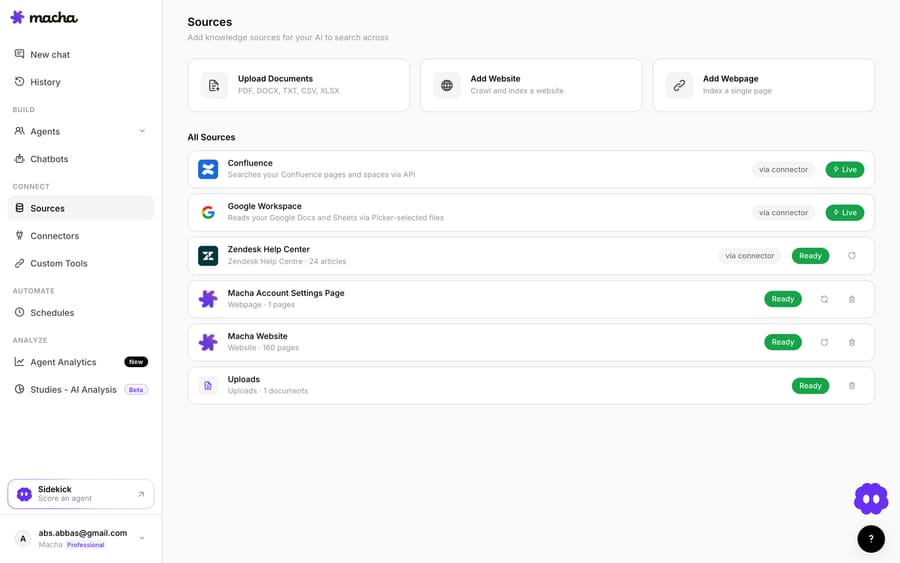
That screen is where the "it doesn't act" gap closes. Custom Tools turn any REST API into an agent action (check an order, issue a refund, update a subscription). Sources ground answers in your knowledge base so replies stay accurate. Simulations replay your real historical tickets against an agent before it goes live, and Analytics log every run so you can see exactly what it did. The portal shows answers; the agent resolves the request.
If you're weighing whether to assemble this yourself or use a platform, we cover the trade-offs in build an AI agent from scratch vs. a platform, and AI agents for customer service is the primer on what these systems do. The short version: your Freshdesk portal sets the deflection floor, an AI agent layer raises the ceiling, and both depend on the quality of the knowledge base underneath them.
Frequently asked questions
What is the Freshdesk customer portal? It's the public, branded self-service website that comes with Freshdesk. It surfaces your knowledge base (Solutions) articles, a ticket submission form, ticket tracking for logged-in customers (My tickets), and on Pro and Enterprise a community forum, all searchable and hosted at your own custom domain.
How do I customize the Freshdesk customer portal? Two ways. Basic styling (no code) sets your logo, colors, and fonts per section, and you can manage up to 10 themes per portal. Advanced customization opens a developer code editor with full CSS control over layout and components. Freshdesk ships with the WCAG-compliant Marina theme by default.
Can I have more than one Freshdesk portal? Yes. Multi-product portal management (separate portals for different products or brands from one account) is available from the Pro plan, which costs $55 per agent per month billed annually.
Does Freshdesk have a free plan with a portal? Freshworks' pricing page, checked 24 September 2026, shows no free plan: the paid plans are Growth, Pro and Enterprise, and new accounts start on a 14-day trial of Enterprise.
Does the Freshdesk portal replace the need for an AI agent? No. The native portal is passive self-service: it answers customers who search it, returns lists of articles, and can't look up a specific customer's data or take actions. An AI agent layer like Macha runs on top of Freshdesk to read the actual question, pull the customer's context, resolve issues in-thread, and escalate with full context when needed.
Which teams get the most from the portal alone?
Teams whose questions are the same for every customer (how-to steps, policies, setup guides) get most of the value from a well-stocked portal on Growth. Teams with two brands or an active user base that wants forums need Pro. Teams whose tickets depend on the customer's own order, plan or account history hit the portal's ceiling fast, because every one of those questions still becomes a ticket. For them, the next step is an agent grounded on the same knowledge base, running on top of Freshdesk, and replayed against real tickets before it answers a live customer.
Verified against Freshworks' Freshdesk documentation and pricing page on 24 September 2026. Freshworks revises portal features and plan gating periodically, so confirm current details on freshworks.com before relying on them.
Add AI agents to your Freshdesk
Macha reads the ticket, drafts the reply and takes the action, inside the Freshdesk you already run.





