



 Intercom
 Shopify
 Stripe
 Slack
Slack Notion
 Google Workspace
 Confluence

What Are Gorgias Views? Shared, Private and Smart Views Explained (2026)


A Gorgias View is a saved filter that sorts your inbox live: Admins and Lead Agents manage up to 500 Shared Views for the team, and every user can keep up to 20 Private Views. Here is how filters, scope and limits work, and where Views stop.
Key takeaways
- A Gorgias View is a dynamic saved filter, not a folder: a single ticket can appear in multiple Views at once and drops out once it no longer matches.
- Gorgias allows up to 500 Shared Views per helpdesk, managed only by Admins and Lead Agents, and up to 20 Private Views per user that only their creator sees.
- Every Gorgias View filter has an attribute, an operator and a value; separate filters combine with AND, while operators like is one of match several values of one attribute.
- Gorgias says its AI Agent is charged only when it resolves a conversation, and third-party breakdowns put the rate at $1 per resolution, or $0.90 on annual billing.
- Creating a View in Gorgias means hovering over Shared views or Private views in the sidebar, clicking the plus icon, choosing Create view, naming it and adding filters.

A Gorgias View is a saved, live filter over your tickets: Admins and Lead Agents can create up to 500 Shared Views for the team, and any user can create up to 20 Private Views that only they see. A View never moves a ticket; each ticket shows up in every View whose filters it matches and drops out when it stops matching (per the Gorgias help center article on creating views, checked 24 September 2026). Filters are built from an attribute, an operator and a value, and multiple filters combine with AND.
| Question | Answer |
|---|---|
| What a View is | A dynamic saved filter, not a folder |
| Shared View limit | Up to 500 per helpdesk, managed by Admins and Lead Agents |
| Private View limit | Up to 20 per user, visible only to the creator |
| Filter parts | Attribute, operator, value |
| Combining filters | AND only; "is one of" matches several values of one attribute |
| Does a View act on tickets? | No; Rules, Macros or an AI agent do that |
What is a Gorgias View, and how is it different from a folder?
A Gorgias View is a dynamic saved filter, not a folder. Per the Gorgias documentation, a single ticket can appear in multiple Views at once — it isn't physically relocated, it simply surfaces in every View whose conditions it matches. If a ticket is open, on the email channel, and tagged return, it will show up in your "Open email" View and your "Returns" View simultaneously. Close it and it silently drops out of both.
That's the mental model to hold onto: Views don't own tickets, they describe them. This is also why people call them "smart views" — they behave like smart folders that re-evaluate themselves every time the underlying tickets change. To see where Views sit in the wider product, it helps to have a picture of what Gorgias is as an ecommerce help desk first; Views are the organizing layer on top of that inbox.
Every View is built from one or more filters, and every filter has the same three parts.
How do filters work in a Gorgias View?
Gorgias' filters documentation breaks a filter into three pieces:
- Attribute — the field you're filtering on:
Status,Channel,Priority,Tags,Assignee user,Assignee team,Customer,Store,Language,Snooze,Created,Closed,Updated,Last message, and quality signals likeCSAT Score,Auto QA Score, andAI Agent feedback. - Operator — how the attribute is compared:
is,is not,is one of,is not one of,is empty,contains one offor tags, and before/after or more/less than comparisons for the date attributes. - Value — the actual condition you're matching against, e.g.
open,email, or a specific tag.
You can stack multiple filters, and they combine with AND logic — each filter narrows the result further. A View defined as Status is open AND Channel is email AND Priority is not low returns only open email tickets that aren't low priority. There's no OR between separate filters in a View. For alternatives on one attribute, use a multi-value operator: Tags contains one of return, refund catches both. Conditions that span different attributes ("tagged VIP OR priority high") still need a shared tag or two Views.
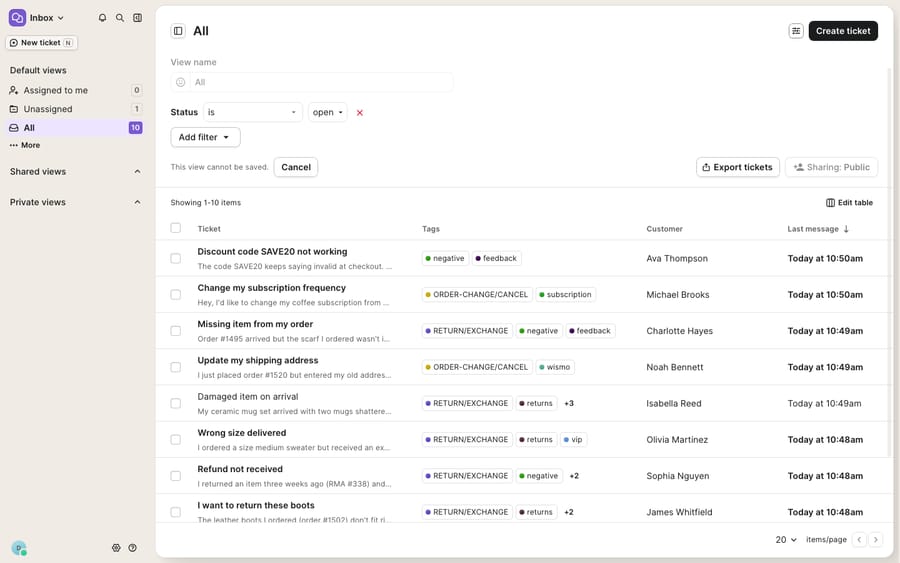
How do you create a View in Gorgias?
The flow is quick once you know where it lives. Following the Gorgias help center:
- Click the dropdown menu in the top-left corner and select Inbox.
- Hover over either Shared views or Private views in the sidebar, click the plus icon, and choose Create view.
- Give the View a name and, optionally, an emoji so it's scannable in the sidebar.
- Click Add Filter, pick an attribute, choose an operator, and select a value.
- Add more filters if you want to narrow further (remember: they AND together).
- Click Create View.
The View appears in your sidebar immediately and starts populating with matching tickets. You can reorder Views and group them into sections to keep a long sidebar navigable.
What is the difference between Shared and Private Views?
The single most important decision when you make a View is its scope, because it determines who it's for and who can change it.
Shared Views are the team-wide queues. They're created and edited only by Admins and Lead Agents, they appear in everyone's sidebar under the Shared views section, and Gorgias puts it plainly: "Only admins and leads can edit, add, or remove shared views from the sidebar." Their visibility can be set to Public (every agent sees it) or Shared with specific teams or users. These are your operational backbone: "Unassigned tickets," "VIP orders," "Awaiting Shopify refund," "CSAT below 3." Because only admins and leads can edit them, they stay consistent — an agent can't accidentally rewrite the filter that the whole team routes off.
Private Views are personal. Any agent can create one, it lands only in their own sidebar, and no one else sees it. This is where an agent builds their own working queue — "My open tickets, oldest first" or "Tickets I snoozed for today." They're perfect as a personal to-do list without cluttering the shared workspace.
| Shared Views | Private Views | |
|---|---|---|
| Who can create/edit | Admins & Lead Agents only | Any agent (their own) |
| Who can see them | Everyone, or chosen teams/users | Only the creator |
| Best for | Team routing, SLAs, brand-wide queues | Personal to-do lists, focus queues |
| Visibility options | Public or Shared with teams/users | Private by default |
| Per-helpdesk limit | Up to 500 | Up to 20 per user |
Those limits are worth remembering: up to 500 Shared Views across the helpdesk and up to 20 Private Views per user, per the Gorgias documentation. Five hundred is generous, but it's also a warning — restraint beats volume.
Which Views should an ecommerce support team build?
Views earn their keep when they map to how agents actually work a shift. A handful of patterns that hold up in ecommerce support:
- Channel-split queues. "Open email," "Open chat," "Open social" as separate Shared Views so agents can batch by medium instead of context-switching every ticket.
- A triage View for the unassigned pile.
Status is openANDAssignee user is emptygives you the pool that needs distributing — the single most useful queue for a team lead. - WISMO isolation. A
Tags is where-is-my-orderView concentrates the "where is my order?" volume that dominates most Shopify inboxes, so it can be worked (or automated) as a block. - Quality follow-up.
CSAT Score is below 3or aAI Agent feedbackView surfaces conversations that need a human second look after the fact.
What can't Gorgias Views do?
Views are genuinely one of the best-executed parts of Gorgias, and this isn't a knock on them. They're fast, transparent, and dynamic in exactly the way you'd want. But it's worth being clear-eyed about what a View is and isn't.
A View organizes tickets; it doesn't act on them. It's a filter, full stop. It will faithfully gather every "Returns" ticket into one queue, but it won't read them, look up the order, decide whether the return window is still open, or write the reply. Every ticket in every View still lands on a human. If a View "Awaiting first response" has 60 tickets in it at 9am, the View has done its whole job — the 60 replies are still yours to write.
Filters combine with AND, not OR. "Is one of" covers alternatives within one attribute, but anything that spans attributes has to be modeled with tags or split across multiple Views, which can multiply your sidebar. Related automation lives in Gorgias Rules and reusable replies in Macros, but those are separate features — a View itself has no actions attached.
AI on top of Views is billed per resolution. Gorgias' own AI Agent can work a queue. Gorgias' pricing page says the AI Agent is on every plan and you "pay only when it resolves a conversation", but it doesn't print the rate; third-party breakdowns put it at $1 per resolution, or $0.90 on annual billing. Gorgias' plan guide (updated May 2026) says conversations fully resolved by the AI Agent don't count as billable helpdesk tickets. The model works when automation lands cleanly, but it ties your cost to a "resolution" definition the vendor controls, and the vendor earns more the more conversations it can count as resolved.
This is the seam where an AI agent layer fits — and it's worth understanding the wider category of AI agents for customer service before reaching for one. Macha is one such layer: it runs on top of the Gorgias you already use through a live native connector — it does not replace Gorgias, its inbox, or its Views. You point Macha at the same tickets a View gathers, and it does the reasoning-heavy part the filter can't: reading a "Returns" queue, looking up the order status through a custom tool that turns your backend API into something the agent can call, and drafting or sending a grounded reply. Crucially, Macha bills per ticket — one conversation, charged once however many messages it takes — never per resolution, a contrast with Gorgias' per-resolution AI billing and a steadier way to budget when outcomes are hard to define. The Macha–Gorgias integration walks through connecting the two, and the pricing page has the tiers in full.
The clean division of labor: keep Gorgias Views as the source of truth for how work is organized and queued, and layer an agent on top for the part a filter can't do — actually clearing the queue.
FAQ
What is a View in Gorgias? A View is a dynamic saved filter that groups tickets matching conditions you define (like status, channel, or tag). Tickets aren't moved — a single ticket appears in every View whose conditions it matches, and drops out automatically when it no longer matches.
What's the difference between Shared and Private Views? Shared Views are created and edited only by Admins and Lead Agents and appear in everyone's sidebar (or for chosen teams/users) — they're for team-wide queues. Private Views can be created by any agent, appear only in that agent's own sidebar, and are ideal as a personal to-do list.
How many Views can I create in Gorgias? Per the Gorgias documentation, a helpdesk can have up to 500 Shared Views, and each user can create up to 20 Private Views of their own.
How do filters work in a Gorgias View? Each filter has three parts: an attribute (e.g. Status), an operator (e.g. "is" or "is one of"), and a value (e.g. "open"). You can stack multiple filters, and they combine with AND logic to narrow which tickets the View returns.
Can a Gorgias View use OR logic? Not between separate filters. Within one attribute, operators like "is one of" and "contains one of" match any of several values, which covers most "returns or refunds" cases.
Can I add AI to Gorgias Views without replacing Gorgias? Yes. An AI agent layer like Macha connects to Gorgias through a live native connector and runs on top of your existing inbox and Views — it doesn't replace them. It reads the tickets a View gathers and drafts or sends grounded replies, billed per ticket — one conversation, charged once — rather than per resolution.
Ready to turn your best Views into cleared queues instead of just organized ones? Start a free trial of Macha and connect it to your Gorgias in minutes.
Add AI agents to your Gorgias
Macha reads the ticket, drafts the reply and takes the action, inside the Gorgias you already run.





