



 Intercom
 Shopify
 Stripe
 Slack
Slack Notion
 Google Workspace
 Confluence

Per-Action vs Per-Resolution AI Pricing: Which Is Cheaper for Your Support Team? (2026)


Per-action AI pricing is usually cheaper when tickets are simple and take one or two steps, while per-resolution pricing wins on complex tickets because it caps the cost of each outcome. The per-unit price on a vendor's page tells you little until you run your own volume and resolution rate through each model.
Key takeaways
- Per-action pricing is usually cheaper for simple tickets, and per-resolution pricing is usually cheaper for complex, multi-step tickets because it caps the cost of each outcome.
- In a worked scenario with 5,000 conversations a month and a 70% resolution rate, per-action pricing costs about $700 while per-resolution at $1.50 costs about $5,250.
- Intercom Fin bills $0.99 per outcome at most once per conversation, and its 50-outcome monthly minimum applies only when Fin runs on a help desk other than Intercom.
- Salesforce Agentforce Flex Credits work out to $0.10 per standard action, while Gorgias AI Agent charges $0.90 to $1.00 per automated interaction plus a helpdesk ticket fee.
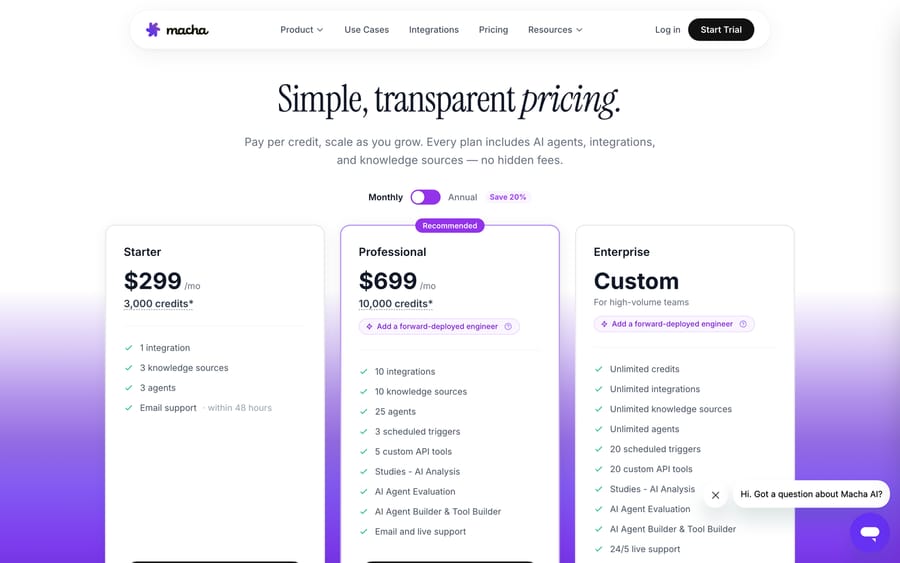
- Macha bills per ticket instead, about $0.40 a ticket from $299 a month for 750, and that price includes setup by the Macha team and a dedicated success manager who handles your changes.

Per-action pricing (Salesforce Agentforce Flex Credits at $0.10 per action) is usually cheaper for simple tickets that take one or two steps, while per-resolution pricing (Intercom Fin at $0.99 per outcome) is usually cheaper for complex, multi-step tickets, because it caps what you pay per outcome however much work it took. In our 5,000-conversation example at a 70% resolution rate, per-action costs about $700 a month against about $5,250 at $1.50 per resolution. Per-conversation pricing sits in between: predictable, but you pay for failures too.
| Model | You pay for | 2026 examples | Cheapest when |
|---|---|---|---|
| Per-resolution | Each issue the AI closes | Fin $0.99 per outcome; Zendesk AI agents per verified resolution; Gorgias AI Agent $0.90 to $1.00 per automated interaction | Complex tickets with a high, verifiable resolution rate |
| Per-conversation | Each conversation handled | eesel AI $299 a month for 500 credits, one per ticket or chat; My AskAI Pro $199 a month for 1,000 credits; Agentforce $2 per conversation | Finance wants a forecastable number |
| Per-action / credits | Each step the AI takes | Agentforce Flex Credits, $0.10 per standard action | Simple tickets that take one or two steps |
For the full rundown of all five AI agent pricing models, see AI agent pricing models, explained. One disclosure: Macha (who publishes this) sells an AI agent layer priced per ticket, a third unit we put alongside these two rather than pretend it settles the argument. Per-resolution is the right call for some teams, and we say so below.
Which pricing model should you pick, in short?
- Per-resolution wins when your tickets are simple, your AI resolves a high and honest share of them, and you value paying only for outcomes, as long as you're willing to audit how "resolution" is counted.
- Per-action / credits wins when your workflows are multi-step, your volume is high and your tickets are simple-but-many, or you want your bill to map transparently to work done with no fuzzy "was this resolved?" judgment in the middle.
- Per-conversation is the predictability compromise: you pay per conversation handled regardless of outcome, which avoids the "what counts as a resolution?" fight but charges you for failures too.
The rest of this article shows the math behind that.
What is the difference between paying for the outcome and paying for the work?
Every pricing model is an answer to one question: what should the vendor get paid for?
- Per-resolution says: pay for the outcome. The meter only ticks when the AI fully closes an issue without a human.
- Per-action says: pay for the work. The meter ticks for each step the AI performs (understanding a ticket, searching your knowledge base, calling an API, drafting a reply, tagging, routing) whether or not that adds up to a tidy "resolution."
Neither is dishonest. They optimize for different things. Per-resolution aligns price to value in the clean case but depends entirely on a definition the vendor controls. Per-action aligns price to effort transparently but asks you to understand your usage. Hold three lenses up to each: predictability (can you forecast the bill?), incentive alignment (does the vendor earn more by helping you, or just by doing more?), and where the risk sits (volume risk on you, or definitional risk on a number the vendor sets?).
What does per-resolution pricing cost in 2026?
You pay a flat fee each time the AI resolves an issue end-to-end. It's the headline model of the current AI-agent wave because it sounds maximally fair: only pay when it works. Rates as of 24 September 2026:
| Vendor | Headline rate | What counts / the catch |
|---|---|---|
| Intercom Fin | $0.99 per outcome | An "outcome" is a resolution, a procedure handoff, a disqualification or a self-serve routing. Lead qualifications bill at $9.99. Charged at most once per conversation. A 50-outcome monthly minimum applies only when Fin runs on a help desk other than Intercom (fin.ai/pricing). Salesforce completed its acquisition of Fin on 10 September 2026; see our Intercom Fin pricing breakdown. |
| Zendesk AI agents | $1.50 committed and $2.00 pay-as-you-go (Zendesk pricing page) | Zendesk's pricing page says AI agents are included and billed per automated (verified) resolution. Since 18 May 2026 each seat earns a monthly dollar allowance ($2, $5 or $10 by plan, capped at $5,000 a year) that offsets resolution charges. Usage above your commitment is billed as overage. |
| Gorgias AI Agent | $1.00 per automated interaction (monthly), $0.90 annual | The double-count caveat: a ticket resolved entirely by AI Agent is charged an automation fee and a helpdesk ticket fee. It only counts as automated if no human is needed within 72 hours (Gorgias billing docs). Interactions past your plan's allowance run $1.50 each (gorgias.com/pricing). |
Rates checked 24 September 2026; confirm on each vendor's pricing page before budgeting.
The pros are real. It's intuitive: you pay for results, not effort. In the clean case, incentives point the right way: if the vendor's model improves from resolving 60% to 75% of tickets, they earn more and you get more value.
The cons are equally real and worth naming:
- "Resolution" is defined by the party who profits from it. Most vendors count an assumed resolution: if the customer doesn't reply or reopen within a window, it's billed as resolved. Fin's definition is "no further help is requested after Fin's last answer." A customer who gave up in frustration looks identical to one who got a perfect answer. (Zendesk billing only verified automated resolutions is a direct response to this critique.)
- Cost is hard to forecast. Tie the bill to a fuzzy event that scales with traffic, and a viral moment or an outage spikes your invoice, with overage billed on top of whatever volume you committed to.
- Hidden double-counting. Gorgias billing a resolution and a ticket, or Fin's separate $9.99 qualification tier, means the "$0.99" or "$0.90" headline isn't the whole story.

Is per-conversation pricing a safer middle ground?
A close cousin worth a mention, because it's where the "I just want a predictable number" buyers land. You pay per conversation handled, resolved or not, either metered as you go or by committing to a monthly volume.
- eesel AI prices per credit, and one credit is one support ticket or chat however many messages it takes. It sells monthly batches from $299 for 500 credits (about $0.60 each) up to $1,749 for 5,000 (about $0.35 each); unused credits don't roll over, overage is optional at $0.80 a credit, and a year paid upfront gets two months free (eesel pricing, checked 6 October 2026). Its Enterprise tier is priced on request. (The earlier pay-per-task rate of $0.40 with no monthly minimum is gone.)
- My AskAI prices per credit: Pro $199/mo (~$133 annual) includes 1,000 credits, overage $0.12; Scale is $499/mo for 2,000 credits at $0.10 overage. Watch the fine print: on chat help-desk integrations a credit is every 2 AI replies, and on email tickets it is 1 credit for the first reply plus 0.5 for each follow-up, so a long back-and-forth registers as several credits (My AskAI pricing explained).
- Salesforce Agentforce also sells a per-conversation option at $2 per conversation, alongside its Flex Credits (Agentforce pricing).
Per-conversation is more predictable than per-resolution (conversation volume is easier to forecast than fuzzy "resolutions") and sidesteps the "what counts as resolved?" fight entirely. The downside: you pay even when the AI fails and a human takes over, so a weak agent costs you twice: the conversation fee and the agent's time.
How does per-action or credit pricing work?
Here you're billed for each automated step the agent takes, typically through a credit system where different actions (or different underlying models) cost different amounts. Salesforce's Agentforce is the clearest example: Flex Credits cost $500 per 100,000, and a standard action uses 20 credits, which works out to $0.10 an action ($0.15 for a voice action at 30 credits).
The pros:
- It's the most honest mapping of cost to work. You pay for what the AI did, with no fuzzy "was this resolved?" judgment call deciding your bill. A one-step "where's my order?" lookup costs less than a five-step workflow that touches three systems.
- No incentive to over-count wins. Because the vendor bills for steps, not for declaring victory, there's no definition to game.
- Granular and transparent. You can watch usage action by action.
The cons, stated plainly:
- It asks you to understand your usage. A per-action bill is only predictable once you know your actions-per-ticket pattern. A chatty or badly-configured agent can rack up actions.
- It's less intuitive than "$0.99 when you win," and it pushes the modeling work onto you.
That last point is the honest trade-off of the whole model: per-action rewards transparency but asks more of the buyer up front.

How do the three models compare side by side?
| Per-resolution | Per-conversation | Per-action / credits | |
|---|---|---|---|
| Unit billed | A resolved outcome | Each conversation handled | Each automated step |
| Predictability | Low (volume + definition swing) | Medium–high | Medium (once usage is understood) |
| Incentive alignment | High if "resolution" is honest; can misalign | Neutral (paid to handle, not solve) | High (pay for work; no win to game) |
| Who controls the risk | Vendor controls the definition | You forecast volume | You model actions/ticket |
| You pay for failures? | No | Yes | Only for the steps actually taken |
| Best for | Simple tickets, high honest resolution rate | Predictable budgeting | Multi-step workflows; transparency-minded teams |
| Example vendors (2026) | Fin ($0.99), Zendesk ($1.50 committed), Gorgias ($0.90 to $1.00) | eesel, My AskAI, Agentforce ($2) | Salesforce Agentforce (Flex Credits) |
Which model is cheapest for my ticket volume?
There is no universally cheapest model, only the cheapest model for your traffic shape. Three scenarios make that concrete. (Per-action math below uses $0.10 per action, Agentforce's standard-action rate; the $0.25 per-conversation rate is illustrative. Your rates and actions per ticket will vary, so model your own.)
Scenario A: Simple tickets, high volume, high resolution rate
A consumer brand: 5,000 conversations/month, AI resolves 70% (3,500), each resolution takes ~2 actions (understand, then reply).
| Model | Calculation | Approx. monthly cost |
|---|---|---|
| Per-resolution ($0.99) | 3,500 × $0.99 | ~$3,465 |
| Per-resolution ($1.50) | 3,500 × $1.50 | ~$5,250 |
| Per-conversation ($0.25) | 5,000 × $0.25 | ~$1,250 |
| Per-action (~$0.10) | 3,500 × 2 actions × $0.10 | ~$700+ |
Per-action and per-conversation win when tickets are simple. You're doing little work per ticket, so paying per step (or per cheap conversation) beats paying a flat outcome fee.
Scenario B: Complex, multi-step workflows
A B2B SaaS team: 2,000 conversations/month, AI resolves 50% (1,000), but each resolution averages 8 actions (multi-system lookups, API calls, multi-turn reasoning).
| Model | Calculation | Approx. monthly cost |
|---|---|---|
| Per-resolution ($0.99) | 1,000 × $0.99 | ~$990 |
| Per-resolution ($1.50) | 1,000 × $1.50 | ~$1,500 |
| Per-action (~$0.10) | 1,000 × 8 actions × $0.10 | ~$800–$1,000+ |
Now it's close, and per-resolution can win, because per-resolution caps your cost per outcome no matter how much work it took, while per-action exposes you to the step count. The heavier your workflows, the more per-resolution's "pay once" looks attractive.
Scenario C: Low resolution rate
An early deployment with a thin knowledge base: 5,000 conversations/month, AI resolves only 30% (1,500).
| Model | Calculation | Approx. monthly cost |
|---|---|---|
| Per-resolution ($0.99) | 1,500 × $0.99 | ~$1,485 |
| Per-conversation ($0.25) | 5,000 × $0.25 | ~$1,250 |
| Per-action (~$0.10, ~2 actions) | 5,000 attempts × 2 × $0.10 | ~$1,000+ |
The lesson: per-resolution rewards a good agent: you only pay for the 30% that worked. Per-conversation punishes a weak agent: you pay for all 5,000 attempts, most of which failed. Per-action sits in between, billing only for steps actually taken. As your resolution rate climbs, per-resolution gets more attractive relative to per-conversation.
Which model is right for your team?
- Choose per-resolution if: your tickets are relatively simple, your agent already resolves a high and verifiable share, and you want to pay only for outcomes. Non-negotiable: make the vendor show you exactly how a resolution is counted (assumed vs. verified, double-counting, minimums) and audit it against your own CSAT and re-contact data.
- Choose per-conversation if: finance needs a flat, forecastable number above all, and you're comfortable paying for conversations the AI doesn't solve. Best once your resolution rate is high enough that you're not paying mostly for failures.
- Choose per-action / credits if: your workflows are multi-step and agentic, you want cost to track actual work with no definition to dispute, and you're willing to model your actions-per-ticket. Best for teams that want transparency and an agent that layers onto the helpdesk they already run.
And whatever you pick, do the one thing most buyers skip: run your own volume through every model like the scenarios above, using your real resolution rate, conversation volume, and ticket complexity. The model that looks cheapest in a vendor's example almost never wins on your traffic. For the broader budgeting picture, our help desk software pricing comparison puts the platform fees alongside these AI usage charges.
How does per-ticket pricing like Macha's compare?
Macha is an AI agent layer that runs on top of your existing helpdesk (Zendesk, Freshdesk, Gorgias, Front, HubSpot or Intercom) rather than replacing it. It bills per ticket: one thread between Macha and one person, charged once no matter how many messages, tool calls or follow-ups it takes, and whichever model the agent runs on. Pricing starts at $299 a month for 750 tickets, about $0.40 each, and the setup is done for you: the Macha team analyzes your past tickets, builds the knowledge base and the agent, and runs it in safe mode until the drafts are right. A dedicated success manager then handles your changes (new categories, instruction changes, new tools), and that's included in the per-ticket price too.
The honest reason we don't bill per "resolution" is the argument running through this whole article: a resolution is a fuzzy, sometimes-fictional event, and charging for one we can't always verify would be exactly the misalignment we just flagged. And the reason we don't bill per action either is the trade-off in the section above: it makes you forecast a step count. A ticket is a number you already have in your helpdesk, and it doesn't move when a conversation takes six replies instead of one.
Our model's real trade-off, stated plainly: a ticket is billed whether or not the agent resolves it, so a queue with a poor resolution rate costs the same as a good one. If you want a single "pay only when you win" number and you trust a vendor's resolution definition, a per-resolution agent may suit you better. If you want a unit you can count in your own helpdesk before you sign anything, and an agent that layers onto your current stack, per-ticket is built for that, and you can watch it work yourself: the trial comes with $50 of free usage (about 125 tickets), no credit card.
Frequently asked questions
What's the difference between per-action and per-resolution AI pricing? Per-resolution charges a flat fee each time the AI closes an issue end-to-end (e.g., Intercom Fin at $0.99). Per-action charges for each step the AI takes (understanding, searching, drafting, routing), usually via credits, such as Agentforce's $0.10 per action. Per-resolution prices the outcome; per-action prices the work. Per-resolution is more intuitive but depends on a vendor-controlled definition; per-action is more transparent but asks you to understand your usage.
Is per-resolution or per-action cheaper? It depends entirely on your traffic. For simple, high-volume tickets that resolve in 1–2 steps, per-action (or per-conversation) is usually cheaper. For complex, multi-step workflows (8+ actions per ticket), per-resolution can win because it caps cost per outcome no matter how much work it took. Model your own resolution rate and actions-per-ticket before deciding.
How much does Intercom Fin cost vs other AI agents in 2026? Intercom Fin is $0.99 per outcome (resolution, procedure handoff, disqualification or self-serve routing), billed at most once per conversation, with lead qualifications at $9.99 and a 50-outcome monthly minimum only when Fin runs on another help desk. Zendesk bills AI agents per verified resolution, and its pricing page lists $1.50 committed and $2.00 pay-as-you-go. Gorgias AI Agent is $0.90 to $1.00 per automated interaction, and a ticket AI Agent resolves alone is also charged as a helpdesk ticket. Confirm all rates on each vendor's pricing page.
What is "assumed resolution" and why does it matter? Most per-resolution vendors count a resolution when the customer doesn't reply or reopen within a window after the AI's last message. The problem: a customer who gave up looks identical to one who got a great answer, and you're billed for both. It can inflate cost and misalign the vendor's incentive toward counting generously. Zendesk's verified resolutions and per-action models both sidestep this in different ways.
Does per-conversation pricing charge me for failed conversations? Yes. Per-conversation models (eesel, My AskAI, Agentforce's $2 option) bill for every conversation handled, resolved or not, so a weak agent costs you twice (the conversation fee plus the human agent's time). Watch for double-counting too: My AskAI counts one credit per two AI replies through a chat help-desk integration.
So which AI pricing model is best?
There's no single "best" AI support pricing model, only the one whose risks you can live with for your traffic. Per-resolution aligns price to outcomes and rewards a strong agent, but only as honestly as the vendor's definition of "resolution," and it can surprise you at scale. Per-conversation buys predictability at the cost of paying for failures. Per-action / credits maps cost to work transparently with no win to game, but asks you to know your usage. Run your real volume, resolution rate, and ticket complexity through all three, demand the exact definition behind any "outcome" you're billed for, and weigh predictability, incentive alignment, and where the risk sits. The headline per-unit price is the least useful number on the page.
Vendor rates checked on 24 September 2026 against each company's pricing page or docs. Zendesk's per-resolution rates come from the plan comparison table on its pricing page, rechecked 25 September 2026. Pricing in this category changes often; next review by December 2026.
Simple per-ticket AI pricing
One thread with one person is one charge, however many replies it takes.





