



 Intercom
 Shopify
 Stripe
 Slack
Slack Notion
 Google Workspace
 Confluence

How Do Freshdesk SLA Policies and Business Hours Work? (2026)


Freshdesk SLA policies stamp first-response and resolution deadlines onto every ticket by priority, then count them against your business hours or a 24×7 clock. Getting the policy order and the clock right decides whether your SLA reports reflect what customers actually wait.
Key takeaways
- A Freshdesk SLA policy sets first response, every response and resolution targets for each of four priorities: Urgent, High, Medium and Low.
- Freshdesk applies the first SLA policy in the list whose conditions match a ticket, with the Default policy catching everything the higher policies miss.
- Multiple SLA policies, up to 1,000, plus reminders, escalations and group-specific business hours are available on the Freshdesk Pro and Enterprise plans only.
- Freshdesk SLA reminders can fire from 5 minutes to 4 hours before a target, and escalations can go out from 5 minutes to 1 month after a breach.
- A two-hour Freshdesk target on business hours for a ticket arriving at 4:55 PM, with a 5 PM close, breaches 1 hour 55 minutes into the next business day.
A Freshdesk SLA policy sets three time targets for each of four priorities (Urgent, High, Medium, Low): first response time, every response time and resolution time, and Freshdesk applies the first policy in your list whose conditions match the ticket. Each target runs on either your business hours or calendar hours (24×7). Every Freshdesk plan gets the Default policy; extra policies, reminders and escalations start on the Pro plan, which allows up to 1,000 SLA policies.
| SLA setting | What it does | Plan |
|---|---|---|
| First response time | Deadline for the first agent reply | Growth, Pro, Enterprise |
| Every response time | Deadline for each later reply to the customer | Growth, Pro, Enterprise |
| Resolution time | Deadline to resolve the ticket | Growth, Pro, Enterprise |
| Multiple SLA policies (up to 1,000) | Different targets by company, group, source and more | Pro and Enterprise |
| Reminders and escalations | Reminder 5 minutes to 4 hours before a breach; escalation after it | Pro and Enterprise |
| Multiple, group-specific business hours | Separate clocks per team or region | Pro and Enterprise |
What does a Freshdesk SLA policy actually set?
A Service Level Agreement (SLA) policy in Freshdesk is a set of time targets applied to tickets. Each policy defines, per priority level, how long the team has to hit three milestones:
- First response time: how long until an agent sends the first reply to the customer.
- Every response time: how long the team has to answer each later customer reply, not just the first. Older docs and some admins call this next response time.
- Resolution time: how long until the ticket is resolved.
These targets are set per priority. A single SLA policy carries four rows, Urgent, High, Medium and Low. You might give an Urgent ticket a one-hour first-response target and a four-hour resolution target, while a Low ticket gets a full business day. The shortest target Freshdesk accepts is 5 minutes. The instant a ticket is created and prioritized, Freshdesk calculates the concrete deadlines and writes them onto the ticket. You can see this in the raw ticket data: every ticket exposes an fr_due_by field (the first-response deadline) and a due_by field (the resolution deadline), both filled from whichever SLA policy applied.
How does Freshdesk decide which SLA policy applies to a ticket?
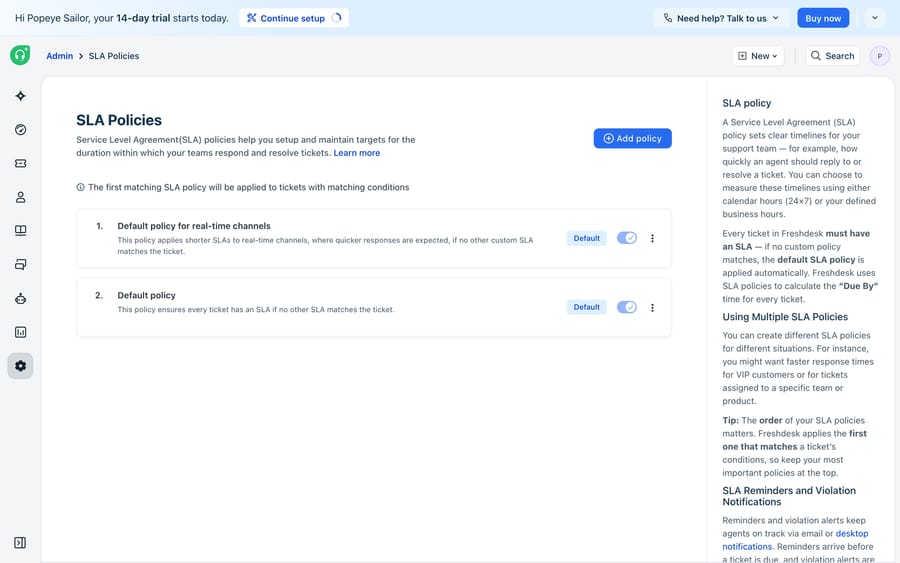
On Pro and Enterprise you can have more than one policy, and they are evaluated in order. Under Admin → Workflows → SLA Policies, policies sit in a top-to-bottom, drag-to-reorder list. Freshdesk's documentation puts it plainly: for new tickets, the SLA policy with matching conditions that appears first in the list is applied. No ticket gets more than one SLA policy.
Each non-default policy is scoped by conditions. Freshdesk currently offers company, group, product, source, ticket type, contact segment, company segment, source info and contact type. That lets you promise VIP customers a faster resolution than everyone else, or give phone tickets a tighter first-response target than portal tickets. The catch-all at the very bottom is the Default SLA policy, which matches any ticket the higher policies didn't. Because evaluation stops at the first match, policy order is behavior: a broad policy placed above a specific one will swallow tickets the specific one was meant to catch. On Growth you only have the Default policy, so every ticket gets the same targets by priority. Freshdesk's Understanding SLA Policies article is the reference for condition types and setup steps.
How do business hours change the SLA clock?
A "4-hour resolution target" means nothing until you answer: four hours of what? Freshdesk lets each SLA target run against one of two clocks:
- Business hours: the timer only counts your configured working hours. A ticket that arrives at 4:55 PM with a two-hour target, on a team that closes at 5 PM, doesn't breach at 6:55 PM. It breaches 1 hour 55 minutes into the next business day, because the clock pauses overnight, on weekends and on holidays.
- Calendar hours (24×7): the timer runs continuously, wall-clock. Pick this for a follow-the-sun or always-on team where "urgent" means urgent regardless of the hour.
Business hours are configured under Admin → Business Hours, where you set working days, daily start and end times, your time zone and a holiday calendar. On Pro and Enterprise you can define multiple business-hours calendars and assign them per group, so your EMEA team's clock and your APAC team's clock each pause at the right local times. Choosing the wrong clock is one of the most common SLA misconfigurations: put an Urgent target on business hours for a team that markets 24/7 support, and you'll technically "meet" SLA while a customer waits all night.
How do you set up SLA policies in Freshdesk, step by step?
A realistic setup looks like this. First, define your business hours (or confirm the default calendar matches your real coverage). Then open SLA Policies and edit the Default policy so every priority has sensible first-response, every-response and resolution targets on the correct clock. That is your safety net. On Pro or Enterprise, add specific policies above it for the cases that deserve different treatment: a "Priority customers" policy scoped to your top companies with tighter targets, or a "Phone & chat" policy scoped by source with a very short first-response target. Drag them into the right order, most specific first. Finally, configure reminders and escalations on each policy. Reminders can fire anywhere from 5 minutes to 4 hours before a target, and escalations can go out from 5 minutes to 1 month after a breach, so a missed target becomes a notification to a lead instead of a surprise in next week's report.
Once that's in place, Freshdesk does the rest automatically. Every incoming ticket gets its fr_due_by and due_by stamped from the matching policy, the SLA timer counts down against the right calendar, and the reminder and escalation chain fires on schedule. For the wider picture of how tickets, priorities and automations fit together, see our Freshdesk features overview.
What can't native Freshdesk SLAs do?
Freshdesk's SLA engine is good at what it does, but notice what it doesn't do. An SLA policy measures time; it doesn't do the work. It will tell you a ticket's first response is due in 47 minutes, then escalate when nobody replies. It can't write that first reply, look up the customer's order, or decide that a password-reset question could have been resolved at once. The clock is a scoreboard, not a player.
There's also a subtler gap. SLA targets depend on priority being set correctly, and priority is set by people (or basic keyword automations) who are often wrong under load. A mis-triaged ticket gets the wrong deadline before anyone notices. And SLAs are reactive: they can escalate a looming breach, but they can't prevent one by clearing the ticket.
This is where an AI agent layer earns its place. Macha runs on top of Freshdesk as a native connector. It is not a Freshdesk alternative and not a help desk; it plugs into the Freshdesk you already run. (Macha's Fresh connector is for Freshdesk the help desk, not Freshchat, Freshservice or Freshcaller.) Instead of counting down the first-response clock, an AI agent can answer the ticket within seconds, grounded on your help center, so many tickets are resolved before the SLA timer matters. On the ones it can't fully resolve, it can triage and set the right priority so the correct SLA policy applies, draft a reply for a human to approve, and add internal notes with the context a manager would otherwise chase. You get fewer breaches through speed, not just louder escalations.
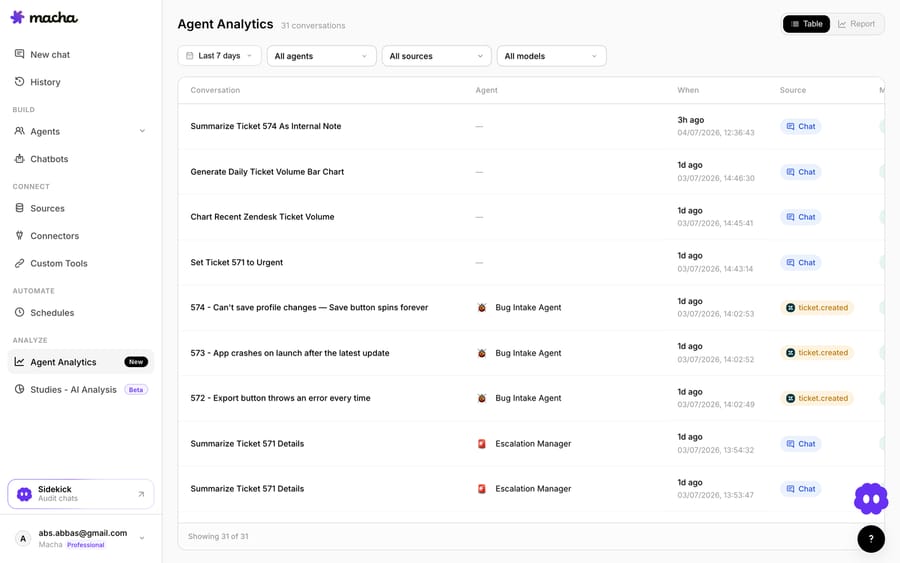
The tooling around the agent is what makes it auditable. Sources ground the agent on your real knowledge base so answers aren't invented. Custom Tools let it turn any REST API (your order system, a shipping lookup, a billing endpoint) into an action the agent can take mid-ticket, which is what lets it resolve rather than just deflect (custom tools docs). Studies let you grade the agent against your own historical Freshdesk tickets before it touches a live queue, and Analytics logs every agent run so you can audit what it did. If you're weighing whether to wire this together yourself or use a platform, our build an AI agent from scratch vs. platform breakdown covers the trade-offs, and AI agents for customer service sets the broader context. Macha is priced per ticket, starting at $299 a month for up to 750 tickets: one conversation, charged once however many steps it takes, with setup and monitoring by the Macha team included (see pricing). It complements your SLA policies rather than replacing them.
For the step-by-step of connecting an agent to your Freshdesk queue, see how to automate Freshdesk with AI.
Frequently asked questions
What is an SLA policy in Freshdesk? An SLA (Service Level Agreement) policy is a set of time targets Freshdesk applies to tickets: first response time, every response time and resolution time, configured separately for each priority (Urgent, High, Medium, Low). When a ticket is created, Freshdesk stamps concrete deadlines onto it (visible as the fr_due_by and due_by fields) and tracks them automatically.
How does Freshdesk decide which SLA policy applies to a ticket? SLA policies are evaluated top to bottom, and Freshdesk applies the first policy whose conditions match the ticket, then stops. Policies can be scoped by company, group, product, source, ticket type, contact or company segment, source info and contact type. The Default SLA policy sits at the bottom as the catch-all, so policy order directly controls behavior.
Which Freshdesk plans get multiple SLA policies? Pro and Enterprise. Growth gets the Default policy only. From Pro you can add up to 1,000 SLA policies, plus reminders, escalations and multiple group-specific business hours.
What's the difference between business hours and calendar hours for SLAs? Business hours only counts your configured working hours, days and holidays, so the SLA clock pauses overnight and on weekends. Calendar hours (24×7) runs continuously against wall-clock time. Use business hours for standard-shift teams and calendar hours for always-on or follow-the-sun support. Business hours are set under Admin → Business Hours and, on Pro and Enterprise, can be defined per group.
Can AI help me meet Freshdesk SLAs? Yes, by doing the work, not just watching the clock. An AI agent layer like Macha runs on top of Freshdesk (Macha's Fresh connector is for Freshdesk, not Freshchat, Freshservice or Freshcaller). It can answer common tickets within seconds, grounded on your help center, so they're resolved before the SLA timer matters, and triage the rest to the correct priority so the right SLA policy applies. Freshdesk's own SLA engine still owns the targets and escalations; the AI reduces how often you approach them.
What should you configure first?
Start with the Default policy and the right clock, because that covers every ticket on every plan. If you're on Pro or Enterprise, layer specific policies above it in most-specific-first order and wire up reminders and escalations so a breach becomes a notification. Then remember the SLA engine measures and doesn't resolve: an AI agent layer can clear the easy tickets and triage the hard ones so you meet targets by getting ahead of them.
SLA behavior checked against Freshdesk's Understanding SLA Policies article (updated 20 August 2026) and the Freshdesk pricing page on 24 September 2026, and first tested on the demousermacha.freshdesk.com account (July 2026). Confirm specifics in your own Admin console.
Add AI agents to your Freshdesk
Macha reads the ticket, drafts the reply and takes the action, inside the Freshdesk you already run.





