



 Intercom
 Shopify
 Stripe
 Slack
Slack Notion
 Google Workspace
 Confluence

How Does Assignment Work in Front? Manual, Round Robin and Load Balancing


Front hands a shared-inbox conversation to one owner by manual assign, comment handoff, first reply, or a round robin or load balancing rule. Round robin drops conversations when everyone is offline, while load balancing queues them and needs the Professional plan.
Key takeaways
- Front assigns a shared-inbox conversation by manual pick, @mention comment handoff, auto-assign on first reply, or a round robin or load balancing rule.
- Front's round robin rule skips a conversation when every teammate is offline, and there is no queue holding it for later assignment.
- Front's load balancing gives each conversation to the teammate with the fewest open assigned conversations, with a per-teammate cap that defaults to and maxes at 100.
- Load balancing rules in Front need the Professional plan, listed at $65 a seat per month billed annually against $25 for Starter.
- Front's auto-assign on first reply is on by default, can be switched off per channel, and only fires for replies sent from inside Front.

Front gives a shared-inbox conversation a single owner in four ways: a manual assign from the toolbar, a handoff through an @mention in an internal comment, auto-assignment when a teammate first replies, and rules that distribute work by round robin or by load balancing. Load balancing is the only mode that queues conversations when everyone is busy, and it needs the Professional plan or above.
| Method | How it picks the owner | Set up where |
|---|---|---|
| Manual assign | You choose a teammate | Assign button on the conversation |
| Comment handoff | @mention loops a teammate in, then you assign | Internal comment in the thread |
| Assign on first reply | Whoever replies first to an unassigned conversation | Channel settings (on by default) |
| Round robin rule | Next available teammate in rotation | Rules |
| Load balancing rule | Online teammate with the fewest open assigned conversations, up to a cap of 100 | Rules, Professional plan and above |
What does "assignment" mean in a Front shared inbox?
Front is a shared-inbox platform, not a ticketing system, and that changes how assignment behaves. In a shared channel (a support@ address, a sales@ alias, an ops queue) every teammate can see every conversation by default. That's the point of a Front shared inbox: visibility and collaboration over rigid handoffs. Assignment is how you layer accountability back on top of that openness.
An assigned conversation has exactly one owner. It surfaces in that person's Assigned to me view, it counts toward their workload, and it tells the rest of the team "someone's got this, no need to double-reply." An unassigned conversation sits in the shared Unassigned view, waiting for a human or a rule to claim it. Front also shows you who else is viewing a thread, so assignment isn't the only thing stopping two agents stepping on each other, but it's the durable, reportable one.
How do you assign a conversation manually?
Per Front's How to assign a conversation documentation, you click Assign on the conversation toolbar and pick a teammate from the dropdown. Recently used assignees float to the top, and once you assign, the conversation appears in that person's Assigned to me section.
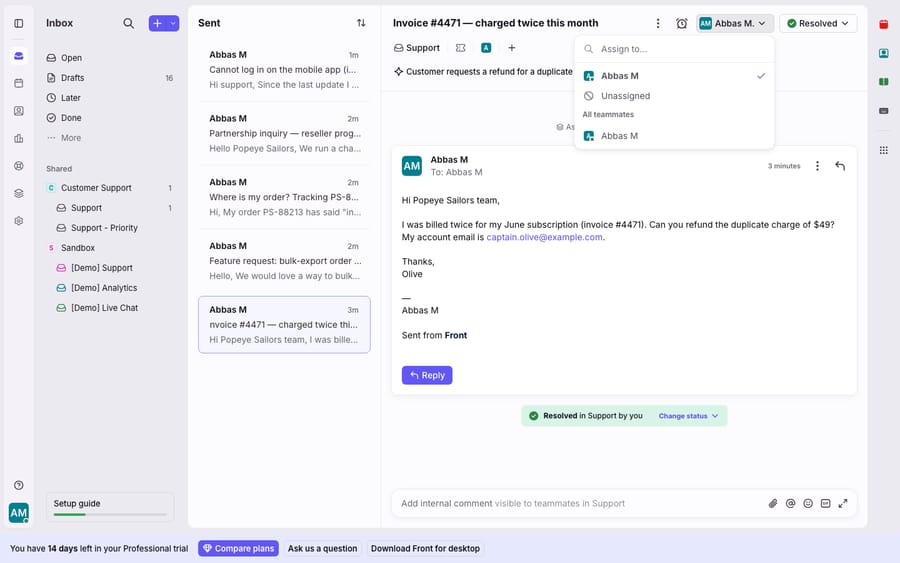
To reassign or unassign, click the current assignee's name at the top of the conversation and choose a different teammate, or pick Unassigned to hand it back to the shared pool. This is the everyday move for a support lead triaging the morning queue or a sales rep passing a lead to whoever owns that account.
Can you hand off a conversation through a comment?
Yes, and it's where Front's collaborative design shows. Internal comments live inside the thread but stay invisible to the customer, and you can @mention a teammate in one to loop them in. Type @, pick the person, add context ("can you take this billing question?"), and they're notified and subscribed. Pair that with a manual assign and you've done a warm handoff with a paper trail, without a single external email. A plain ticketing tool doesn't handle shared drafts and comments the same way, and the comment handoff is the collaborative version of a transfer.
Does Front assign a conversation automatically when someone replies?
Yes, by default. Per Auto-assign conversations on first reply, any time a teammate starts a new conversation or replies to an unassigned conversation from a shared channel, Front assigns it to that teammate. The setting is on by default and an admin can turn it off per channel under Assign conversations on first reply. It only fires for replies sent from Front itself, not from an external tool writing into the channel. For small teams this is often enough: no rules, no rotation, just "whoever answers it, owns it."
What's the difference between round robin and load balancing in Front?
When volume grows past "whoever grabs it," you reach for Front rules. Under Settings → Rules and macros → Rules → Create rule, an assignment action lets Front hand out incoming conversations automatically. The two automatic modes behave very differently.
Round robin distributes incoming conversations in a sequential rotation among available teammates, so everyone gets a roughly even count over time. Per Front's round robin vs. load balancing guide, it has a sharp edge: if all teammates are offline, the conversation isn't assigned and there is no queue to hold it for later. If someone comes online right after their turn was skipped, that conversation isn't reassigned to them. Round robin assumes someone's always around. Our walkthrough on how to set up round robin in Front covers the rule itself.
Load balancing solves the opposite worry: never dropping a conversation. It assigns each inbound conversation to the teammate in the group with the fewest open assigned shared conversations, up to a per-person limit. When everyone hits their limit, the rule pauses and resumes automatically as people clear their plates, and it resumes with the oldest unreplied conversation in the queue. You set each teammate's cap under workspace settings → Rules and macros → Assignment limits, where the default and the maximum are both 100 conversations per teammate per workspace, per Front's load balancing rules documentation.
| Round robin | Load balancing | |
|---|---|---|
| Distribution logic | Sequential rotation | Fewest open assigned conversations |
| If all teammates offline | Not assigned, no queue | Queued, assigned when someone's online |
| Missed turn | Not auto-reassigned | Picked up as capacity frees |
| Per-teammate cap | No | Yes (Assignment limits, max 100) |
| Pause/resume at capacity | No | Yes, oldest unreplied first |
| Best for | Even split, always-staffed teams | Uneven volume, must-not-drop queues |
| Plan gating | No Professional gate stated in Front's docs | Professional plan and above |
One caveat: the assignment limit applies only to the Load balancing option in the rule action. A plain "Assign to teammate" or round robin action ignores those caps. On price, Front's Professional plan lists at $65 a seat per month billed annually, against $25 for Starter, so the load-balancing gate is a $40-a-seat step up (front.com/pricing, checked 24 September 2026).
How does assignment affect SLAs and analytics?
Assignment isn't just tidy queue management. It holds up two things teams get measured on.
SLAs. An unassigned conversation with no owner is the classic SLA leak: the clock runs and nobody's name is on it. That's why round robin and load balancing rules exist, to make sure a response clock always has a person attached. If you run SLA rules in Front, audit how many breaches start life in the Unassigned view.
Analytics. Because every assigned conversation counts toward its owner, assignment is what makes per-teammate reporting meaningful. Response times, resolution counts, and workload distribution all roll up by assignee. If assignment is sloppy (everything landing on one person, or half the queue sitting unassigned) your analytics quietly mislead you. Getting distribution right, and pairing it with clean tags for categorization, is what makes the numbers trustworthy.
What can't assignment rules do, and where does an AI layer fit?
Front's assignment engine is a fast, transparent way to route ownership. But routing a conversation to a person isn't the same as resolving it. Round robin and load balancing decide who answers; they can't decide what the answer is. The teammate who gets the conversation still has to read it, work out the intent, look up the order or account details, and write the reply.
There's also a staffing assumption baked in. Round robin skips conversations when everyone's offline; load balancing queues them but still needs people to come online and clear the backlog. Neither mode adds capacity; they redistribute a fixed amount of it. And because assignment works on state, not content, it can't triage by what a message means: a rule can send "anything from a VIP account" to the account owner, but it can't tell an outage report from a routine question in the same inbox unless you've hand-built conditions for it.
That's the gap an AI agent layer fills, and it's worth understanding the build-versus-buy tradeoff before reaching for one. The broader category of AI agents for customer service exists to do the reasoning an assignment rule can't. Macha is one such layer, and the Macha↔Front connector is live: it runs on top of the Front you already use and doesn't replace Front, its shared inboxes, or its assignment rules. Connected to your workspace, Macha reads conversations, posts internal comments or replies, updates tags and assigns teammates, so a load-balanced or round-robin assignment lands on an owner who opens a ready draft instead of a cold thread. It can also look up order or account status through a custom tool that turns a REST API into something the agent can call. Macha bills per ticket, one conversation charged once however many messages it takes, starting at $299 a month for 750 tickets with setup and monitoring by the Macha team included; the pricing page has the tiers.
The clean division of labor: let Front own who a conversation belongs to, and layer an agent on top for the part assignment can't do, which is producing the reply fast enough to matter. If you're new to the platform underneath all this, our primer on what Front is sets the stage.
FAQ
How do I manually assign a conversation in Front? Click Assign on the conversation toolbar and select a teammate from the dropdown; recently used assignees appear at the top. The conversation then shows up in that person's Assigned to me view. To unassign, click the assignee's name at the top of the conversation and choose Unassigned.
What's the difference between round robin and load balancing in Front? Round robin assigns incoming conversations in a sequential rotation among available teammates; if everyone's offline it won't assign and there's no queue. Load balancing assigns to the teammate with the fewest open assigned conversations up to a per-person limit, pausing when everyone is at capacity and resuming with the oldest unreplied conversation, so nothing gets dropped.
Is load balancing available on every Front plan? No. Load balancing rules need the Professional plan or above. The per-teammate assignment limit (default and maximum of 100 conversations per workspace) applies only to the load-balancing action, not to a plain "Assign to teammate" or round robin action.
Can I turn off auto-assign on first reply? Yes. It's on by default, and an admin can switch off Assign conversations on first reply in each channel's settings. It only applies to replies sent from inside Front.
Can I assign a conversation to a teammate from inside a comment? You can @mention a teammate in an internal comment to loop them in with context and notify them, then assign the conversation to them. Comments stay invisible to the customer, which makes it a clean warm handoff without leaving the thread.
Can I add AI to Front's assignment without replacing Front? Yes. Macha connects to Front as a native integration and runs on top of your existing shared inboxes and assignment rules. Front stays the system of record for who owns a conversation; Macha helps answer the assigned conversation by drafting or sending grounded replies and looking up data through custom tools.
Ready to give every assigned conversation a head start on the reply? Start a free trial of Macha with $50 of free usage and no credit card, and connect it to your Front workspace.
Add AI agents to your Front
Macha reads the conversation, drafts the reply and takes the action, inside the Front you already run.





