



 Intercom
 Shopify
 Stripe
 Slack
Slack Notion
 Google Workspace
 Confluence

How Do Gorgias Snooze and Ticket Statuses Work? Open, Snoozed and Closed Explained (2026)


Every Gorgias ticket is open, snoozed or closed, and snooze sets a ticket aside for anywhere from 1 hour to 1 week before it reopens on its own. Snoozed and reopened tickets also change what your SLA report counts, which most teams never check.
Key takeaways
- Gorgias tickets are always in one of three statuses, open, snoozed or closed, and a customer reply reopens both snoozed and closed tickets automatically.
- Gorgias snooze presets are 1 hour, 3 hours, 6 hours, 1 day, 3 days and 1 week, plus a calendar picker for a specific date and time.
- Gorgias implements snooze by setting the ticket status to closed and scheduling a reopen, rather than treating snooze as a fourth independent status.
- The Gorgias SLA report leaves a snoozed ticket out of the achieved/breached count until its SLA timer runs out or it reaches a final outcome.
- Gorgias AI Agent is billed per automated interaction, with 30 included on the $40 Starter plan and $1.50 for each one after that.
A Gorgias ticket is always open, snoozed or closed. Snooze hides a ticket for 1 hour, 3 hours, 6 hours, 1 day, 3 days, 1 week or until a date you pick, and it reopens when the timer ends, the customer replies or an agent unsnoozes it. Closing is reversible too: a customer reply to a closed ticket reopens it. Snooze is available on all Helpdesk plans and to all roles, per Gorgias' snooze tickets guide (checked 24 September 2026).
| Status | What it means | What ends it | SLA report |
|---|---|---|---|
| Open | Customer waiting or agent working it | Close, Send & Close, or snooze | Pending until first response and resolution targets resolve |
| Snoozed | Hidden until a set time; stored as closed with a reopen date | Timer ends, customer replies, or agent unsnoozes | Left out of achieved/breached until the SLA timer runs out or the ticket reaches a final outcome |
| Closed | Resolved, out of the queue | Customer replies or agent clicks Closed to reopen | Can flip from achieved to breached if it reopens and closes late |
What do open, snoozed and closed mean in Gorgias?
Per Gorgias' handling incoming tickets documentation, a ticket is always in one of exactly three states.
Open is the working state: the customer is waiting on a reply, or an agent is actively on it. Open tickets sit in your main views and count against your queue.
Snoozed is the "not yet, but not done" state. You reach for it when you can't close a ticket but don't want it staring at you either. You're waiting on a customer to send a photo of a damaged item, waiting on the warehouse to confirm stock, or promising a follow-up once a pre-order ships. A snoozed ticket disappears from your open view and comes back on its own.
Closed is the resolved state: the issue is handled and no further action is needed, so it leaves your queue. As we'll see, "closed" in Gorgias is deliberately reversible: a closed ecommerce ticket is one customer reply away from being open again.
If you're new to the platform's model of tickets, tags, and views, our what is Gorgias primer sets the wider context; this piece zooms in on the lifecycle itself.
How do you snooze a ticket in Gorgias, and for how long?
To snooze, click the snooze icon in the ticket header and pick a duration. Gorgias offers a fixed set of quick presets, 1 hour, 3 hours, 6 hours, 1 day, 3 days, or 1 week, plus a calendar/time picker for snoozing until a specific date and time, which is the one you want for "reopen the morning the restock lands." The full behaviour is documented in Gorgias' snooze tickets guide.
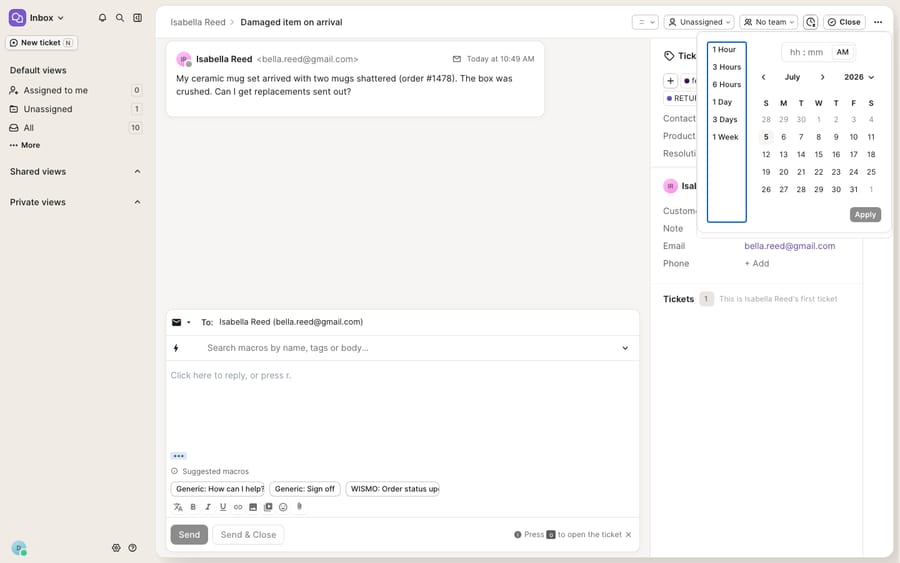
There's a subtlety worth pinning down, because it explains behaviour that confuses people. Gorgias' own docs note that "once snoozed, the ticket status will be set to closed, the ticket will be removed from your view." In other words, snooze is implemented as a scheduled, self-reopening close rather than a fourth independent status. Practically, that's invisible day to day. A Snoozed badge with a countdown appears on the ticket, and if an admin has set it up, snoozed tickets collect in a dedicated Snoozed view in the sidebar so nothing gets truly lost.
What reopens a snoozed ticket in Gorgias?
A snoozed ticket comes back to the top of your open queue when any one of three things happens:
- The snooze timer expires: the ticket reappears automatically at the time you set.
- The customer replies: a new inbound message pulls the ticket back into open immediately, even if the timer hasn't run out. This is the important one for support: if the shopper writes in again, you don't want them waiting behind a snooze you set.
- An agent manually reopens it: click the Snoozed badge to unsnooze early or adjust the timer.
That customer-reply trigger is what makes snooze safe to use liberally. You're never gambling that a customer will be ignored; you're only deferring the proactive follow-up you owe them.
Can Gorgias Rules snooze tickets automatically?
You don't have to snooze by hand. Gorgias Rules can snooze tickets automatically using a "Snooze for" action, and can fire follow-up logic when the snooze delay ends (the trigger is WHEN TICKET SNOOZE DELAY ENDS, and an IF ticket unsnooze date IS/IS NOT EMPTY condition tells a rule whether a ticket was snoozed). A common ecommerce pattern: when an agent tags a ticket awaiting-customer, a rule snoozes it for 3 days; if the timer ends with no reply, another rule reopens it and applies a follow-up-needed tag or sends a gentle nudge via a macro. That turns snooze from a personal reminder into a team-wide SLA hygiene mechanism.
How do you close a Gorgias ticket, and can it reopen?
Gorgias gives you two ways to close, depending on whether you're sending a reply on the way out:
- Close without replying: click the Close button in the ticket header. Use this when the resolution happened elsewhere (a refund processed in Shopify, a duplicate ticket) and no message is needed.
- Send & Close: the button in the reply area that sends your message and closes the ticket in one step, saving the second click. This is the workhorse for "here's your answer, we're done."
Once closed, the button updates to read Closed. But closing is not a locked door: if a customer replies to a closed ticket, Gorgias automatically reopens it, and an agent can reopen manually by clicking the Closed button. That reversibility is exactly right for ecommerce, where a "resolved" return can reignite the moment the shopper asks one more question. It also has consequences for your numbers, which we'll get to next.
Does snoozing pause the SLA timer in Gorgias?
Here's the part that trips up managers reading the dashboard. Status isn't just queue hygiene. It feeds directly into how Gorgias measures performance, and the rules are less intuitive than they look.
Per Gorgias' SLA report documentation, snooze is not an SLA exemption. Snoozed tickets are counted based on their SLA status, whether the SLA timer has run out, "not just because they are snoozed." A snoozed ticket whose timer hasn't run out is left out of the achieved/breached calculation, and it enters the report once it reaches a final outcome, achieved or breached, inside your date range. The docs describe no pause, so if you snooze a ticket to get it out of sight, its SLA outcome still lands in the report.
Closing behaviour matters too. A ticket with both a first-response and a resolution target only counts as achieved once it satisfies all the policy's conditions. A ticket that's had a first reply but is still open sits in a pending state and isn't yet included in the achieved/breached calculation. And because closes can be undone, reopened tickets can flip their outcome: a ticket that read "achieved" can become "breached" in a later reporting window when it reopens, gets worked again, and closes late. Gorgias tracks the latest SLA status inside your selected date range, so the same ticket can wear different labels depending on the window you're looking at.
The takeaway: treat status as data, not just tidiness. Snoozing to clear your view is fine; snoozing to hide a breaching ticket only hides it from you, not from the report.
What can't Gorgias statuses do, and where does an AI agent fit?
Gorgias' status model is clean and does its job well: three states, sensible reopen rules, automatable via rules, and wired into SLA reporting. Nothing here is broken. But notice what snooze and status can't do: they manage when a ticket sits in your queue, not whether it needs to be there at all.
Snooze is, at bottom, a deferral. When you snooze a "where's my order?" ticket for a day because the tracking hasn't updated, you're betting the answer will exist tomorrow and that you'll have time to write it then. The ticket still has to be read, understood, and answered by a human when it wakes up. Multiply that across a Black-Friday queue and "snooze it for later" quietly becomes a backlog with a delay timer.
This is the seam where an AI agent layer fits, and it's worth being honest about the build-versus-buy tradeoff before reaching for one. Gorgias has its own native AI Agent, and it's a real option; we cover it in Gorgias AI Agent explained. Gorgias' AI Agent is on every plan and billed per automated interaction: the Starter plan ($40 a month) includes 30, then each one costs $1.50, per the Gorgias pricing page on 24 September 2026. Some of the deepest ecommerce actions (self-service order edits, returns) lean on Shopify-gated Flows and app connections, which is honest context when you're comparing approaches.
Macha is a different shape of the same idea: an AI agent layer that runs on top of the Gorgias you already use, via the live Macha↔Gorgias connector, never a replacement for your help desk. It reads and writes the same tickets your statuses and SLAs already track: instead of snoozing a WISMO question, a Macha agent can look up the order through a custom tool that turns your store or 3PL's API into something the agent can call, and post a grounded reply now, so the ticket goes straight to closed rather than snoozed. And a genuine, honest contrast worth stating plainly: Macha bills per ticket, not per interaction: one conversation is charged once however many messages it takes, on one plan that starts at $299 a month for up to 750 tickets with setup and monitoring by the Macha team included (see the pricing breakdown). Macha also runs on Zendesk, Freshdesk, Gorgias, Front, HubSpot or Intercom.
The clean division of labour: keep Gorgias' open/snoozed/closed lifecycle as the source of truth for what's in the queue and what's overdue, and layer an agent on top for the part status can't do: actually answering the deferrable tickets fast enough that you rarely need to snooze them at all.
FAQ
What are the three ticket statuses in Gorgias? Open, snoozed, and closed. Open means the ticket is active in your queue; closed means it's resolved and removed from your view; snoozed means it's temporarily hidden and set to reopen automatically after a chosen period.
What snooze-until durations does Gorgias offer? Quick presets of 1 hour, 3 hours, 6 hours, 1 day, 3 days, and 1 week, plus a calendar/time picker to snooze until a specific date and time. You snooze from the snooze icon in the ticket header.
Does a snoozed ticket reopen if the customer replies? Yes. A snoozed ticket reopens automatically when the timer expires, when the customer sends a new reply, or when an agent manually unsnoozes it, so a customer writing back is never left waiting behind a snooze.
Does snoozing pause the SLA timer in Gorgias? No. Per Gorgias' SLA report docs, snoozed tickets are counted based on their underlying SLA status (whether the timer has run out), not simply because they're snoozed. A snoozed ticket stays out of the achieved/breached count until its timer runs out or it reaches a final outcome, so snoozing hides a ticket from your view but not from the report.
Which Gorgias plans can snooze tickets? All Helpdesk plans, and every role can snooze a ticket. Automatic snoozing uses the "Snooze for" action in Rules.
Can I add AI to Gorgias without replacing it? Yes. Macha connects to Gorgias as a live native connector and runs on top of your existing help desk and its statuses. It doesn't replace them. It helps close deferrable tickets by looking up order data and posting grounded replies, while Gorgias stays the system of record for open, snoozed, and closed.
Ready to close the tickets you'd otherwise snooze? Start a free trial of Macha with $50 of free usage and no credit card, and connect it to your Gorgias.
Add AI agents to your Gorgias
Macha reads the ticket, drafts the reply and takes the action, inside the Gorgias you already run.





