





 Shopify
 Stripe
 Slack
Slack Notion
 Google Workspace
 Confluence

How Does Freshdesk SSO Work? SAML, OIDC, JWT, Contact SSO and WordPress Setup


Freshdesk SSO lets agents and customers sign in with an identity they already have, and an Org Admin sets it up in the Freshworks Admin Center using SAML, OAuth2, OpenID Connect or JWT. Agent SSO and Contact SSO are configured separately and can use different identity providers.
Key takeaways
- Freshdesk SSO supports four protocols, SAML, OAuth2, OpenID Connect and JWT, configured separately for Agent SSO covering staff and Contact SSO covering customers.
- Freshdesk SSO is configured in the Freshworks Organization Admin Center under Security and Default Login Methods, and only Organization Admins can reach the configuration form.
- Freshdesk JWT SSO accepts only RS256 signing and needs sub, email, first and last names, an iat timestamp with 300 seconds of clock drift, and a nonce valid for 10 minutes.
- Freshdesk contacts and requesters auto-create on their first SSO login, but agents must already exist in Freshdesk, because SSO authenticates an agent seat rather than provisioning one.
- Freshdesk SSO settings apply at account level across all portals, and the plans that include it start at Growth for $19 per agent a month billed annually.

Freshdesk SSO is set up in the Freshworks Organization Admin Center under Security → Default Login Methods, only by an Org Admin, and supports four protocols: SAML, OAuth2, OpenID Connect and JWT (Freshdesk SSO reference, checked 24 September 2026). You configure it separately for agents (your staff) and contacts (your customers). SAML suits agents behind Okta or Entra ID, the official WordPress plugin gives contacts SSO over OAuth 2.0, and JWT lets your own app act as the identity provider.
| Protocol | Best for | Who runs the IdP | Effort |
|---|---|---|---|
| SAML 2.0 | Agents at companies with Okta / Entra ID / ADFS | A packaged IdP vendor | Low: exchange URLs and a certificate |
| OAuth2 or OpenID Connect | OAuth-native platforms, and the WordPress plugin | A packaged IdP, or WordPress | Low to medium |
| JWT | Contacts logging in via your own product | You (your app) | Higher: you sign tokens |
Two things break most first attempts: an identity provider that releases something other than the user's email as the Name ID, and agents who don't exist in Freshdesk before their first SSO login. Both are covered below.
What is the difference between Agent SSO and Contact SSO?
Understand the split first, because it decides almost everything else. Per Freshworks' Agent SSO and Contact SSO documentation, you configure SSO separately for two distinct groups.
Agent SSO covers the people who work inside the help desk — admins, agents and employees. This is the classic corporate case: your staff already authenticate through a company identity provider, and you want them landing in Freshdesk without a second credential to manage or a second password to leak.
Contact SSO covers the people you support — your customers, logging into the support portal or knowledge base. It's flagged "Only for Freshdesk" in the docs, because it's a product-specific need: if you run a customer portal behind your own product's login, Contact SSO lets a signed-in customer move into your Freshdesk portal without logging in again.
Keep them straight, because they can run on entirely different identity providers. Agents might sign in through Entra ID while contacts flow through your own application's login. When you sit down to configure, the very first question the interface asks is which of the two audiences the policy is for.
Which SSO protocols does Freshdesk support?
Per the Single Sign-On in Freshdesk reference, Freshdesk lists four protocols: SAML, OAuth2, OpenID Connect (OIDC) and JWT. OAuth2 and OIDC work the same way from an admin's point of view, so they are grouped below and in the table above. The reference lists SSO on every Freshdesk plan, on Freshdesk Omni Growth, Pro and Enterprise, and on legacy Omnichannel plans.
SAML 2.0 is the enterprise default. It's an XML-based standard, and it's what most identity providers — Okta, Entra ID, ADFS, OneLogin, Auth0, Google Workspace — expose out of the box. If your organization already has an IdP and you just want agents to use it, SAML is almost always the right pick: you exchange a couple of URLs and a certificate and you're done.
OAuth2 and OIDC are the modern token-based option, and they're what you'll use when your identity provider speaks OAuth natively. Functionally they land in the same place as SAML — the user proves who they are at the IdP and gets dropped into Freshdesk — but the wire format and endpoints differ. This is also the protocol behind the WordPress route below.
JWT is the build-it-yourself option. Rather than plugging into a packaged IdP, you generate a signed JSON Web Token in your own application and hand it to Freshworks. It's the natural fit for Contact SSO where your own product's login is the identity provider, and it's the most flexible and the most hands-on of the three.
Where do you configure Freshdesk SSO?
SSO is no longer a per-product setting buried in the Freshdesk admin. It moved up to the Freshworks Organization Admin Center, which governs login for every Freshworks product under one org. You reach it through the Freshworks Switcher → Admin, then Security → Agents & Employees → Default Login Methods. From there you either edit the default policy, which applies org-wide, or create custom policies for a subset of users.
Only Organization Admins can configure SSO. Freshworks' documentation says so plainly, and it matters practically: a regular Freshdesk account admin — even one who can build every automation and SLA in the product — will not see the SAML configuration form. If the fields below aren't visible to you, that's the reason, and the fix is a role change, not a settings hunt.
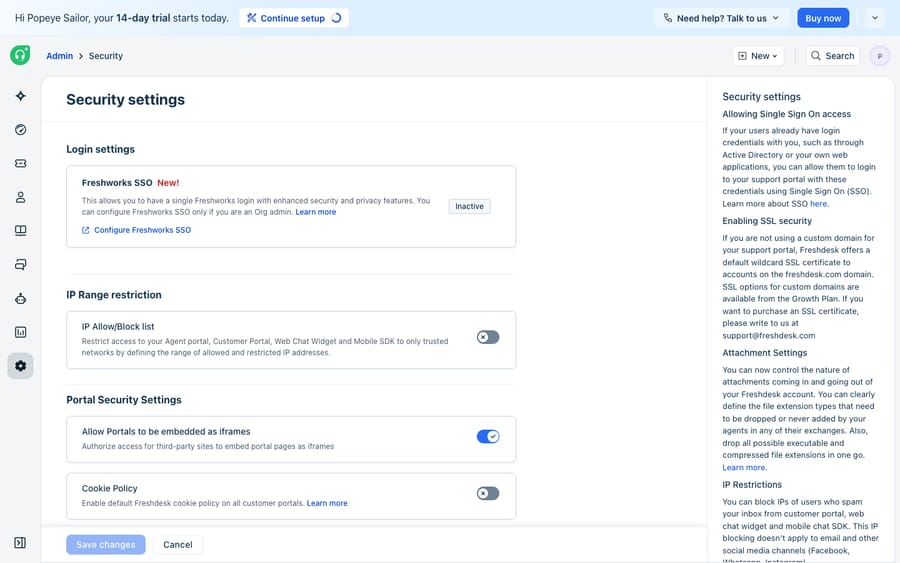
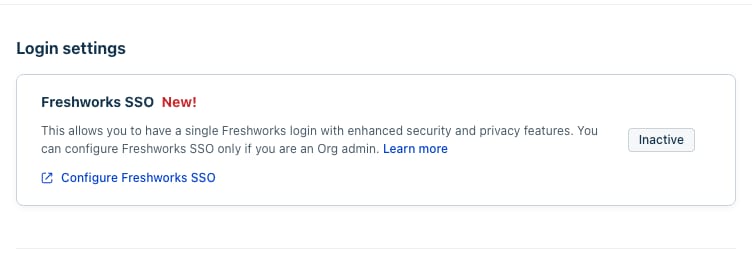
Inside Freshdesk itself, the entry point you can see as an account admin is Admin → Security, where Freshworks SSO appears as a login method alongside IP range restriction, portal security and cookie policy. It sits Inactive until it's configured.
How do you set up SAML SSO in Freshdesk?
SAML setup is a certificate-and-URL exchange between your IdP (the identity provider) and Freshworks (the service provider). Per Freshworks' SAML 2.0 configuration guide, the values you'll wire up are:
- SAML SSO URL, also called the Login URL — the IdP endpoint Freshworks redirects users to for sign-in. Copy from the IdP into Freshworks.
- ACS URL (Assertion Consumer Service) — the Freshworks endpoint your IdP posts the signed SAML response back to. Copy from Freshworks into the IdP.
- Entity ID / Metadata ID — the issuer identifier naming each party in the exchange. Both sides have one.
- Logout URL — where the IdP sends users after they sign out.
- Security certificate — the IdP's x.509 public certificate, usually pasted as Base64, used to verify that the assertion really came from your IdP. Some IdPs expose a SHA-256 fingerprint instead of the full body.
- Attribute mapping — email is mandatory; first name, last name and custom fields are optional pass-throughs.
Freshworks can also generate its own metadata file from the SSO configuration page, which you download and import into the IdP rather than typing the SP-side values by hand. More on that in the certificate-rotation section, because it's the cleanest way to keep both sides in sync.
Azure AD / Microsoft Entra ID, end to end
Entra ID has a pre-built Freshworks app in its gallery, which makes it the smoothest path. Per Freshworks' Azure AD SAML guide:
- In the Azure portal, open Microsoft Entra ID → Enterprise Applications → New application, search the gallery for Freshworks, and add it to your tenant.
- In the app, open Single sign-on → SAML. Under Basic SAML Configuration, set the Identifier (Entity ID) to the SP Entity ID from your Freshworks security settings, the Reply URL to the Freshworks ACS URL, and the Sign-on URL to your Freshworks domain's
/loginpath. - Under User Attributes & Claims, set the Unique User Identifier (Name ID) to
user.mail. Freshworks expects the email format, so it has to be email — not the Azure object ID. - In SAML Signing Certificate, download the Base64 certificate, and note the Login URL and the Azure AD Identifier from the setup panel.
- Back in the Freshworks Admin Center → Security, paste the Azure AD Identifier into Entity ID Provided by the IdP, the Login URL into SAML SSO URL, set Signing Options to Only Signed Assertions (the default), and paste the Base64 certificate into the Security Certificate box. Save.
- In Azure, assign the people who should have access under the app's Users and groups, or set User assignment required to No to open it to the whole directory.
Then hit Sign in with SSO on the Freshworks login page to test the round trip before rolling it out.
A generic SAML 2.0 provider
If your IdP isn't in a gallery — ADFS, PingOne, Shibboleth, anything else that speaks SAML 2.0 — the mechanics are identical, you just copy the values manually:
- In Freshworks Admin Center → Security → Agents & Employees → Default Login Methods, choose SAML and pick Others / Custom if your IdP isn't listed.
- Copy the SP-side values Freshworks shows you — the ACS URL and SP Entity ID — into your IdP's SAML app, or download the Freshworks metadata file and import it in one step.
- Register a new SAML app in your IdP, set its audience and ACS to the Freshworks values, and configure the Name ID to release the user's email.
- Copy the IdP-side values back into Freshworks: SAML SSO URL, Logout URL, Entity ID, and the security certificate or its SHA-256 fingerprint.
- Set Signing Options to Only Signed Assertions, save, and test with Sign in with SSO.
The single most common mistake is a mismatched Name ID format. Freshworks keys the user off email, so if your IdP releases a UPN, a persistent GUID or an unspecified identifier, the login succeeds at the IdP and then fails at Freshworks. When that happens, fix the claim, not the certificate.
How do you set up JWT SSO for your own app?
JWT is where the effort concentrates, and it's the mode most likely to matter for Contact SSO. Per the custom JWT implementation guide, Freshworks accepts RS256 only — you sign with an RSA private key and give Freshworks the matching public key. The token your app mints needs these claims:
{
  "sub": "external-user-id-123",
  "email": "[email protected]",
  "given_name": "Jordan",
  "family_name": "Lee",
  "iat": 1720800000,
  "nonce": "a1b2c3d4e5f6",
  "phone": "+1-555-0100",
  "picture": "https://cdn.example.com/u/123.png"
}
Required: sub (the user's ID in your system), email, iat (Unix epoch seconds, with a 300-second clock-drift tolerance), nonce (a random alphanumeric string valid for 10 minutes), and the first and last names. Freshworks accepts several key names for the names, including given_name and family_name, givenname and surname, or FirstName and LastName. phone and picture are optional.
On the Freshworks side you configure an Authorization URL (where Freshworks redirects the user to log in), a Redirect URL (where they come back after success), the RSA public key, and an optional Logout URL. The flow: Freshworks redirects the user to your Authorization URL with client, state, nonce, grant-type and scope parameters; your app authenticates them and mints the signed JWT; the user is redirected to your Redirect URL with the JWT in the query string; Freshworks validates the signature with your public key before opening the session.
How do you set up contact SSO for a WordPress site?
If your customers already have accounts on a WordPress site, you don't need to build a JWT implementation — there's an official plugin and it runs over OAuth 2.0, with WordPress acting as the identity provider. Per Freshdesk's WordPress SSO article:
- Prerequisites: self-hosted WordPress or a WordPress.com Business plan or above, with write access enabled, plus a Freshdesk account.
- Install the plugin. In WordPress, go to Plugins → Add New, search for the official Freshdesk plugin, install and activate it. "Freshdesk" then appears in your toolbar.
- Get the redirect URL from Freshdesk. Open Freshworks Switcher → Security, go to the Contacts tab (or Agents and Employees if you're doing this for staff), choose Default Login Methods or a custom policy, toggle SSO Login → OAuth 2.0 on, and copy the redirect URL it shows.
- Add the client in WordPress. Go to Freshdesk → SSO Integration → Add New Client, give it a Client Name for your own reference, and paste in that Redirect URL.
- Exchange the credentials. Copy the values from Freshdesk's Client Information page into the WordPress SSO Integration settings.
Once that's saved, someone clicking Login on your support portal authenticates with their WordPress credentials and lands in Freshdesk. The support articles still list a Freshdesk Free plan. The Freshdesk pricing page no longer shows one: it sells Growth, Pro and Enterprise at $19, $55 and $89 per agent a month billed annually, and a separate Free program covers up to 2 agents for 6 months. SSO is on all of them.
One SSO, all your portals
If you run several Freshdesk portals, the question that always comes next is whether each can have its own SSO. It can't, and the answer is worth knowing before you design around it. On the portal-SSO thread in the Freshworks community (954 views), Freshworks staff are explicit: SSO settings apply at account level, portal-specific SSO is a Freshservice capability, and the same SSO is used across all your Freshdesk portals. The recommended route for a customer-facing login button on portal pages is Contact SSO, which is what the WordPress setup above configures.
How do you rotate SAML certificates without locking yourself out?
SAML certificates expire, usually every one to three years, and when one rolls, SSO breaks hard: every login fails at once because the assertion signature no longer validates. Two habits keep this painless.
Prefer metadata over hand-typed fields wherever your IdP supports it. A metadata URL or file carries the entity ID, endpoints and certificate together, so when the IdP publishes a new certificate the details flow through without you re-pasting anything.
When you are pasting a raw certificate, schedule the swap. Get the new Base64 certificate or SHA-256 fingerprint from the IdP before the old one expires, update the Security Certificate field in a quiet window, and keep a non-SSO org-admin login available as a break-glass account. If you get locked out, that fallback admin is how you get back in to fix the field.
Does SSO create Freshdesk agents and contacts automatically?
Contacts yes, agents no. This is the other thing that trips first-time setups. Contacts and requesters auto-create on their first SSO login. Agents must already exist in Freshdesk before their first login — SSO authenticates an agent seat, it doesn't provision one. Add the agent first, then let them sign in.
It's also worth being clear that native SSO is just-in-time authentication, not full lifecycle sync. If you want automated deprovisioning when someone leaves, you layer SCIM on top rather than relying on SAML alone.
Which SSO method should you use, and what are the limits?
The decision usually falls out of the two questions above. Signing in agents with a corporate IdP? Use SAML, or OIDC if your platform prefers it. Signing in contacts through a WordPress site? Use the OAuth 2.0 plugin. Signing in contacts through your own custom application? JWT, because your app becomes the identity provider.
Credit where it's due: Freshdesk's SSO is standards-based and flexible: four protocols, a clean agent/contact split, and custom policies is more than many help desks offer. But be clear-eyed about the edges. Configuration is Org-admin gated, so a day-to-day Freshdesk admin may not be able to finish it alone. The JWT path shifts real work onto you: you own the signing keys, the token minting, the nonce and clock-drift handling, and any bug there becomes a login outage. Portal-level SSO isn't available, so multi-brand setups share one policy. And SSO only governs who gets in — it does nothing about what happens next inside the ticket. If you're hardening access generally, it's worth understanding your Freshdesk API rate limits before you wire integrations on top.
That "what happens after login" gap is where an AI agent layer fits, and the category of AI agents for customer service exists to do the reasoning work authentication can't. Macha is one: it runs on top of the Freshdesk you already use as a native connector, and it explicitly does not replace your help desk, your login, or your SSO policies. You connect it with your Freshdesk subdomain and API key, and the same tickets your signed-in agents and contacts already work land in front of it, where it can draft grounded first replies, triage by intent, and look up order or account status through a custom tool. The connector is for Freshdesk specifically, not Freshchat, Freshservice or Freshcaller. Pricing is one plan on monthly ticket volume, from $299 a month for 750 tickets — about $0.40 a ticket at every tier — with setup and monitoring included and $50 of free usage to try it. The clean split: let Freshworks SSO own who gets in, and let an agent layer help with what happens once they're there. How to automate Freshdesk with AI covers that side end to end.
Frequently asked questions
What SSO protocols does Freshdesk support? Four: SAML, OAuth2, OpenID Connect and JWT. SAML is the usual choice for agents at organizations with a packaged identity provider such as Okta, Microsoft Entra ID, ADFS or OneLogin; OAuth 2.0 is what the official WordPress plugin uses; and JWT is the flexible option when your own application acts as the identity provider, typically for contacts.
What's the difference between Agent SSO and Contact SSO? Agent SSO signs in the people who work inside the help desk — admins, agents and employees — usually through a corporate IdP. Contact SSO, flagged "Only for Freshdesk," signs in your customers to the support portal, often through your own product's login. They can use completely different identity providers and are configured separately.
Where do I configure Freshdesk SSO? In the Freshworks Organization Admin Center, not the per-product Freshdesk admin: Freshworks Switcher → Admin → Security → Agents & Employees → Default Login Methods. Freshdesk's own Admin → Security page surfaces the Freshworks SSO card as the entry point, and it stays Inactive until configured.
Why can't I see the SAML configuration form? Because only Organization Admins can configure SSO. A Freshdesk account admin — however senior inside the product — won't see the fields. The fix is a role change at the org level, not a different settings page.
Which Azure AD values map to which Freshworks fields? Paste the Azure AD Identifier into Entity ID Provided by the IdP, the Azure Login URL into SAML SSO URL, and the Base64 signing certificate into Security Certificate. In Azure, set the Reply URL to the Freshworks ACS URL and the Unique User Identifier to user.mail.
Why does my SSO login fail even though the IdP says it succeeded? Almost always a Name ID mismatch. Freshworks expects the identifier to be the user's email. If your IdP releases a UPN or object GUID instead, authentication succeeds at the IdP and then fails at Freshworks. Fix the claim mapping rather than the certificate.
Do agents get created automatically on first SSO login? No. Contacts and requesters auto-create on their first login, but agents must be added to Freshdesk beforehand. SSO authenticates existing agent seats; it doesn't provision them. For automated deprovisioning you'd add SCIM on top.
How do I set up Freshdesk SSO for WordPress users? Install the official Freshdesk WordPress plugin, then in Freshdesk open Freshworks Switcher → Security → Contacts → Default Login Methods, toggle on SSO Login → OAuth 2.0, and copy the redirect URL. In WordPress, go to Freshdesk → SSO Integration → Add New Client, give it a name, paste the redirect URL, and copy the credentials from Freshdesk's Client Information page back into the plugin. WordPress becomes the identity provider over OAuth 2.0.
Can I have different SSO for each Freshdesk portal? No. SSO settings apply at account level, and the same configuration is used across all your Freshdesk portals; portal-specific SSO is a Freshservice capability. For a customer login button on portal pages, configure Contact SSO.
What signing algorithm does Freshdesk JWT SSO use? RS256 only. You sign with your RSA private key and give Freshworks the matching public key. Required claims are sub, email, iat (300 seconds of clock drift allowed) and nonce (valid for 10 minutes), plus the user's given and family names.
Is SSO available on every Freshdesk plan? Yes. Freshdesk's SSO reference lists it on Growth, Pro and Enterprise, on Freshdesk Omni plans and on legacy Omnichannel plans. Growth is $19 per agent a month billed annually.
Can I add AI to Freshdesk without touching my SSO setup? Yes. An AI agent layer like Macha connects to Freshdesk as a native connector via subdomain and API key, and runs on top of your existing help desk — it doesn't replace or interfere with your SSO policies. It helps after login by drafting grounded replies and triaging by intent, while Freshdesk stays the system of record for identity and access.
What are the two Freshdesk SSO decisions?
Freshdesk SSO is two decisions, not one: which audience (agents or contacts) and which protocol (SAML, OAuth 2.0 or OIDC, or JWT). Agents at a company with a real IdP want SAML, configured by an Org Admin in the Freshworks Admin Center, with the Name ID releasing email and metadata used wherever the IdP supports it. Customers on a WordPress site want the official plugin over OAuth 2.0. Customers behind your own product want JWT. Remember that agents must exist before they can sign in, that one SSO policy covers all your portals, and that a break-glass admin account is what saves you when a certificate rotates unannounced. And when you want the queue behind that login cleared as well as secured, start a trial of an agent layer that works on the same tickets.
Paths, fields, claims and plan availability verified against Freshworks and Freshdesk support documentation and the Freshdesk pricing page, 20 September 2026, with protocols, plan availability, JWT claims and pricing re-checked 24 September 2026; the portal-SSO community thread read the same day. The SAML configuration form is Org-admin gated and was not reachable on our demo account, so it isn't screenshotted here.
Sources: Single Sign-On in Freshdesk, Agent SSO and Contact SSO, Configure SSO with a SAML 2.0 identity provider, Configure SAML 2.0 using Azure Active Directory, Configure SSO with a custom JWT implementation, Setting up single sign-on for your WordPress users, Configuring custom SSO policies under Org, Freshdesk pricing.






