





 Shopify
 Stripe
 Slack
Slack Notion
 Google Workspace
 Confluence

Freshdesk vs Help Scout vs Zendesk (2026): Which Help Desk Should You Choose?


Help Scout fits small email-first teams, Freshdesk is the value pick for multichannel support, and Zendesk is the depth pick at the highest price. Each also bills its AI a different way: per resolution, per session, or per verified resolution plus a Copilot seat.
Key takeaways
- Help Scout suits small email-first teams, Freshdesk is the value pick for multichannel support, and Zendesk costs the most but offers the deepest routing, voice and ecosystem.
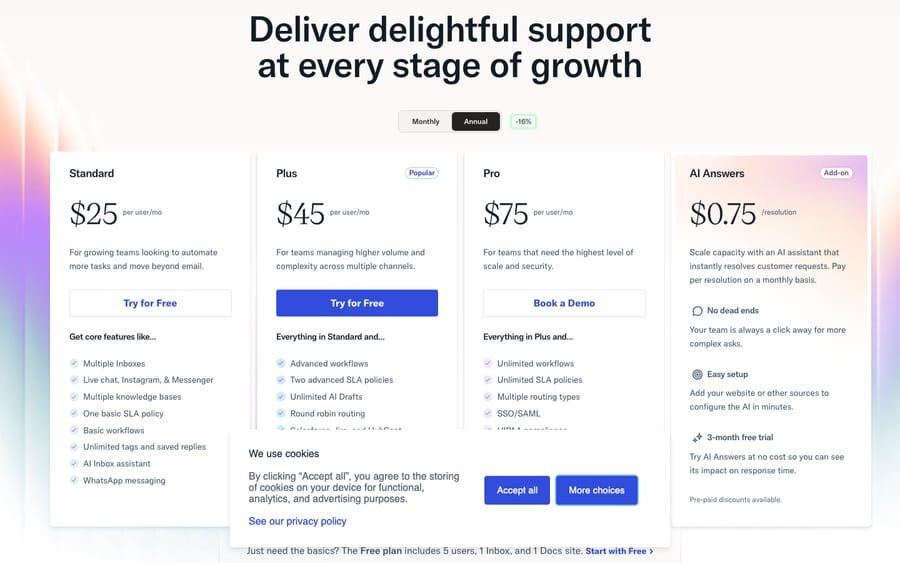
- Help Scout has a Free plan for 5 users with 1 inbox and 1 Docs site, then Standard at $25, Plus at $45 and Pro at $75 per user a month.
- Freshdesk lists Growth at $19, Pro at $55 and Enterprise at $89 an agent a month, and its Free program now covers 2 agents for 6 months.
- Freshdesk's Freddy AI Agent gives 500 free sessions once per account, then charges $49 per 100 sessions whether or not the AI resolves the conversation.
- Help Scout's AI Answers bills $0.75 per resolution after a three-month free trial, while Zendesk bills AI agents at $1.50 to $2.00 per verified resolution.

Help Scout suits small, email-first teams (a Free plan for 5 users, then $25 a user a month), Freshdesk is the value pick for multichannel teams (Growth $19, Pro $55, Enterprise $89 an agent), and Zendesk is the depth pick at the highest price (Suite Team $55, Suite Professional $115). AI is billed three different ways: Help Scout charges $0.75 per resolution, Freshdesk $49 per 100 sessions, and Zendesk $1.50 to $2.00 per verified resolution plus a $50 Copilot seat.
How do Freshdesk, Help Scout and Zendesk compare at a glance?
| Freshdesk | Help Scout | Zendesk | |
|---|---|---|---|
| Best for | Value-focused teams wanting multichannel at a fair price | Small teams who want simplicity and a human, email-first inbox | Enterprises needing depth, omnichannel and deep customization |
| Pricing entry | Growth $19/agent/mo; a 6-month Free program for 2 agents | Free for 5 users; Standard $25/user/mo | Suite Team $55/agent/mo (Support Team $19, ticketing only) |
| AI / automation | Freddy AI Agent, $49 per 100 sessions after a one-time 500 | AI Answers add-on, $0.75/resolution | AI agents at $1.50–$2.00 per verified resolution + Copilot $50/agent |
| Omnichannel | Strong: email, chat, phone, social | Lighter: email-centric, with chat, SMS, WhatsApp, Instagram and Messenger from Standard | Deepest: every channel, messaging, voice |
| Ease / admin | Moderate; more settings than Help Scout | Easiest to set up and run | Most capable but steepest learning curve |
| Standout strength | Price-to-features ratio at scale | Fastest to love; personal, uncluttered UX | Breadth, extensibility and enterprise governance |
Prices are per seat per month, billed annually, checked on each vendor's pricing page on 24 September 2026. All three change pricing, so confirm before you buy.
How much does each help desk cost?
Entry prices flatter everyone, so read them alongside the tier you'll really land on.
Freshdesk lists Growth at $19/agent/month, Pro at $55 and Enterprise at $89 (billed annually), per Freshworks' official pricing. The free plan is no longer on that page: existing accounts can switch to a Free program for up to 2 agents that lasts 6 months. Freddy AI Agent comes with 500 free sessions, but Freshdesk's FAQ says that allowance is "limited to once per account". After it, sessions cost $49 per 100, billed whether or not the AI resolves anything. Freddy AI Copilot is $29 an agent on Pro and Enterprise.
Zendesk is the priciest of the three: Suite Team at $55/agent/month, Suite Professional at $115 and Enterprise at "Talk to Sales", per Zendesk's pricing page. Copilot runs $50/agent/month on top. AI agents come with every plan but bill per verified resolution, $1.50 on a committed volume or $2.00 pay-as-you-go, against a small per-seat allowance of $2 to $10 a month. Our Zendesk AI pricing breakdown does the arithmetic.
Help Scout is the only one of the three with a permanent free tier: 5 users, 1 inbox and 1 Docs site. Paid plans are Standard $25, Plus $45 and Pro $75 per user a month on annual billing (annual saves 16%). AI Answers bills $0.75 per resolution after a three-month free trial, counts at most one resolution per conversation, and lets you set a monthly spending cap. Watch the extras: additional inboxes cost $10 a month and extra Docs sites $20 a month on annual billing ($12 and $24 monthly), per Help Scout's pricing page.
The headline: for a fully featured mid-market setup, Freshdesk tends to be the cheapest per seat, Help Scout is the cheapest place to start and stays affordable for small teams, and Zendesk charges a premium for depth. The AI billing models reward different volume profiles. Help Scout and Zendesk only charge when the AI resolves a conversation; Freshdesk charges for every session, resolved or not, so a low resolution rate costs Freshdesk customers the most.
How do their features and AI differ?
Freshdesk is the closest feature match to Zendesk of the three: multichannel ticketing, a knowledge base, a customer portal, and Freddy AI for deflection and agent assist, priced as add-ons rather than baked in. It's a lot of surface area for the money.
Help Scout deliberately does less, and does it cleanly. It's built around a shared inbox that feels like email, with Docs (knowledge base), Beacon (embeddable help and chat), and AI Answers and AI drafting layered on. Help Scout's own pricing page claims a 73% average resolution rate for AI Answers; treat that as a vendor figure. If your world is mostly email and a bit of chat, the smaller feature set is a feature, not a gap.
Zendesk has the broadest catalogue by a distance: omnichannel routing, messaging, voice, an app builder, and AI agents available on every Suite and Support plan. It's the most capable and the most to learn.
If AI resolution is central to your plans, the shape of it matters more than the logo. Read up on AI agents for customer service generally, and the build-versus-buy tradeoff, before you commit to any one vendor's native AI, because native AI is often the piece teams outgrow first.
Which has the strongest automation?
All three automate the basics: assignment rules, macros or saved replies, and time-based triggers.
Zendesk goes deepest, with granular trigger and automation logic, skills-based routing and an app builder for custom flows. It's also where new admins most often feel overwhelmed. Freshdesk sits in the middle: solid automations, including SLA policies with reminders and escalations, without Zendesk's complexity, which is a large part of its appeal. Help Scout keeps automation intentionally simple, with workflows most teams can configure in an afternoon. That's great for small teams and occasionally limiting for complex operations.
Which is easiest to set up and run?
This is where the three separate most sharply. Reviewers on G2 and Capterra consistently rate Help Scout highest for ease of use, setup and admin: the interface "feels familiar" and onboarding a new agent is fast, per G2/Capterra sentiment summarized across comparison sources. Zendesk draws the opposite note: users praise its power but flag a real learning curve and heavy initial configuration. Freshdesk lands between, with more to configure than Help Scout and far less than Zendesk.
On raw scores (read in July 2026, not re-read for this update), Help Scout carried a 4.6 on Capterra and a 9.1/10 G2 rating for quality of support; Freshdesk sat at roughly 4.5 on Capterra; Zendesk held around 4.3 on G2 and 4.4 on Capterra across thousands more reviews. Bigger review counts mean Zendesk's scores reflect a much wider range of use cases.
Which has the biggest integration ecosystem?
Zendesk has the largest third-party marketplace and partner network: if an integration exists anywhere, it probably exists for Zendesk. Freshdesk has a solid, growing marketplace and the wider Freshworks suite (Freshchat, Freshservice, Freshcaller) if you want to expand into adjacent tools. Help Scout integrates with the common suspects and is loved for its human, responsive support, but its ecosystem is the smallest of the three by design.
What are the pros and cons of each?
Freshdesk
- Pros: Best price-to-features ratio; multichannel out of the box; scales to large teams; less complex than Zendesk.
- Cons: Freddy AI bills per session whether or not it resolves; the free plan is now a 6-month program; UI is busier than Help Scout's; some advanced features gated to Pro/Enterprise.
Help Scout (credit where due, it earns its fans)
- Pros: Easiest to set up and use; a free plan for 5 users; personal, email-first UX; strong knowledge base and support quality; AI that only charges on resolution, with a spending cap.
- Cons: Lighter on native channels (weaker phone); à la carte extras (inboxes, Docs sites) add up; less suited to complex, high-volume routing.
Zendesk
- Pros: Deepest feature set; best omnichannel and voice; largest ecosystem; enterprise-grade governance and reporting.
- Cons: Most expensive; steepest learning curve; can be overkill (and overwhelming) for small teams.
Which should you choose?
- Small team, email-first, wants to move fast: Help Scout. The simplicity and support quality are worth the lighter channel coverage, and up to 5 users can start free.
- Growing team that wants multichannel without the enterprise bill: Freshdesk. It's the value pick and the most direct Zendesk substitute at a lower price.
- Enterprise with complex routing, voice and deep integration needs: Zendesk. You're paying for depth you'll actually use.
- Budget-conscious but scaling past ~25 agents: Freshdesk usually wins on cost per seat once you're fully featured; re-check Help Scout's total once inbox and Docs add-ons stack up.
Can you add an AI layer on top of any of them?
The help-desk-vs-help-desk debate tends to miss this: your choice of inbox and your choice of AI agent don't have to be the same decision. Each vendor's native AI handles deflection, but it's locked to that platform and is often the first thing teams outgrow. An independent AI agent layer runs on top of whatever help desk you land on, reading and writing the same tickets, drafting grounded replies, triaging by intent, and reaching into your systems through a custom tool to answer order- and account-level questions. You pick the help desk on its merits and keep the AI decision separate. (One scope note: Macha's connector for the Freshworks side is for Freshdesk specifically, not Freshchat, Freshservice or Freshcaller. Macha bills per ticket, one conversation charged once however many messages it takes, starting at $299 a month for 750 tickets with setup and monitoring by the Macha team included.)
FAQ
Which is cheapest: Freshdesk, Help Scout or Zendesk? To start, Help Scout: its Free plan covers 5 users, and paid plans start at $25/user. Freshdesk Growth is $19/agent and its Free program covers 2 agents for 6 months; Zendesk Suite starts at $55/agent (annual billing). For a fully featured mid-market setup, Freshdesk is usually the cheapest per seat and Zendesk the most expensive.
Which help desk is easiest to set up? Help Scout, consistently. G2 and Capterra reviewers rate it highest for ease of use, setup and admin. Freshdesk is moderate; Zendesk is the most capable but has the steepest learning curve.
How is AI priced across the three? Differently. Freshdesk's Freddy AI Agent gives 500 sessions once per account, then charges $49 per 100 sessions; Zendesk bills AI agents per verified resolution ($1.50 committed, $2.00 pay-as-you-go) plus an optional $50/agent Copilot; Help Scout's AI Answers charges $0.75 per resolution after a three-month free trial.
Do I have to use each vendor's built-in AI? No. An independent AI agent layer like Macha runs on top of your existing help desk, so you can choose the inbox on its merits and keep the AI decision separate. Native AI is fine for deflection but is locked to that one platform.
Which is best for a large, multichannel team? Zendesk for maximum depth and omnichannel/voice; Freshdesk if you want most of that capability at a lower price. Help Scout is better suited to smaller, email-first teams.
Whichever help desk you land on, you can layer AI on top of it. Start a free trial of Macha with $50 of free usage and connect it to the help desk you already use.






