Shopify
 Stripe
 Slack
Slack Notion
 Google Workspace
 Confluence

Freshdesk vs Salesforce Service Cloud (2026): Which Costs Less and Which Should You Choose?


Freshdesk costs $19 to $89 per agent a month and runs without a dedicated admin, while Salesforce Service Cloud runs $25 to $550 per user a month and ties support to the CRM record your sales team uses. The choice comes down to how much platform you want to own and pay for over three years.
Key takeaways
- Freshdesk is cheaper than Salesforce Service Cloud: Freshdesk paid plans cost $19, $55 or $89 per agent a month, while Service Cloud runs $25 to $550 per user a month.
- Salesforce Service Cloud now sells Core at $195, Advanced at $395 and Max at $550 per user a month, replacing the old Enterprise and Unlimited editions.
- A 500-agent team on Salesforce Service Cloud Core lists at $1,170,000 a year before add-ons, against $534,000 on Freshdesk Enterprise.
- Salesforce charges an additional $75 per user a month for Digital Engagement on its Core and Advanced service editions.
- Every Freshdesk plan includes the first 500 Freddy AI Agent sessions, then extra sessions cost $49 per 100, and Freddy AI Copilot adds $29 per agent a month.

Freshdesk is the cheaper and simpler choice: $19, $55 or $89 per agent a month, against $25 to $550 per user a month for Salesforce Service Cloud, whose Core and Advanced editions most larger teams need cost $195 and $395 (both vendors' pricing pages, checked 24 September 2026). Service Cloud earns its price when support has to share one customer record with sales and marketing and you have an admin to run it. For most SMB and mid-market teams without an existing Salesforce footprint, Freshdesk is the default.
How do Freshdesk and Salesforce Service Cloud compare at a glance?
| Freshdesk | Salesforce Service Cloud | |
|---|---|---|
| Best for | SMBs and mid-market teams that want to launch fast | Enterprises that want support unified with CRM data |
| Pricing entry | Free Program (up to 2 agents, 6 months); Growth from $19/agent/mo | Starter Suite from $25/user/mo |
| Top list price | Enterprise $89/agent/mo | Max $550/user/mo |
| AI / automation | Freddy AI Agent (500 sessions included, then $49 per 100); Copilot $29/agent | Agentforce, Einstein, Data Cloud (deep, add-on heavy) |
| Omnichannel | Email, chat, phone, social, web out of the box | Omni-channel routing, CTI/Voice, digital engagement (often add-ons) |
| Ease / admin | Low: usable without a dedicated admin | High: typically needs an admin or partner |
| Standout strength | Time-to-value and predictable cost | Customisation depth and a single customer record |
How much do Freshdesk and Salesforce Service Cloud cost?
Start with what each vendor charges, because for many teams price settles the argument before features get a vote.
Freshdesk keeps it simple. Per its official pricing page, the paid tiers are Growth at $19, Pro at $55, and Enterprise at $89 per agent per month on annual billing (checked 24 September 2026). The free-forever plan is no longer on that page, but the Freshdesk Free Program still gives up to 2 agents free for 6 months. Every plan includes the first 500 Freddy AI Agent sessions, and extra sessions cost $49 per 100. Freddy AI Copilot is a $29 per agent per month add-on on Pro and Enterprise. You can run real support on Growth or Pro without buying much else.
Salesforce Service Cloud (now marketed as Agentforce Service) sits in a different weight class. Salesforce's own pricing page lists Starter Suite $25 and Pro Suite $100, then three service editions billed annually: Core $195, Advanced $395 and Max $550 per user per month. Max bundles contact center, workforce and quality management plus 2.75M Flex Credits per org per year. The old Enterprise ($165), Unlimited ($330) and Einstein 1 Service (about $500) prices you'll still see on review sites are out of date, though the page's FAQ still uses some of the old names.
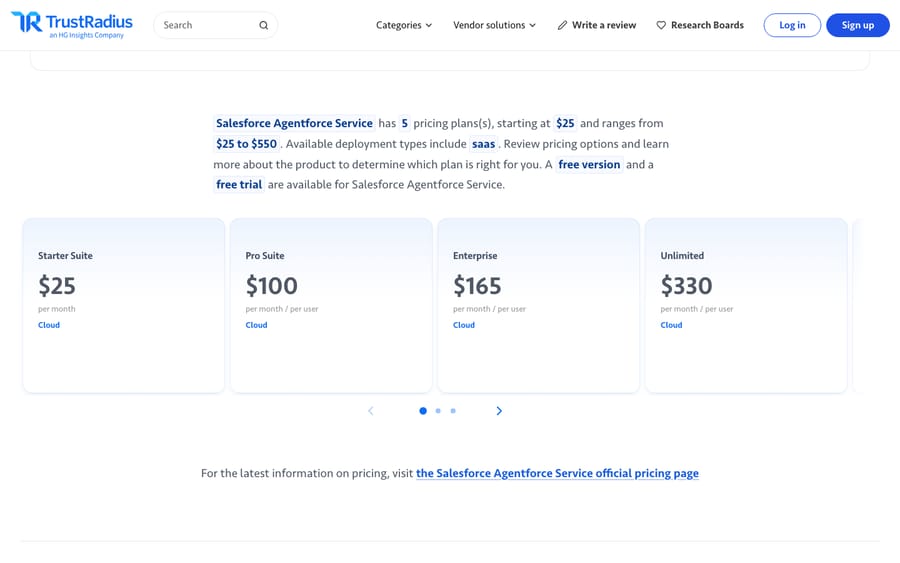
The headline prices understate the real gap. Most Salesforce buyers land on Core or Advanced, and some of the features enterprises want are priced on top: Salesforce lists an additional $75 per user per month for Digital Engagement on Core and Advanced, and Service Cloud Voice and Field Service are separate products with their own pricing. A 500-agent team on Core lists at $1,170,000 a year before add-ons and implementation; the same headcount on Freshdesk Enterprise lists at $534,000. Salesforce's sticker is only the entry fee, and the platform's real cost includes admins, integration work and the add-on stack. Freshdesk's cost is closer to what you see. (We break down the Freshdesk side further in our Freshdesk vs Zendesk comparison, which shares the same per-agent model.)
Which has better AI and features, Freshdesk or Salesforce?
On core ticketing, both are strong, but they optimise for different things.
Freshdesk gives you email, chat, phone, social, and web forms funnelling into one shared inbox, with collision detection, canned responses, and a knowledge base that work out of the box. Freddy AI handles ticket classification, suggested replies, and summarisation, and is deliberately built so non-technical teams get value without a data-science project. It's pragmatic AI: good at the common jobs, not trying to be a platform of its own.
Salesforce Service Cloud goes deeper and wider. Case management is more sophisticated — omni-channel routing, CTI/Voice, and multi-department workflows built for a large, messy support footprint. Its AI story, now under the Agentforce and Einstein banners with Data Cloud underneath, can reason over unified customer data from across sales, service, and marketing. If your differentiator is knowing everything about a customer in one place and acting on it, nothing in Freshdesk's class matches that reach. The catch is that most of it is an add-on and a project, not a checkbox.
How do their automation and workflows differ?
Freshdesk's automation is approachable: time- and event-triggered rules, ticket dispatch, and scenario automations that a support lead can configure without code. It covers the vast majority of what a mid-market team needs, and you'll rarely wait on engineering.
Salesforce's automation is effectively unbounded. Flow Builder, Apex, and the wider platform mean you can model almost any business process and wire support into billing, provisioning, and field operations. That power is real, and it's exactly why Salesforce needs an admin or a certified partner. The same flexibility that lets an enterprise automate anything is what makes it slow and expensive to change for a small team.
Which is easier to set up and run?
This is the clearest split. Independent reviews on G2 and Capterra consistently put Freshdesk ahead on ease of use, setup, and admin: reviewers report getting live in days, and non-technical staff can maintain it. Salesforce scores well on capability but is repeatedly described as clunkier, with a steeper learning curve and a heavier implementation, often requiring a dedicated admin or an outside partner just to launch and keep running.
If you don't have (or don't want) a Salesforce admin on payroll, factor that role into the comparison. It's frequently the single biggest hidden line item.
Which has the bigger ecosystem?
Salesforce wins the ecosystem outright: AppExchange is enormous, and if you already run Sales Cloud or Marketing Cloud, Service Cloud drops into a stack your business understands, sharing one customer record end to end. Its partner network is unmatched.
Freshdesk's ecosystem is smaller but very serviceable: a solid marketplace, clean APIs, and native connectors to the tools most SMBs actually use. For a team that isn't already all-in on Salesforce, Freshdesk's lighter footprint is a feature, not a limitation.
What are the pros and cons of each?
Freshdesk pros: fast time-to-value; predictable, low pricing; genuinely easy to administer; strong out-of-the-box omnichannel; a free program for up to 2 agents to start. Cons: less customisable at the extreme; AI and telephony add cost; not built to be your system-of-record CRM; can feel constrained once processes get very bespoke.
Salesforce Service Cloud pros: unmatched customisation and automation; a single customer record across sales, service, and marketing; deep AI via Agentforce/Einstein/Data Cloud; the largest partner ecosystem. Cons: high and add-on-heavy TCO; steep learning curve; typically needs a dedicated admin or partner; slower and costlier to change; overkill for smaller teams. Neither tool is a bad choice. They're built for different companies.
Which should you choose?
- Pick Freshdesk if you're an SMB or mid-market support team that wants to be live this week, values predictable cost, and doesn't need support fused to a company-wide CRM. It's the pragmatic default for most sub-enterprise teams.
- Pick Salesforce Service Cloud if you already run Salesforce, need support unified with sales and marketing on one record, have genuinely complex multi-department workflows, and have the budget and admin resource to run a platform rather than a tool.
- Still torn? The honest tie-breaker is the org chart, not the feature list. No Salesforce admin and no existing Salesforce footprint? Freshdesk. Already deep in the Salesforce ecosystem with a partner on speed-dial? Service Cloud.
Can you add an AI agent layer on top instead of using the native AI?
Here's the part both vendors would rather you not dwell on: the AI in each is locked to its own platform, and it's priced accordingly. If you'd rather keep the help desk you choose and add a portable AI agent layer on top, one that drafts and sends grounded replies, triages by intent, and looks up order or account status through a custom tool, that layer doesn't have to come from your help-desk vendor. It's worth understanding the build-vs-buy tradeoff before you assume the native AI is your only option.
Macha connects natively to the Freshdesk you're evaluating and reads and writes the same tickets your team already works. It's an agent layer, not a help desk replacement, and it runs on Zendesk, Freshdesk, Gorgias, Front, HubSpot or Intercom. It bills per ticket, not per resolution: one conversation is charged once however many messages it takes, on one plan that starts at $299 a month for up to 750 tickets, with setup and monitoring by the Macha team included (see the pricing breakdown). Salesforce isn't on that list, so if you land on Service Cloud, Agentforce is the native AI route; if you land on Freshdesk, you can choose between Freddy and an agent layer like Macha.
FAQ
Is Freshdesk cheaper than Salesforce Service Cloud? Yes, clearly. On 24 September 2026, Freshdesk paid plans ran $19 to $89 per agent a month, while Salesforce Service Cloud ran $25 to $550 per user a month before add-ons. Larger teams usually need Core ($195) or Advanced ($395), and features such as Digital Engagement add $75 per user a month on those editions, so the real cost gap is wider than the headline prices suggest.
What happened to Salesforce Service Cloud Enterprise and Unlimited? Salesforce's service pricing page now lists Core ($195), Advanced ($395) and Max ($550) per user a month where Enterprise, Unlimited and Einstein 1 Service used to sit. Third-party pages quoting $165 and $330 are showing the old editions.
Which is easier to set up, Freshdesk or Salesforce? Freshdesk. Reviewers on G2 and Capterra consistently rate it higher on ease of setup and admin; reviewers report getting live in days, and non-technical staff can maintain it. Salesforce is more capable but typically needs a dedicated admin or partner to implement and run.
When does Salesforce Service Cloud make more sense? When you already use Salesforce and want support unified with sales and marketing on one customer record, when you have genuinely complex multi-department workflows, and when you have the budget and admin resource to run a platform. Its customisation, automation, and ecosystem are unmatched at that scale.
Can I add AI to Freshdesk or Salesforce without switching platforms? Yes. An AI agent layer like Macha connects to your existing help desk, Freshdesk for example, and runs on top of it, drafting and sending grounded replies and triaging by intent while your ticketing stays the system of record. It's an add-on layer, not a replacement. Macha doesn't run on Salesforce; there, Agentforce is the native option.
Ready to add an AI agent layer to whichever help desk you choose? Start a free trial of Macha with $50 of free usage and no credit card, and connect it to your Freshdesk.