Shopify
 Stripe
 Slack
Slack Notion
 Google Workspace
 Confluence

How Do You Cancel Gorgias, and Can You Get a Refund? (2026)


You cancel Gorgias by turning off auto-renewal under Billing and usage, and the subscription runs until your next renewal date with no refund for unused time. Gorgias's terms ask for 30 days' written notice before the term ends, and uninstalling the Shopify app does not stop the billing.
Key takeaways
- Canceling Gorgias means going to Settings, Account, Billing and usage, clicking Manage on the Helpdesk card, and selecting Cancel auto-renewal, since there is no delete-account button.
- Uninstalling the Gorgias app from Shopify removes the integration and payment method but does not cancel the subscription, which still renews and leaves the accrued cost owed.
- Gorgias's Master Subscription Agreement, last revised March 30, 2026, requires written notice at least 30 days before the term ends for monthly and annual plans alike.
- Gorgias subscription fees are non-refundable once incurred, and canceling the helpdesk ends the AI Agent, Voice and SMS add-ons at the same renewal date.
- A Gorgias Pro plan at $360 a month with AI Agent handling 1,000 conversations costs $1,765 a month at published rates, before ticket overage.
To cancel Gorgias, go to Settings → Account → Billing and usage, click Manage on the Helpdesk card and select Cancel auto-renewal; the subscription stays active until your next renewal date, and Gorgias doesn't refund the unused time. Its Master Subscription Agreement also asks for written notice at least 30 days before the term ends, monthly or annual.
| The cancellation reality | What it means for you |
|---|---|
| No one-click cancel button | You select Cancel auto-renewal under Billing and usage |
| Takes effect at your next renewal | You keep access, and owe any fees and overages, until then |
| No proration | Unused months on an annual plan are not refunded |
| 30-day written notice in the terms | Cancel at least 30 days before the term ends, monthly or annual |
| Uninstalling the Shopify app is not a cancel | You must cancel inside Gorgias too |
| Managed plans | Cancellation goes through your Customer Success Manager |
What are the exact steps to cancel Gorgias?
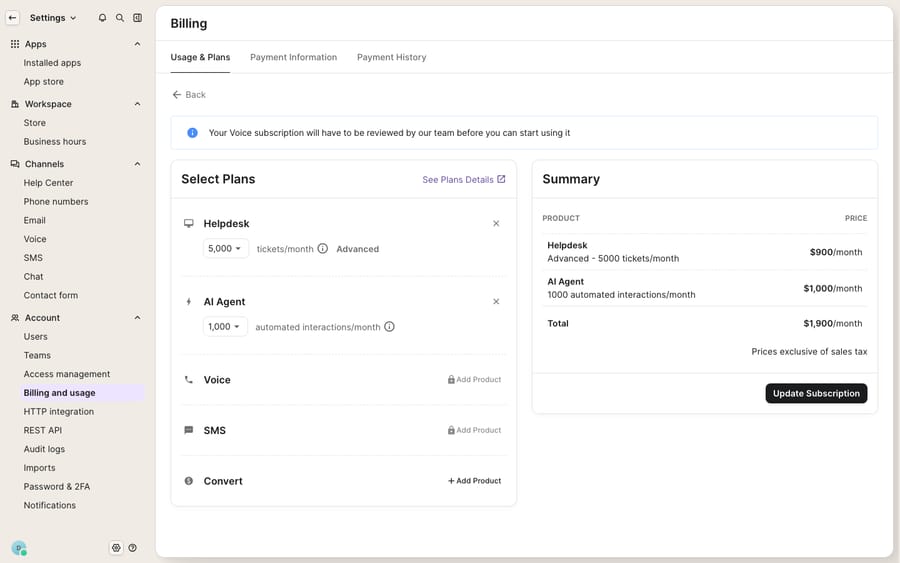
Per Gorgias's own Cancel a Gorgias subscription documentation (updated September 2026), cancellation lives inside your billing page, not on a dedicated "cancel" screen. Only the account owner and admins can do it:
- Go to Settings → Account → Billing and usage.
- Find the Helpdesk card and click Manage.
- Next to your helpdesk plan, click Cancel auto-renewal.
- Review what you'll lose, click Continue To Cancel, and choose a cancellation reason.
- Tick the box confirming you've read the cancellation terms and click Confirm Auto-Renewal Cancellation.
Notice what that flow isn't. There's no "Delete account" button. You're turning off auto-renewal, so the subscription stays live and billable until the date in the Active until banner. Canceling the helpdesk also ends every add-on (AI Agent, Voice and SMS) at the same time. If you only want to drop an add-on, use Remove product on that add-on's card instead. On a managed plan you won't see the cancel option: the banner routes you to Contact us, and your Customer Success Manager cancels on your behalf after a call.
Gorgias's own docs suggest one alternative: if volume or budget dropped, downgrade to a smaller plan and keep your setup, history and integrations. That only works at renewal, though; the terms don't allow a downgrade mid-term.
Does uninstalling the Shopify app cancel Gorgias?
No, and this is the trap worth calling out loudly. Gorgias's FAQ says uninstalling the app from Shopify removes the integration and your payment method but doesn't cancel the subscription. The subscription still renews; without a payment method the charge fails, and you owe the accrued cost anyway. Merchants who assume "remove the app = stop the bill" are the ones who show up months later with a balance. Complete the Cancel auto-renewal step inside Gorgias itself.
Can you get a refund when you cancel Gorgias?
Usually not. Gorgias's Master Subscription Agreement (last revised March 30, 2026) says subscription fees are non-cancelable once incurred and non-refundable. The terms go further: unless the law requires otherwise, customers aren't entitled to "any refund or credit" for a cancellation, "nor for any unused time" on the subscription or "any pre-payments made," and any refund is at Gorgias's sole discretion. The cancel doc repeats it: you still owe fees and overages incurred before the cancellation takes effect.
Two practical consequences fall out of that:
- No proration. If you're halfway through an annual term and cancel, you don't get the unused months back. You keep access until the term ends, then it stops renewing.
- A 30-day notice requirement. Section 7.5 of the terms requires written notice "no less than 30 days prior to the end of the then-current Subscription Term regardless of whether the Subscription is monthly or annual," given through the product or by emailing [email protected]. Miss the window and you can renew into another full term. The in-app cancel counts as notice.
If you're on annual, don't wait until renewal week. Put a reminder in your calendar 30 to 45 days before your term ends, hit Cancel auto-renewal, and keep the confirmation. If you believe you were charged in error, the terms point you to [email protected].
What if your Gorgias cancellation doesn't go through?
The docs won't tell you this part. A recurring thread in Gorgias's public reviews is cancellations that don't get actioned. On Trustpilot, where Gorgias shows a TrustScore of 2.1 from 152 reviews as of September 2026 (a sample skewed toward people arriving to complain about billing), one merchant wrote that "a former member of our team was meant to cancel the highly expensive 5k plus package" and that Gorgias wouldn't waive the remaining months. Another asked "why you made it incredibly difficult to cancel!"
So build a paper trail:
- Cancel auto-renewal in-app (the steps above) and screenshot the confirmation and the Active until date.
- Email [email protected] in writing stating your intent to cancel, your account and your term-end date. Gorgias's FAQ names this address for failed cancellations too, and asks you to include any error message.
- Check your next invoice. If a charge lands after your term ends, reply on the same email thread with your screenshots.
- Escalate through your account manager if you have one, and dispute with your card provider only as a last resort with the documentation in hand.
Changed your mind? Once a cancellation is scheduled the plan dropdowns lock, so you can't reactivate yourself; use the contact us link on the Billing and usage page before your access ends.
Why do people cancel Gorgias?
Most cancellations aren't about product quality. Gorgias is a capable, Shopify-native help desk, and it holds 4.3 out of 5 from 705 reviews on the Shopify App Store. Cancellations cluster around billing shock. Gorgias charges per ticket, and its AI Agent charges per automated interaction on top, with each AI interaction also counting as a helpdesk ticket. The vendor earns on both lines as automation grows.
Here is our own arithmetic from Gorgias's published monthly rates: the Pro plan is $360 for 2,000 tickets, and the matching AI Agent bundle is $190 for 190 interactions, then $1.50 each. If AI Agent handles 1,000 of those conversations, the month costs $360 + $190 + 810 × $1.50 = $1,765, before any ticket overage. The one-star reviews on Shopify tell the same story from the other side: an April 2026 review describes being quoted "a huge plan" and warned about "expensive overage charges," then refused a plan change mid-contract. None of that is fraud. It's a usage-based model working as written, and it's why "how do I cancel Gorgias" is such a common search. For the full breakdown of where the money goes, see our Gorgias pricing explained piece.
Should you cancel Gorgias, or change how the AI runs on it?
If the thing pushing you toward the exit is the AI bill rather than the help desk, canceling the whole platform can be an overcorrection. You'd throw out a working Shopify-native inbox to escape one line item. Removing just the AI Agent add-on (Remove product on its card) is the smaller move.
This is where a different kind of AI agent for customer service fits. Macha is an AI agent layer that runs on top of the help desk you already use, including Gorgias, via a native connector, rather than a replacement for it. The billing mechanism is the point: Macha bills per ticket, one conversation charged once, never per resolution or per message, so a reply that pulls an order status, checks a policy and drafts an answer is one charge. Plans start at $299 a month for up to 750 tickets on the pricing page, with setup and monitoring by the Macha team included. You can wire it into your store data through a custom tool that turns your order or subscription API into something the agent can call. This isn't "cancel Gorgias and switch to Macha": Macha doesn't do help-desk ticketing, it's the automation layer, and it works whether you stay on Gorgias or move. If you are comparison-shopping the whole platform, our best Gorgias alternatives and honest Gorgias review cover the field.
FAQ
Is there a one-click cancel button in Gorgias? No. Go to Settings → Account → Billing and usage, click Manage on the Helpdesk card, select Cancel auto-renewal, then confirm through the reason and summary steps. You're switching off renewal, and the subscription stays active until your next renewal date.
Will I get a refund if I cancel my annual Gorgias plan early? Almost certainly not. Gorgias's terms say subscription fees are non-refundable and non-cancelable once incurred, with no refund or credit for unused time unless the law requires one. You keep access until the term ends but won't get the remaining months back.
Does uninstalling the Gorgias app from Shopify cancel my subscription? No. Uninstalling removes the integration and your payment method, but the subscription still renews and you owe the accrued cost. You must complete the Cancel auto-renewal step inside Gorgias's billing page.
How much notice do I need to give to cancel Gorgias? The terms require written notice at least 30 days before the end of your current subscription term, for both monthly and annual plans. Cancel auto-renewal in-app well before renewal and keep an email record with [email protected].
Can I cancel just the AI Agent add-on and keep the helpdesk? Yes. On the AI Agent card under Billing and usage, click Manage, then Remove product. The add-on stays active until your next renewal. Canceling the helpdesk, by contrast, ends every add-on at once.
Can I lower the AI bill instead of canceling Gorgias entirely? Often, yes. Much of the billing shock comes from the per-interaction AI Agent model rather than the help desk itself. A per-ticket AI agent like Macha on top of Gorgias addresses the cost driver without losing your Shopify-native inbox.
Weighing whether to cancel or just rework how AI runs on your help desk? Start a free trial of Macha and connect it to Gorgias, with no rip-and-replace.