Shopify
 Stripe
 Slack
Slack Notion
 Google Workspace
 Confluence

How Do You Cancel Front? Steps, Seats and Refunds (2026)


A Front company admin can cancel from Company settings, Billing, in about a minute, but payments already made are non-refundable and seat decreases only apply at renewal. Time the exit to your contract term and export your data before the 30-day retention window closes.
Key takeaways
- Canceling Front requires a company admin to open Company settings, Billing, the Upcoming plan at renewal tab, then Cancel plan, confirm, and select a reason.
- Front keeps a cancelled account in a 30-day retention window where users can log in and search history but cannot send messages or use the API.
- Front's terms state that monthly or annual payments already made are non-refundable, with no account credit, even when a customer terminates early.
- Seat decreases in Front count as downgrades and cannot be made before the renewal date, so deactivating a user mid-term does not refund that license.
- A 7-seat Front Professional team pays $455 a month on annual billing, rising to $595 a month with Copilot, or $735 on Enterprise, now the only plan with Smart QA and Smart CSAT.

To cancel Front, a company admin opens gear icon → Company settings → Billing → "Upcoming plan at renewal" → Cancel plan, confirms, and picks a reason. It's self-serve and takes about a minute. The catch is money: Front's terms say payments already made are non-refundable, and seat decreases can't take effect before your renewal date.
| Question | Short answer |
|---|---|
| Who can cancel? | A company admin, from Billing settings |
| Do I get a refund? | No. Monthly and annual payments already made are non-refundable, with no account credit |
| Can I drop seats mid-term? | No. Seat decreases apply at your next contract term |
| What happens after cancelling? | A 30-day retention window: log in, search history and view analytics, but no sending |
| When is data deleted? | 30 days from the termination date, or earlier if an admin asks support |
How do you cancel a Front subscription?
There's a persistent myth that Front hides the cancel button. It doesn't, but you have to be a company admin, and the control sits one layer deeper than most people look. Per Front's guide to cancelling your subscription, the path is:
- Click the gear icon → Company settings, then open Billing in the sidebar.
- Select the "Upcoming plan at renewal" tab.
- Click Cancel plan.
- Review the account summary, check the acknowledgment box, and click Confirm.
- Choose your cancellation reasons and click Cancel Plan to finish.
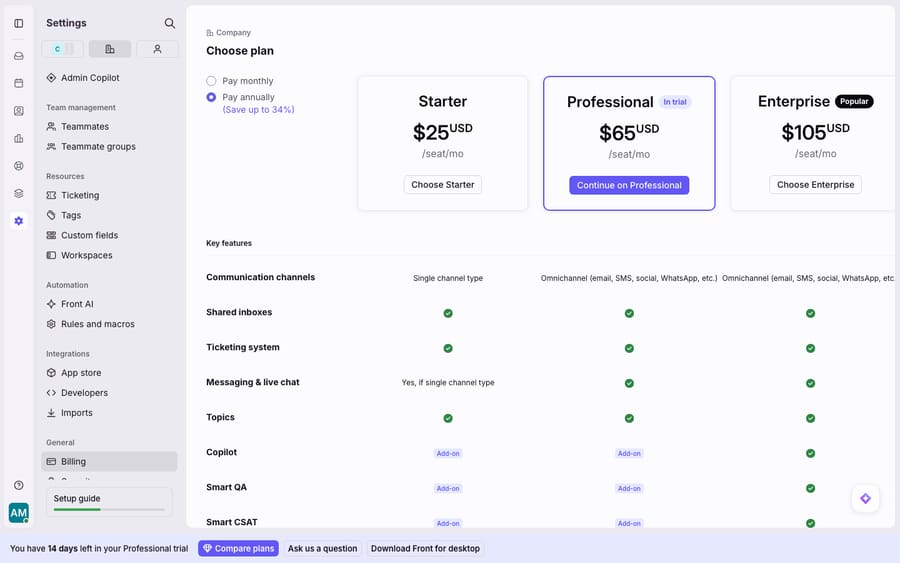
People think there's no cancel button because the Billing page doesn't open onto one. On a trial or a fresh account, Billing opens straight into the plan chooser (Starter, Professional, Enterprise), not a cancellation flow. The cancel control sits behind the "Upcoming plan at renewal" tab and admin permissions, so a regular teammate poking at Billing won't find it.
What happens to your account after you cancel?
Cancelling doesn't cut you off instantly. Your subscription runs to the end of the term you've already paid for, and Front keeps the account in a 30-day retention window from the termination date. During that window you can still log in, search your conversation history, and view analytics. You can't send messages or comments, create new resources (channels, inboxes, teammates), or use the knowledge base or API. Front's stated policy is to permanently delete customer data 30 days from termination; if you want it gone sooner, a company admin has to ask Front's support team.
Can you get a refund if you cancel Front early?
No, and this is the part worth reading twice. Front's cancellation terms state that "any monthly or annual payments you've already made are nonrefundable, and you will not be issued a credit to your account for future use," and that you remain "accountable for the entire upfront fees associated with your chosen subscription period, even upon early termination."
In plain terms: if you're on an annual plan and cancel in month three, you've paid for the remaining nine months and you won't see that money again, not as a refund and not as an account credit. Front isn't unusual among B2B SaaS here, but annual prepay + per-seat pricing + no refunds is the combination that makes an ill-timed cancellation expensive. One Capterra reviewer described exactly this: after a breaking change to Front's Outlook sync, they say Front "acknowledged the limitation but refused early termination, relying entirely on contract wording," per verified Front reviews on Capterra. Fair or not, it's the posture the contract permits.
Can you reduce Front seats before renewal?
Not on your own. Even if you're only trying to trim cost, Front's billing model works against mid-term downsizing. Per Front's billing and invoices documentation, the asymmetry is deliberate:
- Upgrades happen immediately. You can upgrade your plan type or billing recurrence directly on the billing page, and it's charged right away.
- Downgrades wait for renewal. "Downgrades cannot be made before your renewal date." That includes seat decreases, plan-tier drops, and add-on removals.
So if a teammate leaves and you deactivate their account, you don't get that seat's money back. Front is explicit: "You will not receive a refund or credit for that license. You will have the license available for use for the remainder of your contract term." The lower seat count only applies in your next contract term. The one escape hatch is a mid-term change through an active Front sales representative, and that's a negotiation, not a self-serve toggle.
That's why Capterra reviewers call Front "expensive for small teams" and note that "they've raised the prices quite dramatically over the last years." Per-seat pricing is fine when headcount is stable. It stings when headcount moves and you can only true down once a year.
How much does Front cost if you stay?
Before you decide, price out what staying actually costs, including the AI add-ons most teams end up on. These are Front's own list prices from front.com/pricing (checked 24 September 2026):
| Item | Billed annually | Billed monthly |
|---|---|---|
| Starter (up to 10 seats) | $25/seat/month | $35/seat/month |
| Professional (up to 50 seats) | $65/seat/month | $85/seat/month |
| Enterprise | $105/seat/month | Annual only |
| Copilot add-on | $20/seat/month (included in Enterprise) | |
| Smart QA and Smart CSAT | Enterprise only (no longer sold on Starter or Professional as of October 2026) | |
| Autopilot (AI agent) | $0.05 triage / $0.39 handoff / $0.89 resolution per conversation | |
The arithmetic for a 7-seat Professional team on annual billing: 7 × $65 is $455 a month base. Add Copilot (7 × $20 = $140) and you're at $595 a month before a single Autopilot conversation. Smart QA and Smart CSAT are no longer sold on Professional (Enterprise only as of October 2026), so adding them means Enterprise at 7 × $105 = $735 a month. That's the number to hold in mind when you're deciding whether to cancel, downgrade at renewal, or renegotiate. For the full tier-by-tier breakdown, see our Front pricing explained guide.
What should you export before your access winds down?
Whatever you decide, get your data out before the account goes read-only or hits the 30-day deletion clock. Front's shared inboxes hold your conversation history, contacts, tags, canned responses, and analytics, and once cancellation drops you into the retention window, you lose the ability to create resources.
Practical checklist:
- Conversation history: export or archive the threads you're legally or operationally required to keep.
- Contacts: pull your contact list out of Front before access narrows.
- Canned responses, templates and tags: document them; they don't migrate themselves to a new tool.
- Analytics: download any reporting you'll want for the record while you can still reach it.
If Front didn't work out but the shared-inbox model did, the category is crowded. Our roundup of the best Front alternatives compares the collaborative-inbox tools worth trialling next, and if you're still deciding, the honest Front app review weighs where it genuinely shines. For a refresher on what you're actually leaving, what Front is and the Front shared inbox model lay out the fundamentals.
Can you keep Front and fix the AI cost instead?
Sometimes teams cancel Front not because the shared inbox failed, but because the AI economics didn't add up. Front's native AI is priced two ways at once: Copilot at $20 per seat per month, and Autopilot per conversation: $0.05 for triage, $0.39 for a handoff, $0.89 for a resolution (Front's Autopilot pricing, October 2026). You pay for AI on every agent's seat whether or not that agent uses it, and then again for each conversation Autopilot handles. For a low-volume team that's a lot of standing cost; for a growing team, the seat line grows with every hire.
There's a different shape to consider before you tear the whole thing down. An AI agent for customer service can sit on top of the Front you already run, rather than replacing it. Macha is one such layer: it connects through the live Macha–Front integration, reads the routed conversation, and drafts or sends a grounded reply while your shared inboxes, tags, and rules stay where they are. Macha bills per ticket (one conversation, charged once however many messages it takes), not per seat, starting at $299 a month for up to 750 tickets. The cost tracks the volume you handle rather than the size of your team. It's not a reason to keep paying for Front if Front isn't working; it's a way to fix the AI line item without a rip-and-replace, if the inbox itself is fine.
FAQ
Can I cancel Front myself, or do I have to contact support? Standard cancellation is fully self-serve. A company admin goes to gear icon → Company settings → Billing → "Upcoming plan at renewal" → Cancel plan, confirms, and selects a reason. You only need support if you want the account permanently deleted before the 30-day retention window ends.
Will I get a refund if I cancel early? No. Front's terms state that monthly and annual payments already made are non-refundable and won't be credited, and you remain responsible for the full upfront cost of your term even on early termination.
Can I reduce my number of seats before renewal? Not on your own. Seat decreases count as a downgrade, and "downgrades cannot be made before your renewal date", so the reduced count applies to your next contract term. Deactivating a user mid-term doesn't refund that license; it stays available until the term ends. Only an active Front sales rep can make a mid-term change.
What happens to my data after I cancel? Your account enters a 30-day retention window from the termination date. During it you can log in, search conversation history, and view analytics, but you can't send messages, create resources, or use the API or knowledge base. Front then permanently deletes the data, so export conversations, contacts, and templates first.
How much are Front's AI add-ons? On front.com/pricing, Copilot is $20 per seat per month, Smart QA and Smart CSAT are Enterprise only (as of October 2026), and Autopilot bills $0.05 for triage, $0.39 for a handoff and $0.89 for a resolution per conversation. Enterprise includes Copilot, Smart QA and Smart CSAT.
Can I keep Front but fix the AI cost? Yes. Instead of stacking Front's per-seat AI add-ons, an agent layer like Macha runs on top of your existing Front inbox and bills per ticket (one conversation, charged once), leaving your shared inboxes and rules untouched.
Weighing whether to cancel, downgrade at renewal, or just fix the AI economics? Start a free trial of Macha and connect it to your Front in minutes, no rip-and-replace required.