





 Shopify
 Stripe
 Slack
Slack Notion
 Google Workspace
 Confluence

How Do Freshdesk Webhooks Work? Triggers, Payloads and Retries (2026)


A Freshdesk webhook sends an HTTP request to a URL you choose whenever an automation rule fires on a new or updated ticket, so another system can react without polling the API. Freshdesk documents the payload format, retries and rate limits, and it gates the feature by plan.
Key takeaways
- A Freshdesk webhook is a Trigger Webhook action inside an automation rule, available on the Growth, Pro and Enterprise plans, while the response-aware Trigger API starts at Pro.
- A failed Freshdesk webhook call retries once every 30 minutes for a total of 48 calls, roughly a 24-hour window, and Account Administrators get an email with the reason.
- Freshdesk caps webhook calls at 1,000 calls per hour and buffers anything over the limit until fresh calls are available after 1 hour.
- Freshdesk webhook payloads use double-brace placeholders such as ticket.subject, with string placeholders wrapped in quotes and numeric ones like group_id left unquoted.
- Macha's Freshdesk connector has a Custom Webhook trigger, so a Trigger Webhook action in a Freshdesk automation rule can start a Macha agent on matching tickets.

A Freshdesk webhook is a Trigger Webhook action inside an automation rule: when a ticket is created or updated and the rule's conditions match, Freshdesk sends an HTTP request (GET, POST, PUT, PATCH or DELETE) to a URL you choose, with ticket data filled in from placeholders. It is available on the Growth, Pro and Enterprise plans, retries a failed call every 30 minutes for 48 calls, and is capped at 1,000 calls an hour (Freshworks' webhook documentation, last modified 29 January 2026).
| Setting or limit | What Freshdesk documents |
|---|---|
| Where it lives | Admin → Workflows → Automations (Freshdesk Omni: Admin Settings → Configuration and Workflows → Ticket Automations) |
| Plans | Trigger Webhook: Growth, Pro, Enterprise. Trigger API: Pro onward |
| Request types | GET, POST, PUT, PATCH, DELETE |
| Encoding | JSON, XML, XML-Encoded |
| Retries | Once every 30 minutes, 48 calls in total (about 24 hours) |
| Rate limit | 1,000 calls an hour; extra calls buffered for the next hour |
| On failure | Account Administrators get an email with the time and reason |
What is a Freshdesk webhook?
Freshworks defines a webhook as "a callback to an application or web service that is automatically triggered in response to a specified event." In practice, that means Freshdesk makes an outbound API call for you as part of an automation action. You do not poll Freshdesk's API on a timer waiting for something to change; Freshdesk pushes the change to you the moment it happens.
There is one important distinction worth getting straight before you build anything. Per Freshworks' Using webhooks in automation rules documentation, there are two related actions:
- Trigger Webhook: "when the API response is not needed for further automations." Fire-and-forget: notify an external system, sync a record, post to a channel.
- Trigger API: when you do need the response, for example to fetch a customer's subscription plan and then branch on it, or to run a small JavaScript transformation on a ticket field.
If all you want is to send ticket data outward, Trigger Webhook is the action you reach for. If you need to read something back and act on it inside the same rule, that is Trigger API territory.
Where do you set up a webhook in Freshdesk?
Webhooks in Freshdesk are not a standalone menu. They are an action inside an automation rule. You build the rule under Admin → Workflows → Automations (in Freshdesk Omni, Admin Settings → Configuration and Workflows → Ticket Automations), on a rule that runs either on ticket creation or on ticket updates, and then add "Trigger Webhook" as one of the actions the rule performs when its conditions match.
The mental model is the same three-part shape as any Freshdesk automation:
- Event: what starts the rule (a ticket is created, or a specific field changes).
- Conditions: which tickets qualify (priority is Urgent, tag contains
vip, group is Billing). - Actions: what happens, one of which is your webhook call.
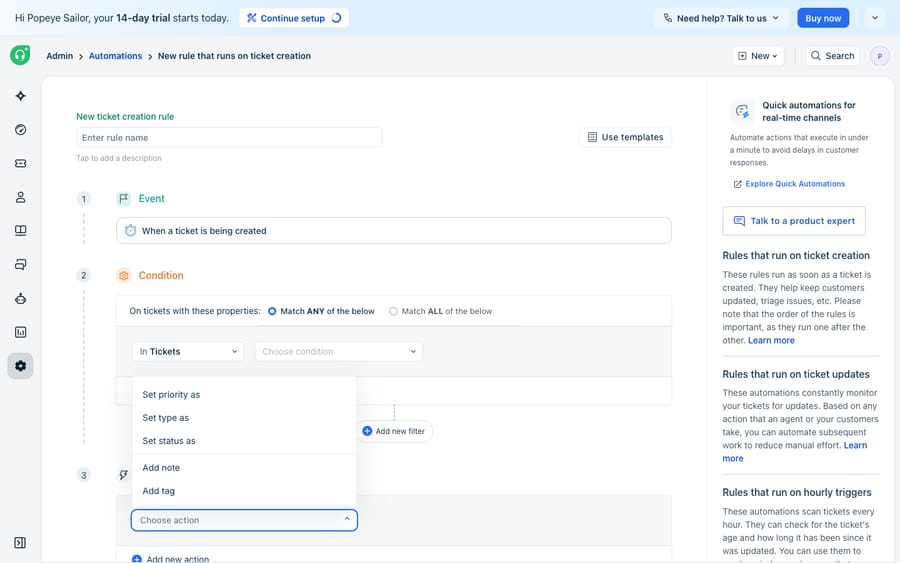
Be aware of the plan gating up front, because it is easy to lose an afternoon to it: Trigger Webhook is available on the Growth, Pro, and Enterprise plans (for both Freshdesk and Freshdesk Omni), and the response-aware Trigger API is Pro onward. On lower tiers the webhook action simply does not appear in the "Choose action" dropdown. As the screenshot above shows, a trial or entry-level plan lists only the built-in actions (set priority, set type, set status, add note, add tag). If you do not see it, that is a billing question, not a configuration bug.
How do you configure the webhook action?
Once you add a Trigger Webhook action to a rule, Freshdesk asks for a handful of settings. Here is what each one does.
Request type. You choose the HTTP method for the callback. Freshworks lists the standard five: GET (retrieve), POST (create), PUT/PATCH (update), and DELETE (delete). One gotcha the docs call out explicitly: if you make a GET call with a webhook, "your automation rules won't be able to use the response", so reach for Trigger API if you need to read what comes back.
Callback URL. The endpoint Freshdesk calls. It can be dynamic: you interpolate ticket data with double-brace placeholders. The documented example is:
https://acme.freshdesk.com/api/v2/tickets/{{ticket.id}}/notesEncoding. JSON, XML, or XML-Encoded. JSON is the sane default for almost every modern endpoint.
Content. Simple lets you tick a list of ticket properties to send; Advanced lets you write a custom request body by hand, which is how you shape the payload to match whatever the receiving API expects.
Authentication and headers. Toggle Requires authentication to attach an API key, and toggle custom headers to add things like an API version or a signing secret. The documented header format is X-Sample-CustomHeader1: VALUE, entered one per line, and header names are not case-sensitive. One more detail that surprises people: webhook actions call the Freshdesk Agent API, so an update made through a webhook is recorded as an agent performing the update.
What does a Freshdesk webhook payload look like?
This is the part people actually want to see. With JSON encoding and Advanced content, you write the body yourself and drop in placeholders that Freshdesk resolves at send time. Straight from Freshworks' automation examples using webhooks, here is a payload that creates a new ticket in response to a customer reply (a POST to the Create Ticket API):
{
  "email": "{{ticket.from_email}}",
  "description": "{{ticket.latest_public_comment}}",
  "subject": "{{ticket.subject}}",
  "status": 2,
  "priority": 1,
  "group_id": {{ticket.group_id}},
  "responder_id": {{ticket.agent.id}},
  "type": "{{ticket.ticket_type}}"
}
Two details to notice. String values wrap the placeholder in quotes ("{{ticket.subject}}"), while numeric fields like group_id reference the placeholder without quotes so the result stays a number. And you can prefix or combine placeholders with static text. A documented PUT example that re-titles a ticket sends:
{
  "subject": "{{ticket.company.name}} | {{ticket.subject}}"
}
You can reach nested and custom fields the same way, for instance writing a timestamp into a custom field:
{
  "custom_fields": {
    "cf_last_updated_time": "{{ticket.modified_on}}"
  }
}
The available placeholders mirror the ticket object: ticket.id, ticket.subject, ticket.from_email, ticket.requester.email, ticket.company.name, ticket.group_id, ticket.agent.id, ticket.ticket_type, and so on — which means most webhook bodies are just the fields of the ticket that changed, plus whatever static values the receiving endpoint needs. If you are stitching several of these rules together, it is worth reading up on how to automate Freshdesk with AI before your rule list gets unwieldy.
What happens when a webhook call fails, and how many can you send?
A webhook is only useful if it actually arrives, and endpoints go down. Freshworks documents sensible-but-modest guarantees here, and they are worth committing to memory.
Retries. If a callback returns anything other than a 2xx or 3xx status, Freshdesk retries it automatically, "once every 30 minutes, totaling 48 calls." That works out to roughly a 24-hour retry window. It is a safety net, not a queue with strong ordering guarantees, so treat your receiver as something that must be idempotent (handle the same ticket update arriving twice without double-acting). When a call fails, Account Administrators also receive an email stating the time and reason for the failure, which is often the first sign an endpoint is down.
Rate limits. Webhook calls are capped at 1,000 calls per hour; anything over the limit is buffered "until fresh calls are available after 1 hour." For most teams that ceiling is invisible, but a noisy bulk update, such as re-tagging thousands of tickets at once, can bump it. This sits alongside Freshdesk's broader API ceilings, which we break down in Freshdesk API rate limits.
Where do Freshdesk webhooks fall short, and where does an AI layer fit?
Webhooks are genuinely good infrastructure. They are deterministic, low-latency, and they mean you never poll. If you have an endpoint and a clear rule, Freshdesk will faithfully push the right JSON to it every time. Credit where it is due: this is native, reliable plumbing, and for straightforward "when X, notify Y" jobs you do not need anything more.
But be clear-eyed about the shape of what a webhook is. First, it is plan-gated: Trigger Webhook needs Growth or above, and the response-aware Trigger API needs Pro or above, so the capability may simply be out of reach on your tier. Second, a webhook is dumb by design. It fires a fixed payload you hand-authored to a URL you hard-coded. It does not read the ticket, understand intent, or decide whether the action even makes sense; it does exactly what the rule says, every time, whether or not it is the right thing. Third, when you need to react to a response (fetch an order status, branch on a subscription tier, transform a value), you are into Trigger API and hand-written JavaScript, which is real engineering to build and maintain.
That third gap is where an AI agent layer fits, and it is worth weighing the build-versus-buy tradeoff honestly. The broader category of AI agents for customer service exists to do the reasoning a static webhook can't. Macha is one such layer, and the framing matters: it runs on top of the Freshdesk you already use as a native connector. It does not replace your help desk, its automation rules, or its webhooks. You connect Macha to Freshdesk with an API key, and instead of hand-authoring a payload for every branch, an agent reads the ticket, decides what to do, and calls your external systems through a custom tool that wraps a REST endpoint into something it can invoke with the right arguments, including reading the response back and acting on it, which is precisely the part a fire-and-forget webhook can't do. The two also work together: Macha's Freshdesk connector has a Custom Webhook trigger, so a Trigger Webhook action in one of your automation rules can be the thing that starts an agent, with Freshdesk's conditions deciding which tickets it sees.
The clean division of labour: keep Freshdesk webhooks for deterministic, one-way "when this, tell that" pushes, and layer an agent on top for the reasoning-heavy calls where the payload, the endpoint, and the decision all depend on what the ticket actually says. (Macha's connector is for Freshdesk tickets; Freshchat, Freshservice and Freshcaller are not on its connector list. Macha also runs on Zendesk, Freshdesk, Gorgias, Front, HubSpot or Intercom. Billing is per ticket, one conversation charged once however many messages it takes, starting at $299 a month for up to 750 tickets, never per resolution. See the pricing breakdown.)
FAQ
What is a webhook in Freshdesk? A webhook is a "Trigger Webhook" action inside an automation rule that makes Freshdesk send an outbound HTTP request to a URL you specify when a ticket is created or updated, carrying ticket data in the body. It lets external systems react to ticket events without polling Freshdesk's API.
Does a Freshdesk webhook tell me when it fails? Yes. Besides retrying every 30 minutes for 48 calls, Freshdesk emails Account Administrators with the time and reason for a failed webhook call.
Which plans support Freshdesk webhooks? The Trigger Webhook action is available on the Growth, Pro, and Enterprise plans (for both Freshdesk and Freshdesk Omni). The response-aware Trigger API action is available from the Pro plan onward. On lower tiers the webhook action does not appear in the automation rule's action list.
How do I customise the webhook payload? Choose JSON encoding and "Advanced" content, then write the request body by hand using double-brace placeholders such as {{ticket.id}}, {{ticket.subject}}, and {{ticket.from_email}}. Wrap string placeholders in quotes and leave numeric ones (like group_id) unquoted so they stay numbers.
What happens if a Freshdesk webhook fails? If the callback returns anything other than a 2xx or 3xx status, Freshdesk retries it automatically once every 30 minutes, totalling 48 calls (roughly a 24-hour window). Because retries can deliver the same event twice, your receiving endpoint should be idempotent.
Can I add AI to Freshdesk webhooks without replacing Freshdesk? Yes. An AI agent layer like Macha connects to Freshdesk as a native connector and runs on top of your existing automation rules and webhooks; it doesn't replace them. Where a static webhook fires a fixed payload, an agent reads the ticket, decides what to do, and calls your APIs (reading the response back), while Freshdesk stays the system of record.
Ready to go beyond fire-and-forget payloads? Start a free trial of Macha and connect it to your Freshdesk. The trial includes $50 of usage with no credit card.






