





 Shopify
 Stripe
 Slack
Slack Notion
 Google Workspace
 Confluence

Can an AI Agent Read PDF, DOCX and XLSX Attachments on Freshdesk Tickets?


A customer attaches a signed return form and a spreadsheet of twelve wrong orders, then writes one line: details are in the files. Freshdesk stores those files but can't read them, so an agent has to open each one and copy the relevant parts into a reply.
Key takeaways
- Macha's Freshdesk connector can extract text from PDF, DOCX, XLSX, CSV and TXT attachments through a Read Attachment tool released on March 15, 2026.
- Freshdesk's search indexes attachment file names but not their contents, according to Freshdesk's own community forum.
- Read Attachment extracts embedded, selectable text only and does not perform OCR, so a scanned or photographed PDF returns nothing to read.
- Macha's changelog documents image vision for Zendesk tickets only, released April 17, 2026, so Freshdesk agents rely on text extraction for documents.
- Macha bills per ticket however many attachments an agent reads, from $299 a month for 750 tickets (about $0.40 each), and the Macha team sets the agent up for you, with a dedicated success manager included.
Freshdesk stores ticket attachments but doesn't read inside them, so to use what's in a PDF, DOCX or XLSX you need a tool that extracts the text. Macha's Freshdesk connector has one: the Read Attachment tool, released on March 15, 2026, downloads a file from a ticket and extracts the text of PDF, DOCX, XLSX, CSV and TXT attachments into the AI agent's context, so the agent can reply, route or escalate on what the customer actually sent.
| Question | Answer |
|---|---|
| Does Freshdesk read attachment contents? | No. Search covers file names, not contents (per Freshdesk's community forum) |
| Formats Macha extracts on Freshdesk | PDF, DOCX, XLSX, CSV, TXT |
| Scanned or image-only PDFs | Not extracted (embedded text only, no OCR) |
| Setup | Freshdesk API key, then add Read Attachment to an agent |
| Extra cost per attachment | None. Billed per ticket, from $299 a month for 750 tickets |
The gap is well documented. Freshdesk's search indexes the names of attached files, not their contents. Freshdesk's own community forum confirms PDFs attached to tickets aren't searchable, and the Freshworks community confirms there's no native automation path to parse what's inside an attachment. Teams end up bolting on the Freshworks Ticket Parsing App, a service like Parseur, or a custom script hitting GET /api/v2/tickets/[id] for the content_url.
Macha closes that gap from the other direction. It's an AI agent layer that sits on top of the Freshdesk you already run, not a replacement for it. The extracted text goes straight into the model's context, so your agent can use what the customer sent.
What did the Freshdesk connector ship with?
The March 15 Freshdesk connector landed with 15 tools: get and search tickets, add public replies and internal notes, update priority/status/tags/fields, assign tickets, search contacts, and browse knowledge base articles. Tucked in that set is a tool called Read Attachment: "Download and read an attachment from a Freshdesk ticket." Under the hood it fetches the file from Freshdesk, extracts the text, and returns it to the agent as readable content.
The supported formats, per the changelog and the connector's tool definition:
| Format | Extension | What gets extracted |
|---|---|---|
.pdf | Embedded text, in reading order | |
| Word | .docx | Body text, headings, table contents |
| Excel | .xlsx | Cell values across sheets, as text |
| CSV | .csv | Rows and columns as plain text |
| Plain text | .txt | Raw file contents |
This is text extraction, which is the right tool for the documents support teams actually receive: invoices, receipts, order spreadsheets, signed forms, exported logs, RMA sheets. (A separate capability, image vision, handles screenshots and photos, and we'll get to where the line sits below.)
How does an AI agent read a Freshdesk attachment?
Reading an attachment isn't a separate product you configure; it's a tool you hand to an agent. The flow looks like this:
- A ticket comes into Freshdesk with one or more attachments.
- Your Macha agent, triggered on ticket creation or invoked by an agent in the helpdesk, notices the attachment and calls Read Attachment.
- Macha downloads the file from Freshdesk, extracts its text, and feeds that text into the model's context alongside the ticket subject, description, and conversation.
- The agent reasons over the contents, not just the file name, and drafts a reply, updates a field, routes the ticket, or escalates with the relevant detail pulled out.
Because Macha runs on top of Freshdesk, the reply, note, or status change lands back on the same ticket through the connector's other tools. The customer never knows a layer was involved; they just get an answer that references what they actually sent.

How do you set it up?
If you've already connected Freshdesk, you're most of the way there. The short version:
- Connect Freshdesk with an API key (the connector authenticates with a Freshdesk API key, scoped to your account). See the Freshdesk integration page for the full tool list.

- Add the Freshdesk tools to an agent, including Read Attachment. An agent only has the tools you give it, so this is an explicit choice.
- Tell the agent when to look. A line in the agent's instructions like "If the ticket has an attachment, read it before replying and use its contents in your answer" is usually enough; the model decides to call the tool when an attachment is present and relevant.
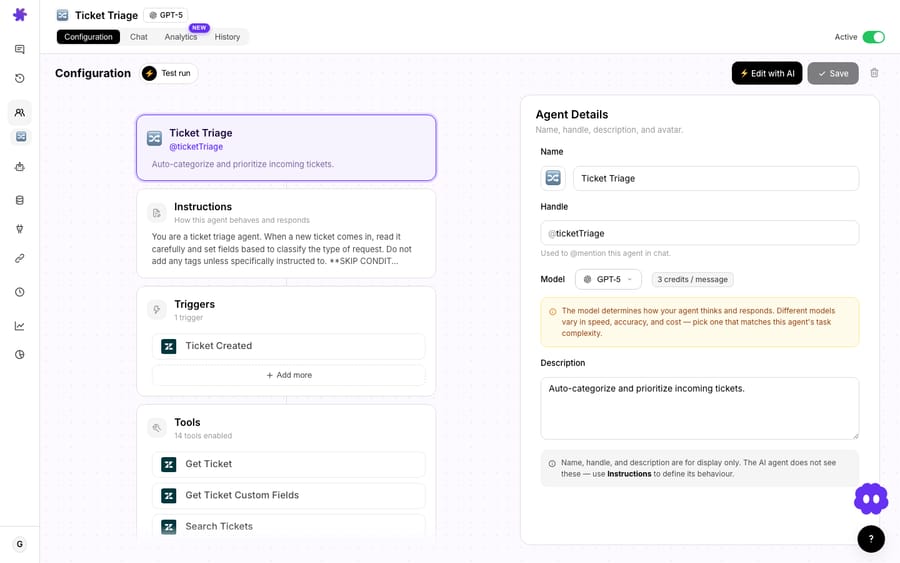
That's the whole setup. From there the agent treats attachments as first-class context.
Which tickets does attachment reading help with?
The feature earns its keep on the unglamorous tickets where the answer is in the file.
The invoice dispute. A customer attaches a PDF invoice and says they were overcharged. Instead of an agent opening the PDF to find the line items, the agent reads the invoice text, pulls the disputed charge and date, and either drafts a reply citing the specific line or escalates to billing with the detail already extracted. Pair it with a Stripe connection, whose tools list a customer's payments and pull a specific charge, and the agent can cross-check the disputed line against the actual transaction in the same run.
The bulk order spreadsheet. A B2B customer drops in an XLSX with thirty order numbers that arrived damaged. The agent reads the spreadsheet, lists the order IDs in an internal note, and routes the ticket to the right team, turning a "someone has to open this and transcribe it" task into a structured handoff.
The signed form. A return or warranty claim comes in as a DOCX. The agent extracts the form fields, checks them against policy in your knowledge base, and confirms whether the claim is complete, or replies asking for the one missing field, instead of a human discovering it three days later.
In every case the pattern is the same: the document stops being an opaque blob and becomes text the agent can reason over, which is exactly what Freshdesk doesn't do on its own. If you want to see the end-to-end shape, our auto-resolve tickets on Freshdesk walkthrough shows the resolution loop attachment-reading plugs into.
Can it read scanned PDFs and screenshots?
Be honest with yourself about what's in the file. Read Attachment extracts embedded text: the selectable, copyable text inside a real PDF, DOCX, or XLSX. It is not OCR. If a customer photographs a paper receipt and saves it as a PDF, or screenshots an error and the "PDF" is really an image, there's no embedded text to extract.
That's a different capability. Macha's image vision sends image content (JPEG, PNG, GIF, WebP) to the model for visual analysis: describing screenshots, reading text off images, parsing photographed receipts. Macha's changelog documents image vision for Zendesk tickets (released April 17, 2026) and lists no Freshdesk equivalent as of its September 2026 entries, so for text-bearing office documents on Freshdesk, Read Attachment is the right tool. Knowing which file you've got (a true text PDF versus an image-only one) tells you which path will work.
What does reading attachments cost?
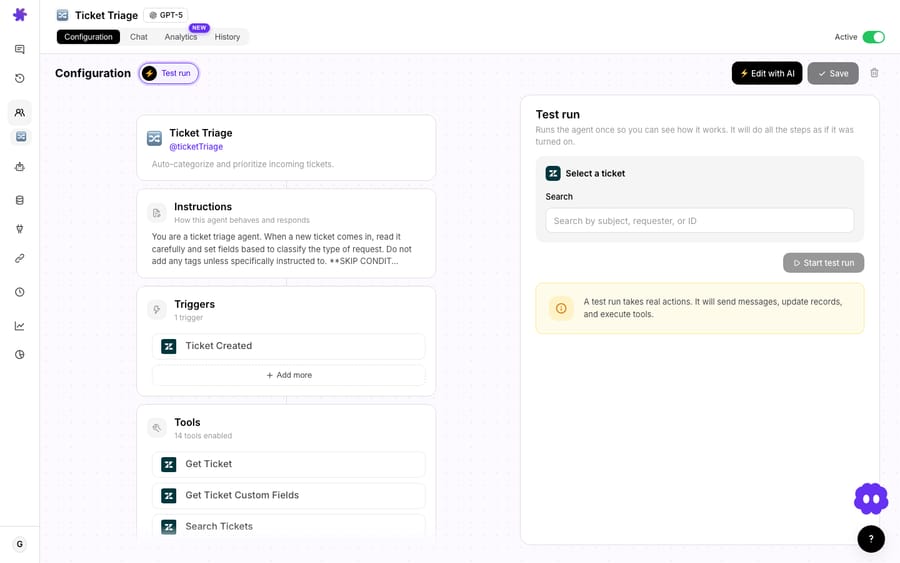
There's no separate line item for reading attachments. Macha bills per ticket (one conversation, charged once, however many steps the agent takes to finish it), so a ticket where the agent opens three files and writes a reply costs the same as a one-line question. Pricing starts at $299 a month for 750 tickets, about $0.40 each, and runs to $3,999 for 10,000 tickets. That price includes the setup and a dedicated success manager who handles your changes afterwards: new ticket categories, instruction edits, new tools. The model you run doesn't change that, so pick on quality and speed: a capable-but-efficient model keeps attachment-heavy queues moving, and the heavier reasoning models are worth the extra latency only when the reasoning is genuinely hard.
For current plans and ticket allowances, see the pricing page. You can try the whole thing on a free trial ($50 of usage, no credit card required).
When does attachment extraction fail?
No feature is free of edges. The honest list:
- Scanned or image-only PDFs won't extract. No embedded text means nothing to pull. Route those to image vision, or ask the customer for a text version. This is the single most common reason extraction comes back empty.
- Five formats, not everything. PDF, DOCX, XLSX, CSV, TXT are covered. Legacy
.doc/.xls, Apple iWork files,.rtf, ZIP archives, and design files (PSD, Figma exports) aren't: the agent will see the attachment but can't read inside it. - Very large or very messy files. A 200-page PDF or a 40-sheet workbook is a lot of text to push into a model's context. Complex multi-column layouts and heavily formatted spreadsheets can extract in an order that's harder for the model to parse than a clean document.
- Extraction is faithful, not magic. The model reads what was extracted; if a table's structure is mangled on the way out, the model can misread it. For anything financial or legal, keep a human in the loop and treat the agent's read as a draft, not a verdict.
- You still need a reason to read. Don't blanket-instruct an agent to read every attachment on every ticket; that's wasted actions. Scope it to the tickets where the answer plausibly lives in the file.
If most of your inbound attachments are photos and screenshots rather than documents, image vision is the feature you want first. If they're invoices, spreadsheets, and forms, Read Attachment is the one.
How does native Freshdesk compare with Macha on top of it?
| Native Freshdesk | Macha layer on Freshdesk | |
|---|---|---|
| Stores attachments | Yes | Uses Freshdesk's |
| Searches attachment file names | Yes | n/a |
| Reads attachment contents | No (forum-confirmed) | Yes: PDF/DOCX/XLSX/CSV/TXT |
| Acts on extracted text (reply, route, escalate) | Manual, by an agent | Automated, by an AI agent |
| Setup | n/a | Done for you by the Macha team, with a dedicated success manager, included |
This is the whole point of a layer model: you keep Freshdesk as your system of record and add the reading-and-acting intelligence on top, rather than ripping anything out. You don't have to wire it up yourself either. Macha is the done-for-you option: you connect Freshdesk with an API key, and the Macha team analyzes your past tickets, builds the knowledge base and the agent (Read Attachment included where your tickets need it), and runs it in safe mode, with drafts as internal notes in Freshdesk, until the drafts are right.
FAQ
Does Freshdesk read PDF or Word attachments on its own? No. Freshdesk indexes attachment file names for search but not their contents; its own community forum confirms attached PDFs aren't searchable by content. Reading inside an attachment requires either custom work against the Freshdesk API or a layer like Macha.
Which file types can Macha extract text from? PDF, DOCX, XLSX, CSV, and TXT, directly from a Freshdesk ticket, via the Read Attachment tool that shipped in the March 15, 2026 connector.
Can it read a scanned PDF or a screenshot? Text extraction reads embedded text, so a scanned (image-only) PDF or a screenshot won't extract. Those are a job for image vision, which analyzes image content directly.
How much does reading an attachment cost? Nothing extra. Macha bills per ticket (one conversation, charged once however many attachments the agent reads), from $299 a month for 750 tickets, about $0.40 each, with setup by the Macha team and a dedicated success manager included. See the pricing page for plans.
Does this replace Freshdesk? No. Macha sits on top of Freshdesk as an AI agent layer. Freshdesk stays your helpdesk; Macha adds agents that read attachments, draft replies, route, and update tickets through the connector.
How do you try it on your Freshdesk queue?
If your Freshdesk queue is full of tickets whose real content is locked inside an attachment, this is a fast win. Start a free trial ($50 of usage, no credit card required), connect Freshdesk, add the Read Attachment tool to an agent, and let it read the next invoice or spreadsheet for you. The full setup is in the docs.
Written by Abbas (Customer Support & AI, Macha) · Reviewed by Ankeet Guha (Co-founder & CTO) · Published 2026-06-24 · Last updated 2026-09-24.
Sources: Freshdesk: search within attached PDFs · Freshdesk: search in PDF documents attached to solutions · Freshworks Community: parse info from a ticket






